当前位置:网站首页>Detailed introduction of v-bind instruction
Detailed introduction of v-bind instruction
2022-07-28 09:20:00 【Mavericks who explore the top secret method】
Preface
In the last article http://t.csdn.cn/YdkSQ
It has been introduced that v-bind Instructions related to , This article will introduce in detail v-bind The directive Usage and application scenarios
One , Attribute binding
1,v-bind Instruction usage
<a v-bind:href='url'> Jump </a>Abbreviation :
<a :href='url'> Jump </a>Be careful : It is generally recommended to use abbreviations when working
Code display :
Click to jump to Baidu by default , After clicking switch address, the default address changes , When you click Baidu again, you will jump to Tencent's official website
 <body>
    <div id="app">
        <a v-bind:href="url"> Baidu </a>
        <button v-on:click="change"> Click to switch addresses </button>
    </div>

    <script src="../Vue/vue.js"></script><!--  introduce vue.js file  -->

    <script>
        const vm = new Vue({
            el: "#app",
            data() {
                return {
                    url: 'http://www.baidu.com'
                }
            },
            methods: {
                // modify URL Address
                change() {
                    this.url = "http://www.qq.com"
                }
            }
        })

    </script>
</body>
design sketch

2,v-bind Instruction utilization input Event implements two-way binding
The first way to write it
<input type="text" :value="msg" v-on:input="changes">The second way
<input type="text" :value="msg" v-on:input="msg=$event.target.value">The third way Use it directly v-model Instruction write
<input type="text" v-model="msg">The realization effect of the above three writing methods is the same , The first two Chinese characters explain v-model The basic operation principle of
Full code display :
<!DOCTYPE html>
<html lang="en">

<head>
    <meta charset="UTF-8">
    <meta http-equiv="X-UA-Compatible" content="IE=edge">
    <meta name="viewport" content="width=device-width, initial-scale=1.0">
    <title>Document</title>
    <script src="../Vue/vue.js"></script>
</head>

<body>
    <div id="app">
        <div>{
   {msg}}</div>

        <input type="text" :value="msg" v-on:input="changes">
        <!--  The second way  -->
        <input type="text" :value="msg" v-on:input="msg=$event.target.value">
        <!--  Or use it directly v-model Instructions can also be implemented  -->
        <input type="text" v-model="msg">
    </div>
    <script>
        const vm = new Vue({
            el: '#app',
            data() {
                return {
                    msg: ' Hello , Li Huanying '
                }
            },
            methods: {
                changes: function (event) {
                    // Overwrite the original data with the latest data in the input field
                    this.msg = event.target.value;
                }
            }
        })
    </script>
</body>

</html>
design sketch

Two , Style binding
1,class Style binding
① Objects form
Objects are generally composed of key value pairs , We usually use belts is The representation property of prefix is Prefix is used to control whether the class name is displayed In general is Indicates that there are two situations for a marker bit. One is true The other is false
<div v-bind:class="{active:isActive}"></div>Add multiple class names
Add it with commas after it
<div v-bind:class="{ active : isActive,active2:isActive2}"></div>Code display
<!DOCTYPE html>
<html lang="en">

<head>
    <meta charset="UTF-8">
    <meta http-equiv="X-UA-Compatible" content="IE=edge">
    <meta name="viewport" content="width=device-width, initial-scale=1.0">
    <title>Document</title>
<script src="../Vue/vue.js"></script>
    <style>
        .active {
            background-color: brown;
            width: 100px;
            height: 100px;
        }
        /*  The second class name  */
        .active2{
            border: 5px solid black;
            width: 100px;
            height: 100px;

        }
    </style>
</head>

<body>
    <div id="app">
        <!--  The second class name is separated by commas and added  -->
        <div v-bind:class="{ active : isActive,active2:isActive2}"></div>
        <button v-on:click="changes"> Switch </button>
    </div>

    <script>
        const vm = new Vue({
            el: '#app',
            data() {
                return {
                    isActive: true,
                    // isActive The value of is true When the page is displayed class The effect of
                    isActive2:true
                }
            },
            methods: {
                changes: function () {
                    //  control isActive The value of the true and false Switch back and forth between
                    this.isActive = !this.isActive
                    this.isActive2 = !this.isActive2
                }
            }
        })
    </script>
</body>

</html>
design sketch
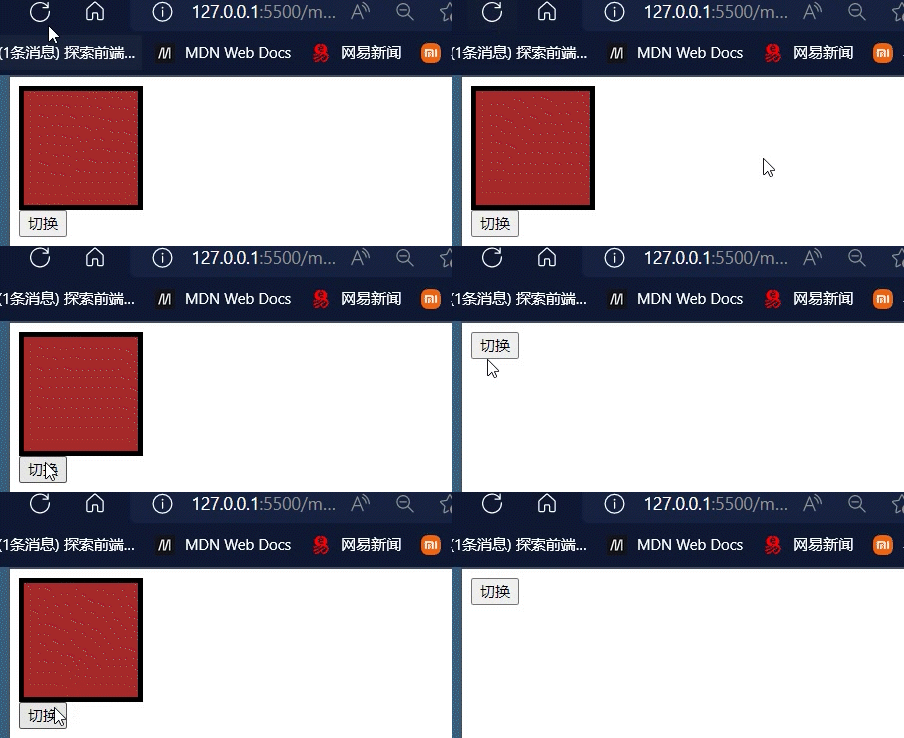
② Array form
First, you need to define the relevant attribute names The value of the attribute represents the actual class name
If you want to add multiple class names , You can separate them with commas and add
<div v-bind:class="[activeClass,active2Class]"></div>2,style Style binding
① Objects form
Many attributes can be added to the object
<div v-bind:style="{border:borderStyle,width:widthStyle,height:heightStyle}"></div>
Short visual template is easy to read , And beautiful
<div v-bind:style="objStyle"> Abbreviation </div>
All the code
<!DOCTYPE html>
<html lang="en">

<head>
    <meta charset="UTF-8">
    <meta http-equiv="X-UA-Compatible" content="IE=edge">
    <meta name="viewport" content="width=device-width, initial-scale=1.0">
    <title>Document</title>
    <script src="../Vue/vue.js"></script>
</head>

<body>
    <div id="app">
        <div v-bind:style="{border:borderStyle,width:widthStyle,height:heightStyle}"></div>
        <button v-on:click="changes"> Switch </button>
        <!--  Short visual template is easy to read  -->
        <div v-bind:style="objStyle"> Abbreviation </div>
    </div>
</body>
<script>
    var vm = new Vue({
        el: '#app',
        data() {
            return {
                borderStyle: '1px solid blue',
                widthStyle: '100px',
                heightStyle: '200px',
//  Abbreviated code block -----------------------------------------
                objStyle: {
                    border: '1px solid blue',
                    width: '300px',
                    height: '300px'
                }
// -------------------------------------------
            }
        },
        methods: {
            changes: function () {
                this.heightStyle = '100px'
            }
        }
    })
</script>

</html>
design sketch

② Array form
You can put more than attribute
<div v-bind:style="[objStyle,overrideStyles]"></div>All the code
<!DOCTYPE html>
<html lang="en">

<head>
    <meta charset="UTF-8">
    <meta http-equiv="X-UA-Compatible" content="IE=edge">
    <meta name="viewport" content="width=device-width, initial-scale=1.0">
    <title>Document</title>
    <script src="../Vue/vue.js"></script>
</head>

<body>
    <div id="app">
        <!--  The grammatical structure of the object  -->
        <!-- <div v-bind:style="{border:borderStyle,width:widthStyle,height:heightStyle}"></div>
        <button v-on:click="changes"> Switch </button> -->
        <!--  Short visual template is easy to read  -->
        <!-- <div v-bind:style="objStyle"> Abbreviation </div> -->
        <!--  Syntax structure of array  -->
        <div v-bind:style="[objStyle, overrideStyles]"></div>

    </div>
</body>
<script>
    var vm = new Vue({
        el: '#app',
        data() {
            return {
                // borderStyle: '1px solid blue',
                // widthStyle: '100px',
                // heightStyle: '200px',
                //  Abbreviated code block -----------------------------------------
                objStyle: {
                    border: '1px solid blue',
                    width: '300px',
                    height: '300px'
                },
                // -------------------------------------------
                overrideStyles:{
                    border:'5px solid orange',
                    backgroundColor:'blue'

                }
            }
        },
        methods: {
            changes: function () {
                this.heightStyle = '100px';
                this.objStyle.width = '100px'
            }
        }
    })
</script>

</html>
边栏推荐
- 19c SYSAUX表空间SQLOBJ$PLAN表过大,如何清理
- Dapp安全总结与典型安全事件分析
- 蓝牙技术|2025年北京充电桩总规模达70万个,聊聊蓝牙与充电桩的不解之缘
- 信息学奥赛一本通 1617:转圈游戏 | 1875:【13NOIP提高组】转圈游戏 | 洛谷 P1965 [NOIP2013 提高组] 转圈游戏
- 2022 high voltage electrician examination simulated 100 questions and simulated examination
- Principle of line of sight tracking and explanation of the paper
- An entry artifact tensorflowplayground
- 【单细胞高级绘图】07.KEGG富集结果展示
- leetcode 452. Minimum Number of Arrows to Burst Balloons 用最少数量的箭引爆气球(中等)
- Learn to draw with nature communications -- complex violin drawing
猜你喜欢

【SwinTransformer源码阅读二】Window Attention和Shifted Window Attention部分

蓝牙技术|2025年北京充电桩总规模达70万个,聊聊蓝牙与充电桩的不解之缘

2022年危险化学品经营单位安全管理人员上岗证题目及答案

linux初始化mysql时报错 FATAL ERROR: Could not find my-default.cnf

The cooperation between starfish OS and metabell is just the beginning
Implementation principle of golang synergy

Principle of line of sight tracking and explanation of the paper

TXT文本文件存储
![Magic brace- [group theory] [Burnside lemma] [matrix fast power]](/img/cf/606d1bc7cd877771afbdd7640b718c.png)
Magic brace- [group theory] [Burnside lemma] [matrix fast power]
Bluetooth technology | the total scale of charging piles in Beijing will reach 700000 in 2025. Talk about the indissoluble relationship between Bluetooth and charging piles
随机推荐
Train your own classification [Bao Jiaobao, the data are ready]
LeetCode_406_根据身高重建队列
一年涨薪三次背后的秘密
Send a message to the background when closing the page
canvas常用原型方法及绘制图片应用
Magic brace- [group theory] [Burnside lemma] [matrix fast power]
【打包部署】
MySQL 8.0.30 GA
Introduction to official account
Informatics Olympiad all in one 1617: circle game | 1875: [13noip improvement group] circle game | Luogu p1965 [noip2013 improvement group] circle game
信息学奥赛一本通 1617:转圈游戏 | 1875:【13NOIP提高组】转圈游戏 | 洛谷 P1965 [NOIP2013 提高组] 转圈游戏
2022高压电工考试模拟100题及模拟考试
Sentry log management system installation and use tutorial
VR panoramic shooting helps promote the diversity of B & B
ES6 变量的解构赋值
【C语言】详解顺序表(SeqList)
sql server 的关键字在哪张系统表?
OpenShift 4 - 使用 VerticalPodAutoscaler 优化应用资源 Request 和 Limit
A perfect cross compilation environment records the shell scripts generated by PETA
ES6 let and Const