当前位置:网站首页>An entry artifact tensorflowplayground
An entry artifact tensorflowplayground
2022-07-28 09:13:00 【51CTO】
tensorflow playground brief introduction
TensorFlow The amusement park is a simple neural network that can be trained through a web browser And realize the tool of visual training process .
Address :http://playground.tensorflow.org/
TensorFlow playground Use
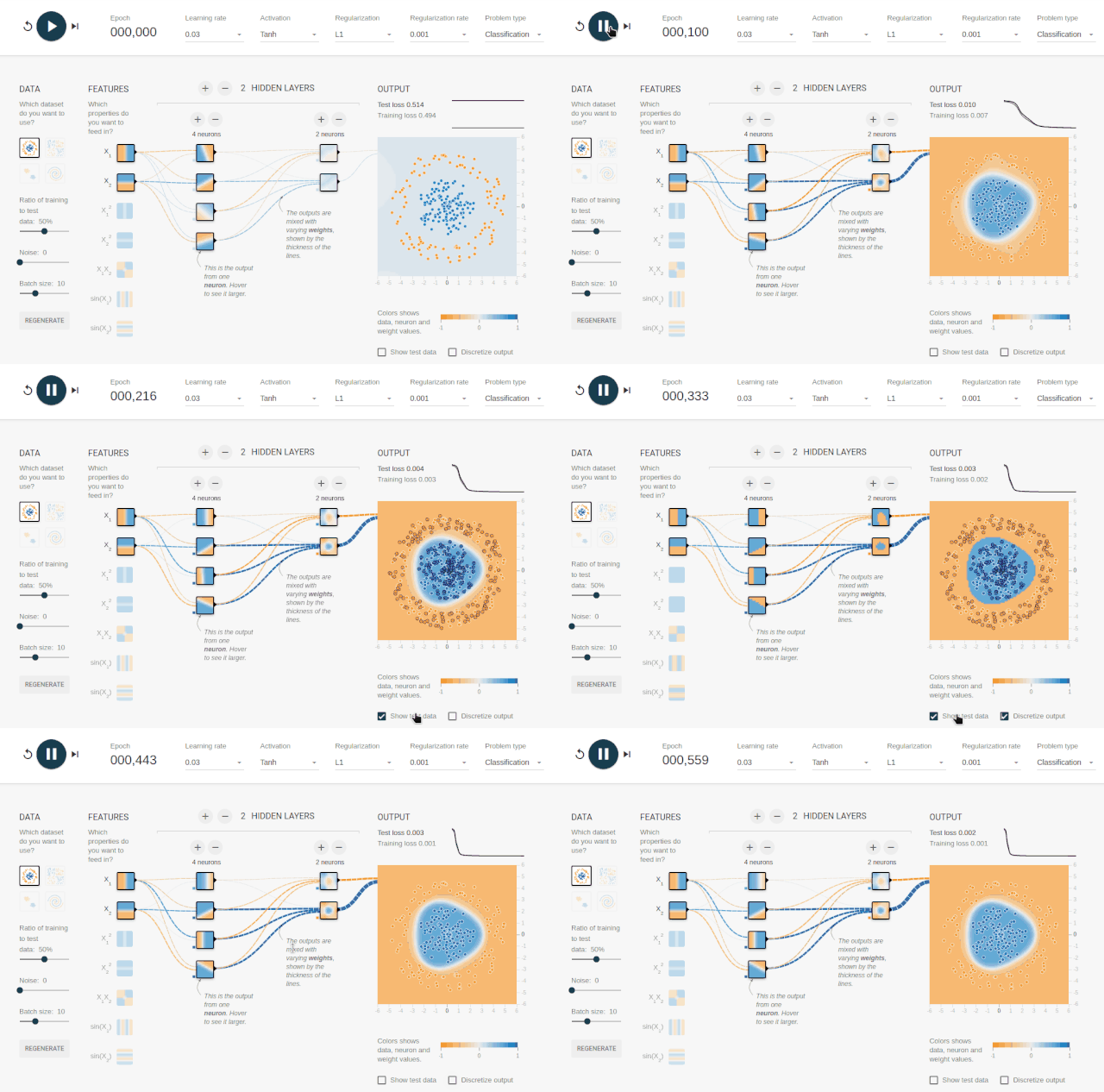
TensorFlow playground Interface

TensorFlow playground Interface diagram

Function details
(1) Control operation
The three functions from left to right are :(a) restart ;(b) function ;(c) Run one cycle at a time
(2) Number of operating cycles
Used to view the number of training cycles
(3) Parameter adjustment area
name ——> Functional specifications
Learning rate ——> Learning rate ( It's a super parameter , Gradient descent algorithm will be used ; The learning rate is set artificially according to the actual situation ).
Activation——> Activation function ( The default is nonlinear function Tanh; If for the linear classification problem , The activation function can not be used here ).
Regularization——> Regularization ( Regularization is the use of norms to solve the problem of over fitting ). Problem type Question type ( What we want to solve here is a binary classification problem , Simply explain that the classification problem refers to , Given a new pattern , Infer its corresponding category according to the training set ( Such as :+1,-1), It is a qualitative output , Also called discrete variable prediction ; The regression problem refers to , Given a new pattern , Infer its corresponding output value according to the training set ( The set of real Numbers ) How much is the , It is a quantitative output , Also called continuous variable prediction ; Here we belong to the classification problem .).

(4) Data area
name ——> explain
DATA ——> Dataset type ( Here are four data sets , By default, we select the first ; The selected data will also be displayed on the far right OUTPUT in ; In this data , We can see blue and yellow dots on the two-dimensional plane ; Each dot represents a sample example ; The color of the dot represents the label of the sample ; Because there are only two colors , So here is a binary classification problem ; Here we take the example of judging whether the parts of a factory are qualified , Then yellow represents unqualified parts , Blue represents qualified parts ).
Ratio of training to test ——> The proportion of data used for testing ( Directly operate the progress bar to adjust ). Noise Introduce noise into the data .
Batch size ——> adjustment batch size Size .

(5) Network structure adjustment area
name ——> explain
FEATURES ——> Eigenvector ( In order to map a practical problem to a point in space , We need to extract features . Here we can use the length and quality of parts to roughly describe ; So here x1 It represents the length of the part ,x2 Represents the quality of parts ; The eigenvector is the input of the neural network ).
HIDDEN LAYERS ——> Hidden layer ( The neural network between input and output is called hidden layer ; Generally, the more hidden layers of neural networks, the deeper this neural network ; Here we have a hidden layer by default , This hidden layer has 4 Nodes ).
Directly click on each icon to select Features The type of , For the operation of hidden layer , You can directly select the plus and minus signs to obtain the desired number of hidden layers and the number of neurons in each layer .

(6) Output result area
After setting the above parameters , Click Run to observe the change of output results .
If you choose a classification problem , You can see obvious boundary changes and loss In a decreasing situation , Click on show test data You can display those who are not participating in training test Data sets , Click on Discretize output You can see the result of discretization .
demonstration
Parameter setting : Learning rate 0.03, Activation function Tanh, The regularization L1 The proportion 0.001, Question type Classification
data : Select the first one on the top left
Network structure : Select with two hidden layers , The first hidden layer 4 Neurons , The second hidden layer 2 Neurons
Reference from :https://www.jianshu.com/p/95d46de63408

边栏推荐
- DIY system home page, your personalized needs PRO system to meet!
- 12 common design ideas of design for failure
- 【英语考研词汇训练营】Day 15 —— analyst,general,avoid,surveillance,compared
- 快速上手Flask(一) 认识框架Flask、项目结构、开发环境
- 阿里云服务器搭建和宝塔面板连接
- Detailed explanation of switch link aggregation [Huawei ENSP]
- 推荐一个摆脱变量名纠结的神器和批量修改文件名方法
- [cloud computing] several mistakes that enterprises need to avoid after going to the cloud
- What content does the new version of network security level protection evaluation report template contain? Where can I find it?
- Mongodb (compare relational database, cloud database, common command line, tutorial)
猜你喜欢

Two dimensional array and operation

NPM and yarn use (official website, installation, command line, uploading your own package, detailed explanation of package version number, updating and uninstalling package, viewing all versions, equ

NDK series (6): let's talk about the way and time to register JNI functions

Realize batch data enhancement | use of keras imagedatagenerator

Line generation (matrix)
![Map of China province > City > level > District > Town > village 5-level linkage download [2019 and 2021]](/img/ea/fd799bbef5110fddf4066e76892f81.png)
Map of China province > City > level > District > Town > village 5-level linkage download [2019 and 2021]

Vs2015 use dumpbin to view the exported function symbols of the library
【单细胞高级绘图】07.KEGG富集结果展示

How to obtain the subordinate / annotation information of KEGG channel

Huid learning 7: Hudi and Flink integration
随机推荐
MDM数据质量应用说明
Recommend an artifact to get rid of the entanglement of variable names and a method to modify file names in batches
Detailed explanation of MSTP protocol for layer 3 switch configuration [Huawei ENSP experiment]
Network interface network crystal head RJ45, Poe interface definition line sequence
关闭页面时向后台发送消息
快速上手Flask(一) 认识框架Flask、项目结构、开发环境
Explain cache consistency and memory barrier
台大林轩田《机器学习基石》习题解答和代码实现 | 【你值得拥有】
Basic syntax of jquey
Sentinel
Post it notes -- 45 {packaging of the uniapp component picker, for data transmission and processing -- Based on the from custom packaging that will be released later}
Learn to draw with nature communications -- complex violin drawing
Different HR labels
View the dimensions of the list
NPM and yarn use (official website, installation, command line, uploading your own package, detailed explanation of package version number, updating and uninstalling package, viewing all versions, equ
DAPP safety summary and typical safety incident analysis
Argocd Web UI loading is slow? A trick to teach you to solve
[cloud computing] several mistakes that enterprises need to avoid after going to the cloud
v-bind指令的详细介绍
LeetCode_406_根据身高重建队列