当前位置:网站首页>SQL tuning guide notes 8:optimizer access paths
SQL tuning guide notes 8:optimizer access paths
2022-06-12 21:38:00 【dingdingfish】
This paper is about SQL Tuning Guide The first 8 Chapter “ Optimize access paths ” The notes .
Important basic concepts
access path
The means by which the database retrieves data from a database. For example, a query using an index and a query using a full table scan use different access paths.
A method of retrieving data from a database . for example , Queries that use indexes and queries that use full table scans use different access paths .
Access path is a technique used by queries to retrieve rows from row sources .heap-organized table
A table in which the data rows are stored in no particular order on disk. By default, CREATE TABLE creates a heap-organized table.
A table , There is no specific storage order for the data rows on the disk . By default ,CREATE TABLE Create a heap organization table .index-organized table
A table whose storage organization is a variant of a primary B-tree index. Unlike a heap-organized table, data is stored in primary key order.
Storage organization is primary B Table of tree index variants . Different from the heap organization table , Data is stored in primary key order .external table
A read-only table whose metadata is stored in the database but whose data in stored in files outside the database. The database uses the metadata describing external tables to expose their data as if they were relational tables.
A read-only table , Its metadata is stored in the database , But its data is stored in a file outside the database . Databases use metadata that describes external tables to present their data , As if they were relational tables .unselective
A relatively large fraction of rows from a row set. A query becomes more unselective as the selectivity approaches 1. For example, a query that returns 999,999 rows from a table with one million rows is unselective. A query of the same table that returns one row is selective.
The row set returns a relatively large number of branches . As selectivity approaches 1, Queries become less selective . for example , Return from a million row table 999,999 Row queries are not selective . Queries that return the same table in one row are selective .
8.1 Introduction to Access Paths
A row source is a set of rows returned by the steps in the execution plan . The row source can be a table 、 The result of a view or join or group operation .
Unary operations such as access paths are a technique for querying and retrieving rows from row sources , It accepts a single row source as input . for example , A full table scan retrieves rows from a single row source . by comparison , Join is a binary operation , Receive input from two row sources .
The database uses different access paths for different relational data structures . The following table summarizes the common access paths for the main data structures .
The optimizer considers different possible execution plans , Then assign a cost to each plan . The optimizer selects the lowest cost plan . Generally speaking , The index access path is more effective for statements that retrieve a small number of table rows , The full table scan is more effective when accessing most of the table data .
8.2 Table Access Paths
Table is Oracle The basic unit of data organization in a database .
Relational tables are the most common table types . Relational tables have the following organizational characteristics :
- The heap organization table does not store rows in any particular order .
- The index organization table sorts rows according to the primary key value .
- The external table is read-only , Its metadata is stored in the database , But its data is stored outside the database .
8.2.1 About Heap-Organized Table Access
By default , Tables are organized by heap , This means that the database places the rows in the most appropriate location , Not in the order specified by the user .
When a user adds a row , The database places these rows in the first available space in the data segment . There is no guarantee that rows will be retrieved in the order they are inserted .
8.2.1.1 Row Storage in Data Blocks and Segments: A Primer
The database stores rows in data blocks . In the table , The database can write a row anywhere at the bottom of the block . Oracle The database manages the blocks themselves using block overhead that includes row directories and table directories .
One extent Consists of logically contiguous data blocks . These blocks may not be physically contiguous on the disk .segment It's a group. extent, It contains all the data of the logical storage structure in the table space . for example ,Oracle The database allocates one or more extent To form the data of the table segment. The database also allocates one or more extent To form the index segment of the table .
By default , The database uses automatic segment space management for persistent local management table spaces (ASSM). When a session first inserts data into a table , The database formats the bitmap block . A block in a bitmap trace segment . The database uses bitmaps to find free blocks , Then format each block before writing . ASSM Scattered inserts between blocks to avoid concurrency problems .
High water level (HWM) Is a point in a segment where the data block is unformatted and never used . stay HWM under , The status of a block can be formatted and written 、 Formatted but empty , Or unformatted . Low high water mark (low HWM) Marks the point where all blocks are formatted , Because their status may be containing data or containing data before .
During a full table scan , The database reads all known formatted low HWM block , Then read the segment bitmap to determine HWM And low HWM Which blocks between are formatted and can be safely read . The database will not read HWM Outside the block , Because these blocks are unformatted .
8.2.1.2 Importance of Rowids for Row Access
Each row in the heap organization table has a unique rowid, It corresponds to the physical address of the line block . rowid It's a line of 10 Byte physical address .
rowid Point to a specific file 、 Block and line numbers . for example , stay rowid AAAPecAAFAAAABSAAA in , final AAA Indicates line number . The line number is the index of the line directory entry . The row directory entry contains a pointer to the upstream position of the block .
Sometimes a database can move a row at the bottom of a block . for example , If row movement is enabled , Then the row can be updated because of the partition key 、 Flashback table operation 、 Shrink table operation, etc . If the database moves a row within a block , Then the database updates the row directory entry to modify the pointer . rowid remain unchanged .
Oracle The database is used internally rowid To build the index . for example ,B Each key in the tree index is associated with a key that points to the address of the associated row rowid Related to . Physics rowid Provides the fastest access to table rows , Enable the database to run at one time I/O Retrieve a row from .
8.2.1.3 Direct Path Reads
In the direct path (direct path) Reading , The database reads the buffer directly from the disk to PGA in , Completely bypass SGA.
The following figure shows decentralized and sequential reads ( Store the buffer in SGA in ) And direct path reading .
Oracle The cases where the database may perform direct path reading include :
- perform CREATE TABLE AS SELECT sentence
- perform ALTER REBUILD or ALTER MOVE sentence
- Read from temporary table space
- Parallel queries
- from LOB Segment reading
8.2.2 Full Table Scans
Full table scan reads all rows from the table , Then filter out the rows that do not meet the selection criteria .
8.2.2.1 When the Optimizer Considers a Full Table Scan
Generally speaking , The optimizer has no other access path to choose from , Or when the cost of another available access path is high , Will select full table scan .
The following table shows the typical reasons for selecting a full table scan .
- No index
If the index does not exist , The optimizer uses a full table scan . - Query predicates apply functions to indexed columns
Unless the index is a function based index , Otherwise, the database will index the column values , Not the value of the column after the function is applied . A typical application level error is indexing a character column , for example char_col, And then use WHERE char_col=1 And so on . The database implicitly TO_NUMBER The function applies to constants 1, This prevents the use of indexes . - issue SELECT COUNT(*) Inquire about , Although there is an index , But the index column contains null values
At this time, the optimizer cannot use the index to calculate the number of table rows , Because the index cannot contain empty entries . - Query predicates cannot be used B The leading part of the tree index
for example , staff (first_name,last_name) There may be an index on . If the user uses predicates WHERE last_name=‘KING’ Send out a query , The optimizer may not select the index , Because column first_name Not in predicate . however , under these circumstances , The optimizer may choose to use the index to skip scanning . - The selectivity of query is not strong
If the optimizer determines that the query requires most of the blocks in the table , So even if the index is available , It also uses full table scanning . Full table scanning can use larger I/O call . Carry out less large I/O Calls are less expensive than making many smaller calls . - Table statistics are out of date
for example , A watch is very small , But now it's bigger . If the table statistics are out of date and do not reflect the current size of the table , Then the optimizer does not know that indexes are now the most efficient than full table scans . - The watch is very small
If the table contains less than... Below the high water mark n Block , among n be equal to DB_FILE_MULTIBLOCK_READ_COUNT Initialization parameter settings , Then full table scanning may be cheaper than index range scanning . Regardless of the proportion of tables being accessed or the index that exists , The cost of scanning can be lower . - This table has a high degree of parallelism
The high parallelism of tables makes the optimizer prefer a full table scan to a range scan . Inquire about ALL_TABLES.DEGREE Column to determine the parallelism . - This query uses a full table scan prompt .
Tips FULL( Table alias ) Instructs the optimizer to use a full table scan .
8.2.2.2 How a Full Table Scan Works
In a full table scan , The database sequentially reads each formatted block below the high watermark . The database reads each block only once .
The following figure describes the scanning of table segments , Shows how the scan skips unformatted blocks below the high watermark .
Because the blocks are adjacent , A database can be created by making I/O Call is larger than a single block ( It is called multi block read ) To speed up scanning . The size of the read call ranges from one block to DB_FILE_MULTIBLOCK_READ_COUNT The number of blocks specified by the initialization parameter . for example , Set this parameter to 4 It instructs the database to read at most in one call 4 Block .( The one you skipped 2 Block , It is estimated that they are unformatted through the bitmap )
The algorithm for caching blocks during a full table scan is complex . for example , How the database caches blocks depends on the size of the table .
8.2.2.3 Full Table Scan: Example
The following statement uses a full table scan , Because salary No index on column .
SELECT salary
FROM   hr.employees
WHERE  salary > 4000;
8.2.3 Table Access by Rowid
rowid Is an internal representation of where data is stored .
Yes rowid Specify the data file and data block containing the row and the position of the row in the block . By specifying the row ID To locate a row is the fastest way to retrieve a single row , Because it specifies the exact location of the row in the database .
Be careful :Rowids It may change in different versions . It is not recommended to access data by location , Because rows can move .
8.2.3.1 When the Optimizer Chooses Table Access by Rowid
in the majority of cases , The database passes after scanning one or more indexes rowid Access table .
however ,rowid Table access does not necessarily occur after each index scan . If the index contains all the required columns , You may not need to press rowid The interview of .
8.2.3.2 How Table Access by Rowid Works
To pass the rowid Access table , The database performs multiple steps .
The database does the following :
- From the sentence WHERE Clause or through an index scan of one or more indexes to obtain the rowid
If the column in the statement does not exist in the index , Table access may be required . - According to its rowid Locate each selected row in the table
8.2.3.3 Table Access by Rowid: Example
In the execution plan of the following statement , The database passes through the rowid To return the data in the row ( the reason being that SELECT *).
step 1 Shown in BATCHED Access means that the database retrieves multiple... From the index rowid, Then try to access the rows in block order , To improve clustering and reduce the number of blocks that the database must access .
SELECT *
FROM   employees
WHERE  employee_id > 190;

-----------------------------------------------------------------------------------------------------
| Id  | Operation                           | Name          | Rows  | Bytes | Cost (%CPU)| Time     |
-----------------------------------------------------------------------------------------------------
|   0 | SELECT STATEMENT                    |               |    16 |  1104 |     2   (0)| 00:00:01 |
|   1 |  TABLE ACCESS BY INDEX ROWID BATCHED| EMPLOYEES     |    16 |  1104 |     2   (0)| 00:00:01 |
|*  2 |   INDEX RANGE SCAN                  | EMP_EMP_ID_PK |    16 |       |     1   (0)| 00:00:01 |
-----------------------------------------------------------------------------------------------------
8.2.4 Sample Table Scans
Sample tables are scanned from simple tables or complex tables SELECT sentence ( For example, statements involving connections and views ) Random samples of retrieved data in .
8.2.4.1 When the Optimizer Chooses a Sample Table Scan
When statement FROM Clause contains SAMPLE When a keyword , The database uses sample tables to scan .
SAMPLE Clause has the following form :
- SAMPLE (sample_percent)
The database reads the specified percentage of rows in the table to perform a sample table scan . - SAMPLE BLOCK (sample_percent)
The database reads a specified percentage of table blocks to perform a sample table scan .
sample_percent Specify the percentage of total rows or blocks to include in the sample . The value must be in 0.000001 To ( But does not include )100 Within the scope of . This percentage is expressed as the probability of selecting each row or cluster of rows in the block sample for the sample . This does not mean that the database accurately retrieves sample_percent That's ok .
Be careful : Block sampling can only be performed during a full table scan or an index fast full scan . If there is a more efficient execution path , The database will not sample the block . Be sure to block sample specific tables or indexes , Please use FULL or INDEX_FFS Tips .
8.2.4.2 Sample Table Scans: Example
This sample uses the sample table scan to access the employee table 1% The data of , Sample by block instead of by row . This table consists of 107 That's ok .
---------------------------------------------------------------------------------
| Id  | Operation           | Name      | Rows  | Bytes | Cost (%CPU)| Time     |
---------------------------------------------------------------------------------
|   0 | SELECT STATEMENT    |           |       |       |     2 (100)|          |
|   1 |  TABLE ACCESS SAMPLE| EMPLOYEES |     1 |    69 |     2   (0)| 00:00:01 |
---------------------------------------------------------------------------------
8.2.5 In-Memory Table Scans
In-Memory Scan from In-Memory Column Store(IM Column store ) Retrieve rows in .
IM Column storage is an optional SGA Area , It stores copies of tables and partitions in a special column format optimized for fast scanning .
8.2.5.1 When the Optimizer Chooses an In-Memory Table Scan
The optimizer cost model knows IM The contents of the column store .
When the user executes the reference IM When querying tables in the column store , The optimizer calculates all possible access methods ( Including in memory table scanning ) Cost of , And choose the lowest cost access method .
8.2.5.2 In-Memory Query Controls
You can use initialization parameters to control In-Memory Inquire about .
The following database initialization parameters affect In-Memory function :
INMEMORY_QUERY
This parameter enables or disables in memory queries for the database at the session or system level . When you want to test enable and disable IM Column stored workload , This parameter is very helpful .OPTIMIZER_INMEMORY_AWARE
This parameter enables (TRUE) Or disable (FALSE) For the optimizer cost model 、 Table extension 、 All memory enhancements made by Bloom filters, etc . Set this parameter to FALSE This will cause the optimizer to SQL Ignore table during statement optimization In-Memory attribute .OPTIMIZER_FEATURES_ENABLE
When set below 12.1.0.2 The value of , This parameter is the same as the OPTIMIZER_INMEMORY_AWARE Set to FALSE The effect is the same .
To enable or disable In-Memory Inquire about , You can specify INMEMORY or NO_INMEMORY Tips , They are INMEMORY_QUERY Set by query equivalents of initialization parameters . If SQL Statements use INMEMORY Tips , But the object it refers to has not been loaded into IM Column storage , The database will not wait for the object to fill in before executing the statement IM Column storage . however , The initial access to the object triggers IM Objects in the column store are populated .
8.2.5.3 In-Memory Table Scans: Example
Here is a brief introduction . Implementation plan Operation There will be TABLE ACCESS INMEMORY FULL keyword .
8.3 B-Tree Index Access Paths
An index is an optional structure , Associated with a table or table cluster , Sometimes it can speed up data access .
By creating indexes on one or more columns of a table , In some cases, you can retrieve a small group of randomly distributed rows from a table . Indexing is reducing disk I/O One of the many ways .
8.3.1 About B-Tree Index Access
B Tree is the abbreviation of balanced tree , Is the most common type of database index .
B-tree An index is an ordered list of values , Divided into multiple ranges . By associating a key with a row or row range ,B Trees provide excellent retrieval performance for a wide range of queries , Including exact matching and range search .
8.3.1.1 B-Tree Index Structure
B-tree There are two types of blocks in an index : Branch blocks for searching and leaf blocks for storing values .
The following figure illustrates B The logical structure of the tree index . The branch block stores the minimum key prefix required to make a branch decision between two keys . The leaf block contains each index data value and the corresponding... Used to locate the actual row rowid. For each index entry, press (key, rowid) Sort . Leaf blocks are linked in both directions .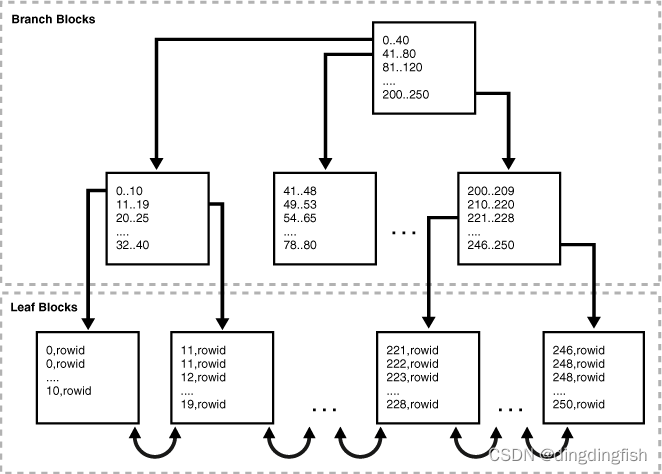
8.3.1.2 How Index Storage Affects Index Scans
Bitmap index blocks can appear anywhere in the index segment .
The figure above shows that the blade blocks are adjacent to each other . for example ,1-10 Block in 11-19 Next to and before the block . This sort describes the linked list that connects the index entries . however , Index blocks do not need to be stored sequentially in index segments . for example ,246-250 Blocks can appear anywhere in a segment , Including directly in 1-10 Before the block . therefore , An ordered index scan must perform a single block I/O. The database must read an index block to determine which index block it must read next .
The index block stores the index entries in the heap , Just like a table row . for example , If you first set the value 10 Insert into table , So the key is 10 The index entry for may be inserted at the bottom of the index block . If next 0 Insert into the table , Then the key 0 The index entry of may be inserted into 10 Above the entry . therefore , The index entries in the block body are not stored in key sequence . however , In the index block , The row header keys are used to store records in sequence . for example , The first record in the header points to 0 Index entry for , And so on , Until the pointing key is 10 Record of index entries for . therefore , An index scan can read the line header to determine where to start and end the range scan , Avoid reading every entry in the block .
8.3.1.3 Unique and Nonunique Indexes
In a non unique index , The database will rowid Store it as an extra column attached to the key . This entry adds a length byte to make the index key unique .
for example , The first index key in the non unique index shown in the figure above is 0,rowid Not simply 0. The database sorts data by index key value , Then press rowid Ascending order . for example , The items are sorted as follows :
0,AAAPvCAAFAAAAFaAAa
0,AAAPvCAAFAAAAFaAAg
0,AAAPvCAAFAAAAFaAAl
2,AAAPvCAAFAAAAFaAAm
8.3.1.4 B-Tree Indexes and Nulls
B-tree The index never stores all entries with empty keys , This is important for how the optimizer selects the access path . The result of this rule is a single column B Tree indexes never store null values .
An example helps to illustrate . hr.employees Table in employee_id There is a primary key index on , stay department_id There's a unique index on . department_id Columns can contain null values , Make it a nullable column , but employee_id Column cannot .
SQL> SELECT COUNT(*) FROM employees WHERE department_id IS NULL;

  COUNT(*)
----------
         1

SQL> SELECT COUNT(*) FROM employees WHERE employee_id IS NULL;

  COUNT(*)
----------
         0
So the implementation plan is different :
--  Full table scan
EXPLAIN PLAN FOR SELECT department_id FROM employees;
SELECT PLAN_TABLE_OUTPUT FROM TABLE(DBMS_XPLAN.DISPLAY());

--  Index range scan
EXPLAIN PLAN FOR SELECT department_id FROM employees WHERE department_id=10;
SELECT PLAN_TABLE_OUTPUT FROM TABLE(DBMS_XPLAN.DISPLAY());

--  Get rid of NULL after , You can still use index scanning :INDEX FULL SCAN
EXPLAIN PLAN FOR SELECT department_id FROM employees
WHERE department_id IS NOT NULL;
SELECT PLAN_TABLE_OUTPUT FROM TABLE(DBMS_XPLAN.DISPLAY());
8.3.2 Index Unique Scans
The index unique scan returns at most 1 individual rowid.
8.3.2.1 When the Optimizer Considers Index Unique Scans
Index unique scan requires equality predicate .
say concretely , Only if the query predicate uses the equality operator ( for example WHERE prod_id=10) When referencing all columns in a unique index key , The database will perform a unique scan .
The unique or primary key constraint itself is not sufficient to produce an index unique scan , Because the non unique index on the column may already exist . Consider the following example , This example creates t_table surface , And then in numcol Create a non unique index on :
DROP TABLE t_table;
CREATE TABLE t_table(numcol INT);
CREATE INDEX t_table_idx ON t_table(numcol);
SELECT UNIQUENESS FROM USER_INDEXES WHERE INDEX_NAME = 'T_TABLE_IDX';

UNIQUENES
---------
NONUNIQUE
The following code creates a primary key constraint on a column with a non unique index , This results in an index range scan instead of an index unique scan :
ALTER TABLE t_table ADD CONSTRAINT t_table_pk PRIMARY KEY(numcol);
SET AUTOTRACE TRACEONLY EXPLAIN
SELECT * FROM t_table WHERE numcol = 1;

--------------------------------------------------------------------------------
| Id  | Operation        | Name        | Starts | E-Rows | A-Rows |   A-Time   |
--------------------------------------------------------------------------------
|   0 | SELECT STATEMENT |             |      1 |        |      0 |00:00:00.01 |
|*  1 |  INDEX RANGE SCAN| T_TABLE_IDX |      1 |      1 |      0 |00:00:00.01 |
--------------------------------------------------------------------------------
You can use INDEX(alias index_name) Prompt to specify the index to use , However, you cannot specify a specific type of index access path .
This example is so strange , The non unique index should be deleted after the primary key is defined .
8.3.2.2 How Index Unique Scans Work
Scan searches the index sequentially to find the specified key . Index unique scan stops processing immediately after finding the first record , Because there can be no second record . The database gets... From the index entries rowid, And then retrieve rowid Specified row .
The following figure illustrates an index unique scan . This statement requests prod_id Products in the column ID 19 The record of , This column has a primary key index .
8.3.2.3 Index Unique Scans: Example
This example uses a unique scan from products Retrieve a row from the table .
SELECT *
FROM   sh.products
WHERE  prod_id = 19;

-------------------------------------------------------------------------------------------
| Id  | Operation                   | Name        | Rows  | Bytes | Cost (%CPU)| Time     |
-------------------------------------------------------------------------------------------
|   0 | SELECT STATEMENT            |             |     1 |   173 |     1   (0)| 00:00:01 |
|   1 |  TABLE ACCESS BY INDEX ROWID| PRODUCTS    |     1 |   173 |     1   (0)| 00:00:01 |
|*  2 |   INDEX UNIQUE SCAN         | PRODUCTS_PK |     1 |       |     0   (0)| 00:00:01 |
-------------------------------------------------------------------------------------------
8.3.3 Index Range Scans
An index range scan is an ordered scan of values .
The scanning range can be bounded on both sides ( for example >= and <=), It can also be unbounded on one or both sides ( for example > and <). The optimizer usually selects range scans for highly selective queries .
By default , The database stores the indexes in ascending order , And scan them in the same order . for example , The predicate department_id >= 20 Query using range scan returns by index key 20、30、40 And so on . If multiple index entries have the same key , Then the database is pressed rowid Return them in ascending order , therefore 0,AAAPvCAAFAAAAFaAAAa And then 0,AAAPvCAAFAAAAFaAAg, And so on .
Descending index range scanning is the same as index range scanning , Only the database returns rows in descending order . Usually , When sorting data in descending order or looking for values smaller than a specified value , The database will use a descending scan .
8.3.3.1 When the Optimizer Considers Index Range Scans
For index range scanning , An index key must have multiple values .
say concretely , The optimizer considers index range scanning in the following cases :
- Specify one or more leading columns of the index in the condition .
Condition specifies one or more expressions and logic ( Boolean ) Combination of operators , And back to TRUE、FALSE or UNKNOWN value . - The index key can have 0 individual 、1 individual Or more .
Tips : If you need to sort data , Please use ORDER BY Clause , Don't rely on indexes . If the index can satisfy ORDER BY Clause , Then the optimizer uses this option , To avoid sorting .
When the index can satisfy ORDER BY DESCENDING When clause , The optimizer will consider descending index range scanning .
If the optimizer selects a full table scan or another index , You may need to prompt to enforce this access path . INDEX(tbl_alias ix_name) and INDEX_DESC(tbl_alias ix_name) The prompt instructs the optimizer to use a specific index .
8.3.3.2 How Index Range Scans Work
During an index range scan ,Oracle The database moves from root to branch .
Generally speaking , The scanning algorithm is as follows :
- Read the root block .
- Read branch block .
- Alternate the following steps , Until all the data is retrieved :
a. Read the leaf block to get rowid.
b. Read a table block to retrieve rows .
Be careful : In some cases , An index scan reads a set of index blocks , Yes rowid Sort , Then read a set of table blocks .
therefore , To scan the index , The database moves backwards or forwards through leaf blocks . for example , Yes 20 To 40 Between ID The scan of will locate the first one with a minimum key value of 20 Or larger leaf pieces . Scanning is performed horizontally in the leaf node linked list , Until greater than is found 40 Value , Then stop .
The following figure illustrates an index range scan using ascending order . A statement requests department_id The value in the column is 20 Employee records of , The column has a non unique index . In this example , department 20 There is 2 Index entries .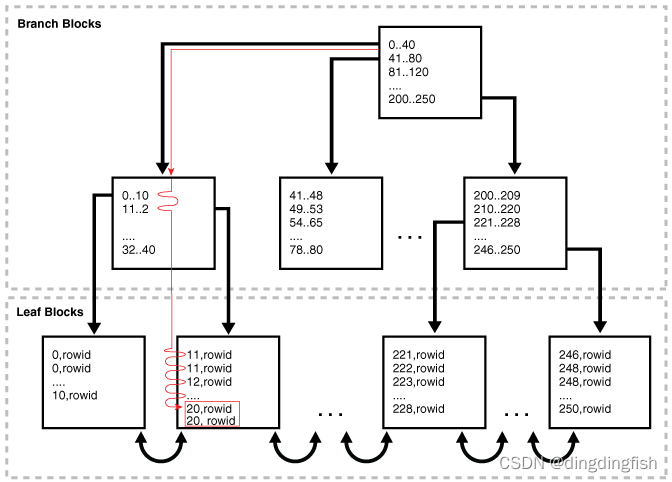
8.3.3.3 Index Range Scan: Example
This example uses an index range scan to retrieve a set of values from the employee table .
SELECT *
FROM   employees
WHERE  department_id = 20
AND    salary > 1000;

---------------------------------------------------------------------------------------------------------
| Id  | Operation                           | Name              | Rows  | Bytes | Cost (%CPU)| Time     |
---------------------------------------------------------------------------------------------------------
|   0 | SELECT STATEMENT                    |                   |     2 |   138 |     2   (0)| 00:00:01 |
|*  1 |  TABLE ACCESS BY INDEX ROWID BATCHED| EMPLOYEES         |     2 |   138 |     2   (0)| 00:00:01 |
|*  2 |   INDEX RANGE SCAN                  | EMP_DEPARTMENT_IX |     2 |       |     1   (0)| 00:00:01 |
---------------------------------------------------------------------------------------------------------
8.3.3.4 Index Range Scan Descending: Example
This example uses an index to sort from employees Retrieving rows from a table .
SELECT *
FROM   employees
WHERE  department_id < 20
ORDER BY department_id DESC;

--------------------------------------------------------------------------------------------------
| Id  | Operation                    | Name              | Rows  | Bytes | Cost (%CPU)| Time     |
--------------------------------------------------------------------------------------------------
|   0 | SELECT STATEMENT             |                   |     2 |   138 |     2   (0)| 00:00:01 |
|   1 |  TABLE ACCESS BY INDEX ROWID | EMPLOYEES         |     2 |   138 |     2   (0)| 00:00:01 |
|*  2 |   INDEX RANGE SCAN DESCENDING| EMP_DEPARTMENT_IX |     2 |       |     1   (0)| 00:00:01 |
--------------------------------------------------------------------------------------------------
The database locates the first index leaf block , The block contains 20 Or less . Then the scan is performed horizontally to the left through the linked list of leaf nodes . The database gets... From each index entry rowid, And then retrieve rowid Specified row .
8.3.4 Index Full Scans
Index full scan reads the entire index sequentially . A full scan of the index can eliminate separate sort operations , Because the data in the index is sorted by index key .
8.3.4.1 When the Optimizer Considers Index Full Scans
The optimizer considers a full scan of the index in a number of cases .
These include :
- Predicates refer to columns in the index . This column does not have to be a leading column .
- Predicate... Is not specified , But all of the following conditions are met :
- All columns in tables and queries are in indexes .( It seems to be inconsistent with the following example )
- At least one index column is not empty .
- The query contains... On non nullable columns of the index ORDER BY.
8.3.4.2 How Index Full Scans Work
The database reads the root block , Then go down to the left side of the index ( If a descending full scan , Is the right ) Until you reach the blade block .
Then the database reaches a leaf block , Scanning takes place at the bottom of the index , One block at a time , By sort order . The database uses a single block I/O Instead of multiple pieces I/O.
The following figure illustrates the index full scan . A statement requests to press department_id Sorted department records .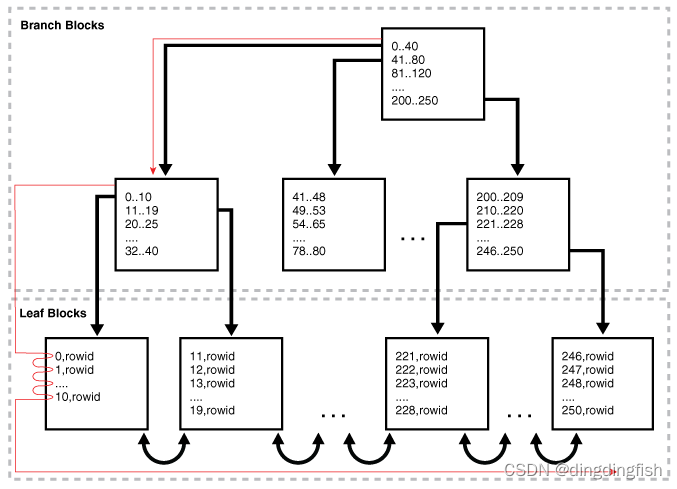
8.3.4.3 Index Full Scans: Example
This example uses a full scan of the index to satisfy the requirement with ORDER BY Clause .
SELECT department_id, department_name
FROM   departments
ORDER BY department_id;

-------------------------------------------------------------------------------------------
| Id  | Operation                   | Name        | Rows  | Bytes | Cost (%CPU)| Time     |
-------------------------------------------------------------------------------------------
|   0 | SELECT STATEMENT            |             |    27 |   432 |     2   (0)| 00:00:01 |
|   1 |  TABLE ACCESS BY INDEX ROWID| DEPARTMENTS |    27 |   432 |     2   (0)| 00:00:01 |
|   2 |   INDEX FULL SCAN           | DEPT_ID_PK  |    27 |       |     1   (0)| 00:00:01 |
-------------------------------------------------------------------------------------------
because department_name Not in index , So we need to pass rowid Go to the query table , However, sorting is still avoided .
8.3.5 Index Fast Full Scans
Index fast full scan reads index blocks in an unordered order , Because they exist on disk . This scan does not use indexes to probe tables , Instead, read the index instead of the table , Essentially, the index itself is used as a table .
8.3.5.1 When the Optimizer Considers Index Fast Full Scans
When a query only accesses attributes in an index , The optimizer will consider this scan .
Be careful : Unlike full scan , Fast full scan does not eliminate sort operations , Because it doesn't read the index sequentially .
INDEX_FFS(table_name index_name) Prompt to force a fast full index scan .
8.3.5.2 How Index Fast Full Scans Work
The database uses multiple blocks I/O To read the root block and all leaf and branch blocks . The database ignores branches and root blocks and reads index entries on leaf blocks .
8.3.5.3 Index Fast Full Scans: Example
This example uses a quick full index scan as a result of the optimizer prompt .
EXPLAIN PLAN FOR
SELECT /*+ INDEX_FFS(departments dept_id_pk) */ COUNT(*)
FROM   departments;

----------------------------------------------------------------------------
| Id  | Operation             | Name       | Rows  | Cost (%CPU)| Time     |
----------------------------------------------------------------------------
|   0 | SELECT STATEMENT      |            |     1 |     2   (0)| 00:00:01 |
|   1 |  SORT AGGREGATE       |            |     1 |            |          |
|   2 |   INDEX FAST FULL SCAN| DEPT_ID_PK |    27 |     2   (0)| 00:00:01 |
----------------------------------------------------------------------------

--  If not specified hint, Then for INDEX FULL SCAN
-----------------------------------------------------------------------
| Id  | Operation        | Name       | Rows  | Cost (%CPU)| Time     |
-----------------------------------------------------------------------
|   0 | SELECT STATEMENT |            |     1 |     1   (0)| 00:00:01 |
|   1 |  SORT AGGREGATE  |            |     1 |            |          |
|   2 |   INDEX FULL SCAN| DEPT_ID_PK |    27 |     1   (0)| 00:00:01 |
-----------------------------------------------------------------------
8.3.6 Index Skip Scans
When the initial column of the composite index is “ skip ” Or not specified in the query , An index skip scan will occur .
8.3.6.1 When the Optimizer Considers Index Skip Scans
Usually , Skipping scanning index blocks is faster than scanning table blocks , And faster than performing a full index scan .
When the following conditions are met , The optimizer will consider skipping the scan :
The leading column of the composite index is not specified in the query predicate .
for example , Query predicates do not reference cust_gender Column , The composite index key is (cust_gender,cust_email).There are many different values in the non leading key of the index , There are relatively few different values in the leading key .
for example , If the composite key is (cust_gender,cust_email), that cust_gender The column has only two different values , but cust_email There are thousands of .
8.3.6.2 How Index Skip Scans Work
Index skip scan logically splits the composite index into smaller sub indexes .
The number of different values in the index leading column determines the number of logical sub indexes . The smaller the number is. , The fewer logical sub indexes the optimizer must create , The more efficient the scanning is . Scan reads each logical index individually , and “ skip ” Index blocks on non leading columns that do not meet the filter conditions .
8.3.6.3 Index Skip Scans: Example
The following example requires a new index , To not destroy the example schema, I'm not going to implement it :
CREATE INDEX cust_gender_email_ix
  ON sh.customers (cust_gender, cust_email);
In principle, the following SQL:
SELECT *
FROM   sh.customers
WHERE  cust_email = '[email protected]';
Convert to the following :
( SELECT *
  FROM   sh.customers
  WHERE  cust_gender = 'F'
  AND    cust_email = '[email protected]' )
UNION ALL
( SELECT *
  FROM   sh.customers
  WHERE  cust_gender = 'M'
  AND    cust_email = '[email protected]' )
8.3.7 Index Join Scans
An index join scan is a hash join of multiple indexes , Together, they return all the columns requested by the query . The database does not need to access tables , Because all data is retrieved from the index .
8.3.7.1 When the Optimizer Considers Index Join Scans
In some cases , Avoiding table access is the most cost-effective option .
The optimizer considers index joins in the following cases :
- A hash join of multiple indexes retrieves all the data requested by the query , No need to access tables .
- The cost of retrieving rows from a table is higher than the cost of reading an index without retrieving rows from a table . Index joins are often expensive . for example , When two indexes are scanned and joined , Selecting the most selective index and then probing the table is usually cheaper .
You can use INDEX_JOIN(table_name) Prompt to specify index connection .
8.3.7.2 How Index Join Scans Work
Index join involves scanning multiple indexes , And then, the results of these scans rowid Use hash join to return rows .
In index connection scanning , Always avoid table access . for example , The process of joining two indexes on a table is as follows :
- Scan the first index to retrieve rowid.
- Scan the second index to retrieve rowid.
- Press rowid Perform a hash join to get rows .
8.3.7.3 Index Join Scans: Example
SELECT /*+ INDEX_JOIN(employees) */ last_name, email
FROM   employees
WHERE  last_name like 'A%';

-------------------------------------------------------------------------------------------
| Id  | Operation              | Name             | Rows  | Bytes | Cost (%CPU)| Time     |
-------------------------------------------------------------------------------------------
|   0 | SELECT STATEMENT       |                  |     3 |    48 |     2   (0)| 00:00:01 |
|*  1 |  VIEW                  | index$_join$_001 |     3 |    48 |     2   (0)| 00:00:01 |
|*  2 |   HASH JOIN            |                  |       |       |            |          |
|*  3 |    INDEX RANGE SCAN    | EMP_NAME_IX      |     3 |    48 |     1   (0)| 00:00:01 |
|   4 |    INDEX FAST FULL SCAN| EMP_EMAIL_UK     |     3 |    48 |     1   (0)| 00:00:01 |
-------------------------------------------------------------------------------------------
8.4 Bitmap Index Access Paths
Bitmap index combines index data with rowid Range combined .
8.4.1 About Bitmap Index Access
In traditional B In the tree index , An index entry points to a single row . In the bitmap index , Keys are index data and rowid A combination of ranges .
The database stores at least one bitmap for each index key . Every value in the bitmap , A series of 1 and 0 value , All point to rowid A line in the range . therefore , In the bitmap index , An index entry points to a set of rows instead of a single row .
8.4.1.1 Differences Between Bitmap and B-Tree Indexes
Bitmap index is used with B-tree Index different keys , But stored in B-tree In structure .
The following table shows the differences between index entry types .
Database stores bitmap index in B In the tree structure . The database can be key The first part of , That is, a quick search on the attribute set that defines the index B-tree, And then we get the corresponding rowid Range and bitmap .
8.4.1.2 Purpose of Bitmap Indexes
Bitmap indexes are usually suitable for different values with low or medium numbers (NDV) , And infrequently modified data .
Generally speaking ,B-tree Index for high NDV And frequent DML Active Columns . for example , The optimizer may choose one B A tree index is used to query a query that returns several rows sales.amount Column . by comparison ,customers.state and customers.county Column is a candidate for bitmap index , Because they have very few different values , Infrequently updated , And from the efficient AND and OR Benefit from operation .
Bitmap indexing is a useful way to speed up ad hoc queries in data warehouses . They are the basis of star transformation . say concretely , Bitmap indexes are useful in queries that contain :
- WHERE Multiple conditions in clause
Before accessing the table itself , The database will filter out certain ( But not all ) The conditions are right . - To have low or medium NDV The column of AND、OR and NOT operation
Combining bitmap indexing makes these operations more efficient . The database can merge bitmaps from bitmap indexes very quickly . for example , If customers.state and customers.county Bitmap index on column , These indexes can greatly improve the performance of the following queries :
SELECT *
FROM   customers
WHERE  state = 'CA'
AND    county = 'San Mateo'
The database can effectively merge 1 Value to rowid.
- Counting function
The database can scan bitmap indexes without scanning tables . - Select a null predicate
And B The tree index is different , Bitmap indexes can contain null values . Queries that calculate the number of empty values in a column can use bits
Graph index , Without scanning the table .( If a column a It's empty ,count(a) No null value will be calculated , but count(*) Meeting .) - Have not experienced severe DML The column of
The reason is that an index key points to multiple rows . If the session modifies the index data , The database cannot lock a single bit in the bitmap : contrary , The database locks the entire index entry , This actually locks the multiple lines that the bitmap points to . for example , If a particular customer's County of residence is from San Mateo Change to Alameda, Then the database must obtain the San Mateo Index entries and Alameda Exclusive access to index entries . until COMMIT To modify the row containing these two values .
8.4.1.3 Bitmaps and Rowids
For a specific value in the bitmap , If the row value matches the bitmap condition , Then the value is 1, Otherwise 0. Based on these values , The database uses an internal algorithm to map bitmaps to rowid.
Bitmap entries contain index values 、rowid Range ( Start and end rowid) And bitmap . Every... In the bitmap 0 or 1 Values are rowid The offset of the range , And map to potential rows in the table , Even if the line does not exist . Because the number of possible rows in a block is predetermined , So the database can use the range endpoint to determine the value of any row in the range rowid.
Hakan A factor is a bitmap indexing algorithm used to limit Oracle The database assumes optimization of the number of rows that can be stored in a single block . By artificially limiting the number of rows , The database reduces the size of the bitmap .
surface 8-4 Shows sh.customers.cust_marital_status Part of a sample bitmap for Columns , The column can be empty . The actual indexes are 12 Different values . Only... Is shown in the sample 3 individual :null、 Married and single .
As shown in the table 8-4 Shown , Bitmap indexes can contain keys that consist entirely of null values , This is related to B The tree index is different . In the table 8-4 in , Within the scope 6 Yes null The value is 1, This means that within the scope of 6 Yes cust_marital_status The value is null. Index nulls for some SQL Statements can be useful , For example, using aggregate functions COUNT Query for .
8.4.1.4 Bitmap Join Indexes
A bitmap join index is a bitmap index used to join two or more tables .
The optimizer can use bitmap join indexes to reduce or eliminate the amount of data that must be joined during plan execution . Bitmap join indexes are more efficient in storage than materialized join views .
The following example is in sh.sales and sh.customers Create a bitmap index on the table :
CREATE BITMAP INDEX cust_sales_bji ON sales(c.cust_city)
  FROM sales s, customers c
  WHERE c.cust_id = s.cust_id LOCAL;
front CREATE Statement FROM and WHERE Clause represents the join condition between tables . customers.cust_city Columns are index keys .
Each key value in the index represents a possible city in the customer table . conceptually , The key values of the index may be as follows , Each key value is associated with a bitmap :
San Francisco   0 0 0 1 0 1 0 0 0 1 0 0 0 0 0 . . .
San Mateo       0 1 0 0 0 0 0 0 1 0 0 0 0 0 1 . . .
Smithville      1 0 0 0 1 0 0 1 0 0 1 0 1 0 0 . . .
.
.
.
Each bit in the bitmap corresponds to a row in the sales table . stay Smithville In the key , value 1 Indicates that the first row in the sales table corresponds to sales to Smithville Customer's product , And value 0 Indicates that the second line corresponds to not sold to Smithville Customer's product .
SELECT COUNT (*)
FROM   sales s, customers c
WHERE  c.cust_id = s.cust_id
AND    c.cust_city = 'Smithville';
Consider the following pairs Smithville Query of customer's individual sales quantity :
SELECT COUNT (*)
FROM   sales s, customers c
WHERE  c.cust_id = s.cust_id
AND    c.cust_city = 'Smithville';
The following schedule shows database reads Smithville Bitmap to get Smithville sales volumes ( step 4), So as to avoid connecting customers and sales tables .
------------------------------------------------------------------------------------
|Id| Operation                    | Name |Rows|Bytes|Cost (%CPU)| Time|Pstart|Pstop|
------------------------------------------------------------------------------------
| 0| SELECT STATEMENT             |              |     |    |29 (100)|        | |  |
| 1|  SORT AGGREGATE              |              |   1 |   5|        |        | |  |
| 2|   PARTITION RANGE ALL        |              | 1708|8540|29   (0)|00:00:01|1|28|
| 3|    BITMAP CONVERSION COUNT   |              | 1708|8540|29   (0)|00:00:01| |  |
|*4|     BITMAP INDEX SINGLE VALUE|CUST_SALES_BJI|     |    |        |        |1|28|
------------------------------------------------------------------------------------

Predicate Information (identified by operation id):
---------------------------------------------------

   4 - access("S"."SYS_NC00008$"='Smithville')
8.4.1.5 Bitmap Storage
The bitmap index is located in B In the tree structure , Use branch blocks and leaf blocks , As in the B Like in a tree .
for example , If customers.cust_marital_status Listed 12 Different values , Then a branch block may point to a key married,rowid-range and single,rowid-range, Another branch block may point to widowed,rowid-range key . perhaps , A single branch block can point to containing all 12 Pieces of leaves with different keys .
Each index column value may have one or more bitmap fragments , Each segment has its own rowid Range , Occupy a continuous set of rows in one or more ranges . The database can use bitmap fragments to decompose index entries that are large relative to the block size . for example , The database can divide a single index entry into three parts , The first two parts are in separate blocks within the same range , The last part is in separate blocks in different ranges .
To save space ,Oracle Databases can be compressed 0 Continuous range of values .
8.4.2 Bitmap Conversion to Rowid
Bitmap conversion converts between entries in a bitmap and rows in a table . The transformation can be from item to line (TO ROWID), Or from line to item (FROM ROWID).
8.4.2.1 When the Optimizer Chooses Bitmap Conversion to Rowid
The optimizer uses transformations when retrieving rows from tables using bitmap index entries .
8.4.2.2 How Bitmap Conversion to Rowid Works
conceptually , Bitmaps can be represented as tables .
for example , surface 8-4 Represent the bitmap as a table , The customer line number is used as the column ,cust_marital_status Value as line . surface 8-4 Each field in the has a value 1 or 0, Represents a column value in a row . conceptually , Bitmap conversion uses an internal algorithm , namely “ Fields in bitmap F Corresponding to the... Of the table M Block No N That's ok ” or “ In the table M Block No N Rows correspond to fields in the table F Bitmap .”
8.4.2.3 Bitmap Conversion to Rowid: Example
In this example , The optimizer selects bitmap transformation operations to satisfy queries that use range predicates .
Yes sh.customers Table query selection 1918 Names of all clients born before :
SELECT cust_last_name, cust_first_name
FROM   customers
WHERE  cust_year_of_birth < 1918;
The following plan shows , The database uses a range scan to find all less than 1918 Key value of ( step 3), The... In the bitmap 1 Value to rowids( step 2), And then use rowids Get the line from the customer surface ( step 1):
-------------------------------------------------------------------------------------------
|Id| Operation                           | Name             |Rows|Bytes|Cost(%CPU)| Time  |
-------------------------------------------------------------------------------------------
| 0| SELECT STATEMENT                    |                  |    |     |421 (100)|        |
| 1|  TABLE ACCESS BY INDEX ROWID BATCHED| CUSTOMERS        |3604|68476|421   (1)|00:00:01|
| 2|   BITMAP CONVERSION TO ROWIDS       |                  |    |     |         |        |
|*3|    BITMAP INDEX RANGE SCAN          | CUSTOMERS_YOB_BIX|    |     |         |        |
-------------------------------------------------------------------------------------------

Predicate Information (identified by operation id):
---------------------------------------------------
   3 - access("CUST_YEAR_OF_BIRTH"<1918)
       filter("CUST_YEAR_OF_BIRTH"<1918)
8.4.3 Bitmap Index Single Value
This type of access path uses a bitmap index to find a single key value .
8.4.3.1 When the Optimizer Considers Bitmap Index Single Value
When the predicate contains the equality operator , The optimizer will consider this access path .
8.4.3.2 How Bitmap Index Single Value Works
This query scans a single bitmap to find a bitmap that contains 1 Value position . Database will 1 Value to rowid, And then use rowid Find the line .
The database only needs to process a bitmap . for example , The following table shows sh.customers.cust_marital_status Bitmap index of the oligopoly values in the column ( In two bitmaps ). In order to satisfy the query of customers with few status , The database can search for each in a few bitmaps 1 Value , Find the corresponding line rowid.
8.4.3.3 Bitmap Index Single Value: Example
In this example , The optimizer selects bitmap index single valued operations to satisfy queries that use equality predicates .
Yes sh.customers The query of the table will select all the widowed customers :
SELECT *
FROM   customers
WHERE  cust_marital_status = 'Widowed';
The following scenario shows the database read customers Bitmap index with Widowed Key entry ( step 3), The... In the bitmap 1 Value to rowids( step 2), And then use rowids from customers Get row at surface ( step 1):
-------------------------------------------------------------------------------------------
|Id| Operation                          | Name               |Rows|Bytes|Cost (%CPU)| Time|
-------------------------------------------------------------------------------------------
| 0|SELECT STATEMENT                    |                     |    |    |412(100)|        |
| 1| TABLE ACCESS BY INDEX ROWID BATCHED|CUSTOMERS            |3461|638K|412  (2)|00:00:01|
| 2|  BITMAP CONVERSION TO ROWIDS       |                     |    |    |        |        |
|*3|   BITMAP INDEX SINGLE VALUE        |CUSTOMERS_MARITAL_BIX|    |    |        |        |
-------------------------------------------------------------------------------------------

Predicate Information (identified by operation id):
---------------------------------------------------

   3 - access("CUST_MARITAL_STATUS"='Widowed')
8.4.4 Bitmap Index Range Scans
This type of access path uses a bitmap index to find a list of values .
8.4.4.1 When the Optimizer Considers Bitmap Index Range Scans
When the predicate selects a series of values , The optimizer will consider this access path .
The scanning range can be bounded on both sides , It can also be unbounded on one or both sides . The optimizer usually selects range scans for selective queries .
8.4.4.2 How Bitmap Index Range Scans Work
This scan works like B Tree range scan .
for example , The following table shows sh.customers.cust_year_of_birth Three values in the bitmap index of the column . If the query requests all people born in 1917 Customers years ago , Then the database can scan this index for anything below 1917 Value , Then get the with 1 Of course rowid.
8.4.4.3 Bitmap Index Range Scans: Example
This example uses a range scan to select customers born before a certain year .
Yes sh.customers The query selection of the table was born in 1918 The name of the customer before :
SELECT cust_last_name, cust_first_name
FROM   customers
WHERE  cust_year_of_birth < 1918
The following plan shows , Database access cust_year_of_birth lower than 1918 All bitmaps of ( step 3), Convert bitmap to rowid( step 2), Then get the row ( step 1):
-------------------------------------------------------------------------------------------
|Id| Operation                           | Name             |Rows|Bytes|Cost(%CPU)|Time   |
-------------------------------------------------------------------------------------------
| 0| SELECT STATEMENT                    |                  |    |     |421 (100)|        |
| 1|  TABLE ACCESS BY INDEX ROWID BATCHED|CUSTOMERS         |3604|68476|421   (1)|00:00:01|
| 2|   BITMAP CONVERSION TO ROWIDS       |                  |    |     |         |        |
|*3|    BITMAP INDEX RANGE SCAN          |CUSTOMERS_YOB_BIX |    |     |         |        |
-------------------------------------------------------------------------------------------

Predicate Information (identified by operation id):
---------------------------------------------------
   3 - access("CUST_YEAR_OF_BIRTH"<1918)
       filter("CUST_YEAR_OF_BIRTH"<1918)
8.4.5 Bitmap Merge
This access path merges multiple bitmaps , And return a single bitmap as the result .
Bitmap merging is performed by BITMAP MERGE Operation instructions .
8.4.5.1 When the Optimizer Considers Bitmap Merge
The optimizer typically uses bitmap merging to combine bitmaps generated from bitmap index range scans .
8.4.5.2 How Bitmap Merge Works
Merge use Boolean... Between two bitmaps OR operation . The generated bitmap selects all rows in the first bitmap , And all rows in each subsequent bitmap .
The query may select 1918 All clients born before . The following example shows three customers.cust_year_of_birth Example bitmap for key :1917、1916 and 1915. If anywhere in any bitmap has 1, Then the merged bitmaps have 1 Location . otherwise , The merged bitmap is 0.
1917     1 0 1 0 0 0 0 0 0 0 0 0 0 1
1916     0 1 0 0 0 0 0 0 0 0 0 0 0 0
1915     0 0 0 0 0 0 0 0 1 0 0 0 0 0
------------------------------------
merged:  1 1 1 0 0 0 0 0 1 0 0 0 0 1
In the result bitmap 1 The value corresponds to the containing value 1915、1916 or 1917 The line of .
8.4.5.3 Bitmap Merge: Example
This example shows how a database merges bitmaps to optimize queries using range predicates .
Yes sh.customers Table query selection 1918 The name of a female client born before :
SELECT cust_last_name, cust_first_name
FROM   customers
WHERE  cust_gender = 'F'
AND    cust_year_of_birth < 1918
The following plan shows , The database gets all data below 1918 Of cust_year_of_birth Key bitmap ( step 6), And then use OR Logically merge these bitmaps to create a single bitmap ( step 5). The database for F Of cust_gender Key to get a single bitmap ( step 4), And then execute... On the two bitmaps AND operation . The result is a bitmap , Which contains the request line 1 It's worth ( step 3).
-------------------------------------------------------------------------------------------
|Id| Operation                          | Name               |Rows|Bytes|Cost(%CPU)|Time  |
-------------------------------------------------------------------------------------------
| 0|SELECT STATEMENT                    |                    |    |     |288(100)|        |
| 1| TABLE ACCESS BY INDEX ROWID BATCHED|CUSTOMERS           |1802|37842|288  (1)|00:00:01|
| 2|  BITMAP CONVERSION TO ROWIDS       |                    |    |     |        |        |
| 3|   BITMAP AND                       |                    |    |     |        |        |
|*4|    BITMAP INDEX SINGLE VALUE       |CUSTOMERS_GENDER_BIX|    |     |        |        |
| 5|    BITMAP MERGE                    |                    |    |     |        |        |
|*6|     BITMAP INDEX RANGE SCAN        |CUSTOMERS_YOB_BIX   |    |     |        |        |
-------------------------------------------------------------------------------------------

Predicate Information (identified by operation id):
---------------------------------------------------
   4 - access("CUST_GENDER"='F')
   6 - access("CUST_YEAR_OF_BIRTH"<1918)
       filter("CUST_YEAR_OF_BIRTH"<1918)
8.5 Table Cluster Access Paths
A table cluster is a group of tables that share common columns and store related data in the same block . When tables are grouped together , A data block can contain rows from multiple tables .
8.5.1 Cluster Scans
An index cluster is a table cluster that uses indexes to locate data .
The cluster index is on the cluster key B Tree index . Cluster scan retrieves all rows with the same cluster key value from tables stored in the index cluster .
8.5.1.1 When the Optimizer Considers Cluster Scans
When a query accesses a table in an index cluster , The database will consider cluster scanning .
8.5.1.2 How a Cluster Scan Works
In an index cluster , The database stores all rows with the same cluster key value in the same data block .
for example ,hr.employees2 and hr.departments2 Table in emp_dept_cluster Middle group , If the cluster key is department_id, Then the database will be divided into 10 All employees of are stored in the same block , department 20 All employees of are stored in the same block , wait .
B The tree cluster index compares the cluster key value with the database block address of the block containing the data (DBA) Related to . for example , key 30 The index entry for shows the containing Department 30 Address of the block of the employee line :
30,AADAAAA9d
When a user requests a row in a cluster , The database scans the index for the DBA. Oracle The database is then based on these DBA Positioning line .
8.5.1.3 Cluster Scans: Example
This example is in department_id Column to cluster the employee and department tables , Then query a single department in the cluster .
As the user hr, You create table clusters 、 Cluster indexes and tables in clusters , As shown below :
CREATE CLUSTER employees_departments_cluster
   (department_id NUMBER(4)) SIZE 512;

CREATE INDEX idx_emp_dept_cluster
   ON CLUSTER employees_departments_cluster;

CREATE TABLE employees2
   CLUSTER employees_departments_cluster (department_id)
   AS SELECT * FROM employees;
 CREATE TABLE departments2
   CLUSTER employees_departments_cluster (department_id)
   AS SELECT * FROM departments;
Your inquiry Department 30 The employees in are as follows :
SELECT *
FROM   employees2
WHERE  department_id = 30;
To perform a scan ,Oracle The database first scans the cluster index to get the description department 30 Of course rowid( step 2). then ,Oracle The database uses this rowid location employees2 The lines in the ( step 1).
---------------------------------------------------------------------------
|Id| Operation            | Name               |Rows|Bytes|Cost(%CPU)|Time|
---------------------------------------------------------------------------
| 0| SELECT STATEMENT     |                    |   |    | 2 (100)|        |
| 1|  TABLE ACCESS CLUSTER| EMPLOYEES2         | 6 |798 | 2   (0)|00:00:01|
|*2|   INDEX UNIQUE SCAN  |IDX_EMP_DEPT_CLUSTER| 1 |    | 1   (0)|00:00:01|
---------------------------------------------------------------------------

Predicate Information (identified by operation id):
---------------------------------------------------

   2 - access("DEPARTMENT_ID"=30)
8.5.2 Hash Scans
Hash clusters are similar to index clusters , Only the index key is replaced by the hash function . There is no separate cluster index .
In a hash cluster , Data is index . The database uses hash scanning to locate rows in a hash cluster based on hash values .
8.5.2.1 When the Optimizer Considers a Hash Scan
When a query accesses a table in a hash cluster , The database will consider hash scanning .
8.5.2.2 How a Hash Scan Works
In a hash cluster , All rows with the same hash value are stored in the same data block .
To perform a hash scan on the cluster ,Oracle The database first obtains the hash value by applying the hash function to the cluster key value specified by the statement . Oracle The database then scans the data block containing the row with this hash value .
8.5.2.3 Hash Scans: Example
This example is for the Department ID Hash the employee and department tables on the column , Then query a single department in the cluster .
You create a hash cluster and tables in the cluster , As shown below :
CREATE CLUSTER employees_departments_cluster
   (department_id NUMBER(4)) SIZE 8192 HASHKEYS 100;

CREATE TABLE employees2
   CLUSTER employees_departments_cluster (department_id)
   AS SELECT * FROM employees;

CREATE TABLE departments2
   CLUSTER employees_departments_cluster (department_id)
   AS SELECT * FROM departments;
Your inquiry Department 30 The employees in are as follows :
SELECT *
FROM   employees2
WHERE  department_id = 30
To perform a hash scan ,Oracle The database first checks the key value 30 Apply the hash function to get the hash value , The hash value is then used to scan the data block and retrieve rows ( step 1).
----------------------------------------------------------------
| Id  | Operation         | Name       | Rows  | Bytes | Cost  |
----------------------------------------------------------------
|   0 | SELECT STATEMENT  |            |       |       |     1 |
|*  1 |  TABLE ACCESS HASH| EMPLOYEES2 |    10 |  1330 |       |
----------------------------------------------------------------

Predicate Information (identified by operation id):
---------------------------------------------------

   1 - access("DEPARTMENT_ID"=30)
边栏推荐
猜你喜欢

Smart management of green agriculture: a visual platform for agricultural product scheduling

Cookies and sessions

SQL调优指南笔记6:Explaining and Displaying Execution Plans

复杂系统如何检测异常?北卡UNCC等最新《复杂分布式系统中基于图的深度学习异常检测方法综述》,阐述最新图异常检测技术进展

一级指针&二级指针知识点梳理

SQL调优指南笔记10:Optimizer Statistics Concepts

NiO User Guide

Build a highly available database

ICML2022 | GALAXY:極化圖主動學習

GNS installation and configuration
随机推荐
Libmysqlclient A static library
Design and practice of Hudi bucket index in byte skipping
ATOI super resolution
#141 Linked List Cycle
服务没有报告任何错误mysql
图灵奖得主:想要在学术生涯中获得成功,需要注意哪些问题?
Zip compression decompression
How to design a message box through draftjs
Icml2022 | galaxy: active learning of polarization map
ZGC concurrent identity and multi view address mapping in concurrent transition phase
atoi超强解析
【QNX Hypervisor 2.2 用户手册】4.2 支持的构建环境
Yanghui triangle code implementation
CUDA out of memory
Recursively call knowledge points - including example solving binary search, frog jumping steps, reverse order output, factorial, Fibonacci, Hanoi tower.
重排数列练习题
递归调用知识点-包含例题求解二分查找、青蛙跳台阶、逆序输出、阶乘、斐波那契、汉诺塔。
结构体知识点all in
Okio source code analysis
Npoi create word