当前位置:网站首页>Object initialization
Object initialization
2022-07-25 09:36:00 【Hills and valleys】
List of articles
Chapter one OC The singleton model
Chapter two OC Initialization of
The third chapter OC And agreements
Chapter four OC And main Some operations and basic concepts of functions
Preface
Talking about initialization method and rewriting of initialization method
One 、 Object initialization ?
- What is object initialization ?
After we create an object , Assigning values to its properties is called object initialization
- Allocate space for objects :
[[ Class name alloc]init]
[ Class name new]
These two methods are essentially the same .
- Reset the memory space of each instance variable to 0;
The shaping variable is reset to 0, Floating point objects are reset to 0.0.BOOL Type reset to NO.
- The function of initialization
Objects that only allocate memory cannot be used , Must be initialized ,OC The most common initialization method is init.
init Method can complete initialization , But it just completes the most basic initialization , therefore , All member variables of the object are still 0
Let's see if Not initialized What will happen :
Class interface :
#import <Foundation/Foundation.h>

NS_ASSUME_NONNULL_BEGIN

@interface User : NSObject
@property(nonatomic,copy) NSString*name;
@property(nonatomic,assign) int age;

@end

NS_ASSUME_NONNULL_END
The realization of the class :
 Insert a code chip here #import "User.h"

@implementation User
@synthesize name;
@synthesize age;
@end;
test :
#import"User.h"
#import<Foundation/Foundation.h>
int main() {

    @autoreleasepool {

        User* user = [[User alloc]init];
        NSLog(@"user.name = %@,user.age = %d", user.name, user.age);

    }
}
result :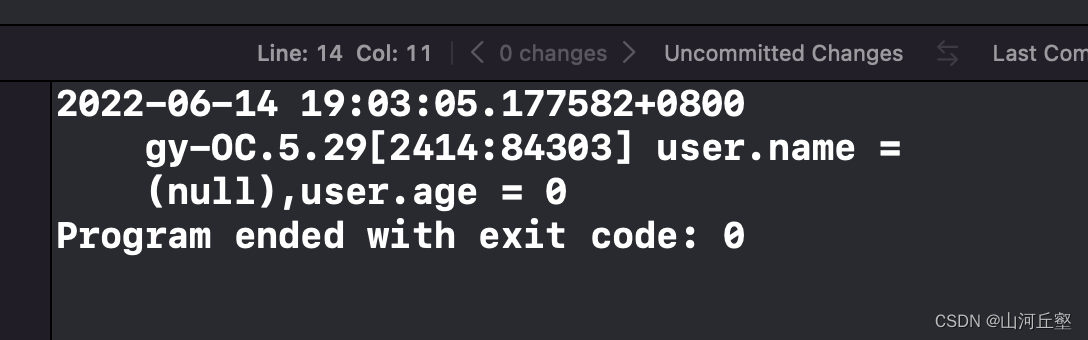
Here we see the importance of initialization .
Two 、 Initialization method
The interface and implementation of the class are the same as above , Give the test part :
#import"User.h"
#import<Foundation/Foundation.h>
int main(){

    @autoreleasepool {

        User* user = [[User alloc]init];
        user.name = @" Nana ";
        user.age = 18;
        NSLog(@"user.name = %@,user.age = %d", user.name, user.age);

    }
}
result :
3、 ... and 、 Override initialization method
Class interface :
#import <Foundation/Foundation.h>

NS_ASSUME_NONNULL_BEGIN

@interface User : NSObject
@property(nonatomic,copy) NSString*name;
@property(nonatomic,assign) int age;

@end

NS_ASSUME_NONNULL_END
The realization of the class :
#import "User.h"

@implementation User
@synthesize name;
@synthesize age;
-(id)init{

    if(self = [super init]){

        self.name = @"wang";
        self.age = 18;
    }
    return self;
}
@end
Test part :
#import"User.h"
#import<Foundation/Foundation.h>
int main(){

    @autoreleasepool {

        User* user = [[User alloc]init];
        NSLog(@"user.name = %@,user.age = %d", user.name, user.age);
        User* m = [[User alloc]init];
        NSLog(@"m.name = %@,m.age = %d", user.name, user.age);
    }
}
result :
We found that , These two objects are calling init When the method is used , Will automatically assign values to objects . Because we rewrite init Method , What we use here is init The method is no longer NSObject Provided , But we rewrite . Before we call the rewritten init After the method , Will automatically assign values to objects .
边栏推荐
猜你喜欢


![[GKCTF 2021]easynode](/img/f0/1daf6f83fea66fdefd55608cbddac6.png)


随机推荐
卷积神经网络的兴趣简单介绍
¥1-2 例2.2 将两个集合的并集放到线性表中
How to deploy the jar package to the server? Note: whether the startup command has nohup or not has a lot to do with it
How to customize the title content of uni app applet (how to solve the problem that the title of applet is not centered)
[GKCTF 2021]easynode
Operation 7.19 sequence table
Why use json.stringify() and json.parse()
How many regions can a positive odd polygon be divided into
Machine learning -- detailed introduction of standardscaler (), transform (), fit () in sklearn package
Numpy - Construction of array
TCP network application development process
【代码源】 每日一题 素数之欢(bfs)
梦想启航(第一篇博客)
语音聊天app源码-钠斯网络源码出品
Android 如何使用adb命令查看应用本地数据库
Data control language (DCL)
机器学习 —— Sklearn包中StandardScaler()、transform()、fit()的详细介绍
main函数的一些操作
数据查询语言(DQL)
How to obtain location information (longitude and latitude) by uni app