当前位置:网站首页>VB.net类库——4给屏幕截图,裁剪
VB.net类库——4给屏幕截图,裁剪
2022-06-26 20:40:00 【小虞163】
VB.net用screen类来截图,其实不需要调用api
在类库myScreen里写函数
 ''' <summary>
    ''' 获取屏幕图片
    ''' </summary>
    ''' <returns>屏幕图片</returns>
    Public Function GetScreen()
        Dim scr As Screen = Screen.PrimaryScreen
        Dim recSc As Rectangle = scr.Bounds
        Image = New Bitmap(recSc.Width, recSc.Height)
        g = Graphics.FromImage(Image)
        g.CopyFromScreen(New Point(0, 0), New Point(0, 0), New Size(recSc.Width, recSc.Height))
        Return Image
    End Function
    ''' <summary>
    ''' 此函数多用来裁剪获取到的屏幕图片。注意:调用时要先在MouseDown中向GDIscr.p1中传入第一个顶点。
    ''' 再在MouseUp中向GDIscr.p2传入第二个顶点,顶点样式为从左上角划向右下角。
    ''' </summary>
    ''' <param name="bmp">传入截图,也可是其他的图片</param>
    ''' <returns>裁剪后的图片</returns>
    Public Function CutScren(bmp As Bitmap)
        g = Graphics.FromImage(bmp)
        Dim rc As Rectangle = New Rectangle(p1, New Size(p2.X - p1.X, p2.Y - p1.Y))   '起点和长宽
        Image = bmp.Clone(rc, Imaging.PixelFormat.Format32bppArgb)
        Return Image
    End Function
在类中写:
 Public p1 As Point
    Public p2 As Point
公开这两个变量:在主窗体需要调用
调用:test里新建一个窗体叫Cut
加入一个picturebox:


FromBorderStyle改为none
WindowState改为Maximized,
Cut写入代码:
'Imports GDI_Make_NET4_5.myScreen
Public Class Cut
    Public GDIscr As New GDI_Make_NET4_5.myScreen
    Private ispick As Boolean
    Public Sub ShowMe(bmp As Bitmap)
        Pic.Location = New Point(0, 0)
        Pic.Width = bmp.Width
        Pic.Height = bmp.Height
        Pic.Image = bmp
        ispick = True
        Me.Show()
    End Sub

    Private Sub Pic_MouseDown(sender As Object, e As MouseEventArgs) Handles Pic.MouseDown
        If ispick = True Then
            GDIscr.p1 = New Point(e.X, e.Y)
        End If
    End Sub

    Private Sub Pic_MouseUp(sender As Object, e As MouseEventArgs) Handles Pic.MouseUp
        If ispick = True Then
            GDIscr.p2 = New Point(e.X, e.Y)
            Pic.Image = GDIscr.CutScren(Pic.Image)
            Clipboard.SetImage(Pic.Image)
            MsgBox("已复制到剪切板,双击图片退出")
            ispick = False
        End If
    End Sub

    Private Sub Pic_DoubleClick(sender As Object, e As EventArgs) Handles Pic.DoubleClick
        Close()
    End Sub
End Class
主窗体用MouseDown获取第一个点,MouseUp获取第二个点并调用函数,传入myScreen,
ispick的作用是防止二次裁剪出现错误,代码中的msgbox段可以自行修改、或保存图片。
测试: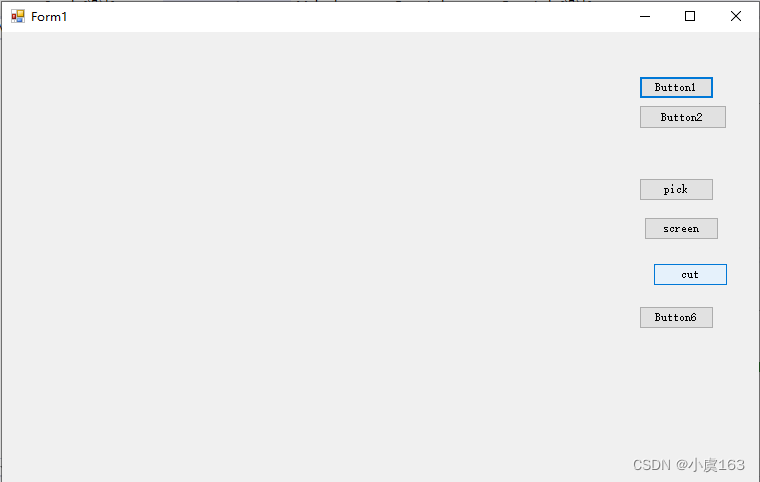
点screen则获取当前屏幕的截图
点击cut显示Cut窗体,注意,显示一个窗体。选择第一个点是你想选择区域的左上角,第二个点是你想选择区域的右下角,看懂代码就可以了,如果把点的顺序反过来截图,则显示不出。
边栏推荐
- StringUtils判断字符串是否为空
- [Bayesian classification 2] naive Bayesian classifier
- Is there any risk in opening a mobile stock registration account? Is it safe?
- 【贝叶斯分类2】朴素贝叶斯分类器
- Détails de l'annotation des ressources sentinelles
- C primer plus learning notes - 3. Character IO (input / output)
- Sword finger offer II 098 Number of paths / Sword finger offer II 099 Sum of minimum paths
- 飞天+CIPU体为元宇宙带来更大想象空间
- Leetcode question brushing: String 02 (reverse string II)
- Garbage collection mechanism of browser
猜你喜欢

基于Qt实现的“合成大西瓜”小游戏

Guomingyu: Apple's AR / MR head mounted display is the most complicated product in its history and will be released in January 2023

Idea error: process terminated

GameFi 活跃用户、交易量、融资额、新项目持续性下滑,Axie、StepN 能摆脱死亡螺旋吗?链游路在何方?

Distributed ID generation system

The source code that everyone can understand (I) the overall architecture of ahooks
![[protobuf] some pits brought by protobuf upgrade](/img/c1/01ba268c786c046d6fbc450a72ab45.png)
[protobuf] some pits brought by protobuf upgrade

Detailed explanation of retrospective thinking

Flutter TextField详解
Three basic backup methods of mongodb
随机推荐
Introduction to single chip microcomputer one-on-one learning strategy, independent development program immediately after reading
第2章 构建自定义语料库
30. concatenate substrings of all words
0基础学c语言(3)
Arduino uno + DS1302 uses 31 byte static RAM to store data and print through serial port
Leetcode question brushing: String 05 (Sword finger offer 58 - ii. left rotation string)
Détails de l'annotation des ressources sentinelles
GameFi 活跃用户、交易量、融资额、新项目持续性下滑,Axie、StepN 能摆脱死亡螺旋吗?链游路在何方?
西瓜书重温(七): 贝叶斯分类器(手推+代码demo)
好物推薦:移動端開發安全工具
Garbage collection mechanism of browser
0 basic C language (2)
后台查找,如何查找网站后台
leetcode刷题:哈希表08 (四数之和)
The relationship between the development of cloud computing technology and chip processor
C primer plus learning notes - 3. Character IO (input / output)
【protobuf 】protobuf 升级后带来的一些坑
Distributed ID generation system
【protobuf 】protobuf 昇級後帶來的一些坑
宝藏又小众的覆盖物PBR多通道贴图素材网站分享