当前位置:网站首页>Data warehouse 4.0 notes - user behavior data collection IV
Data warehouse 4.0 notes - user behavior data collection IV
2022-07-23 11:44:00 【Silky】
1 Log collection Flume install

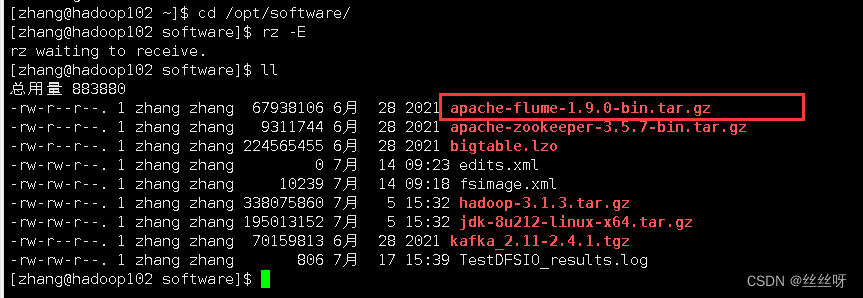
[[email protected] software]$ tar -zxvf apache-flume-1.9.0-bin.tar.gz -C /opt/module/
[[email protected] module]$ mv apache-flume-1.9.0-bin/ flume
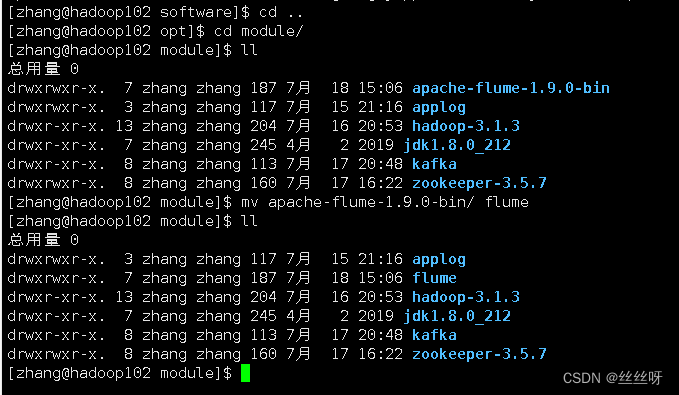
take lib Under folder guava-11.0.2.jar Delete to be compatible with Hadoop 3.1.3
[[email protected] module]$ rm /opt/module/flume/lib/guava-11.0.2.jar

hadoop Can work normally

take flume/conf Under the flume-env.sh.template Change the file to flume-env.sh, And configuration flume-env.sh file
[[email protected] conf]$ mv flume-env.sh.template flume-env.sh

[[email protected] conf]$ vi flume-env.sh
export JAVA_HOME=/opt/module/jdk1.8.0_212

distribution
[[email protected] module]$ xsync flume/


2 Log collection Flume To configure

Flume The specific configuration is as follows :
stay /opt/module/flume/conf Create under directory file-flume-kafka.conf file
[[email protected] conf]$ vim file-flume-kafka.conf
In the file configuration, the following ( Write it down first , Then configure )
# Name each component
a1.sources = r1
a1.channels = c1

# describe source
a1.sources.r1.type = TAILDIR
a1.sources.r1.filegroups = f1
a1.sources.r1.filegroups.f1 = /opt/module/applog/log/app.*
a1.sources.r1.positionFile = /opt/module/flume/taildir_position.json
# Configure interceptors (ETL Data cleaning    Judge json Is it complete )
a1.sources.r1.interceptors =  i1
a1.sources.r1.interceptors.i1.type = com.zhang.flume.interceptor.ETLInterceptor$Builder

# describe channel
a1.channels.c1.type = org.apache.flume.channel.kafka.KafkaChannel
a1.channels.c1.kafka.bootstrap.servers = hadoop102:9092,hadoop103:9092
a1.channels.c1.kafka.topic = topic_log
a1.channels.c1.parseAsFlumeEvent = false

# binding source and channel as well as sink and channel The relationship between
a1.sources.r1.channels = c1
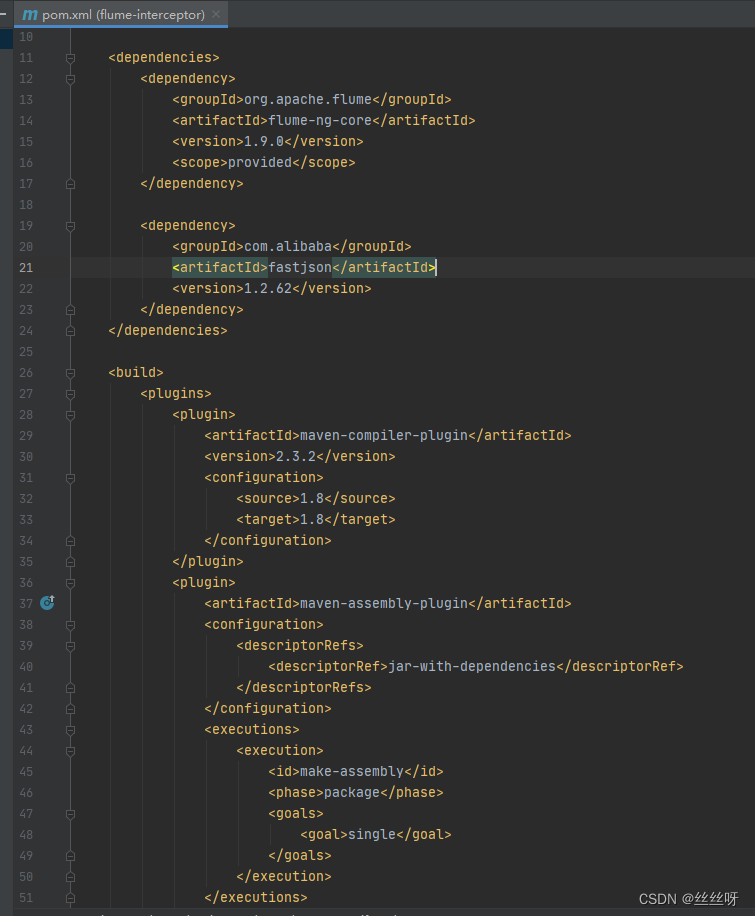
establish Maven engineering flume-interceptor

<dependencies>
    <dependency>
        <groupId>org.apache.flume</groupId>
        <artifactId>flume-ng-core</artifactId>
        <version>1.9.0</version>
        <scope>provided</scope>
    </dependency>

    <dependency>
        <groupId>com.alibaba</groupId>
        <artifactId>fastjson</artifactId>
        <version>1.2.62</version>
    </dependency>
</dependencies>

<build>
    <plugins>
        <plugin>
            <artifactId>maven-compiler-plugin</artifactId>
            <version>2.3.2</version>
            <configuration>
                <source>1.8</source>
                <target>1.8</target>
            </configuration>
        </plugin>
        <plugin>
            <artifactId>maven-assembly-plugin</artifactId>
            <configuration>
                <descriptorRefs>
                    <descriptorRef>jar-with-dependencies</descriptorRef>
                </descriptorRefs>
            </configuration>
            <executions>
                <execution>
                    <id>make-assembly</id>
                    <phase>package</phase>
                    <goals>
                        <goal>single</goal>
                    </goals>
                </execution>
            </executions>
        </plugin>
    </plugins>
</build>
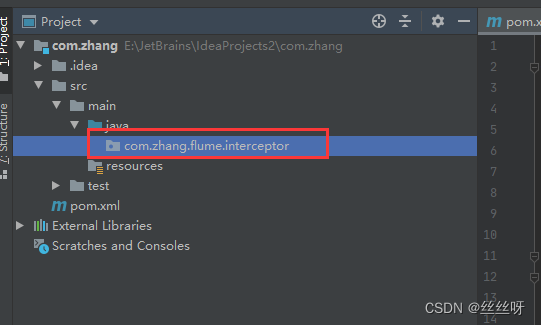
Create a package name :com.zhang.flume.interceptor
stay com.zhang.flume.interceptor Package created under JSONUtils class
package com.zhang.flume.interceptor;

import com.alibaba.fastjson.JSON;
import com.alibaba.fastjson.JSONException;

public class JSONUtils {
    public static boolean isJSONValidate(String log){
        try {
            JSON.parse(log);
            return true;
        }catch (JSONException e){
            return false;
        }
    }
}

stay com.zhang.flume.interceptor Package created under ETLInterceptor class 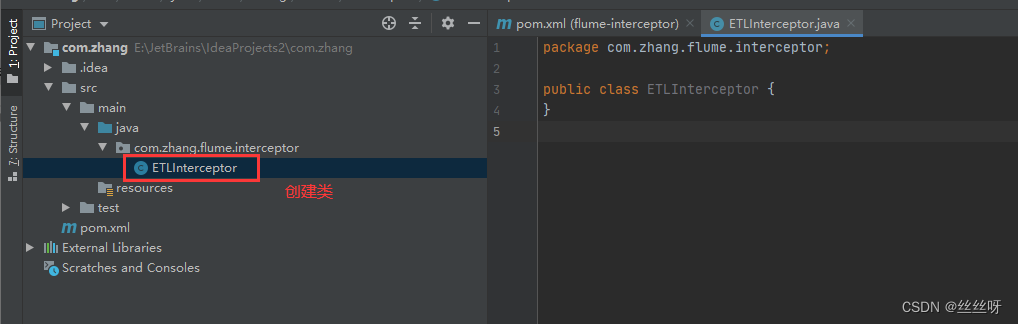
package com.zhang.flume.interceptor;

import com.alibaba.fastjson.JSON;
import org.apache.flume.Context;
import org.apache.flume.Event;
import org.apache.flume.interceptor.Interceptor;

import java.nio.charset.StandardCharsets;
import java.util.Iterator;
import java.util.List;

public class ETLInterceptor implements Interceptor {

    @Override
    public void initialize() {

    }

    @Override
    public Event intercept(Event event) {

        byte[] body = event.getBody();
        String log = new String(body, StandardCharsets.UTF_8);

        if (JSONUtils.isJSONValidate(log)) {
            return event;
        } else {
            return null;
        }
    }

    @Override
    public List<Event> intercept(List<Event> list) {

        Iterator<Event> iterator = list.iterator();

        while (iterator.hasNext()){
            Event next = iterator.next();
            if(intercept(next)==null){
                iterator.remove();
            }
        }

        return list;
    }

    public static class Builder implements Interceptor.Builder{

        @Override
        public Interceptor build() {
            return new ETLInterceptor();
        }
        @Override
        public void configure(Context context) {

        }

    }

    @Override
    public void close() {

    }
}

Package compilation


You need to put the packed bag into hadoop102 Of /opt/module/flume/lib Under the folder .
[[email protected] module]$ cd flume/lib/
Upload files
Filter it out :
[[email protected] lib]$ ls | grep interceptor

distribution
[[email protected] lib]$ xsync flume-interceptor-1.0-SNAPSHOT-jar-with-dependencies.jar

Get the full class name 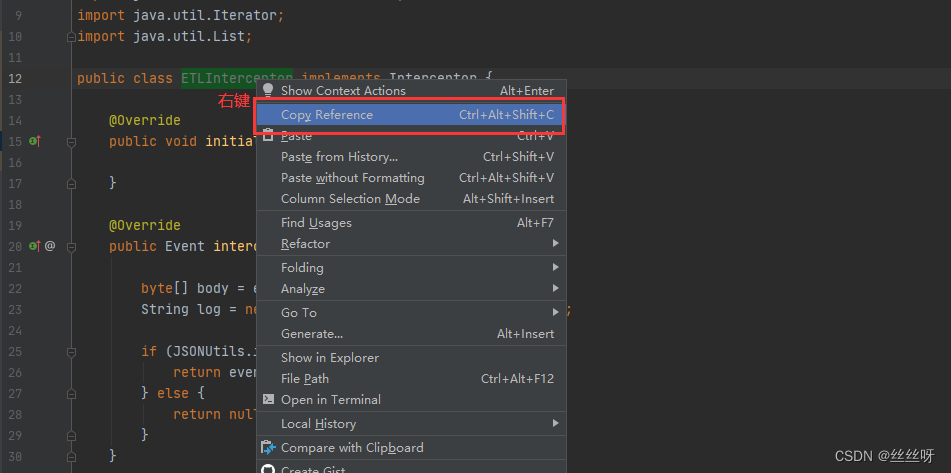
Put it in the initial configuration file :

Now put the configuration file on the cluster
[[email protected] conf]$ vim file-flume-kafka.conf

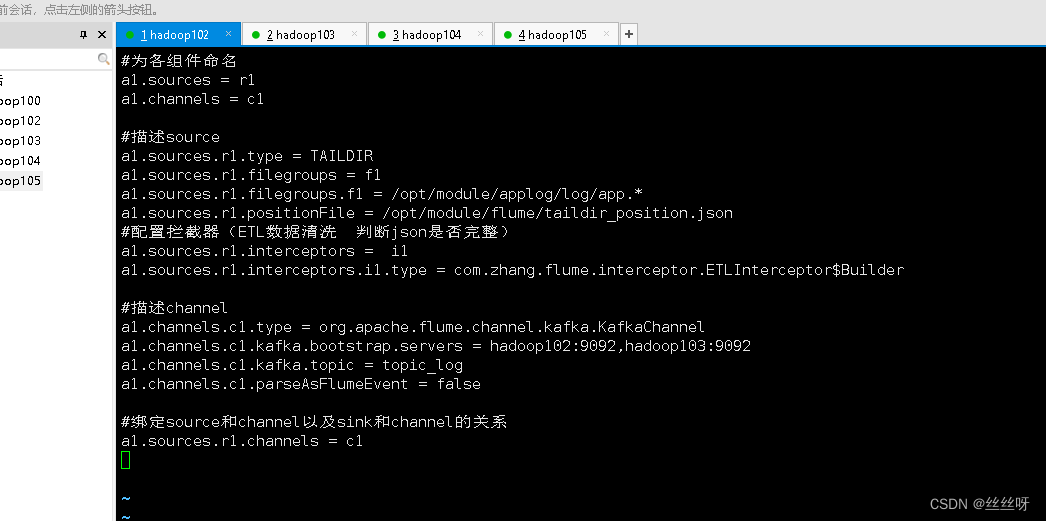
distribution [[email protected] conf]$ xsync file-flume-kafka.conf

start-up flume
[[email protected] flume]$ bin/flume-ng agent --name a1 --conf-file conf/file-flume-kafka.conf &


[[email protected] flume]$ bin/flume-ng agent --name a1 --conf-file conf/file-flume-kafka.conf &

103 Also started successfully .
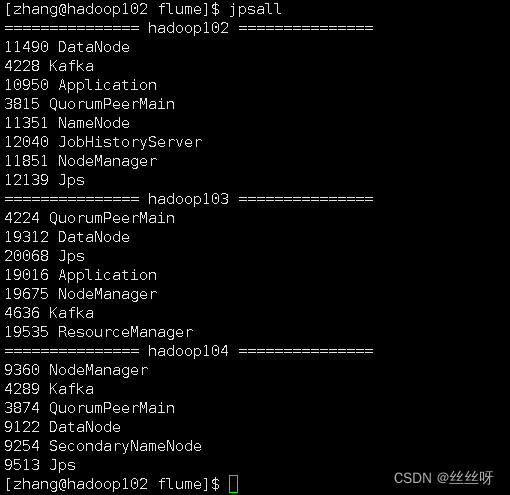
3 test Flume-Kafka passageway
Generate logs
[[email protected] flume]$ lg.sh
consumption Kafka data , Observe whether the console has data acquisition :
[[email protected] kafka]$ bin/kafka-console-consumer.sh \
--bootstrap-server hadoop102:9092 --from-beginning --topic topic_log
You can see the corresponding log 

If it's bad hadoop102 window , Find out flume It was shut down 
[[email protected] ~]$ cd /opt/module/flume/
Start at the front desk
[[email protected] flume]$ bin/flume-ng agent --name a1 --conf-file conf/file-flume-kafka.conf

Successful launch , But after closing the client, I found that it was closed again
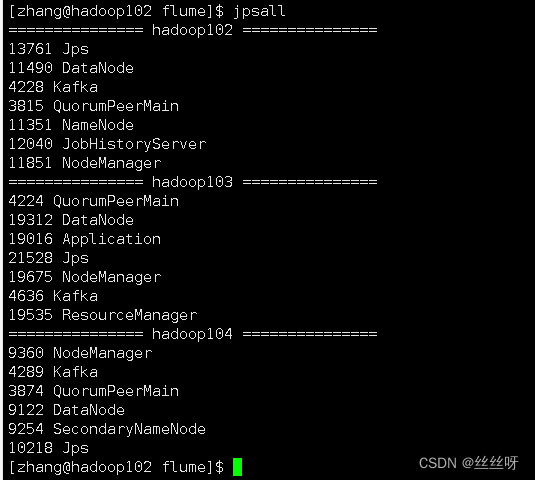
add nohup
[[email protected] flume]$ nohup bin/flume-ng agent --name a1 --conf-file conf/file-flume-kafka.conf

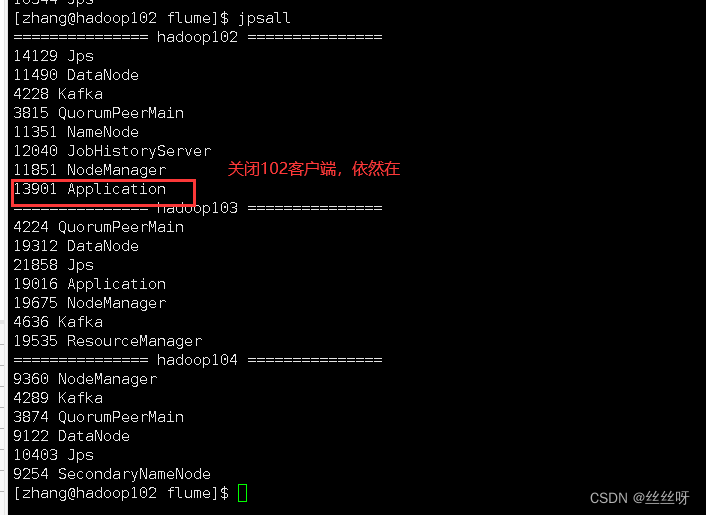
nohup, The order can be made after you exit the account / After closing the terminal Continue to run the corresponding process .nohup Just don't hang up , Run the command without hanging up .
How to stop ?…… How to get the number 13901?
[[email protected] kafka]$ ps -ef | grep Application
[[email protected] kafka]$ ps -ef | grep Application | grep -v grep
[[email protected] kafka]$ ps -ef | grep Application | grep -v grep | awk '{print $2}'

[[email protected] kafka]$ ps -ef | grep Application | grep -v grep | awk '{print $2}' | xargs

[[email protected] kafka]$ ps -ef | grep Application | grep -v grep | awk '{print $2}' | xargs -n1 kill -9

Application May be replaced by other identical names , So we need to find a unique identifier flume The logo of


4 Log collection Flume Start stop script
stay /home/atguigu/bin Create script in directory f1.sh
[[email protected] bin]$ vim f1.sh
Fill in the script as follows
#! /bin/bash

case $1 in
"start"){
        for i in hadoop102 hadoop103
        do
                echo " -------- start-up  $i  collection flume-------"
                ssh $i "nohup /opt/module/flume/bin/flume-ng agent --conf-file /opt/module/flume/conf/file-flume-kafka.conf --name a1 -Dflume.root.logger=INFO,LOGFILE >/opt/module/flume/log1.txt 2>&1  &"
        done
};;
"stop"){
        for i in hadoop102 hadoop103
        do
                echo " -------- stop it  $i  collection flume-------"
                ssh $i "ps -ef | grep file-flume-kafka | grep -v grep |awk  '{print \$2}' | xargs -n1 kill -9 "
        done

};;
esac

[[email protected] bin]$ chmod 777 f1.sh
Test that the stop and start are normal

5 consumption Kafka data Flume


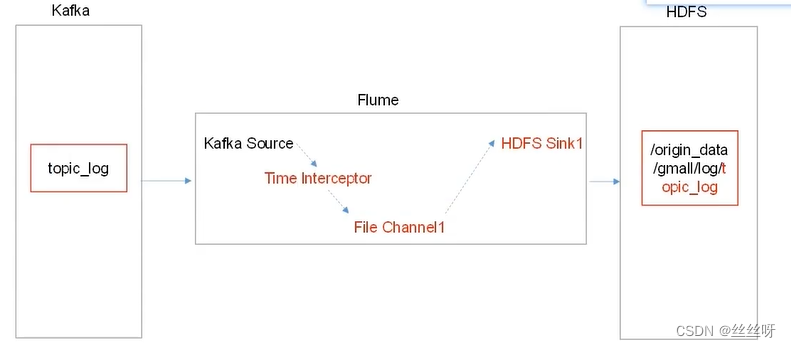
Time blockers are important , Solve the problem of zero drift 
consumer Flume To configure
stay hadoop104 Of /opt/module/flume/conf Create under directory kafka-flume-hdfs.conf file
( Get a1.sources.r1.interceptors.i1.type Then configure )
[[email protected] conf]$ vim kafka-flume-hdfs.conf
##  Components
a1.sources=r1
a1.channels=c1
a1.sinks=k1

## source1
a1.sources.r1.type = org.apache.flume.source.kafka.KafkaSource
a1.sources.r1.batchSize = 5000
a1.sources.r1.batchDurationMillis = 2000
a1.sources.r1.kafka.bootstrap.servers = hadoop102:9092,hadoop103:9092,hadoop104:9092
a1.sources.r1.kafka.topics=topic_log

## Time interceptor
a1.sources.r1.interceptors = i1
a1.sources.r1.interceptors.i1.type = com.zhang.flume.interceptor.TimeStampInterceptor$Builder

## channel1
a1.channels.c1.type = file
a1.channels.c1.checkpointDir = /opt/module/flume/checkpoint/behavior1
a1.channels.c1.dataDirs = /opt/module/flume/data/behavior1/


## sink1
a1.sinks.k1.type = hdfs
a1.sinks.k1.hdfs.path = /origin_data/gmall/log/topic_log/%Y-%m-%d
a1.sinks.k1.hdfs.filePrefix = log-
a1.sinks.k1.hdfs.round = false

# Control the generated small files
a1.sinks.k1.hdfs.rollInterval = 10
a1.sinks.k1.hdfs.rollSize = 134217728
a1.sinks.k1.hdfs.rollCount = 0

##  The control output file is a native file .
a1.sinks.k1.hdfs.fileType = CompressedStream
a1.sinks.k1.hdfs.codeC = lzop

##  assemble
a1.sources.r1.channels = c1
a1.sinks.k1.channel= c1
Flume Time stamp interceptor ( Solve the problem of zero drift )
stay com.zhang.flume.interceptor Package created under TimeStampInterceptor class
package com.zhang.flume.interceptor;

import com.alibaba.fastjson.JSONObject;
import org.apache.flume.Context;
import org.apache.flume.Event;
import org.apache.flume.interceptor.Interceptor;

import java.nio.charset.StandardCharsets;
import java.util.ArrayList;
import java.util.List;
import java.util.Map;

public class TimeStampInterceptor implements Interceptor {

    private ArrayList<Event> events = new ArrayList<>();

    @Override
    public void initialize() {

    }

    @Override
    public Event intercept(Event event) {

        Map<String, String> headers = event.getHeaders();
        String log = new String(event.getBody(), StandardCharsets.UTF_8);

        JSONObject jsonObject = JSONObject.parseObject(log);

        String ts = jsonObject.getString("ts");
        headers.put("timestamp", ts);

        return event;
    }

    @Override
    public List<Event> intercept(List<Event> list) {
        events.clear();
        for (Event event : list) {
            events.add(intercept(event));
        }

        return events;
    }

    @Override
    public void close() {

    }

    public static class Builder implements Interceptor.Builder {
        @Override
        public Interceptor build() {
            return new TimeStampInterceptor();
        }

        @Override
        public void configure(Context context) {
        }
    }
}


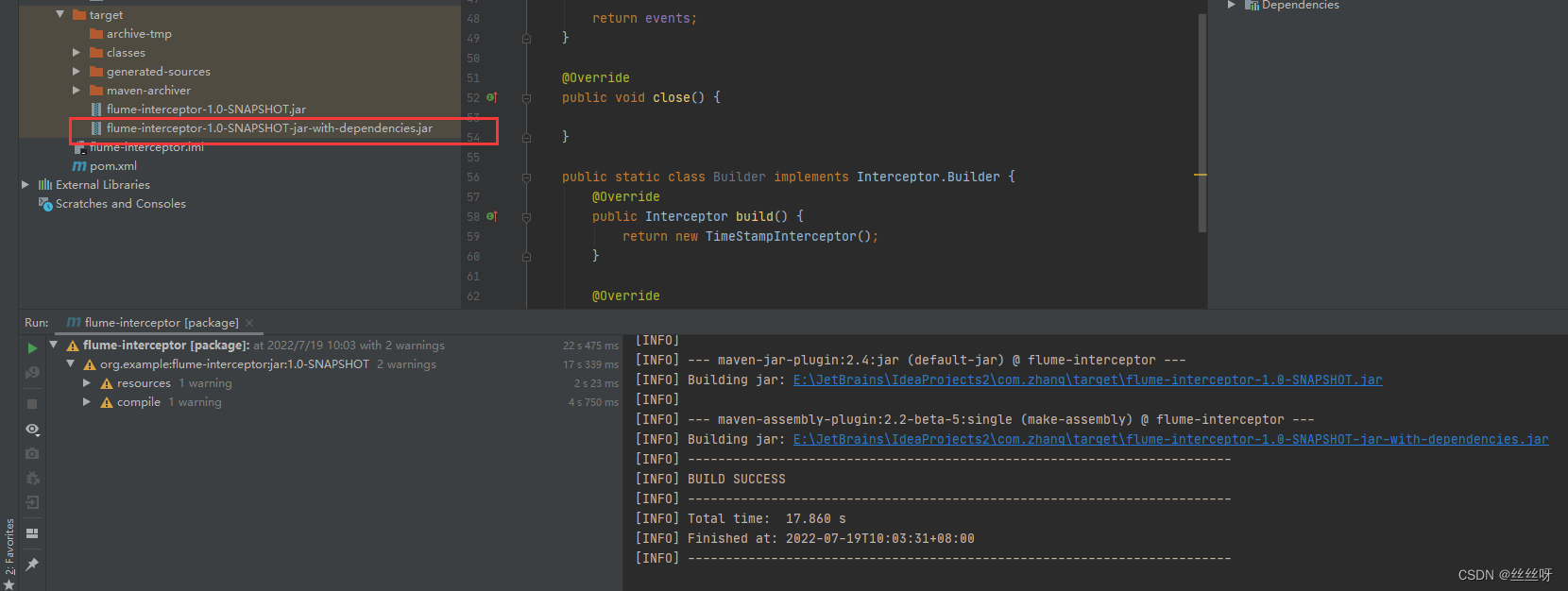
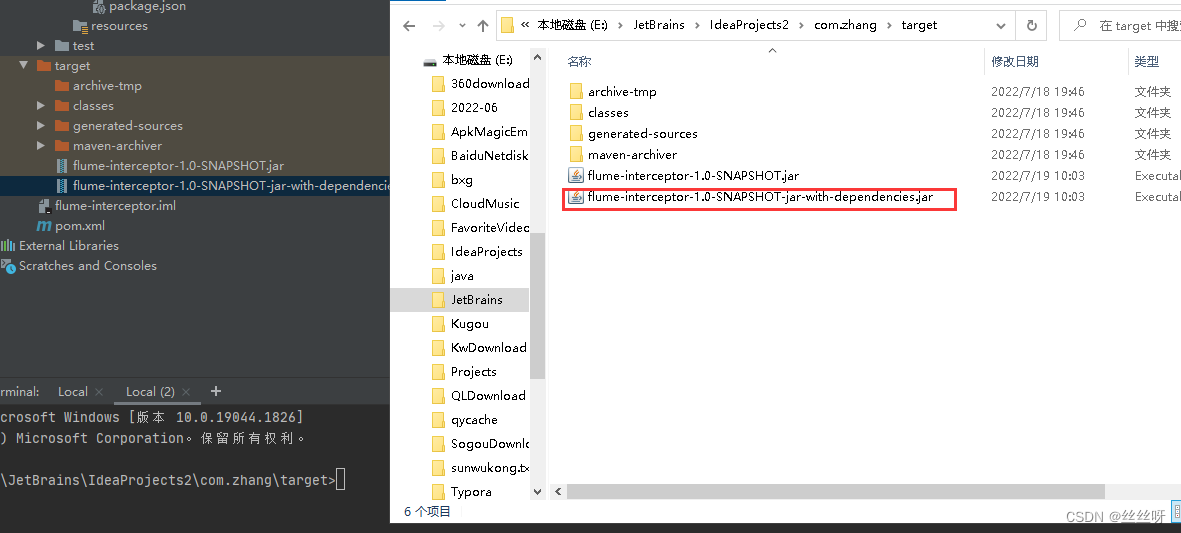
Came to hadoop104 On :

Transfer documents 
Check whether it is
[[email protected] lib]$ ls | grep interceptor

Delete the previous
[[email protected] lib]$ rm -rf flume-interceptor-1.0-SNAPSHOT-jar-with-dependencies.jar.0
Be careful : It is suggested to check the time , here .0 Is a newly generated file , Not before .
Complete the script written before 
com.zhang.flume.interceptor.TimeStampInterceptor
Now start writing the configuration file 

start-up flume
[[email protected] flume]$ nohup /opt/module/flume/bin/flume-ng agent --conf-file /opt/module/flume/conf/kafka-flume-hdfs.conf --name a1 -Dflume.root.logger=INFO,LOGFILE >/opt/module/flume/log2.txt 2>&1 &

Check the date (104 On )

Look again. 102 Log date previously configured on


Now let's take a look at HDFS The date in is the time corresponding to the log , still 104 The system time corresponding to this machine
To open the first HDFS 
[[email protected]adoop102 applog]$ lg.sh
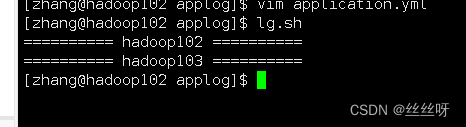

Check the time , Is the time corresponding to the log

episode : At first my origin_data file , Why don't you come out , But I followed the video step by step , Finally, I found out the problem :
Import jar When the package ,flume-interceptor-1.0-SNAPSHOT-jar-with-dependencies.jar The file is previous ,.0 Is the latest document , So you should delete the previous file , leave .0 file . Of course, if there is a problem, go back and delete it again jar package , Just re import .
consumer Flume Start stop script
stay /home/zhang/bin Create script in directory f2.sh
[[email protected] bin]$ vim f2.sh
Fill in the script as follows
#! /bin/bash

case $1 in
"start"){
        for i in hadoop104
        do
                echo " -------- start-up  $i  consumption flume-------"
                ssh $i "nohup /opt/module/flume/bin/flume-ng agent --conf-file /opt/module/flume/conf/kafka-flume-hdfs.conf --name a1 -Dflume.root.logger=INFO,LOGFILE >/opt/module/flume/log2.txt   2>&1 &"
        done
};;
"stop"){
        for i in hadoop104
        do
                echo " -------- stop it  $i  consumption flume-------"
                ssh $i "ps -ef | grep kafka-flume-hdfs | grep -v grep |awk '{print \$2}' | xargs -n1 kill"
        done

};;
esac
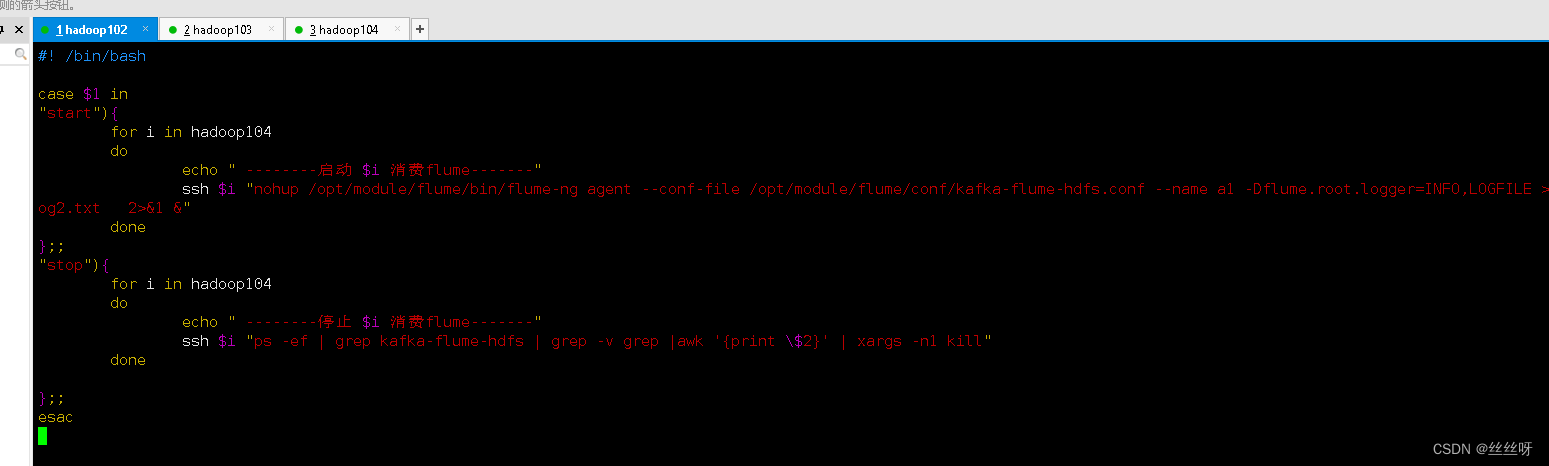
[[email protected] bin]$ chmod 777 f2.sh


Project experience Flume Memory optimization
modify flume Memory parameter settings


6 Acquisition channel start / Stop script
stay /home/zhang/bin Create script in directory cluster.sh
[[email protected] bin]$ vim cluster.sh
Fill in the script as follows ( Pay attention to the closing sequence , stop it Kafka It takes time , If shut down Kafka Then close Zookeeper, It may be due to delay , It doesn't shut down properly )
#!/bin/bash

case $1 in
"start"){
        echo ==================  start-up   colony  ==================

        # start-up  Zookeeper colony
        zk.sh start

        # start-up  Hadoop colony
        myhadoop.sh start

        # start-up  Kafka Collection cluster
        kf.sh start

        # start-up  Flume Collection cluster
        f1.sh start

        # start-up  Flume Consumer clusters
        f2.sh start

        };;
"stop"){
        echo ==================  stop it   colony  ==================

        # stop it  Flume Consumer clusters
        f2.sh stop

        # stop it  Flume Collection cluster
        f1.sh stop

        # stop it  Kafka Collection cluster
        kf.sh stop

        # stop it  Hadoop colony
        myhadoop.sh stop

        # stop it  Zookeeper colony
        zk.sh stop

};;
esac
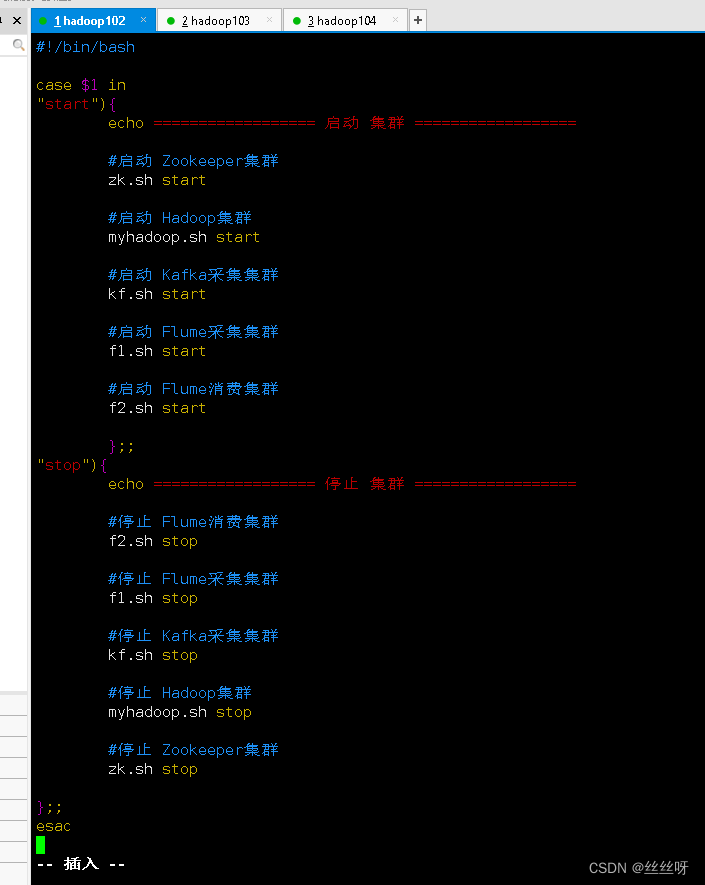
[[email protected] bin]$ chmod 777 cluster.sh
It can be closed normally , start-up


7 Common problems and solutions
visit 2NN page http://hadoop104:9868, I can't see the details


Find the file to modify
[[email protected] ~]$ cd /opt/module/hadoop-3.1.3/share/hadoop/hdfs/webapps/static/

[[email protected] static]$ vim dfs-dust.js

find 61 That's ok 
modify 61 That's ok
return new Date(Number(v)).toLocaleString();
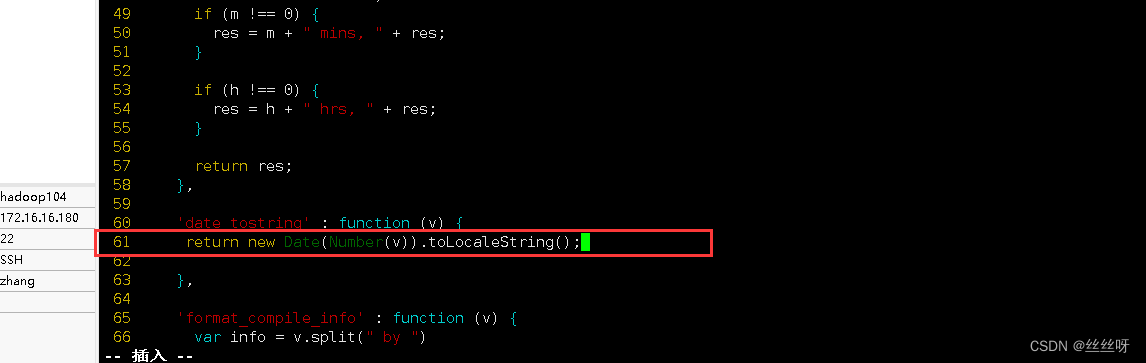
Forced to refresh ( More tools —— Clear browser —— Clear data )

边栏推荐
- CTF web common software installation and environment construction
- Development of digital collection system: Baidu AI pays tribute to Air China
- Entrepôt de données 4.0 Notes - acquisition de données commerciales
- mysql和sql server的设置优化及使用
- NFT digital collection system development: the combination of music and NFT
- The object in $attrs doesn't change, but it triggers watch listening?
- Vite x sigma creates designer specific I18N plug-ins
- mysql根据中文字段首字母排序
- Yarn capacity scheduler settings
- 数字藏品系统开发:百度AI致敬中国航空
猜你喜欢

数仓4.0笔记——业务数据采集
quartz2.2简单调度Job

Data warehouse 4.0 notes - Data Warehouse Modeling
Quartz2.2 simple scheduling job

数字藏品开发/元宇宙数字藏品开发

Development of digital collection system: what are the main features of NFT?

NFT digital collection system development, development trend of Digital Collections

Vite x sigma creates designer specific I18N plug-ins

Digital collection development / digital collection system development solution

General Query & paging code
随机推荐
Resizeobserver ignoring buried point records - loop limit exceeded
SQL realizes the user statistics of continuous login for more than 7 days
NFT digital collection development: Jingdong "Qida bear takes you to the capital" tourism package
Principle of file upload vulnerability
Accumulate SQL by date
Custom MVC (Part 2)
用户连续登陆(允许中断)查询sql
Data warehouse 4.0 notes - business data collection
DVWA学习笔记
Quartz2.2 simple scheduling job
数仓4.0笔记——业务数据采集
數倉4.0筆記——業務數據采集
MySQL account management & four engines & database and table building
Basis of penetration test
XML建模
Using dynamic programming to solve the longest growing subsequence problem
Entrepôt de données 4.0 Notes - acquisition de données commerciales
MySQL modify function permission is not effective
Shell takes the month within a certain time range
数仓4.0笔记——用户行为数据采集四