当前位置:网站首页>Shell string variable
Shell string variable
2022-06-25 13:59:00 【Resounding through heaven】
1 Introduce
character string (String) It is a combination of a series of characters . The string is Shell One of the most commonly used data types in programming ( Besides numbers and strings , There are no other types )
2 Three formats of string
1 Single quotation mark method
2 Double quotation marks , recommend
3 No quotation marks
vim string.sh

#!/bin/bash
name1='james'
name2="kobe"
name3=paul

echo "name1: ${name1}"
echo "name2: ${name2}"
echo "name3: ${name3}"

3 The three formats of strings differ
1 Use single quotes ’' String
Any character will be output as it is , Using variables in concatenated strings is invalid .
2 By double quotation marks " " Surrounded string
It contains variables , Then the variable will be parsed to get the value , Instead of outputting it as it is .
3 A string that is not surrounded by quotation marks
Variables in strings that are not surrounded by quotation marks are also parsed , This point and double quotation marks " " The surrounding string is the same .
No spaces in the string , Otherwise, the string after the space will be parsed as other commands .
demo:
vim string.sh

#!/bin/bash
name="kobe"


echo ' Print with single quotation marks  name: ${name}'
echo " Use double quotation marks to print  name: ${name}"
echo   Do not use quotation marks for printing name:${
    name}

4 Get string length
4.1 grammar
${# String variable name }
4.2 meaning
Get string length
#!/bin/bash
name="kobe"


echo ' Print with single quotation marks  name: ${name}'
echo " Use double quotation marks to print  name: ${name}"
echo   Do not use quotation marks for printing name:${
    name}


echo " String length is : ${#name}"
4.3 result

5 String splicing
5.1 Splicing method
1 Unsigned splicing
2 Double quotation mark splicing
5.2 demo
#!/bin/bash
hello="hello"
world="world"
hello_world=${
    hello}${
    world}
echo " Unsigned splicing : ${hello_world}"

hello_world1="${hello}${world}"
echo " Double quotation mark splicing :${hello_world}"

6 String interception
6.1 grammar
| Format | explain |
|---|---|
${ Variable name :start:length} | from string To the left of the string start Character start , Intercept to the right length Characters .start from 0 Start |
${ Variable name :start} | from string To the left of the string start Characters begin to intercept , Until the last . |
${ Variable name :0-start:length} | from string To the right of the string start Character start , Intercept to the right length Characters .start from 1 Start , Represents the first character on the right |
${ Variable name :0-start} | from string To the right of the string start Characters begin to intercept , Until the last . |
${ Variable name #*chars} | from string The first occurrence to the left of the string *chars The position begins , Intercept *chars All characters on the right . |
${ Variable name ##*chars} | from string The last occurrence to the left of the string *chars The position begins , Intercept *chars All characters on the right . |
${ Variable name %chars*} | from string The first occurrence to the right of the string chars* The position begins , Intercept chars* All the characters on the left . |
${ Variable name %%chars*} | from string The last occurrence to the right of the string chars* The position begins , Intercept chars* All the characters on the left |
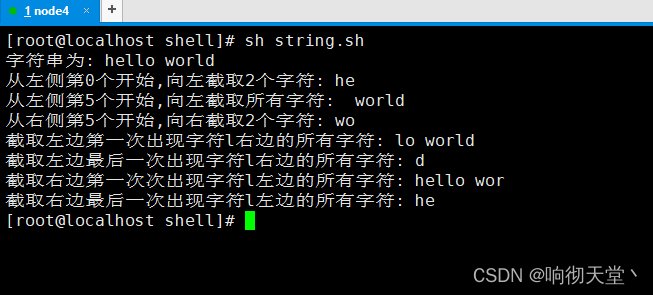
6.2 demo
 character string "hello world"

 From the left 0 Start , Intercept to the left 2 Characters
 From the left 5 Start , Intercept all characters to the left
 From the right 5 Start , Intercept to the right 2 Characters
 Intercept the first character on the left l All characters on the right
 Intercept the last character on the left l All characters on the right
 Intercept the first character on the right l All the characters on the left
 Intercept the last character on the right l All the characters on the left
#!/bin/bash
string="hello world"

echo " String is : ${string}"


str1="${string:0:2}"
echo " From the left 0 Start , Intercept to the left 2 Characters : ${str1}"

str2="${string:5}"
echo " From the left 5 Start , Intercept all characters to the left : ${str2}"

str3="${string:0-5:2}"
echo " From the right 5 Start , Intercept to the right 2 Characters : ${str3}"

str4="${string#*l}"
echo " Intercept the first character on the left l All characters on the right : ${str4}"

str5="${string##*l}"
echo " Intercept the last character on the left l All characters on the right : ${str5}"

str6="${string%l*}"
echo " Intercept the first character on the right l All the characters on the left : ${str6}"

str7="${string%%l*}"
echo " Intercept the last character on the right l All the characters on the left : ${str7}"
边栏推荐
- Rust, le meilleur choix pour un programmeur de démarrer une entreprise?
- Mise en place d'un Cluster kubernets avec plusieurs serveurs Cloud
- leetcode:456. 132 mode [monotone stack]
- Cold migration and resize of Nova component source code analysis
- Logistic Regression VS Linear Regression
- JVM 用工具分析OOM经典案例
- Vscode--- format setting configuration
- golang项目依赖管理工具go vendor,go mod
- 专家建议|8大措施加速你的创新职业规划和成长
- API in Nova
猜你喜欢

删库跑路、“投毒”、改协议,开源有哪几大红线千万不能踩?
![leetcode:456. 132 mode [monotone stack]](/img/fa/44a5194b244f30383409ef40966453.png)
leetcode:456. 132 mode [monotone stack]

专家建议|8大措施加速你的创新职业规划和成长
Windows下MySQL的安装和删除

How to solve SQL import

Gorm---- Association query

JVM 用工具分析OOM经典案例

Logistic Regression VS Linear Regression

The starting point for learning programming.

On the realization of guessing numbers game
随机推荐
Class usage and inheritance in ES6
Settings the PC must be turned on
untiy强制刷新UI
Openstack learning notes -nova component insight
golang项目依赖管理工具go vendor,go mod
英语中的九大词性与九大时态
On the realization of guessing numbers game
JVM 用工具分析OOM经典案例
SSH secret free function for # scripting
sigmoid函数sigmoid求导
Openstack learning notes (I)
使用KVM虚拟化部署EVE-NG
Deep parsing and implementation of redis stream advanced message queue [10000 words]
JS prototype. slice. call(arguments); Convert pseudo array to array
分类器与cross entropy loss函数
Gorm-- search you don't know
Cold migration and resize of Nova component source code analysis
Discuz copy today's headlines template /discuz news and information business GBK template
‘nvidia-smi‘ 不是内部或外部命令,也不是可运行的程序或批处理文件
Getting started with numpy Library