In this paper, we describe the process by Rainbond Cloud native application management platform One click deployment highly available DolphinScheduler colony , This way is suitable for people who don't know much about Kubernetes、 Users of complex technologies such as containerization , Reduced in Kubernetes Deployment in China DolphinScheduler Threshold .
Apache DolphinScheduler It's a distributed and extensible visualization DAG Workflow task scheduling open source system . Solve data research and development ETL Intricate dependencies , Can't directly monitor task health status and other issues .DolphinScheduler With DAG The streaming approach will Task Assemble , It can monitor the running status of tasks in real time , At the same time, it supports retry 、 Recovery from the specified node failed 、 Suspension and Kill Tasks, etc
Simple and easy to use :DAG Monitoring interface , All process definitions are visual , Customize by dragging tasks DAG, adopt API Mode docking with the third party system , One key deployment
high reliability : A lot of decentralization Master And many Worker, Self support HA function , Use task queue to avoid overload , It will not cause the machine to get stuck
Rich use scenarios : Support pause resume operation . Multi tenant support , Better response to big data usage scenarios . Support more task types , Such as spark, hive, mr, python, sub_process, shell
High scalability : Support custom task type , Scheduler uses distributed scheduling , Scheduling capacity grows linearly with cluster ,Master and Worker Support dynamic online and offline
Prerequisite
- Usable Rainbond Cloud native application management platform , See documentation Rainbond Fast installation
DolphinScheduler Cluster one click deployment
- Dock and visit the built-in open source app store , Search keywords
dolpYou can find it DolphinScheduler application .

- Click on DolphinScheduler On the right side of the
installGo to the installation page , Fill in the corresponding information , Click OK to start the installation , Automatically jump to the application view .
| Options | explain |
|---|---|
| Team name | User built workspace , Isolate by namespace |
| Cluster name | choice DolphinScheduler To which one K8s colony |
| Select application | choice DolphinScheduler To which application is deployed , The application contains several related components |
| Application version | choice DolphinScheduler Version of , Currently, the optional version is 3.0.0-beta2 |

- Wait a few minutes ,DolphinScheduler The cluster will be installed , And run it .

- Click on the access , Will visit DolphinScheduler-API Components , The default user password is
admin/dolphinscheduler123

API Master Worker Node scaling
DolphinScheduler API、Master、Worker Both support scaling multiple instances , Multiple instances can ensure the high availability of the entire cluster .
With Worker For example , Enter the assembly -> Telescopic , Set the number of instances .

verification Worker node , Get into DolphinScheduler UI -> The monitoring center -> Worker View node information .

The configuration file
API and Worker Service sharing /opt/dolphinscheduler/conf/common.properties , When modifying the configuration, you only need to modify API The configuration file for the service .
How to support Python 3?
Worker The service is installed by default Python3, You can add environment variables when using PYTHON_HOME=/usr/bin/python3
How to support Hadoop, Spark, DataX etc. ?
With Datax For example :
- Installing a plug-in .Rainbond Team view -> plug-in unit -> Install plug-ins from the store -> Search for
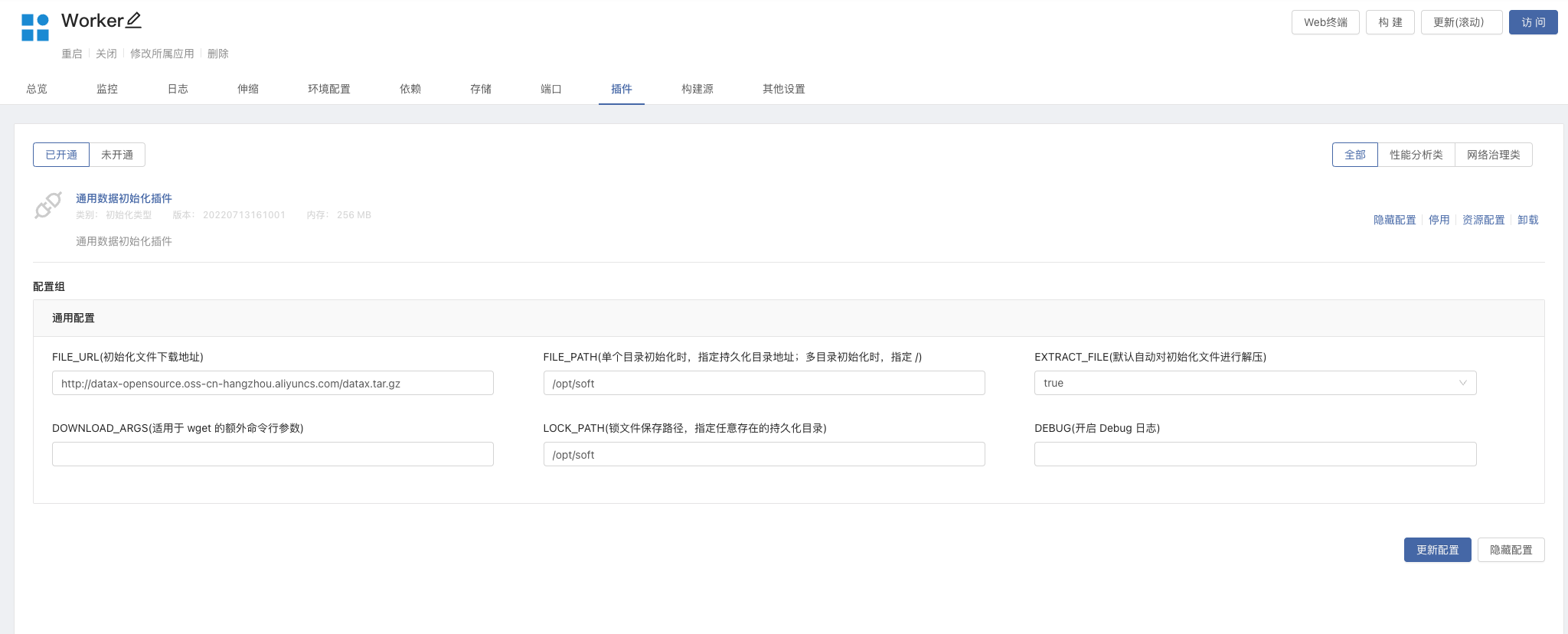
Universal data initialization plug-inAnd install . - Open plug-ins . Get into Worker In component -> plug-in unit -> Opening
Universal data initialization plug-in, And modify the configuration- FILE_URL:http://datax-opensource.oss-cn-hangzhou.aliyuncs.com/datax.tar.gz
- FILE_PATH:/opt/soft
- LOCK_PATH:/opt/soft
- Update components , The initialization plug-in will be downloaded automatically
DataxAnd unpack it/opt/softUnder the table of contents .