当前位置:网站首页>Use of polarplot function in MATLAB
Use of polarplot function in MATLAB
2022-06-30 12:13:00 【jk_ one hundred and one】
Catalog
Convert from degrees to radians before drawing
Draw multiple lines in polar coordinates
Draw radius values at equally spaced angles
Specify the line color of the polar chart
Specify line color after creation
Use complex values to create polar charts
polarplot The function draws lines in polar coordinates .
grammar
polarplot(theta,rho)
polarplot(theta,rho,LineSpec)
polarplot(theta1,rho1,...,thetaN,rhoN)
polarplot(theta1,rho1,LineSpec1,...,thetaN,rhoN,LineSpecN)
polarplot(rho)
polarplot(rho,LineSpec)
polarplot(Z)
polarplot(Z,LineSpec)
polarplot(___,Name,Value)
polarplot(pax,___)
p = polarplot(___)
explain
polarplot(theta,rho) Draw lines in polar coordinates , from theta Represents the arc angle ,rho Represents the radius value of each point . The input must be a vector of equal length or a matrix of equal size . If the input is matrix ,polarplot Will draw rho The right of theta The graph of the columns of the . One input can also be a vector , The other is matrix , But the length of the vector must be equal to one dimension of the matrix .
polarplot(theta,rho,LineSpec) Set the linetype of the line 、 Marking symbols and colors .
polarplot(theta1,rho1,...,thetaN,rhoN) Draw multiple rho,theta Pair up .
polarplot(theta1,rho1,LineSpec1,...,thetaN,rhoN,LineSpecN) Specify the linetype of each line 、 Marking symbols and colors .
polarplot(rho) At equidistant angles ( Be situated between 0 and 2π Between ) draw rho Radius value in .
polarplot(rho,LineSpec) Set the linetype of the line 、 Marking symbols and colors .
polarplot(Z) draw Z Complex values in .
polarplot(Z,LineSpec) Set the linetype of the line 、 Marking symbols and colors .
polarplot(___,Name,Value) Use one or more Name,Value Specify the properties of the drawing line for the group parameter . Property settings apply to all lines . Can't use Name,Value Assign different attribute values to different lines for groups .
polarplot(pax,___) Use pax designated PolarAxes object , Instead of using the current coordinate area .
p = polarplot(___) Returns one or more drawing line objects . Use... After creating a drawing line object p Set properties for it . About the attribute list , see also Line attribute .
Example
Create a polar chart
Draw lines in polar coordinates .
theta = 0:0.01:2*pi;
rho = sin(2*theta).*cos(2*theta);
polarplot(theta,rho)
As shown in the figure :

Convert from degrees to radians before drawing
Create data to plot .
theta = linspace(0,360,50);
rho = 0.005*theta/10;
take theta The value in is converted from degrees to radians . Then plot the data in polar coordinates .
theta_radians = deg2rad(theta);
polarplot(theta_radians,rho)
As shown in the figure :

Draw multiple lines in polar coordinates
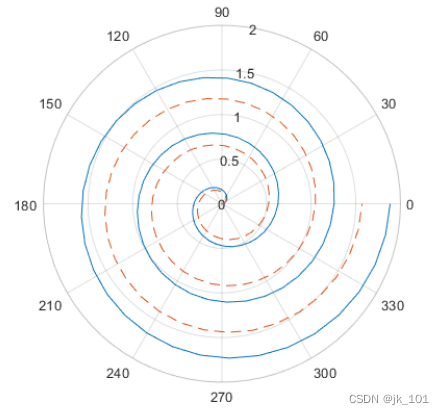
Draw two lines in polar coordinates . The second line uses a dashed line .
theta = linspace(0,6*pi);
rho1 = theta/10;
polarplot(theta,rho1)

rho2 = theta/12;
hold on
polarplot(theta,rho2,'--')
hold off
As shown in the figure :
Draw radius values at equally spaced angles
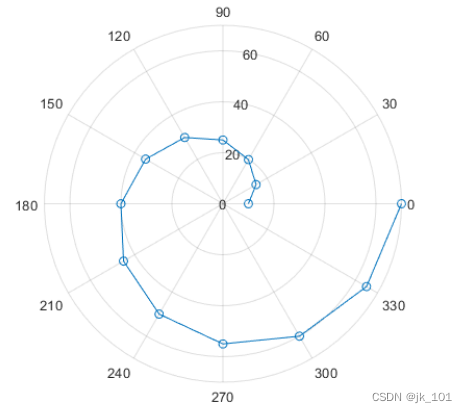
Specify only the radius value , Do not specify an angle value .polarplot Will be at equidistant angles ( from 0 To 2π) Draw the radius value . A circular marker is displayed at each data point .
rho = 10:5:70;
polarplot(rho,'-o')
As shown in the figure :
Draw negative radius values
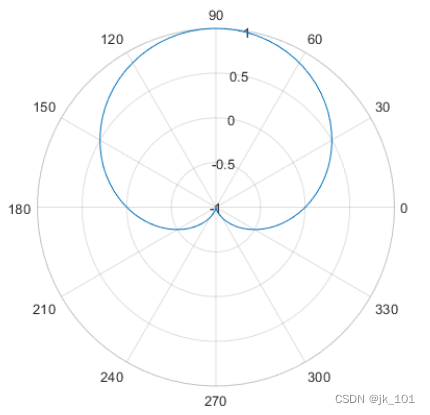
Use a negative radius value to create a polar chart . By default ,polarplot Reflects negative values through the origin .
theta = linspace(0,2*pi);
rho = sin(theta);
polarplot(theta,rho)
As shown in the figure :

change r The scope of the shaft , Make it from -1 To 1.
rlim([-1 1])As shown in the figure :
Specify the line color of the polar chart
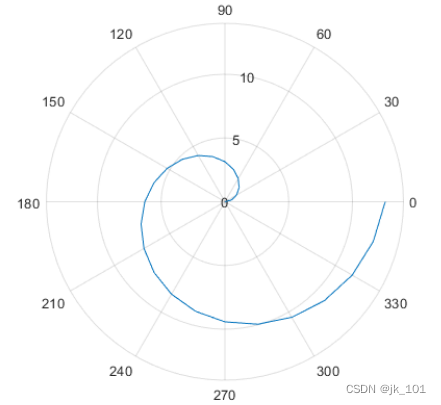
Create a polar chart with a red line marked with a circle .
theta = linspace(0,2*pi,25);
rho = 2*theta;
polarplot(theta,rho,'r-o')
As shown in the figure :

Specify line color after creation
Create a polar chart and return the drawing line object .
theta = linspace(0,2*pi,25);
rho = 2*theta;
p = polarplot(theta,rho);
As shown in the figure :
Change the line color and width and add a marker .
p.Color = 'magenta';
p.Marker = 'square';
p.MarkerSize = 8;
As shown in the figure :

Use complex values to create polar charts
Draw complex values in polar coordinates . Show markers at each point , There is no connecting line between marks .
Z = [2+3i 2 -1+4i 3-4i 5+2i -4-2i -2+3i -2 -3i 3i-2i];
polarplot(Z,'*')
As shown in the figure :

theta - Angle value
Angle value , Specify as vector or matrix . Specify the radian value . To convert data from degrees to radians , Please use deg2rad.
To change theta The scope of the shaft , Please use thetalim.
rho - Radius value
Radius value , Specify as vector or matrix . By default , A negative value will reflect through the origin . The reflection of a point is achieved by taking the absolute value of its radius and increasing its angle 180 Degrees to achieve .
To change r The scope of the shaft , Please use rlim.
Z - Complex values
Complex values , Specify as vector or matrix , The form of each element is  or x+iy, among :
rho = sqrt(x^2+y^2)
theta = atan(y/x)
LineSpec - Linetype 、 Marking and color
Linetype 、 Marking and color , Specified as a character vector or string containing symbols . Symbols can be displayed in any order . You do not need to specify all three characteristics at the same time ( Linetype 、 Marking and color ). for example , If you ignore linetype , Specify only tags , Then the plot displays only the marks , Do not show lines .
| Linetype | explain | Lines representing |
|---|---|---|
'-' | Solid line |
|
'--' | Dotted line |
|
':' | Dotted line |
|
'-.' | Point line |
|


| Mark | explain | Generated tags |
|---|---|---|
'o' | circle |
|
'+' | plus |
|
'*' | asterisk |
|
'.' | spot |
|
'x' | Cross |
|
'_' | Horizontal lines |
|
'|' | Vertical lines |
|
's' | square |
|
'd' | The diamond |
|
'^' | Upper triangle |
|
'v' | Lower triangle |
|
'>' | Right triangle |
|
'<' | Left triangle |
|
'p' | Pentagonal |
|
'h' | hexagon |
|


| Color name | Short name | RGB A triple | appearance |
|---|---|---|---|
| 'red' | 'r' | [1 0 0] |
|
| 'green' | 'g' | [0 1 0] |
|
| 'blue' | 'b' | [0 0 1] |
|
| 'cyan' | 'c' | [0 1 1] |
|
| 'magenta' | 'm' | [1 0 1] |
|
| 'yellow' | 'y' | [1 1 0] |
|
| 'black' | 'k' | [0 0 0] |
|
| 'white' | 'w' | [1 1 1] |
|


pax-PolarAxesobject
PolarAxes object . Can be set by PolarAxes Object properties to modify its appearance and behavior .
Tips
To convert data from degrees to radians , Please use deg2rad. To convert data from radians to degrees , Please use rad2deg.
You can modify the polar area properties to customize the chart . About the attribute list , May refer to PolarAxes attribute .
To plot additional data in the polar region , Please use hold on command . however , You cannot plot data that requires Cartesian coordinates in a polar chart .
边栏推荐
- 服务器常用的一些硬件信息(不断更新)
- R语言ggplot2可视化:gganimate包基于transition_time函数创建动态散点图动画(gif)
- R language ggplot2 visualization: use ggplot2 visualization scatter diagram and the size parameter in AES function to specify the size of data points (point size)
- R语言ggplot2可视化:使用ggplot2可视化散点图、使用scale_color_viridis_d函数指定数据点的配色方案
- R language ggplot2 visualization: use ggplot2 to visualize the scatter diagram and use scale_ color_ viridis_ D function specifies the color scheme of data points
- The website with id 0 that was requested wasn‘t found. Verify the website and try again
- Biological network analysis using deep learning
- The website with id 0 that was requested wasn‘t found. Verify the website and try again
- 浏览器播放rtsp视频,基于nodeJs
- R language ggplot2 visualization: use ggplot2 to visualize the scatter diagram and use scale_ The size function configures the measurement adjustment range of the size of the data point
猜你喜欢

光谱共焦位移传感器的原理是什么?能应用那些领域?

edusoho企培版纯内网部署教程(解决播放器,上传,后台卡顿问题)

How can c write an SQL parser

线下门店为什么要做新零售?
![[leetcode] 15. Sum of three numbers](/img/0c/4363d7737d90c170eb4519828990b9.png)
[leetcode] 15. Sum of three numbers

ZABBIX monitors the number of TCP connections

服务器常用的一些硬件信息(不断更新)

21、wpf之绑定使用小记

AGCO AI frontier promotion (6.30)
Conference Preview - Huawei 2012 lab global software technology summit - European session
随机推荐
如何使用插件化机制优雅的封装你的请求hook
Flutter 从零开始 005 图片及Icon
wallys/IPQ8074a/2x(4 × 4 or 8 × 8) 11AX MU-MIMO DUAL CONCURRENT EMBEDDEDBOARD
Paper interpretation (AGC) attributed graph clustering via adaptive graph revolution
R language ggplot2 visualization: use ggplot2 visualization scatter diagram and the color parameter in AES function to specify that data points in different groups are displayed in different colors
[leetcode] 15. Sum of three numbers
智慧法院新征程,无纸化办公,护航智慧法院绿色庭审
爱可可AI前沿推介(6.30)
200. number of islands
对象映射 - Mapping.Mapster
Object mapping - mapping Mapster
R语言ggplot2可视化:使用ggplot2可视化散点图、aes函数中的size参数指定数据点的大小(point size)
Ensemble de cartes
用于生成学习任务的量子神经网络2022最新综述
R language ggplot2 visualization: use ggplot2 to visualize the scatter diagram and use scale_ color_ viridis_ D function specifies the color scheme of data points
Edusoho enterprise training version intranet only deployment tutorial (to solve the problems of player, upload and background jam)
The website with id 0 that was requested wasn‘t found. Verify the website and try again
Go 语言入门很简单:Go 处理 XML 文件
Embedded SIG | 多 OS 混合部署框架
Shell first command result is transferred to the second command delete