当前位置:网站首页>Semantic segmentation learning notes (1)
Semantic segmentation learning notes (1)
2022-07-02 15:24:00 【Shallow thoughts 52】
List of articles
One 、 difference
Semantic segmentation : Each pixel is labeled ( This pixel is human , Trees , Background, etc ) Semantic segmentation only distinguishes categories , Do not distinguish specific units in the classification

Instance segmentation : Not only to distinguish categories , Also distinguish each individual in the category

Panoramic segmentation : It is equivalent to semantic segmentation plus instance segmentation
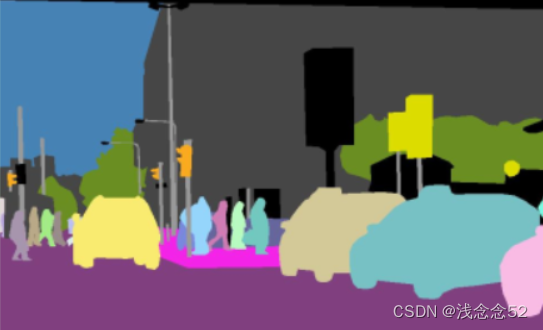
Two 、 The code demonstrates the original image and mask The fusion
from PIL import Image

import imgviz

import numpy as np

image_file=r'D:\aaa\envs\labelme\Scripts\2_3_json\img.png'

mask_file=r'D:\aaa\envs\labelme\Scripts\2_3_json\label.png'

image=Image.open(image_file)

mask=Image.open(mask_file)

mask_img=Image.blend(image.convert("RGBA"),
                     mask.convert("RGBA"),0.5)

mask_img.save("vis2.png")

3、 ... and 、 Data processing
take labelme Marked json convert to mask Images
import json
import os

import imgviz
import numpy as np
from PIL import Image
import cv2
import glob

def save_colored_mask(mask,image_file):
    lbl_image=Image.fromarray(mask.astype(np.uint8),mode='P')
    colormap=imgviz.label_colormap()
    lbl_image.putpalette(colormap.flatten())
    lbl_image.save(image_file)


json_files=r'E:\ desktop \ Information \ Semantic segmentation '
img_file=r'E:\ desktop \ Information \ Semantic segmentation \ picture '

json_l=glob.glob(os.path.join(json_files,'*.json'))

for json_ in json_l:
    name=os.path.basename(json_)
    img_name=name.replace('json','png')
    fs=open(json_,encoding='utf-8')
    dict_=json.load(fs)
    #  Get images   wide , high
    height = dict_['imageHeight']
    width = dict_['imageWidth']

    shapes = dict_["shapes"]
    #  Generate an all zero image
    img = np.zeros((height, width), dtype=np.uint8)

    label_color = {
    "sheep": 1}
    for shape in shapes:
        #  Analyze the coordinates of polygon contour points
        points = shape['points']
        #  Parse polygon labels
        label = shape['label']

        points = np.array(points, dtype=np.int32)
        #  Draw the outline
        cv2.polylines(img, [points], isClosed=True, color=(255), thickness=2)
        #  Fill polygon color
        cv2.fillPoly(img, [points], color=label_color[label])
    img_path=os.path.join(img_file,img_name)
    print(img_path)

    save_colored_mask(img, img_path)
边栏推荐
- TiDB 环境与系统配置检查
- 07_哈希
- 【C语言】详解指针的初阶和进阶以及注意点(1)
- How to test tidb with sysbench
- Why can't programmers who can only program become excellent developers?
- Btrace- (bytecode) dynamic tracking tool
- Map介绍
- Practice of compiling principle course -- implementing an interpreter or compiler of elementary function operation language
- Dragonfly low code security tool platform development path
- 搭载TI AM62x处理器,飞凌FET6254-C核心板首发上市!
猜你喜欢
![[C language] explain the initial and advanced levels of the pointer and points for attention (1)](/img/61/1619bd2e959bae1b769963f66bab4e.png)
[C language] explain the initial and advanced levels of the pointer and points for attention (1)
TiDB数据迁移工具概览

15_Redis_Redis.conf详解
IE 浏览器正式退休
基于RZ/G2L | OK-G2LD-C开发板存储读写速度与网络实测

How to avoid 7 common problems in mobile and network availability testing

Table responsive layout tips
Application and practice of Jenkins pipeline

vChain: Enabling Verifiable Boolean Range Queries over Blockchain Databases(sigmod‘2019)
21_Redis_浅析Redis缓存穿透和雪崩
随机推荐
Record an error report, solve the experience, rely on repetition
Niuke Practice 101
你不知道的Set集合
[noi Simulation Competition] scraping (dynamic planning)
哈夫曼树:(1)输入各字符及其权值(2)构造哈夫曼树(3)进行哈夫曼编码(4)查找HC[i],得到各字符的哈夫曼编码
Implementation of n queen in C language
21_ Redis_ Analysis of redis cache penetration and avalanche
Map introduction
IE 浏览器正式退休
The traversal methods of binary tree mainly include: first order traversal, middle order traversal, second order traversal, and hierarchical traversal. First order, middle order, and second order actu
C RichTextBox controls the maximum number of lines displayed
CodeCraft-22 and Codeforces Round #795 (Div. 2)D,E
Have you learned the wrong usage of foreach
Huffman tree: (1) input each character and its weight (2) construct Huffman tree (3) carry out Huffman coding (4) find hc[i], and get the Huffman coding of each character
Solution of Queen n problem
19_Redis_宕机后手动配置主机
Points clés de l'examen de principe de compilation pour l'année scolaire 2021 - 2022 [Université chinoise d'outre - mer]
FPGA - clock-03-clock management module (CMT) of internal structure of 7 Series FPGA
[solution] educational codeforces round 82
Table responsive layout tips