当前位置:网站首页>【Pygame小游戏】Chrome上的小恐龙竟可以用代码玩儿了?它看起来很好玩儿的样子~
【Pygame小游戏】Chrome上的小恐龙竟可以用代码玩儿了?它看起来很好玩儿的样子~
2022-06-10 22:42:00 【程序员梨子】
前言
作者 :“程序员梨子”
**文章简介 **:本篇文章主要是写了使用Pygame模块写的小恐龙游戏的小代码啦~
**文章源码免费获取 : 为了感谢每一个关注我的小可爱每篇文章的项目源码都是无
偿分享滴
所有文章完整的素材+源码都在或文末领取

正文

看到这个有没有很熟悉的小可爱吖?
关于这只恐龙,我想很多人都是知道的啦~
这个小bug可能只是开发者的一个可爱设计,这玩意是个彩蛋,而且还可以当游戏玩,只需要按下
空格键。按下空格键之后,果然神奇的事情发生了:小恐龙欢快地跑了起来。
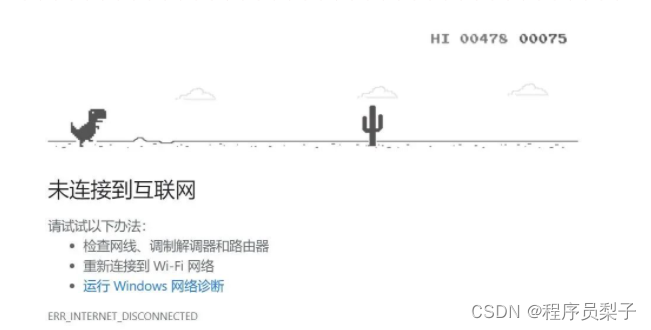
游戏操作起来十分简单,只需要继续按空格键跳跃,不断避开出现的障碍物仙人掌。随着恐龙向前
跑,前面的路不断刷新,右上角的分数也在增加。
这游戏,算是极简版超级马里奥了,可能是为我这种上网兴致被打断的人准备的小惊喜吧。
这只恐龙还会越跑越快,除了地上跑的的仙人掌(?),很快会出现天上飞的鸟,游戏白痴如我,
最高纪录也就十几秒吧。嘻嘻,今天的话小编就来给大家仿制这款小恐龙游戏,希望大家喜欢啦~

运行环境
本文用到的环境:Python3.6、Pycharm社区版、Pygame游戏模块自带的就不展示啦。
pip install -i https://pypi.douban.com/simple/ +模块名代码展示
import cfg
import sys
import random
import pygame
from modules import *


'''main'''
def main(highest_score):
    # 游戏初始化
    pygame.init()
    screen = pygame.display.set_mode(cfg.SCREENSIZE)
    pygame.display.set_caption('小恐龙游戏')
    # 导入所有声音文件
    sounds = {}
    for key, value in cfg.AUDIO_PATHS.items():
        sounds[key] = pygame.mixer.Sound(value)
    # 游戏开始界面
    GameStartInterface(screen, sounds, cfg)
    # 定义一些游戏中必要的元素和变量
    score = 0
    score_board = Scoreboard(cfg.IMAGE_PATHS['numbers'], position=(534, 15), bg_color=cfg.BACKGROUND_COLOR)
    highest_score = highest_score
    highest_score_board = Scoreboard(cfg.IMAGE_PATHS['numbers'], position=(435, 15), bg_color=cfg.BACKGROUND_COLOR, is_highest=True)
    dino = Dinosaur(cfg.IMAGE_PATHS['dino'])
    ground = Ground(cfg.IMAGE_PATHS['ground'], position=(0, cfg.SCREENSIZE[1]))
    cloud_sprites_group = pygame.sprite.Group()
    cactus_sprites_group = pygame.sprite.Group()
    ptera_sprites_group = pygame.sprite.Group()
    add_obstacle_timer = 0
    score_timer = 0
    # 游戏主循环
    clock = pygame.time.Clock()
    while True:
        for event in pygame.event.get():
            if event.type == pygame.QUIT:
                pygame.quit()
                sys.exit()
            elif event.type == pygame.KEYDOWN:
                if event.key == pygame.K_SPACE or event.key == pygame.K_UP:
                    dino.jump(sounds)
                elif event.key == pygame.K_DOWN:
                    dino.duck()
            elif event.type == pygame.KEYUP and event.key == pygame.K_DOWN:
                dino.unduck()
        screen.fill(cfg.BACKGROUND_COLOR)
        # --随机添加云
        if len(cloud_sprites_group) < 5 and random.randrange(0, 300) == 10:
            cloud_sprites_group.add(Cloud(cfg.IMAGE_PATHS['cloud'], position=(cfg.SCREENSIZE[0], random.randrange(30, 75))))
        # --随机添加仙人掌/飞龙
        add_obstacle_timer += 1
        if add_obstacle_timer > random.randrange(50, 150):
            add_obstacle_timer = 0
            random_value = random.randrange(0, 10)
            if random_value >= 5 and random_value <= 7:
                cactus_sprites_group.add(Cactus(cfg.IMAGE_PATHS['cacti']))
            else:
                position_ys = [cfg.SCREENSIZE[1]*0.82, cfg.SCREENSIZE[1]*0.75, cfg.SCREENSIZE[1]*0.60, cfg.SCREENSIZE[1]*0.20]
                ptera_sprites_group.add(Ptera(cfg.IMAGE_PATHS['ptera'], position=(600, random.choice(position_ys))))
        # --更新游戏元素
        dino.update()
        ground.update()
        cloud_sprites_group.update()
        cactus_sprites_group.update()
        ptera_sprites_group.update()
        score_timer += 1
        if score_timer > (cfg.FPS//12):
            score_timer = 0
            score += 1
            score = min(score, 99999)
            if score > highest_score:
                highest_score = score
            if score % 100 == 0:
                sounds['point'].play()
            if score % 1000 == 0:
                ground.speed -= 1
                for item in cloud_sprites_group:
                    item.speed -= 1
                for item in cactus_sprites_group:
                    item.speed -= 1
                for item in ptera_sprites_group:
                    item.speed -= 1
        # --碰撞检测
        for item in cactus_sprites_group:
            if pygame.sprite.collide_mask(dino, item):
                dino.die(sounds)
        for item in ptera_sprites_group:
            if pygame.sprite.collide_mask(dino, item):
                dino.die(sounds)
        # --将游戏元素画到屏幕上
        dino.draw(screen)
        ground.draw(screen)
        cloud_sprites_group.draw(screen)
        cactus_sprites_group.draw(screen)
        ptera_sprites_group.draw(screen)
        score_board.set(score)
        highest_score_board.set(highest_score)
        score_board.draw(screen)
        highest_score_board.draw(screen)
        # --更新屏幕
        pygame.display.update()
        clock.tick(cfg.FPS)
        # --游戏是否结束
        if dino.is_dead:
            break
    # 游戏结束界面
    return GameEndInterface(screen, cfg), highest_score


'''run'''
if __name__ == '__main__':
    highest_score = 0
    while True:
        flag, highest_score = main(highest_score)
        if not flag: break
效果展示
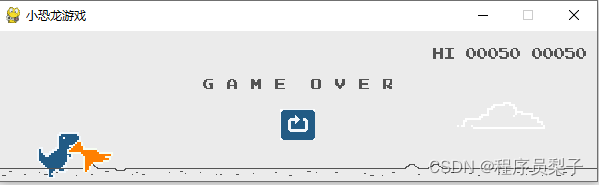
这是一款彩色版本的小恐龙游戏啦:空格开始游戏、空格往上跳、还有飞鸟仙人掌障碍物哦~
1)游戏界面

2)游戏开始

3)游戏结束
总结
嘻嘻,这款小恐龙,你爱了嘛?
如果各位喜欢的话,请大家帮忙三联啦~,=
这个目前对小编来说很重要。祝各位,发大财,行大运,身体健康。嘻嘻,老规矩源码找我拿撒
关注小编获取更多精彩内容!记得点击传送门哈
如需打包好的完整源码+素材免费分享滴~找我就可以啦!!传送门

边栏推荐
- LabVIEW执行串行回送测试
- R language to draw two-dimensional normal distribution density surface;
- LeetCode+ 21 - 25
- C# Tryparse的用法
- Fiddler filtering sessions
- 都说验证码是爬虫中的一道坎,看我只用五行代码就突破它。
- Four ways to add names to threads in the thread pool
- Solve access denied for user 'root' @ 'localhost' (using password: yes)
- Mathematics and quality education
- Before we learn about high-performance computing, let's take a look at its history
猜你喜欢

黑马头条丨腾讯薪酬制度改革引争议;英特尔全国扩招女工程师;黑马100%就业真的吗......
![[paper sharing] pata: fuzzing with path aware Taint Analysis](/img/f6/627344c5da588afcf70302ef29d134.png)
[paper sharing] pata: fuzzing with path aware Taint Analysis

curl导入postman报错小记

【Pygame小游戏】别找了,休闲游戏专题来了丨泡泡龙小程序——休闲游戏研发推荐

OSS stores and exports related content

Data and information resource sharing platform (6)

Kubernetes 基本介绍及核心组件

Im instant messaging source code with tutorial /uniapp instant messaging source code, with installation tutorial

LabVIEW get IMAQ get last event coordinates
Difference between oscilloscope and spectrum analyzer
随机推荐
Chapter 6 - branch and bound method
LabVIEW obtains the information of all points found by the clamp function
PHP implementation of iframe cross site text replacement / iframe website text replacement
LabVIEW 禁止其他可多核心处理的应用程序在所有核心上执行
LabVIEW中创建毫秒时间标识
LabVIEW获取Clamp函数找到的所有点的信息
MultipartFile重命名上传
Openvp* integrated LDAP authentication
Classic sentences in Yi Shu's works
IGBT与三代半导体SiC双脉冲测试方案
OSS stores and exports related content
SystemVerilog(十)-用户自定义类型
2022年高考量化卷|请各位量化考生答题
VS 番茄助手添加头注释 以及使用方式
LabVIEW uses the visa read function to read USB interrupt data
给线程池里面线程添加名称的4种方式
Apple CMS collection station source code - building tutorial - attached source code - new source code - development documents
The data file insurance CSV contains 1338 observations, that is, the registered beneficiaries of the insurance plan and the characteristics that represent the characteristics of patients and the total
LabVIEW打开其他EXE程序
MySQL学习之子查询