当前位置:网站首页>A little cool, explore space with.Net Maui
A little cool, explore space with.Net Maui
2022-07-26 20:13:00 【biyusr】
Design
I am ready to use. .NET Maui Implement a very interesting " Go to space " The program . First step , Need picture material , I use the Aan Ragil A group of very good Dribbble Material pictures .
Of course , You can also download it at the bottom link .

Realization
The complete source code of this application can be found in Github Visit and download . We need to make three pages in total .
Initialize project
I created an empty .NET Maui Program . then , I disabled the navigation bar on each page , Then set the background color , It's mainly a modification of App.xaml file .
<!-- Content Page Style -->
<Style TargetType="ContentPage" ApplyToDerivedTypes="True">
    <Setter Property="NavigationPage.HasNavigationBar" Value="False" />
    <Setter Property="BackgroundColor" Value="{StaticResource PageBackgroundColor}" />
    <Setter Property="Padding" Value="0"/>
</Style>

<!-- Navigation Page -->
<Style TargetType="NavigationPage" ApplyToDerivedTypes="True">
    <Setter Property="BackgroundColor" Value="{StaticResource PageBackgroundColor}" />
</Style>
For Android devices , Use Android LifeCycle Events make the status bar translucent .
builder
    .UseMauiApp<App>()
    .ConfigureFonts(fonts =>
    {
        fonts.AddFont("Montserrat-Medium.ttf", "RegularFont");
        fonts.AddFont("Montserrat-SemiBold.ttf", "MediumFont");
        fonts.AddFont("Montserrat-Bold.ttf", "BoldFont");
    })
    .ConfigureLifecycleEvents(events =>
    {
#if ANDROID
        events.AddAndroid(android => android.OnCreate((activity, bundle) => MakeStatusBarTranslucent(activity)));

        static void MakeStatusBarTranslucent(Android.App.Activity activity)
        {
            activity.Window.SetFlags(Android.Views.WindowManagerFlags.LayoutNoLimits, Android.Views.WindowManagerFlags.LayoutNoLimits);

            activity.Window.ClearFlags(Android.Views.WindowManagerFlags.TranslucentStatus);

            activity.Window.SetStatusBarColor(Android.Graphics.Color.Transparent);
        }
#endif
    });
To make the view cover the bottom , Each page uses IgnoreSafeArea attribute .
<ContentPage>
    <Grid IgnoreSafeArea="{OnPlatform Android=False, iOS=True}">
    </Grid>
</ContentPage>
For the sake of simplicity , I didn't use it MVVM Pattern , It's ordinary Maui UI structure . Created a **Planet ** Class to store information about planets , And created a PlanetService service .
Initial page
Next is the initial page , I divided it into two parts .

The upper part consists of a separate image of each planet . I use the HorizontalOptions、VerticalOptions、TranslationX、TranslationY、WidthRequest and HeightRequest Control the position and size of each image .
<Image
    Source="earth.png"
    VerticalOptions="Start" HorizontalOptions
    ="Center"
    TranslationX="-48"
    TranslationY="148"
    WidthRequest="96"
    HeightRequest="96"/>
Lower part , I didn't use it Frame Control , Instead, lighter Border Control .
<Border
Padding="24,32"
BackgroundColor="{StaticResource FrameBackgroundColor}"
Stroke="{StaticResource BorderColor}"
HorizontalOptions="Fill"
VerticalOptions="End"
Margin="20">
<Border.StrokeShape>
    <RoundRectangle CornerRadius="24"/>
</Border.StrokeShape>

<VerticalStackLayout
    Spacing="16">

    <Label
        HorizontalOptions="Center"
        HorizontalTextAlignment="Center"
        Style="{StaticResource IntroPageHeaderStyle}"
        Text="Hello!"/>


    <Label
        HorizontalOptions="Center"
        HorizontalTextAlignment="Center"
        LineBreakMode="WordWrap"
        Style="{StaticResource IntroPageTextStyle}"
        Text="Want to know and explain all things about the planets in the Milky Way galaxy?"/>

    <Button
        Style="{StaticResource ButtonStyle}"
        Text="Explore Now"
        HorizontalOptions="Center"
        Margin="0,12,0,6"
        Clicked="ExploreNow_Clicked"/>

</VerticalStackLayout>

</Border>
Take a look at the effect of the first page .

Doesn't it look good ! We can also set the fade effect , Add some animation .
   protected override async void OnAppearing()
    {
        base.OnAppearing();

        if (this.AnimationIsRunning("TransitionAnimation"))
            return;

        var parentAnimation = new Animation();

        //Planets Animation
        parentAnimation.Add(0, 0.2, new Animation(v => imgMercury.Opacity = v, 0, 1, Easing.CubicIn));
        parentAnimation.Add(0.1, 0.3, new Animation(v => imgVenus.Opacity = v, 0, 1, Easing.CubicIn));
        parentAnimation.Add(0.2, 0.4, new Animation(v => imgEarth.Opacity = v, 0, 1, Easing.CubicIn));
        parentAnimation.Add(0.3, 0.5, new Animation(v => imgMars.Opacity = v, 0, 1, Easing.CubicIn));
        parentAnimation.Add(0.4, 0.6, new Animation(v => imgJupiter.Opacity = v, 0, 1, Easing.CubicIn));
        parentAnimation.Add(0.5, 0.7, new Animation(v => imgSaturn.Opacity = v, 0, 1, Easing.CubicIn));
        parentAnimation.Add(0.6, 0.8, new Animation(v => imgNeptune.Opacity = v, 0, 1, Easing.CubicIn));
        parentAnimation.Add(0.7, 0.9, new Animation(v => imgUranus.Opacity = v, 0, 1, Easing.CubicIn));

        //Intro Box Animation
        parentAnimation.Add(0.7, 1, new Animation(v => frmIntro.Opacity = v, 0, 1, Easing.CubicIn));

        //Commit the animation
        parentAnimation.Commit(this, "TransitionAnimation", 16, 3000, null, null);
    }
It's almost done , Let's see the final effect on the mobile phone , Very cool !
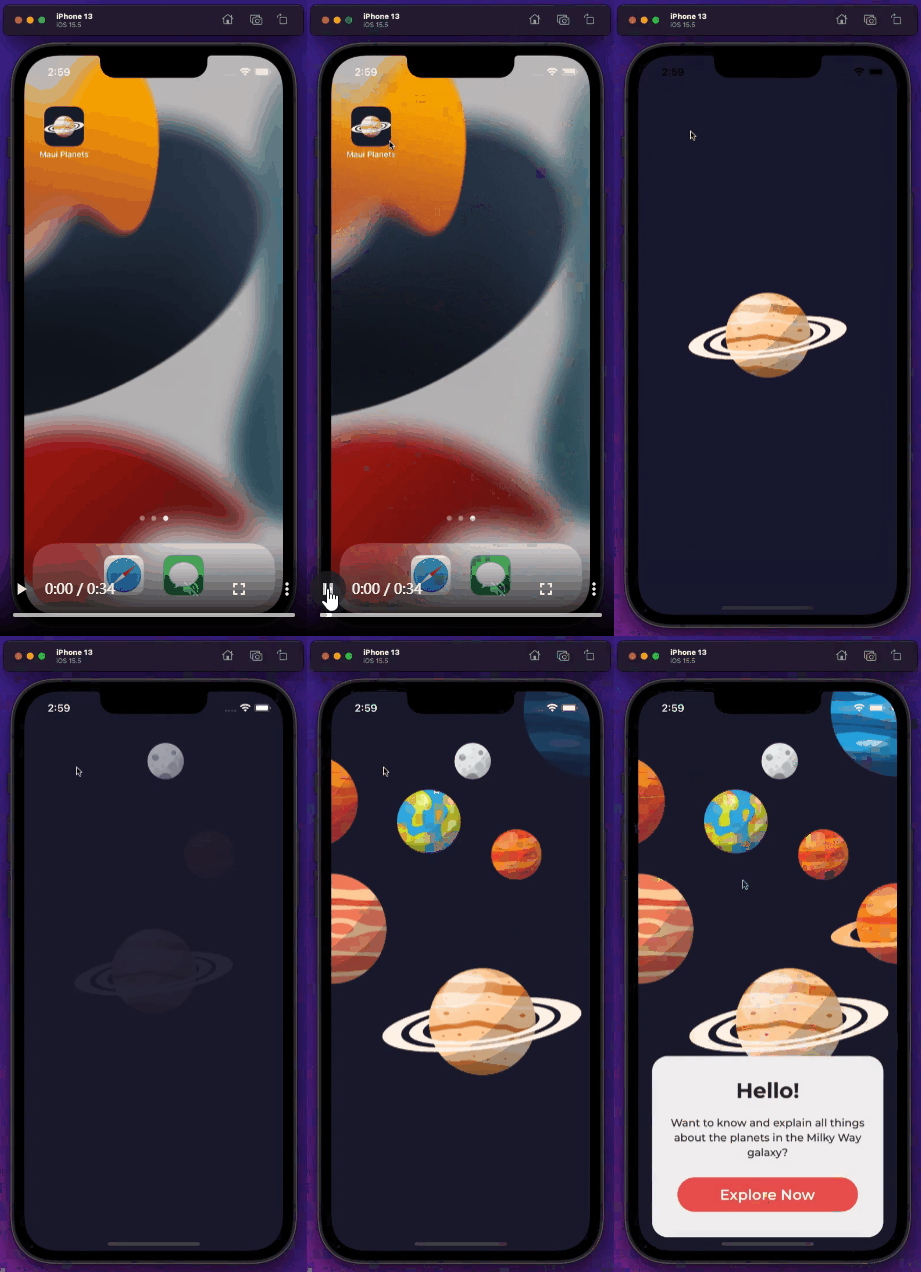
You can find its source code and material information at the following address .
https://github.com/naweed/MauiPlanets
https://dribbble.com/shots/15592060-Planet-Mobile-App
边栏推荐
- cv2.resize()
- 2022 极术通讯-安谋科技开启商业化新篇章
- numpy.put()
- DOM case: 10 second countdown - write jump page related knowledge
- Jincang database kingbasees SQL language reference manual (18. SQL statement: drop materialized view to drop synonym)
- Impersonate authentication
- LeetCode_回溯_中等_40.组合总和 II
- 记一次 .NET 某物管后台服务 卡死分析
- 金仓数据库 KingbaseES SQL 语言参考手册 (15. SQL语句:CREATE MATERIALIZED VIEW 到 CREATE SCHEMA)
- 徽商期货开户安全吗?请问徽商期货开户应该注意什么呢?
猜你喜欢





随机推荐
.NET GC工作流程
Record an analysis of a.Net property management background service stuck
Kingbasees SQL language reference manual of Jincang database (19. SQL statement: drop table to load)
20220725树状数组入门反思
There is an Oolong incident in open source. Maybe you don't know these five open source protocols
An open source web drawing board is really convenient
SQL injection
2000字助你精通防抖与节流
如何实现一个能处理海量数据的异步任务队列系统(至尊典藏版)
Is flush reliable? I just started to learn financial management. Is it safe to open a securities account?
以 NFT 为抵押品的借贷协议模式探讨
金仓数据库 KingbaseES SQL 语言参考手册 (12. SQL语句:ALTER LANGUAGE 到 ALTER SUBSCRIPTION)
cv2.resize()
金仓数据库 KingbaseES SQL 语言参考手册 (14. SQL语句:COMMIT 到 CREATE LANGUAGE)
直播预约有奖| 高级咨询顾问徐雁斐:效能度量如何助力高效精细的外包管理
[cache series] advantages, disadvantages and choices of several cache read-write schemes
计算机组成原理常见面试题目总结,含答案
SQL优化的一些建议,希望可以帮到和我一样被SQL折磨的你
I tried many report tools and finally found a report based on Net 6
URL format