当前位置:网站首页>Idea automatically generates unit tests, doubling efficiency!
Idea automatically generates unit tests, doubling efficiency!
2022-06-23 23:43:00 【Migrant worker brother】
Click below “Java Programming duck ” Follow and mark the stars
More exciting First time direct
Today, let's introduce a tool Squaretest, It is a plug-in that automatically generates unit tests , Why use it ?
This is mainly because the company has recently adopted the index of code quality control , The HKCEE evaluates the unit test coverage of each project , as well as sonar The problems scanned out , A lot of old projects, old code , Or projects that are in a hurry to deliver , Unit tests are seriously missing , The coverage is only 5% Less than .
So several small partners are doing crazy heap unit tests these days ,3 A pile of people 2 Genius piled up 30%, So I came to help write two , When I wrote the second one, I found , This job shouldn't be done by people , To see the original code , Then write all kinds of... According to the logic Mock, Feeling is something to follow , So I checked , I found that there are plug-ins to help us do this , So let's take a look .
I'm using idea, Let's download the plug-in first ,File——>Settings——>Plugins, Search for Squaretest, then install Just fine , After the plug-in installation is completed, you need to restart

After reboot , There is one more item in the menu bar Squaretest, Now let's talk about how to use , You can also look at the last item of this menu :Generate Test Methods(Help) Let's see a demonstration of it , But the demonstration is not complete , Let me take a screenshot to show you how I use it , And some use experience .

First, we open a class , This class is the one we are going to experiment with , This class has a 7 individual public Method , because Squaretest The generated unit test methods can only generate public Of , Of course, this is also reasonable ! After all private It must be public Called .

If we write the unit test of this class , It takes a while just to see , Let's see how I operate , Open your class , Position the cursor in the code , Right click to select Generate…

Then you will see that there are two familiar icons , For the first time, choose the second option , It will let you choose the template of unit test , Because I have chosen , So I'm not going to pop up again , But I'll tell you how to change the template later .

After selecting the second item, a box will pop up. See below, it will automatically identify the needs of the current class Mock Member variables of , Direct point ok

The real directory hierarchy of the class will be used automatically test Create a unit test class in the folder , The class name is the original class name followed by Test

I'll post the code to show you what it generates , See if it's scary , Bull by bull ,7 Unit test methods , It comes out in seconds , Ladies and gentlemen, how long will it take you to write it yourself , After all, time is money ! Then let's try one !
public class CrawlerScreenShotServiceImplTest {


    @Mock
    private CrawerScreenShotTaskMapper mockCrawerScreenShotTaskMapper;
    @Mock
    private CrawerScreenShotTaskLogMapper mockCrawerScreenShotTaskLogMapper;

    @InjectMocks
    private CrawlerScreenShotServiceImpl crawlerScreenShotServiceImplUnderTest;

    @Before
    public void setUp() {


        initMocks(this);
    }

    @Test
    public void testReceiveData() {


        // Setup
        final CrawlerScreenShotVO vo = new CrawlerScreenShotVO();
        vo.setUrl("url");
        vo.setPcFlag(false);
        vo.setMembergroup("membergroup");
        vo.setTaskType(0);
        vo.setUrlType(0);

        when(mockCrawerScreenShotTaskLogMapper.saveSelective(any(CrawerScreenShotTaskLog.class))).thenReturn(0);
        when(mockCrawerScreenShotTaskMapper.saveBatch(Arrays.asList(new CrawlerScreenShotTask(0L, "url", "imageOssUrl", false, false, "memberGroup", 0, 0, "fileName", new GregorianCalendar(2019, Calendar.JANUARY, 1).getTime(), new GregorianCalendar(2019, Calendar.JANUARY, 1).getTime(), false, "skuCode", "state", "operater")))).thenReturn(0);

        // Run the test
        final Result<String> result = crawlerScreenShotServiceImplUnderTest.receiveData(vo);

        // Verify the results
    }

    @Test
    public void testListJobScreenShotTask() {


        // Setup

        // Configure CrawerScreenShotTaskMapper.listJobScreenShotTask(...).
        final CrawlerScreenShotTaskDto crawlerScreenShotTaskDto = new CrawlerScreenShotTaskDto();
        crawlerScreenShotTaskDto.setId(0L);
        crawlerScreenShotTaskDto.setUrl("url");
        crawlerScreenShotTaskDto.setSkuCode("skuCode");
        crawlerScreenShotTaskDto.setPcFlag(false);
        crawlerScreenShotTaskDto.setMemberGroup("memberGroup");
        crawlerScreenShotTaskDto.setUrlType(0);
        crawlerScreenShotTaskDto.setFileName("fileName");
        crawlerScreenShotTaskDto.setTaskType(0);
        crawlerScreenShotTaskDto.setState("state");
        final List<CrawlerScreenShotTaskDto> crawlerScreenShotTaskDtos = Arrays.asList(crawlerScreenShotTaskDto);
        when(mockCrawerScreenShotTaskMapper.listJobScreenShotTask(new GregorianCalendar(2019, Calendar.JANUARY, 1).getTime())).thenReturn(crawlerScreenShotTaskDtos);

        // Run the test
        final List<CrawlerScreenShotTaskDto> result = crawlerScreenShotServiceImplUnderTest.listJobScreenShotTask();

        // Verify the results
    }

    @Test
    public void testQuery() {


        // Setup
        final NikeScreenShotListRequestVo requestVo = new NikeScreenShotListRequestVo();
        requestVo.setUrl("url");
        requestVo.setUrlType(0);
        requestVo.setStartTime(new GregorianCalendar(2019, Calendar.JANUARY, 1).getTime());
        requestVo.setEndTime(new GregorianCalendar(2019, Calendar.JANUARY, 1).getTime());
        requestVo.setStatus(0);
        requestVo.setPcFlag(0);
        requestVo.setPageNum(0);
        requestVo.setPageSize(0);

        // Configure CrawerScreenShotTaskMapper.query(...).
        final PimScreenShotVo pimScreenShotVo = new PimScreenShotVo();
        pimScreenShotVo.setId(0L);
        pimScreenShotVo.setUrl("url");
        pimScreenShotVo.setImageOssUrl("imageOssUrl");
        pimScreenShotVo.setStatus(0);
        pimScreenShotVo.setPcFlag(false);
        pimScreenShotVo.setCreateTime(new GregorianCalendar(2019, Calendar.JANUARY, 1).getTime());
        pimScreenShotVo.setUrlType(0);
        pimScreenShotVo.setMsg("msg");
        final List<PimScreenShotVo> pimScreenShotVos = Arrays.asList(pimScreenShotVo);
        when(mockCrawerScreenShotTaskMapper.query(any(NikeScreenShotListRequestVo.class))).thenReturn(pimScreenShotVos);

        // Run the test
        final PageInfo<PimScreenShotVo> result = crawlerScreenShotServiceImplUnderTest.query(requestVo);

        // Verify the results
    }

    @Test
    public void testQuerySelectBoxData() {


        // Setup

        // Configure CrawerScreenShotTaskMapper.query(...).
        final PimScreenShotVo pimScreenShotVo = new PimScreenShotVo();
        pimScreenShotVo.setId(0L);
        pimScreenShotVo.setUrl("url");
        pimScreenShotVo.setImageOssUrl("imageOssUrl");
        pimScreenShotVo.setStatus(0);
        pimScreenShotVo.setPcFlag(false);
        pimScreenShotVo.setCreateTime(new GregorianCalendar(2019, Calendar.JANUARY, 1).getTime());
        pimScreenShotVo.setUrlType(0);
        pimScreenShotVo.setMsg("msg");
        final List<PimScreenShotVo> pimScreenShotVos = Arrays.asList(pimScreenShotVo);
        when(mockCrawerScreenShotTaskMapper.query(any(NikeScreenShotListRequestVo.class))).thenReturn(pimScreenShotVos);

        // Run the test
        final PimScreenShotTaskParamsDto result = crawlerScreenShotServiceImplUnderTest.querySelectBoxData();

        // Verify the results
    }

    @Test
    public void testFindExecutionScreenShotTaskCount() {


        // Setup
        when(mockCrawerScreenShotTaskMapper.findExecutionScreenShotTaskCount()).thenReturn(0);

        // Run the test
        final Integer result = crawlerScreenShotServiceImplUnderTest.findExecutionScreenShotTaskCount();

        // Verify the results
        assertEquals(0, result);
    }

    @Test
    public void testFindCrawerScreenshotTaskByCreateTime() {


        // Setup
        final CrawlerScreenShotTaskSyncDto crawlerScreenShotTaskSyncDto = new CrawlerScreenShotTaskSyncDto();
        crawlerScreenShotTaskSyncDto.setId(0L);
        crawlerScreenShotTaskSyncDto.setUrl("url");
        crawlerScreenShotTaskSyncDto.setSkuCode("skuCode");
        crawlerScreenShotTaskSyncDto.setTaskType(0);
        crawlerScreenShotTaskSyncDto.setStatus(0);
        crawlerScreenShotTaskSyncDto.setLastModifyTime(new GregorianCalendar(2019, Calendar.JANUARY, 1).getTime());
        crawlerScreenShotTaskSyncDto.setOperater("operater");
        crawlerScreenShotTaskSyncDto.setMsg("msg");
        final List<CrawlerScreenShotTaskSyncDto> expectedResult = Arrays.asList(crawlerScreenShotTaskSyncDto);

        // Configure CrawerScreenShotTaskMapper.findCrawerScreenshotTaskByCreateTime(...).
        final CrawlerScreenShotTaskSyncDto crawlerScreenShotTaskSyncDto1 = new CrawlerScreenShotTaskSyncDto();
        crawlerScreenShotTaskSyncDto1.setId(0L);
        crawlerScreenShotTaskSyncDto1.setUrl("url");
        crawlerScreenShotTaskSyncDto1.setSkuCode("skuCode");
        crawlerScreenShotTaskSyncDto1.setTaskType(0);
        crawlerScreenShotTaskSyncDto1.setStatus(0);
        crawlerScreenShotTaskSyncDto1.setLastModifyTime(new GregorianCalendar(2019, Calendar.JANUARY, 1).getTime());
        crawlerScreenShotTaskSyncDto1.setOperater("operater");
        crawlerScreenShotTaskSyncDto1.setMsg("msg");
        final List<CrawlerScreenShotTaskSyncDto> crawlerScreenShotTaskSyncDtos = Arrays.asList(crawlerScreenShotTaskSyncDto1);
        when(mockCrawerScreenShotTaskMapper.findCrawerScreenshotTaskByCreateTime(new GregorianCalendar(2019, Calendar.JANUARY, 1).getTime())).thenReturn(crawlerScreenShotTaskSyncDtos);

        // Run the test
        final List<CrawlerScreenShotTaskSyncDto> result = crawlerScreenShotServiceImplUnderTest.findCrawerScreenshotTaskByCreateTime(new GregorianCalendar(2019, Calendar.JANUARY, 1).getTime());

        // Verify the results
        assertEquals(expectedResult, result);
    }

    @Test
    public void testQueryCrawlerDashboard() {


        // Setup
        when(mockCrawerScreenShotTaskMapper.queryCrawlerDashboard(0, 0, 0, new GregorianCalendar(2019, Calendar.JANUARY, 1).getTime(), new GregorianCalendar(2019, Calendar.JANUARY, 1).getTime())).thenReturn(0);

        // Run the test
        final Integer result = crawlerScreenShotServiceImplUnderTest.queryCrawlerDashboard(0, 0, 0, new GregorianCalendar(2019, Calendar.JANUARY, 1).getTime(), new GregorianCalendar(2019, Calendar.JANUARY, 1).getTime());

        // Verify the results
        assertEquals(0, result);
    }
}
Wrong report , Don't panic , This assertion is to check whether the results of your unit test run meet the expectations , If you don't want to check, just want to complete coverage , Just kill it ( Manual formation ).

What about? ! No stimulation , I'm not happy , Seconds seconds 90 Multi line code coverage is reached 90% above .

As mentioned above, the first time you come in will let you choose the template of unit test , If you want to switch, you can press the shortcut key in the unit test class ,Alt+M, Or by Squaretest The penultimate menu , The following is the effect of pressing shortcut keys , I chose this template , You can also learn from .

OK, above Squaretest That's the end of the part , Of course, La can't be happy too early , This class is a relatively successful case , Most of the time, you still have to make minor changes by yourself , After all, the test data it generates may not match your if else Data, right , But it's easy to change , In this way, from their own analysis if else Turned into ,debug The program is complete , Where to report an error ,debug In the past , See if there is a problem with the generated data , Change the data , Passed. , Anyway, I use it very comfortable , Proper savings 70% The amount of work .
After solving the above problem , Found another problem , This tool VO,DTO,Entity,Command,Model In terms of this entity class , Generally, we use this entity class lombok Annotations get,set, also constract Constructor and other annotations , But this tool can only generate unit tests for the constructors of these entity classes , Can't generate get set Unit testing of methods , So I wrote a base Method , Entity class inherits , Simply write two lines of tape , Look at the code below :
@SpringBootTest
@RunWith(MockitoJUnitRunner.class)
public abstract class BaseVoEntityTest<T> {


    protected abstract T getT();

    private void testGetAndSet() throws IllegalAccessException, InstantiationException, IntrospectionException,
            InvocationTargetException {


        T t = getT();
        Class modelClass = t.getClass();
        Object obj = modelClass.newInstance();
        Field[] fields = modelClass.getDeclaredFields();
        for (Field f : fields) {


            boolean isStatic = Modifier.isStatic(f.getModifiers());
            //  Filter fields
            if (f.getName().equals("isSerialVersionUID") || f.getName().equals("serialVersionUID") || isStatic || f.getGenericType().toString().equals("boolean")
                    || f.isSynthetic()) {


                continue;
            }
            PropertyDescriptor pd = new PropertyDescriptor(f.getName(), modelClass);
            Method get = pd.getReadMethod();
            Method set = pd.getWriteMethod();
            set.invoke(obj, get.invoke(obj));
        }
    }

    @Test
    public void getAndSetTest() throws InvocationTargetException, IntrospectionException,
            InstantiationException, IllegalAccessException {


        this.testGetAndSet();
    }

}
In the same way, we pass on the entity class Squaretest Generate unit tests , Then inherit the one I wrote above base class ,vo The unit test code of is slightly changed , as follows
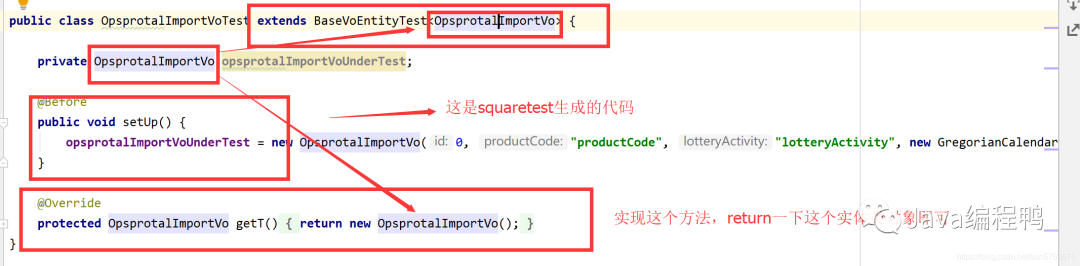
see run After that , coverage 100%, Proper , Through these two solutions , In one day, we got coverage 60% above , Don't be too exciting , You can try it , Of course, this is not a unit test written purely for errands , During our follow-up development , You can also use this tool to generate , Then test your code , This is also the way to improve work efficiency !

source :blog.csdn.net/sun5769675/
article/details/111043213
END
 After reading this article, there are gains ? Please forward to share with more people
 Focus on 「Java Programming duck 」, promote Java Skill
 Focus on Java Programming duck WeChat official account , The background to reply : Yard farm gift bag   A copy of the latest technical data can be obtained . cover Java  Frame learning 、 Architect learning, etc !


 If the article helps , Looking at , Forward! .
Thank you for your support (*^__^*)边栏推荐
- 生成式对抗网络(GANs)及变体
- 【HackTheBox】 meow
- Several guesses about the design of Tencent conference number
- 腾讯会议号设计的几种猜测
- 图论(树的直径)
- Onsaveinstancestate callback opportunity of activity
- ORB_ Slam3 environment setup and demo demonstration
- ACM. Hj89 24 point operation ●●●
- Androidkotlin comprehensive and detailed class usage grammar learning guide
- CTF—Go题目复现
猜你喜欢
![[Xilinx ax7103 microbalze Learning Notes 6] MicroBlaze custom IP core packaging experiment](/img/26/c4e6be2e3b17c7925108e95943c558.png)
[Xilinx ax7103 microbalze Learning Notes 6] MicroBlaze custom IP core packaging experiment
![入参参数为Object,但传递过去却成了[object object] 是因为需要转为JSON格式](/img/8c/b1535e03900d71b075f73f80030064.png)
入参参数为Object,但传递过去却成了[object object] 是因为需要转为JSON格式

项目中常用到的 19 条 MySQL 优化

NLog details

STM32-------定时器

AutoCAD -- summarize three methods of drawing rounded corners in CAD

Golang type assertion

【HackTheBox】Fawn

2022山东健博会,济南国际大健康产业博览会,中国营养健康展
MySQL导致索引失效的几种情况

随机推荐
Preliminary understanding of 3D printing and laser cutting process
Cs5213 HDMI to VGA with audio signal output scheme
在OpenCloudOS使用snap安装.NET 6
MySQL导致索引失效的几种情况
What kind of automated test is used for H5 mobile terminal
PyQt5_ Qtablewidget paging radio right-click menu control
Niuke.com: the double pointer problem of receiving rainwater
图像分割-数据标注
微信视频号如何用 PC 电脑做直播?
Facebook 开源微光效果 Shimmer
HDLBits-&gt;Circuits-&gt;Arithmetic Circuitd-&gt;3-bit binary adder
【Try to Hack】masscan
AIX system monthly maintenance check (I)
MySQL索引底层为什么用B+树?看完这篇文章,轻松应对面试。
完整开源项目之诗词吧 APP
2022年信息安全工程师考试知识点:访问控制
Activity的onSaveInstanceState回调时机
Analysis on the advantages and disadvantages of the best 12 project management systems at home and abroad
入参参数为Object,但传递过去却成了[object object] 是因为需要转为JSON格式
"Shanda Diwei Cup" the 12th Shandong ICPC undergraduate program design competition