当前位置:网站首页>MySQL安装常见报错处理大全
MySQL安装常见报错处理大全
2022-07-29 01:15:00 【xiaoweiwei99】
???
哈喽!大家好,我是【】,江湖人称jeames007,10年DBA工作经验
中国DBA联盟成员,一位上进心十足的【大数据领域博主】!???
中国DBA联盟(ACDU)成员,目前从事DBA及程序编程
擅长主流数据Oracle、MySQL、PG 运维开发,备份恢复,安装迁移,性能优化、故障应急处理等。
如果有对【数据库】感兴趣的【小可爱】,欢迎关注【】???
感谢各位大可爱小可爱!
文章目录
前言
本文总结了MySQL安装过程常见故障处理,分享给大家
1.无法启动处理,错误1053
Windows 无法启动Mysql服务 错误1053:服务没有及时响应启动或控制请求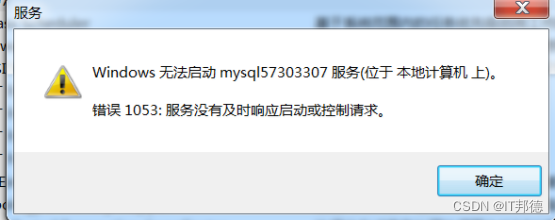
1.1 结束进程
处理方法:
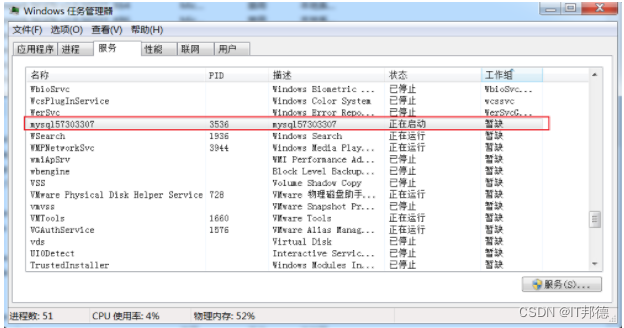
1、在命令行中敲入tasklist查看进程
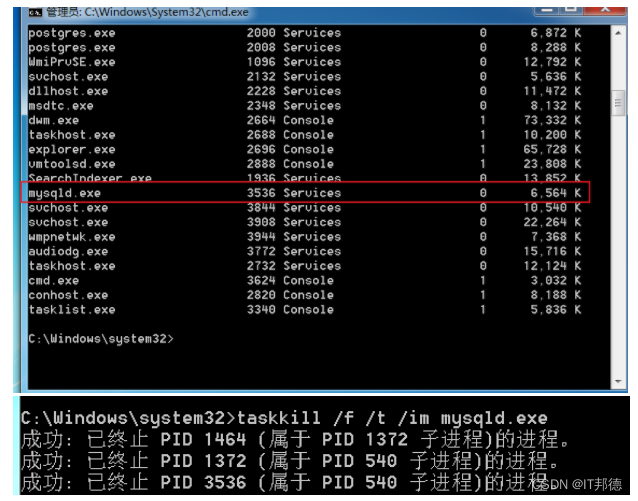
2、根据进程名杀死进程
taskkill /f /t /im 进程名称
1.2 更改网络服务
Server2012位置
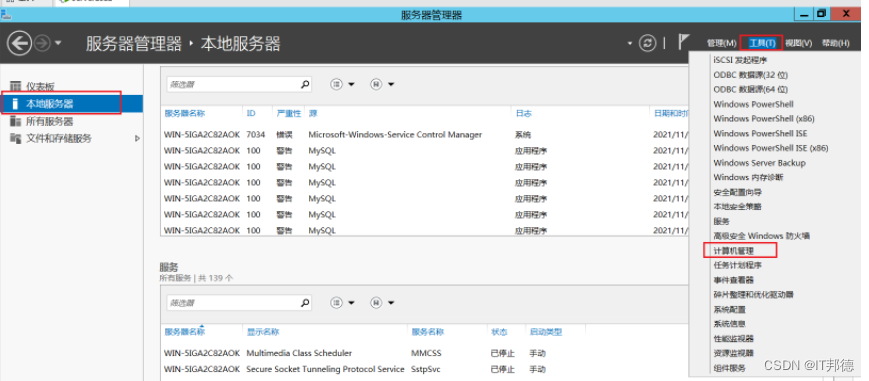
其他win7及win10操作系统
1)、计算机->管理->本地用户和组->组 双击,效果图如下: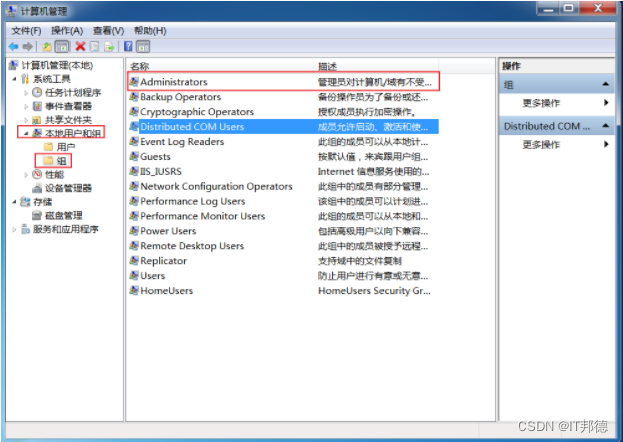
(2)、双击Administrators,并点击添加,再点击高级
(3)、把 NETWORK SERVICE添加到Administrators组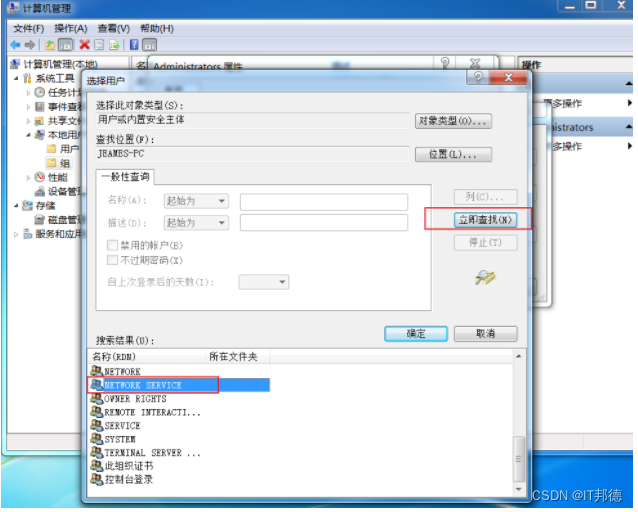
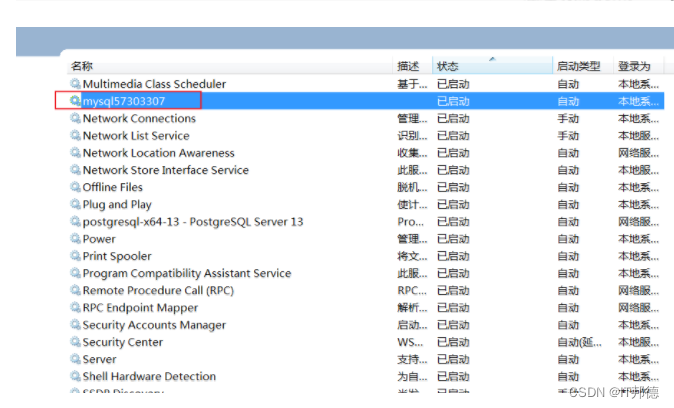
1.3 删除服务
sc delete mysql57303307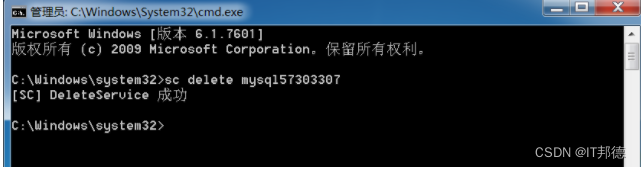
此处记住,重新安装Mysql就可以,2步操作重新执行(删除原有Mysql文件,全部重新安装即可)
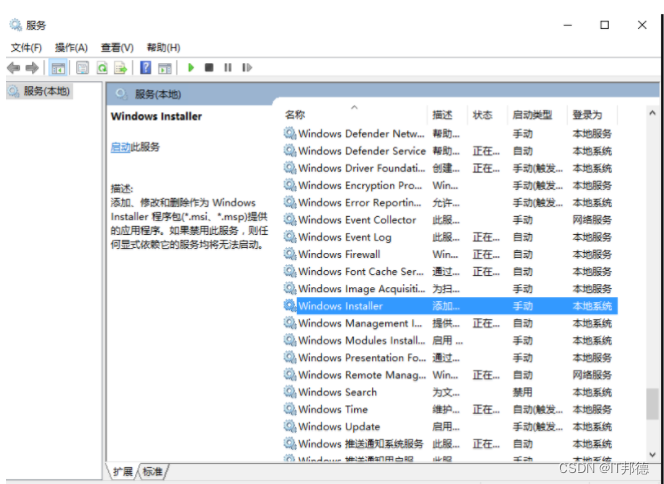
还有个坑就是,如果还是启动不了, 记得要开启这个服务Windows Installer
Windows Installer是一种通用的软件发布方式,用于安装软件。
默认情况下,该服务是手动启动,需要进入服务管理中开启。
右击开始——运行——输入“services.msc”——Windows Installer——启动
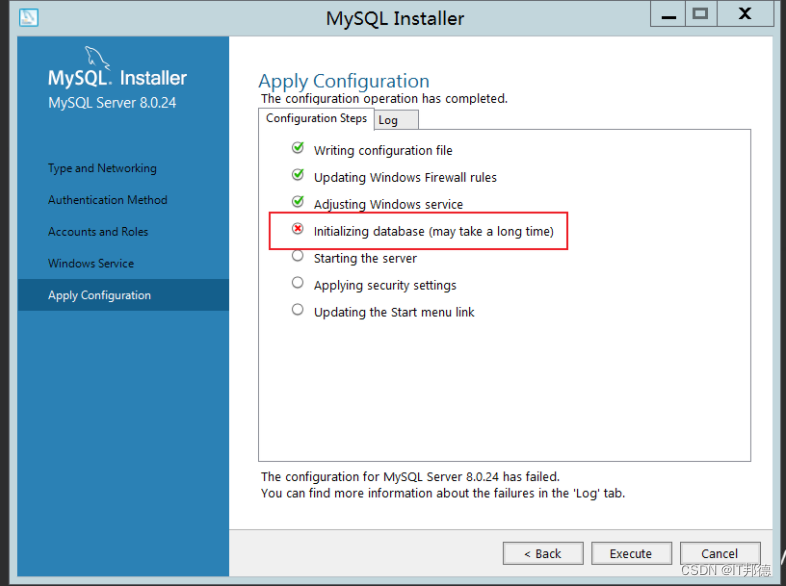
2.Winwods安装初始化报错
Beginning configuration step: Writing configuration file

Saving my.ini configuration file...
Saved my.ini configuration file.
Ended configuration step: Writing configuration file

Beginning configuration step: Updating Windows Firewall rules

Adding a Windows Firewall rule for MySQL80 on port 3306.
Attempting to add a Windows Firewall rule with command: netsh.exe advfirewall firewall add rule name="Port 3306" protocol=TCP localport=3306 dir=in action=allow
确定。


Successfully added the Windows Firewall rule.
Adding a Windows Firewall rule for MySQL80 on port 33060.
Attempting to add a Windows Firewall rule with command: netsh.exe advfirewall firewall add rule name="Port 33060" protocol=TCP localport=33060 dir=in action=allow
确定。


Successfully added the Windows Firewall rule.
Ended configuration step: Updating Windows Firewall rules

Beginning configuration step: Adjusting Windows service

Attempting to grant Network Service require filesystem permissions.
Granted permissions.
Adding new service
New service added
Ended configuration step: Adjusting Windows service

Beginning configuration step: Initializing database (may take a long time)

Attempting to run MySQL Server with --initialize-insecure option...
Starting process for MySQL Server 8.0.24...
Starting process with command: C:Program FilesMySQLMySQL Server 8.0binmysqld.exe --defaults-file="C:ProgramDataMySQLMySQL Server 8.0my.ini" --console --initialize-insecure=on --lower-case-table-names=1...
Process for mysqld, with ID 2572, was run successfully and exited with code -1073741515.
Failed to start process for MySQL Server 8.0.24.
Database initialization failed.
Ended configuration step: Initializing database (may take a long time)
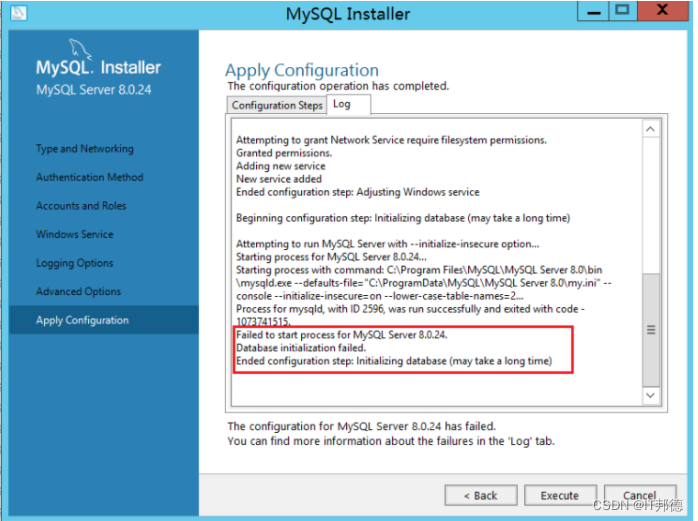
安装VC_redist.x86即可执行既OK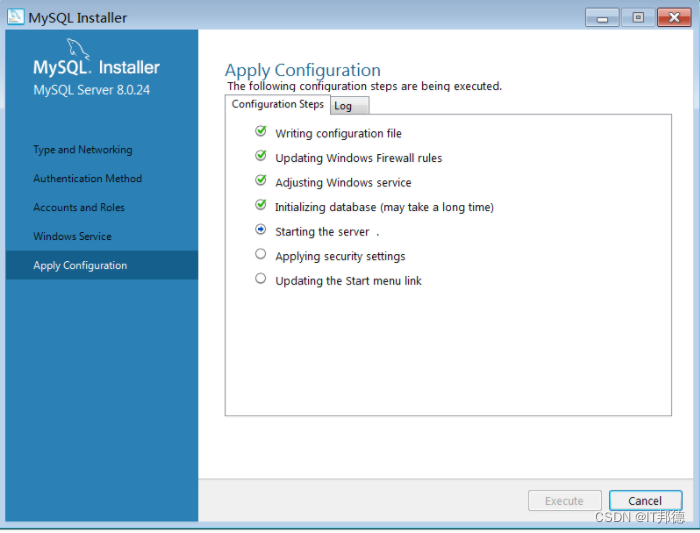
输入gpedit.msc,打开策略管理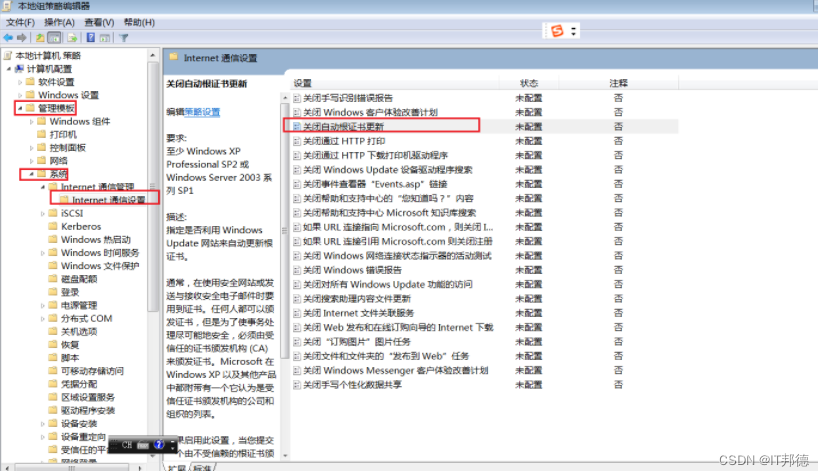
启用证书更新后正常
由于部分系统镜像构建较早,且不能进行系统更新,需要安装系统补丁包才能完成vc++安装
4.Centos环境rpm初始化MySQL报错
Centos7 默认提供的 openssl 版本是 1.0.2 的,某些 php 扩展或者其他软件依赖 1.1 以上版本,如果过低的话就会报错
libssl.so.1.1: cannot open shared object file: No such file or directory
也有执行 openssl version 时报错和上面一致,这是由于 openssl 库的位置不正确或未安装 1.1 以上版本的问题
想要升级 openssl 版本则需要手动进行编译,报错解决方式很简单,安装正确即可,
下面说一下我以 Centos7 为例,说一下具体的编译安装步骤
–openssl版本确认
[[email protected] ~]# openssl version
OpenSSL 1.0.1e-fips 11 Feb 2013
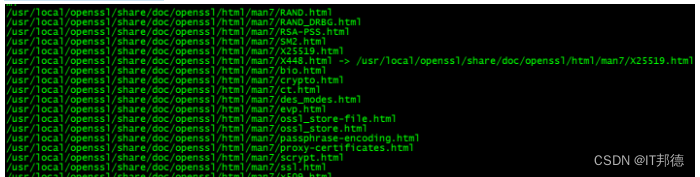
–编译 openssl
tar -xvf openssl-1.1.1g.tar.gz
cd openssl-1.1.1g
./config shared --openssldir=/usr/local/openssl --prefix=/usr/local/openssl
make && make install
–配置
编译完成后,使用 openssl version,来查看一下当前 openssl 版本号时,
你会发现还是 1.0.2,所以这里需要做一些额外的配置工作。
[[email protected] openssl-1.1.1g]# more /etc/ld.so.conf
include ld.so.conf.d/*.conf
[[email protected] openssl-1.1.1g]# echo “/usr/local/lib64/” >> /etc/ld.so.conf
[[email protected] openssl-1.1.1g]# ldconfig
再次使用 openssl version 验证版本就可以了,
如果不行,可以尝试下面的方式,
依次执行(先备份老版本,再从新版本安装位置创建软连接)
mv /usr/bin/openssl /usr/bin/openssl.old
ln -s /usr/local/openssl/bin/openssl /usr/bin/openssl
ln -s /usr/local/openssl/include/openssl /usr/include/openssl
echo “/usr/local/openssl/lib” >> /etc/ld.so.conf
ldconfig -v
4.MySQL8安装后无法登陆
第一办法:
1.用命令编辑/etc/my.cnf配置文件,即:vim /etc/my.cnf 或者 vi /etc/my.cnf
2.在[mysqld]下添加skip-grant-tables,然后保存并退出
3.重启mysql服务:service mysqld restart
4.更改root用户名
重启以后,执行mysql命令进入mysql命令行
5.修改root用户密码,此处注意,有时候会报不允许修改,先flush privileges再执行即可
update mysql.user set authentication_string=password(‘root’) where user=‘root’; --5.7版本
flush privileges;
6.把/etc/my.cnf中的skip-grant-tables注释掉,然后重启mysql,即:service mysqld restart
好了,下面就可以用root新的密码登录了!
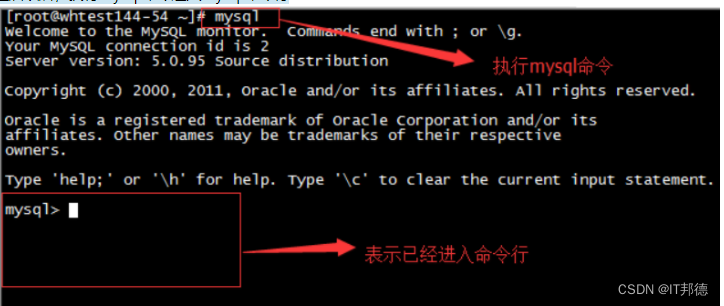
第二种办法:
在mysql8系统下,适用如下方法(全路径)
G:mysql-8.0.23-winx64inmysqld --datadir=G:mysql-8.0.23-winx64data80323308 --console --skip-grant-tables --shared-memory

然后再开一个窗口,执行下面命令
cd G:mysql-8.0.23-winx64in
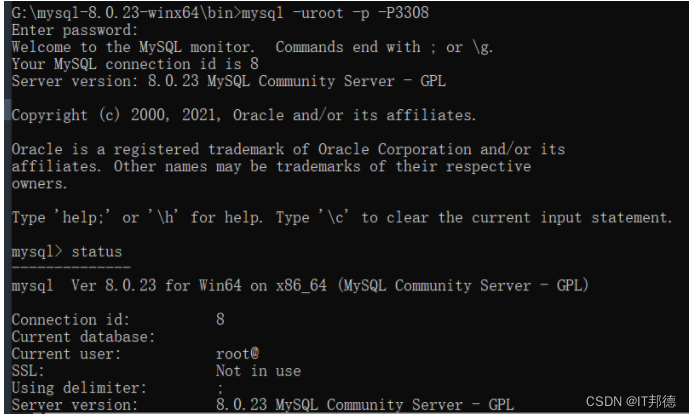
mysql> select user,host,authentication_string from mysql.user;
mysql> delete from mysql.user where user=‘root’ ;
mysql> flush privileges; --记得刷新哈,如果提示无法创建
mysql> create user [email protected]‘%’ identified with mysql_native_password by ‘root’;
mysql> grant all on . to [email protected]‘%’ with grant option;
mysql> flush privileges;
mysql> drop user ‘root’@‘localhost’;
mysql> flush privileges;
mysql> create user [email protected]‘localhost’ identified with mysql_native_password by ‘root’;
mysql> grant all on . to [email protected]‘localhost’ with grant option;
mysql> flush privileges;

边栏推荐
- StoneDB 邀请您参与开源社区月会!
- Wonderful use of data analysis
- Nine days later, we are together to focus on the new development of audio and video and mystery technology
- How to crawl web pages with playwright?
- Monadic linear function perceptron: Rosenblatt perceptron
- Top network security prediction: nearly one-third of countries will regulate blackmail software response within three years
- 数学建模——自来水管道铺设问题
- The information security and Standardization Commission issued the draft for comments on the management guide for app personal information processing activities
- druid. The performance of IO + tranquility real-time tasks is summarized with the help of 2020 double 11
- Data security is a competitive advantage. How can companies give priority to information security and compliance
猜你喜欢

数学建模——自来水管道铺设问题

Add graceful annotations to latex formula; "Data science" interview questions collection of RI Gai; College Students' computer self-study guide; Personal firewall; Cutting edge materials / papers | sh
ASCII code table

Super scientific and technological data leakage prevention system, control illegal Internet behaviors, and ensure enterprise information security
![[the road of Exile - Chapter 8]](/img/df/a801da27f5064a1729be326c4167fe.png)
[the road of Exile - Chapter 8]

Large scale web crawling of e-commerce websites (Ultimate Guide)

规划数学期末考试模拟二
![[the road of Exile - Chapter III]](/img/f8/3d1dfabaacf030450c1576fe543cfa.png)
[the road of Exile - Chapter III]

Covering access to 2w+ traffic monitoring equipment, EMQ creates a new engine for the digitalization of all elements of traffic in Shenzhen

【流放之路-第六章】
随机推荐
Some summaries of ibatis script and provider
把逻辑做在Sigma-DSP中的优化实例-数据分配器
给LaTeX公式添加优美的注解;日更『数据科学』面试题集锦;大学生『计算机』自学指南;个人防火墙;前沿资料/论文 | ShowMeAI资讯日报
[the road of Exile - Chapter 4]
Mathematical modeling -- heat conduction of subgrade on Permafrost
Top network security prediction: nearly one-third of countries will regulate blackmail software response within three years
How companies make business decisions -- with the help of data-driven marketing
数学建模——自来水管道铺设问题
Data security is a competitive advantage. How can companies give priority to information security and compliance
druid. IO custom real-time task scheduling policy
leetcode/乘积小于K 的连续子数组的个数
基于 ICA 与 DL 的语音信号盲分离
Js DOM2 和 DOM3
规划数学期末考试模拟二
LeetCode 练习——剑指 Offer 45. 把数组排成最小的数
[netding cup 2020 rosefinch group]nmap
[the road of Exile - Chapter 7]
Stonedb invites you to participate in the open source community monthly meeting!
(CVPR-2019)选择性的内核网络
Explanation of yocto project directory structure