当前位置:网站首页>Day20qt multiple forms switching idea 2021-10-31
Day20qt multiple forms switching idea 2021-10-31
2022-06-22 02:45:00 【Morning and evening rain】
Qt Realize the switching of multiple forms
demand :
The three forms switch back and forth
Be careful :
1. It should be clear when to allocate memory space for objects , And specify whether to allocate space in the heap or stack area , Avoid flashing the window 、 Constantly create forms, etc , See also Allocate storage space for objects
2. If 1 No. form switches to 2 No. form , Attention should be paid to ,2 The instantiation of Form No. is in 1 In form No , Because in 1 Internal work 2 Display operation of , Be sure to instantiate the object first .
3. If 2 No. form switches back to 1 No. form , Attention should be paid to , because 2 No. form object in 1 Instantiation in , therefore , Should be determined by the 2 Sending signal , stay 1 Receive signals and process ( hide 2 Show 1).
4. If in 1 Instantiation in 2, That must be in 1 Add 2 The header file .
scene :
No matter how many forms are switched, the idea is the same , From front to back , Instantiate the following form object , And display ; From back to front , Sending signal , Handled by the previous form .
Code :
Created three Qt The interface class represents three forms respectively , Post the code as follows :
oneForm.h Code
#ifndef ONEFORM_H
#define ONEFORM_H
#include <QWidget>
#include <twoform.h>
QT_BEGIN_NAMESPACE
namespace Ui {
     class oneForm; }
QT_END_NAMESPACE
class oneForm : public QWidget
{

    Q_OBJECT
public:
    oneForm(QWidget *parent = nullptr);
    ~oneForm();
    twoForm t1;// Global instantiation 2 No. form
    void doProcessGoToTwoForm();// Show 2, hide 1
    void doProcessTwoFormRequst();// receive 2 The signal , Show 1
private:
    Ui::oneForm *ui;
};
#endif // ONEFORM_H
oneForm.cpp Code
#include "oneform.h"
#include "ui_oneform.h"
oneForm::oneForm(QWidget *parent)
    : QWidget(parent)
    , ui(new Ui::oneForm)
{

    ui->setupUi(this);
    connect(ui->btn1,&QPushButton::clicked,this,&oneForm::doProcessGoToTwoForm);// Switch to the second interface
    connect(&t1,&twoForm::backToOne,this,&oneForm::doProcessTwoFormRequst);// The received signal displays the first interface
}
oneForm::~oneForm()
{

    delete ui;
}
void oneForm::doProcessGoToTwoForm()
{

// The first way   effect : The window flashed by , Create local variables , End of slot function execution , The system reclaims memory space
// twoForm t2;
// t2.show();
// The second way   Pointer to the variable   effect : Specifies that the parent object is the current object , The window will be attached to the current window
// twoForm *t3 = new twoForm(this);
// t3->show();
// The third way , Pointer to the variable   effect : One button per click , A new pointer variable will be created , Multiple forms will appear
// twoForm * t4 = new twoForm();
// t4->show();
// The fourth way , Create global pointer variables or class objects
        t1.show();
        this->hide();
}

void oneForm::doProcessTwoFormRequst()
{

    this->show();
}
twoForm.h Code
#ifndef TWOFORM_H
#define TWOFORM_H
#include <QWidget>
#include <threeform.h>
namespace Ui {

class twoForm;
}
class twoForm : public QWidget
{

    Q_OBJECT
public:
    explicit twoForm(QWidget *parent = nullptr);
    ~twoForm();
    void doProcessBackToOneForm();// Send a signal to 1  hide 2
    void doProcessGoToThreeForm();// hide 2  Show 3
    void doProcessThreeFormRequst();// receive 3 The signal , Show 2
    threeForm *t2;// Create a global 3 Form pointer variable No
signals:
    void backToOne();
private:
    Ui::twoForm *ui;
};
#endif // TWOFORM_H
twoForm.cpp Code
#include "twoform.h"
#include "ui_twoform.h"
twoForm::twoForm(QWidget *parent) :
    QWidget(parent),
    ui(new Ui::twoForm)
{

    ui->setupUi(this);
    t2 = new threeForm();
    connect(ui->btn2,&QPushButton::clicked,this,&twoForm::doProcessBackToOneForm);// Return to the first interface by sending a signal
    connect(ui->btn3,&QPushButton::clicked,this,&twoForm::doProcessGoToThreeForm);// Switch to the third interface
    connect(t2,&threeForm::backToTwo,this,&twoForm::doProcessThreeFormRequst);// Display the second interface by processing the signal
}

twoForm::~twoForm()
{

    delete ui;
}
void twoForm::doProcessBackToOneForm()
{

    emit backToOne();
    this->hide();
}
void twoForm::doProcessGoToThreeForm()
{

    this->hide();
    t2->show();
}
void twoForm::doProcessThreeFormRequst()
{

    this->show();
}
threeForm.h Code
#ifndef THREEFORM_H
#define THREEFORM_H
#include <QWidget>
namespace Ui {

class threeForm;
}
class threeForm : public QWidget
{

    Q_OBJECT
public:
    explicit threeForm(QWidget *parent = nullptr);
    ~threeForm();
    void doProcessBackToTwoForm();// Send a signal to 2
signals:
    void backToTwo();
private:
    Ui::threeForm *ui;
};
#endif // THREEFORM_H
threeForm.cpp Code
#include "threeform.h"
#include "ui_threeform.h"
threeForm::threeForm(QWidget *parent) :
    QWidget(parent),
    ui(new Ui::threeForm)
{

    ui->setupUi(this);
    connect(ui->btn4,&QPushButton::clicked,this,&threeForm::doProcessBackToTwoForm);// towards 2 Sending signal
}
threeForm::~threeForm()
{

    delete ui;
}
void threeForm::doProcessBackToTwoForm()
{

    this->hide();
    emit backToTwo();
}
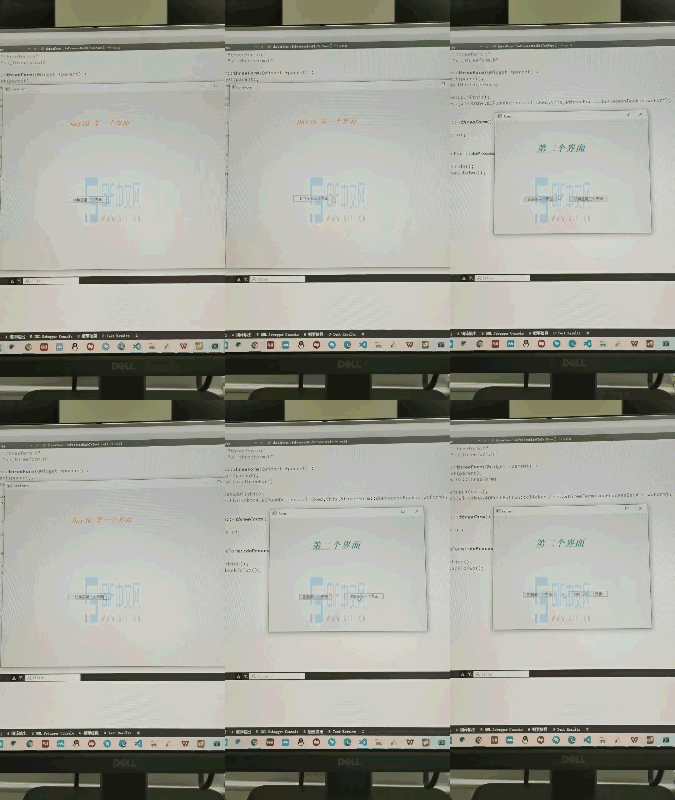
effect
边栏推荐
- Openjudge noi 1.13 46: octal to decimal
- PostgreSQL fetches data according to the size of the time field
- Li Kou today's question 1108 IP address invalidation
- OpenJudge NOI 1.13 46:八进制到十进制
- 基于xposed框架hook使用
- Relative references must start with either “/“, “./“, or “../“.
- Microblog closes publishing multiple part-time fraud information illegal accounts: how to crack down on data fraud
- Transformation numérique des RH avec okr
- Dynamically load assetdatabase of assets
- GraphAcademy 课程讲解:《Neo4j 图数据科学基础》
猜你喜欢

EMC Radiation Emission rectification - principle Case Analysis

EMC整改小技巧

【1. 快速排序】

Database daily question - day 19: top ranked travelers

Markdown advanced syntax, marktext compatible
GraphAcademy 课程讲解:《Neo4j 图数据科学基础》

Asemi Schottky diode 1N5819 parameters, 1N5819 replacement, 1N5819 source
【4. 高精度加法】

Fabric. JS iText set italics manually
EMC rectification tips
随机推荐
GraphAcademy 课程讲解:《Neo4j 图数据科学简介》
从数据库的分类说起,一文了解图数据库
Informer有什么
Starting from the classification of database, I understand the graph database
Global exception handling
When retail digitalization enters a new stage of development, we need to connect the public domain with the private domain
【Docekr学习遇到的坑】
Wechat applet film and television comment exchange platform system graduation design (2) applet function
Wechat applet film and television review and exchange platform system graduation design completion (7) Interim inspection report
Ioerror: no translation files found for default language zh cn Solutions for
Paper notes: multi label learning ackel
Implementation differences between import and require in browser and node environments
自动化工具-监测文件的变化
Pytorch visualization
【4. 高精度加法】
ModuleNotFoundError: No module named ‘torchvision. datasets‘; ‘ torchvision‘ is not a package
如何选择合适的 Neo4j 版本(2022版)
PMP项目管理知识该如何运用?
EMC辐射发射整改-原理案例分析
Markdown advanced syntax, marktext compatible