当前位置:网站首页>Fabric. JS iText set italics manually
Fabric. JS iText set italics manually
2022-06-22 02:17:00 【InfoQ】
Brief introduction
Fabric.jsFabric.jsIText- Set italics when creating text
- Let the user set italics manually
Initialize canvas

<canvas id="c" width="300" height="300" style="border: 1px solid #ccc"></canvas>
<!-- introduce fabric.js -->
<script src="https://cdn.bootcdn.net/ajax/libs/fabric.js/521/fabric.js"></script>
<script>
const canvas = new fabric.Canvas('c') // Create a canvas , And bind elements
const iText = new fabric.IText('hello world') // Create text
canvas.add(iText) // Add text to the canvas
</script>
Set italics when creating text
ITextitalicoblique italic// Omitted code
const iText = new fabric.IText('hello world', {
fontStyle: 'italic'
})
fontStyleitalicoblique
//  Omitted code
const iText = new fabric.IText('hello world', {
 styles: {
 0: {
 1: {
 fontStyle: 'italic'
 }
 }
 }
})

styles Subscript 00-1Set italics manually
- Full Text Italic / Restore the default
- The selected text is italicized / Restore the default
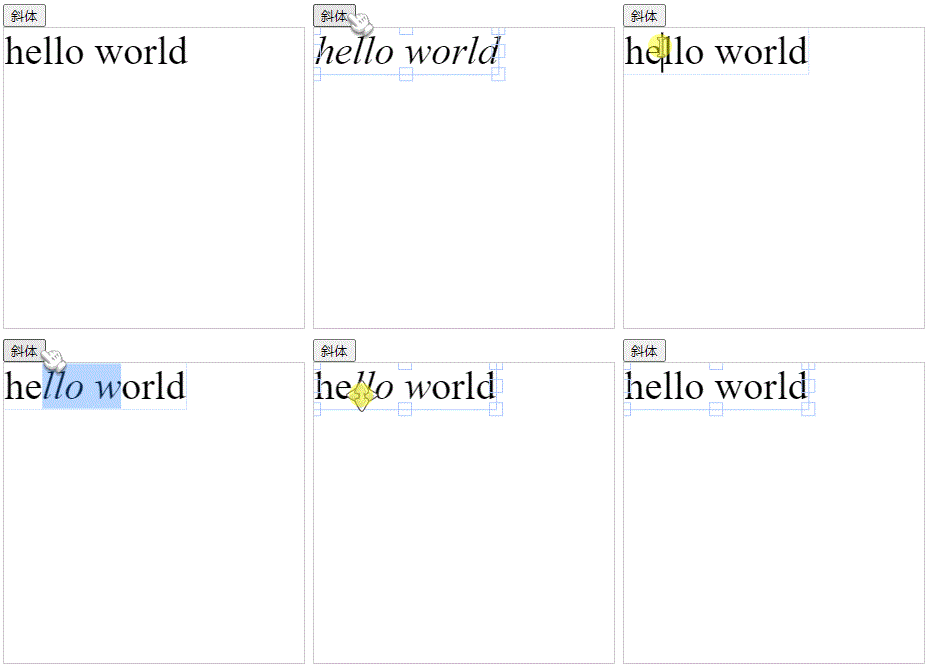
<button onclick="italic()"> Italics </button>
<canvas id="c" width="300" height="300" style="border: 1px solid #ccc"></canvas>
<!-- introduce fabric.js -->
<script src="https://cdn.bootcdn.net/ajax/libs/fabric.js/521/fabric.js"></script>
<script>
const canvas = new fabric.Canvas('c') // Create a canvas , And bind elements
const iText = new fabric.IText('hello world') // Create text
canvas.add(iText) // Add text to the canvas
function italic() {
let activeTxt = canvas.getActiveObject()
if (!activeTxt) return
if (activeTxt.isEditing) {
// Edit state , Italicize the selected text or restore the default operation
const state = activeTxt.getSelectionStyles().find(item => item.fontStyle !== 'italic')
if (!state || (JSON.stringify(state) === '{}' && activeTxt['fontStyle'] === 'italic')) {
activeTxt.setSelectionStyles({ 'fontStyle': 'normal' })
} else {
activeTxt.setSelectionStyles({ 'fontStyle': 'italic' })
}
} else {
// Selection status , Italicize the full text or restore the default operation
if (activeTxt['fontStyle'] === 'italic') {
activeTxt.fontStyle = 'normal'
let s = activeTxt.styles
for(let i in s) {
for (let j in s[i]) {
s[i][j].fontStyle = 'normal'
}
}
} else {
activeTxt.fontStyle = 'italic'
let s = activeTxt.styles
for(let i in s) {
for (let j in s[i]) {
s[i][j].fontStyle = 'italic'
}
}
}
}
canvas.renderAll()
}
</script>
- adopt
canvas.getActiveObject()Method to get the currently selected object .
- If no text is currently selected , No operation .
- adopt
isEditingProperty to detect whether the text is in the editing state .
- In editing state , Italicize the selected text or restore the default operation .
- In the non editing state , Italicize the full text or restore the default operation .
Code warehouse
边栏推荐
- rt_ Thread thread management
- What does the maturity and redemption time of financial products mean?
- Mysql database easy learning 09 - commonly used by data analysts: multi table query of data query language DQL
- Paper notes: multi label learning ackel
- 微信小程序影视评论交流平台系统毕业设计毕设(6)开题答辩PPT
- How to gain freedom and wealth
- 学习过的课程
- Intel written test questions DIY
- Chapter 21 design of pavement crack detection and identification system -- matlab deep learning practice
- No sleep at noon, sleepy in the afternoon
猜你喜欢

微信小程序影视评论交流平台系统毕业设计毕设(6)开题答辩PPT

Mba-day24 best value problem

Mysql database easy learning 09 - commonly used by data analysts: multi table query of data query language DQL

Chapter 18 build a general video processing tool based on GUI matlab application GUI implementation
Common shortcut keys in Excel summary of shortcut keys in Excel

微信小程序影视评论交流平台系统毕业设计毕设(7)中期检查报告
atguigu----列表渲染
![Leetcode 513 find the value in the lower left corner of the tree [bfs binary tree] the leetcode path of heroding](/img/15/b406e7bf1b83cbdd685c8cde427786.png)
Leetcode 513 find the value in the lower left corner of the tree [bfs binary tree] the leetcode path of heroding
![[chapter 07 face QR code recognition based on principal component analysis matlab deep learning practical case]](/img/cd/65a541e8d0fc7a49ee3ef1d266790a.png)
[chapter 07 face QR code recognition based on principal component analysis matlab deep learning practical case]
![[Chapter 15 wavelet based image compression technology deep learning machine learning image processing application matlab.]](/img/c3/b30dd7951c747fdd2428b31be3efec.png)
[Chapter 15 wavelet based image compression technology deep learning machine learning image processing application matlab.]
随机推荐
Chapter 03 extraction of anterior segment tissue based on multi-scale morphology - full system matlab intelligent driving in-depth learning
rt_ Thread thread management
Common shortcut keys in Excel summary of shortcut keys in Excel
微信小程序影视评论交流平台系统毕业设计毕设(8)毕业设计论文模板
What does the maturity and redemption time of financial products mean?
Mysql database easy learning 06 - commonly used by data analysts: single table query of data query language DQL
[Chapter 14 image compression and reconstruction based on principal component analysis -- matlab deep learning practical case]
cmake常用命令分类备忘
Ansible Inventory 主机清单
How does the QT program implement the default selection of a behavior in the selected listwidget
rt_thread线程管理
idea----复制黏贴
[chapter 04 answer sheet recognition based on Hough change]
sql server递归查询
Informer有什么
Mobile app test method
Right alignment of MathType formula right number in word
Brief introduction to common pigtails of communication pigtails
优秀的 Verilog/FPGA开源项目介绍(二十七)- 小型CPU
带你区分几种并行