当前位置:网站首页>c# 水晶报表打印
c# 水晶报表打印
2022-07-02 10:23:00 【coder i++】
转:https://www.cnblogs.com/aitong/p/10717786.html
水晶报表介绍
水晶报表是 vs 早期版本自带的一款报表控件。vs2017不自带水晶报表,需要自行安装。虽然水晶报表是收费控件,但是微软已经付过钱了,所以vs自带的水晶报表可以直接使用。
如果项目是 .net 4.0 以上版本,需要修改 App.config 文件。因为水晶报表的 .net 版本可能低于 .net 4.0
在软件发布的时候需要把对应的config文件一起发布,否则也无法使用水晶报表
<startup useLegacyV2RuntimeActivationPolicy="true"> //在这一行加入 useLegacyV2RuntimeActivationPolicy="true"
<supportedRuntime version="v4.0" sku=".NETFramework,Version=v4.5" />
</startup>
在解决方案资源管理器中添加数据集DataSet1.xsd,在数据集中添加 DataTable.
新建 Crystal Reports 文件
在解决方案资源管理器中新建 Crystal Reports 文件: CrystalReport1.rpt 。添加后左侧会出现 “字段资源管理器” 。如果不小心关掉字段资源管理器,可以在 “视图” “其它窗口” “文档大纲” 将其调出。

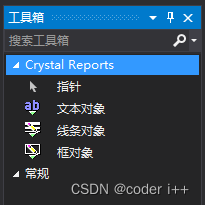
vs的工具箱中也会出现相应的控件。可以将文本对象添加到报表中。 文本对象常用属性:CanGrow (可以自动换行) HorAlignment (居中,靠左,靠右)。
在数据库字段右键选择数据库专家。添加项目数据中的 DataTable1
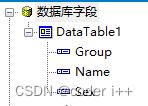
在 “组名字段” 右键插入组。选择 DataTable1 中的字段 ,排序方式选择按原始顺序(水晶报表的排序方式不实用,一般在设置 DataTable 时自行排序)。
数据库字段中的 Name Sex 可以拖到报表的详细资料中。报表的页眉会自动添加文本框。文本框的内容可修改为姓名,性别。

在界面中添加显示控件:CrystalReportViewer 重命名为crv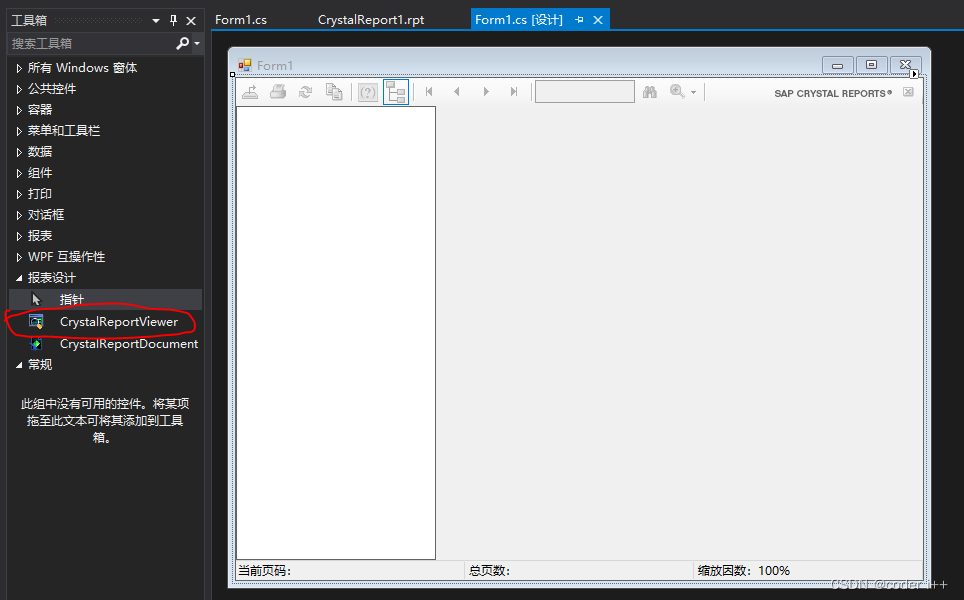
在窗口中创建报表对象并添加数据,显示到 CrystalReportViewer 上面。可以直接打印,也可以通过控件上的打印按钮打印。
using CrystalDecisions.CrystalReports.Engine;
using System;
using System.Collections.Generic;
using System.ComponentModel;
using System.Data;
using System.Drawing;
using System.Linq;
using System.Text;
using System.Threading.Tasks;
using System.Windows.Forms;

namespace CrTest
{

    public partial class Form1 : Form
    {

        public Form1(bool directPrint = false)
        {

            InitializeComponent();
            DataSet1 ds = new DataSet1();
            ds.DataTable1.Rows.Add("组1", "张1", "男");
            ds.DataTable1.Rows.Add("组3", "王1", "男");
            ds.DataTable1.Rows.Add("组2", "李1", "男");
            ds.DataTable1.Rows.Add("组1", "张2", "男");
            ds.DataTable1.Rows.Add("组1", "张3", "女");
            ds.DataTable1.Rows.Add("组1", "张4", "男");
            ds.DataTable1.Rows.Add("组2", "李2", "男");
            ds.DataTable1.Rows.Add("组2", "李3", "女");
            ds.DataTable1.Rows.Add("组2", "李4", "男");
            ds.DataTable1.Rows.Add("组3", "王2", "男");

            ReportClass cr = new CrystalReport1();
            cr.SetDataSource(ds);
            TextObject title = (TextObject)cr.ReportDefinition.ReportObjects["Text1"];
            title.Text = "人员表格";
            if (directPrint)
            {

                PrintDialog print = new PrintDialog();
                if (print.ShowDialog() == DialogResult.OK)
                {

                    cr.PrintOptions.PrinterName = print.PrinterSettings.PrinterName;
                    cr.PrintToPrinter(1, false, 0, 0);
                }
            }
            this.crv.ReportSource = cr;
        }
    }
}
边栏推荐
- We sincerely invite young creators to share with investors and entrepreneurs how to make choices in life in the metauniverse
- leetcode621. task scheduler
- uniapp小程序 subPackages分包配置
- Use bloc to build a page instance of shutter
- BeanUtils -- shallow copy -- example / principle
- 错误:EACCES:权限被拒绝,访问“/usr/lib/node_modules”
- How much do you know about free SSL certificates? The difference between free SSL certificate and charged SSL certificate
- Daily practice of C language --- monkeys divide peaches
- 【模板】最长公共子序列 (【DP or 贪心】板子)
- [technology development-22]: rapid overview of the application and development of network and communication technology-2-communication Technology
猜你喜欢

Bridge of undirected graph
基于ssm+jsp框架实现的学生选课信息管理系统【源码+数据库】

Solution: Compression Technology (original version and sequel version)
selenium 元素定位方法
Don't spend money, spend an hour to build your own blog website

Solve "sub number integer", "jump happily", "turn on the light"
QT - make a simple calculator - realize four operations
Drawing Nyquist diagram with MATLAB

2022 Heilongjiang provincial examination on the writing skills of Application Essays

selenium,元素操作以及浏览器操作方法
随机推荐
Drawing Nyquist diagram with MATLAB
[Blue Bridge Cup] children's worship circle
科技的成就(二十七)
Use of UIC in QT
Performance optimization of memory function
口袋奇兵点评
How to explain binary search to my sister? This is really difficult, fan!
使用BLoC 构建 Flutter的页面实例
Subcontracting configuration of uniapp applet subpackages
ensp简单入门
BeanUtils -- shallow copy -- example / principle
Three talking about exception -- error handling
Qt如何设置固定大小
Why can't d link DLL
[technology development-22]: rapid overview of the application and development of network and communication technology-2-communication Technology
量子三体问题: Landau Fall
[Unity]使用GB2312,打包后程序不正常解决方案
2022 zero code / low code development white paper [produced by partner cloud] with download
D language, possible 'string plug-ins'
Will your sleep service dream of the extra bookinfo on the service network