当前位置:网站首页>We were tossed all night by a Kong performance bug
We were tossed all night by a Kong performance bug
2022-07-26 17:32:00 【51CTO】
The story background
stay Erda In the technical architecture of , We used kong As API Technology selection of gateway . Because it has the characteristics of high concurrency and low latency , Combined with Kubernetes Ingress Controller, Declarative configuration based on cloud native , Can achieve rich API Strategy .
In our earliest delivered cluster ,kong It is still relatively early 0.14 edition , With the increasing requirements of business level for security , We need to be based on kong Implement security plug-ins , Help the system to have better security capabilities . Due to the earlier 0.14 Version cannot be used go-pluginserver To expand kong Plug in mechanism of , We have to put kong Upgrade to a relatively new 2.2.0 edition .
The upgrade process will not be repeated here , Basically, it is upgraded smoothly step by step according to the official documents , But in the days after the upgrade , our SRE The team received intensive consultation and even criticism , Businesses deployed on the cluster Intermittent inaccessibility , Very high latency .
A series of failed attempts
Parameter tuning
At first, in order to quickly fix this problem , We are right. kong Of NGINX_WORKER_PROCESSES、MEM_CACHE_SIZE、 DB_UPDATE_FREQUENCY、WORKER_STATE_UPDATE_FREQUENCY Parameters and postgres Of work_mem、 share_buffers Have been properly tuned .
however , No effect .
Clean up the data
Due to the historical reasons of this cluster , Will register or delete frequently api data , Therefore, about 5 More than 10000 articles route perhaps service data .
We suspect that the performance degradation is caused by the large amount of data , And then combine erda Data pairs in kong Delete the historical data in , In the process of deletion, the deletion is slow and at the same time kong A sharp decline in performance .
After several tests, we determined 「 Just call admin The interface of leads to kong Performance degradation 」 This conclusion , It is very similar to the problem of the community , Links are as follows :
https://github.com/Kong/kong/issues/7543
kong Instance read-write separation
I'm sure it's admin After the reason of the interface , We decided to admin Business related kong Instance separation , hope admin The call of will not affect the normal traffic access of the business , Expect to achieve kong Of admin Slow interface , But don't affect the access performance of the business .
However , No effect .
postgres transfer RDS
kong After the efforts at the level are fruitless , We also observed when calling admin Interface test ,postgres The process of has also increased a lot ,CPU The utilization rate has also increased , Also decided to pg Migrate to More professional RDS in .
still , No effect .
Roll back
Finally, we rolled back to 0.14 edition , Pursue temporary “ Peace of mind ”.
thus , The online attempt is basically a paragraph , It also roughly finds out the conditions for the recurrence of the problem , So we decided to build an environment offline to continue to find out the cause of the problem .
The way to reproduce the problem
We will have problems kong Of postgres Import a copy of the data into the development environment , simulation 「 call admin Interface is a sharp decline in performance 」 The situation of , And find a solution .
Import data
We will have problems in the cluster postgre After the data is backed up, it is imported into a new cluster :
And turn it on kong Of prometheus plug-in unit , Easy to use grafana To view the performance icon :
Phenomenon one
call admin Service / Same slow , It is consistent with the online phenomenon , Call when the amount of data is large admin Of / Directories take more time .

Phenomenon two
Then let's simulate the call encountered online admin Poor service access performance after interface , First call admin Interface to create a business api, For the test , We created one service And one. routes:
You can use it later curl http://10.97.4.116:8000/baidu2 To simulate the business interface for testing .
Get ready admin Interface test script , Create and delete a service/route, Intersperse one in the middle service list.
Then continue to call the script :
In the process of continuously calling the script, access a business interface , You will find it very slow , It is completely consistent with the online phenomenon .
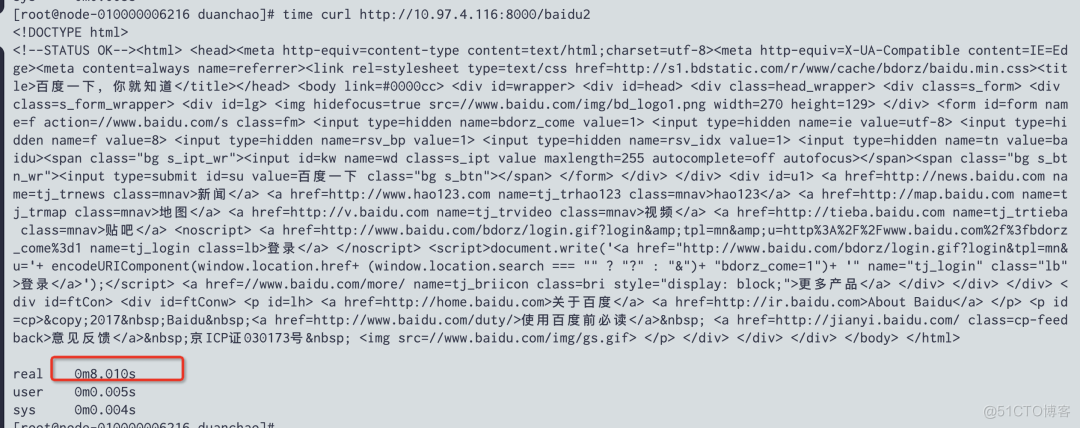
PS: Streamline scripts , Only one write is triggered after , Or deletion will also trigger this phenomenon
Accompanying phenomenon
- kong Example of cpu Follow mem Both continue to rise , And when admin This phenomenon is still not over after the interface call .mem It will rise to a certain extent nginx worker process oom fall , And then restart , This may be the reason for the slow access ;
- We set it up
KONG_NGINX_WORKER_PROCESSES by 4, And for pod The memory of is 4G When ,pod The overall memory will be stable at 2.3G, however call admin Interface test ,pod Memory will keep rising to more than 4G, Trigger worker Of OOM, So I will pod The memory of is adjusted to 8G. Call again admin Interface , Find out pod Memory is still rising , It just rose to 4.11 G It's over , This seems to mean that we are going to set pod The memory of is KONG_NGINX_WORKER_PROCESSES twice as much , This problem is solved ( But there is another important question is why to call once admin Interface , It will cause the memory to rise so much ); - in addition , When I keep calling admin At the interface , The final memory will continue to grow and stabilize to 6.9G.
At this time, we will abstract the problem :
call 「kong admin Interface 」 Cause the memory to keep rising , And then trigger oom Lead to worker By kill fall , Eventually, business access is slow .
Continue to investigate what is taking up memory :
I use pmap -x [pid] I checked it twice worker Memory distribution of the process , What changes is the part framed in the second picture , Judging from the address, the whole memory has been changed , But after exporting and stringing the memory data , There is no effective information for further investigation .


Conclusion
- The question is related to kong The upgrade (0.14 --> 2.2.0) It doesn't matter. , Use it directly 2.2.0 Version will also have this problem ;
- kong every other
worker_state_update_frequency It will be rebuilt in memory after time router, Once reconstruction starts, it will lead to Memory goes up , After looking at the code, the problem is Router.new Here's the way , Will apply for lrucache But there is no flush_all, According to the latest 2.8.1 Version of lrucache After the release, the problem still exists ; - That is to say kong Of
Router.new When other logic in the method arrives, the memory rises ;

- This shows that the problem is kong There is a performance bug, It still exists in the latest version , When route Follow service When reaching a certain order of magnitude, there will be calls admin Interface , Lead to kong Of worker Memory is rising rapidly , bring oom This leads to poor business access performance , The temporary solution can be to reduce
NGINX_WORKER_PROCESSES And increase kong pod Of memory , Make sure to call admin The memory required after the interface is enough to use without triggering oom, To ensure the normal use of business .
Last , We will be in https://github.com/Kong/kong/issues/7543
For more technical dry goods, please pay attention to 【 Erda Erda】 official account , Grow with many open source enthusiasts ~
边栏推荐
- 2.1.2 synchronization always fails
- maximum likelihood estimation
- Implementing DDD based on ABP -- aggregation and aggregation root practice
- Is it safe for Guosen Securities to open an account? How can I find the account manager
- A collection of commonly used shortcut keys for office software
- Linear regression from zero sum using mxnet
- 2019 popularization group summary
- 6-19漏洞利用-nsf获取目标密码文件
- On the evolution of cloud native edge computing framework
- [development tutorial 8] crazy shell · open source Bluetooth heart rate waterproof sports Bracelet - triaxial meter pace
猜你喜欢

【机器学习】Mean Shift原理及代码
[machine learning] principle and code of mean shift
Why are test / development programmers who are better paid than me? Abandoned by the times

2019 popularization group summary

Establishment of Eureka registration center Eureka server

SCCM tips - improve the download speed of drivers and shorten the deployment time of the system when deploying the system

37.【重载运算符的类别】

The user experience center of Analysys Qianfan bank was established to help upgrade the user experience of the banking industry

Pyqt5 rapid development and practice 3.2 introduction to layout management and 3.3 practical application of QT Designer

(25)Blender源码分析之顶层菜单Blender菜单
随机推荐
Eureka Registry - from entry to application
After Australia, New Zealand announced the ban on Huawei 5g! Huawei official response
OpenWrt之feeds.conf.default详解
pip安装模块,报错
#夏日挑战赛# OpenHarmony基于JS实现的贪吃蛇
现在网上开户安全么?股票开户要找谁?
leetcode:1206. 设计跳表【跳表板子】
The latest interface of Taobao / tmall keyword search
On the evolution of cloud native edge computing framework
如何使用 align-regexp 对齐 userscript 元信息
Is it safe for Guosen Securities to open an account? How can I find the account manager
[ctfshow-web]反序列化
2019 popularization group summary
The diagram of user login verification process is well written!
Create MySQL function: access denied; you need (at least one of) the SUPER privilege(s) for this operation
How to ensure cache and database consistency
我们被一个 kong 的性能 bug 折腾了一个通宵
Redis hotspot key and big value
API for sellers -- description of the return value of adding baby API to Taobao / tmall sellers' stores
硬件开发与市场产业