当前位置:网站首页>Summer vacation study record
Summer vacation study record
2022-06-30 11:27:00 【Tong Meng still】
Try 2D Game vitality Knight
1. Map making

By means of windows=>2D=>Tilemap Put the desired map in this box , You can click the brush to add a map to the world map . And you need to create the game object first Tilemap.
Add the required game objects to the map .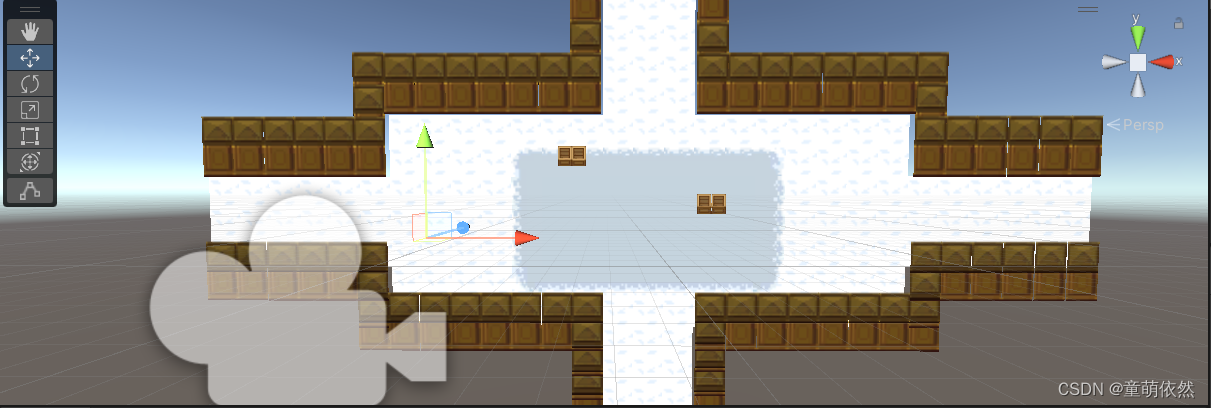
2. The enemy made
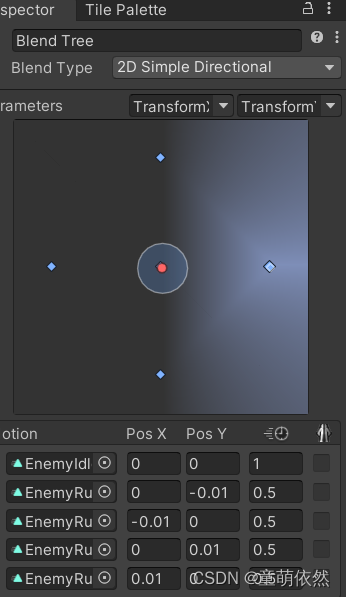
Animate the enemy , And make corresponding animation state machine control .
using System;
using System.Collections;
using System.Collections.Generic;
using UnityEngine;

public class Enemy : MonoBehaviour
{

    public float speed = 1f; // Movement speed
    Animator animator;
    Rigidbody2D rigBody;
    public Vector2 movePlay; // Move the vector
    public float moveTimer; // Move timer
    public float moveTime = 1; //  Move time
    bool IsMove = false;
    Vector3 originPos;
    Vector3 endPos;
    float timers = 0;
    int direction = 1;
    public int Bloodvalue;
    // Must be in FixedUpdate in
    IEnumerator TestIfTurn()
    {

        originPos = transform.position;
        yield return new WaitForSeconds(0.05f);
        endPos = transform.position;
        if (Vector3.Distance(originPos, endPos) <= 0.001f)
        {

            direction = direction * (-1);
        }
    }
    void Start()
    {

        rigBody = GetComponent<Rigidbody2D>();
        animator = GetComponent<Animator>();
        // Use a function that switches the direction vector
        moveAuto();
    }

    // Update is called once per frame
    void Update()
    {

        moveTimer -= Time.deltaTime;
        // Judge whether the timer has finished
        if (moveTimer >= 2)
        {

            Vector3 thisScale = this.transform.localScale;
            Vector2 position = rigBody.position;
            position += movePlay * speed * Time.deltaTime;
            rigBody.MovePosition(position); // Call the method of rigid body position assignment

        }
        else if (moveTimer <= 2 && moveTimer >= 0)
        {

            animator.SetFloat("TransformX", 0);
            animator.SetFloat("TransformY", 0);
        }
        else if (moveTimer <= 0)
        {

            // When finished, call again , Regain direction
            moveAuto();
            // The timer is reassigned
            moveTimer = moveTime;
        }

    }


    void moveAuto()
    {

        // Random generation -1,0,1 The number of , Because of the random number Next Do not take the maximum value , This is used here (-1,2)
        // Here, a random motion vector is generated
        System.Random rd = new System.Random();
        float x = rd.Next(-1, 2);
        float y = rd.Next(-1, 2);
        movePlay = new Vector2(x, y);
        // Switch direction
        Vector3 thisScale = this.transform.localScale;
        if (x != 0)
        {

            thisScale.x = Math.Abs(thisScale.x) * x;
            transform.localScale = thisScale;
        }
        animator.SetFloat("TransformX", x);
        animator.SetFloat("TransformY", y);
    }
    private void OnTriggerEnter(Collider other)
    {

        if (other.CompareTag("Bullet"))
        {

            Destroy(other.gameObject);
        }
    }
    void Blood(int value)
    {

        Bloodvalue -= value;
    }
}
3. Protagonist production
It is similar to the enemy , Make animation first , Adding animation to the animation state machine 
The code is as follows
using System.Collections;
using System.Collections.Generic;
using UnityEngine;

public class Player : MonoBehaviour
{

    public Animator anim;
    public float runSpeed;
    public bool run;
    private float stopX,stopY;
    private Rigidbody2D rigidbody;
    void Start()
    {

        rigidbody = GetComponent<Rigidbody2D>();
        anim = GetComponent<Animator>();
    }

    // Update is called once per frame
    void Update()
    {

        Run();
    }
    void Run()
    {


        float moveDir = Input.GetAxis("Horizontal");
        float moveDer = Input.GetAxis("Vertical");
        Vector2 platerVel = new Vector2(moveDir * runSpeed, moveDer * runSpeed);
        rigidbody.velocity = platerVel;
        if (platerVel != Vector2.zero)
        {

            anim.SetBool("Run", true);
            stopX = moveDir;
            stopY = moveDer;
        }
        else
        {

            anim.SetBool("Run", false);
        }
        anim.SetFloat("InputX", stopX);
        anim.SetFloat("InputY", stopY);
    }
}
Gun code
using System.Collections;
using System.Collections.Generic;
using UnityEngine;

public class Gun : MonoBehaviour
{

    public GameObject Prefab;
    public Transform Shoottransform;
    public GameObject Player;
    private float m_nextFire;

    /// <summary>
    ///  Firing rate
    /// </summary>
    public float FireRate = 2.0f;

    /// <summary>
    ///  The target of the bullet
    /// </summary>
    public GameObject Bullet;

    /// <summary>
    ///  Bullet speed
    /// </summary>
    public float BulletSpeed;
    void FixedUpdate()
    {

        Shoot();
        //  Get mouse coordinates and convert them to world coordinates
        Vector3 m_mousePosition = Input.mousePosition;
        m_mousePosition = Camera.main.ScreenToWorldPoint(m_mousePosition);
        //  the reason being that 2D, In less than z Axis . Make z The value of the axis is 0, So the coordinates of the mouse are (x,y) On the plane
        m_mousePosition.z = 0;

        //  Weapon orientation angle
        float m_weaponAngle = Vector2.Angle(m_mousePosition - this.transform.position, Vector2.right);
        if (transform.position.x < m_mousePosition.x)
        {

            m_weaponAngle = -m_weaponAngle;
        }

        // Judge the pros and cons of weapons
        if ( transform.localScale.x > 0)
        {

            transform.localScale = new Vector3(-transform.localScale.x, transform.localScale.y, transform.localScale.z);
        }
        else if ( transform.localScale.x < 0)
        {

            transform.localScale = new Vector3(-transform.localScale.x, transform.localScale.y, transform.localScale.z);
        }

        //  Change the final angle
        transform.eulerAngles = new Vector3(0, 0, m_weaponAngle);
    }
    void Shoot()
    {

        m_nextFire = m_nextFire + Time.fixedDeltaTime;

        if(Input.GetMouseButton(0) && m_nextFire>FireRate)
        {

            //  Get mouse coordinates and convert them to world coordinates
            Vector3 m_mousePosition = Input.mousePosition;
            m_mousePosition = Camera.main.ScreenToWorldPoint(m_mousePosition);
            //  the reason being that 2D, In less than z Axis . Make z The value of the axis is 0, So the coordinates of the mouse are (x,y) On the plane
            m_mousePosition.z = 0;

            //  Bullet angle
            float m_fireAngle = Vector2.Angle(m_mousePosition - this.transform.position, Vector2.up);

            if(m_mousePosition.x>this.transform.position.x)
            {

                m_fireAngle = -m_fireAngle;
            }

            //  Zero the timer
            m_nextFire = 0;

            //  Generate bullets
            GameObject m_bullet = Instantiate(Bullet, transform.position, Quaternion.identity) as GameObject;

            //  Speed
            m_bullet.GetComponent<Rigidbody2D>().velocity = ((m_mousePosition-transform.position).normalized * BulletSpeed);

            //  angle
            m_bullet.transform.eulerAngles = new Vector3(0, 0, m_fireAngle);

        }
    }
}
Camera follow code
using System.Collections;
using System.Collections.Generic;
using UnityEngine;

public class MainCamera : MonoBehaviour
{

    public Transform target;
    public float smoothing;
    internal static readonly object main;

    // Define two positions to limit camera movement
    // Start is called before the first frame update
    void Start()
    {


    }
    void Update()
    {


    }
    void LateUpdate()
    {

        if (target != null)
        {

            Vector3 targetPos = target.position;
            transform.position = Vector3.Lerp(transform.position, targetPos, smoothing);
        }
    }
}
边栏推荐
- win10 R包安装报错:没有安装在arch=i386
- Esp32-c3 introductory tutorial basic part ⑫ - mass production burning device configuration and serial number, NVS partition confirmation, NVS partition generation program, CSV to bin
- DataX JSON description
- Go语言学习之Switch语句的使用
- 8 lines of code to achieve quick sorting, easy to understand illustrations!
- SQL必需掌握的100个重要知识点:使用子查询
- 数据库连接池 druid
- 数字化不是试出来,而是蹚出来的|行知数字中国 × 富士康史喆
- 100 important knowledge points that SQL must master: summary data
- Qualcomm released the "magic mirror" of the Internet of things case set, and digital agriculture has become a reality
猜你喜欢

promise async和await的方法与使用

Mathematics (fast power)

相对位置编码Transformer的一个理论缺陷与对策

CVPR 2022 | 大幅减少零样本学习所需人工标注,马普所和北邮提出富含视觉信息的类别语义嵌入...

R语言去重操作unique duplicate filter

Esp32-c3 introductory tutorial question ⑨ - core 0 panic 'ed (load access fault) Exception was unhandled. vfprintf. c:1528

阿里云李飞飞:中国云数据库在很多主流技术创新上已经领先国外
Methods and usage of promise async and await

【西安交通大学】考研初试复试资料分享

数字化不是试出来,而是蹚出来的|行知数字中国 × 富士康史喆
随机推荐
【IC5000教程】-01-使用daqIDEA图形化debug调试C代码
Esp32-c3 introductory tutorial basic part ⑪ - reading and writing non-volatile storage (NVS) parameters
从开源项目探讨“FPGA挖矿”的本质
HMS Core音频编辑服务3D音频技术,助力打造沉浸式听觉盛宴
IDEA 又出新神器,一套代码适应多端!
【leetcode 239】滑动窗口
微信表情符号被写入判决书,你发的每个 emoji 都可能成为呈堂证供
一个人就是一本书
Discussion on the essence of "FPGA mining" from open source projects
国产数据库的黄金周期要来了吗?
ESP32-C3入门教程 基础篇⑫——量产烧写设备配置和序列号, NVS partition分区确认, NVS 分区生成程序, csv转bin
训练一个图像分类器demo in PyTorch【学习笔记】
Wechat Emoji is written into the judgment, and every Emoji you send may become evidence in court
How to analyze native crash through GDB
[leetcode 239] sliding window
数据库 自动增长
LeetCode Algorithm 86. 分隔鏈錶
Oracle NetSuite 助力 TCM Bio,洞悉数据变化,让业务发展更灵活
100 important knowledge points that SQL must master: insert data
Understanding society at the age of 14 - reading notes on "happiness at work"