当前位置:网站首页>搭建一个点歌QQ机器人,另外还能看美女
搭建一个点歌QQ机器人,另外还能看美女
2022-06-23 09:55:00 【皮小孩ls】
前言
完整项目包括框架、代码和详细使用说明可以去链接下载:
QQ机器人基础版(文章1-2所有功能)
QQ机器人多功能版(文章1-3所有功能)
下载完只需要按照使用说明修改几处地方即可搭建成功!!
第一篇文章:QQ机器人详细制作教程(从配置到简单的功能)
第二篇文章:搭建一个QQ机器人陪女朋友聊天并叫她起床
前两篇文章都上了CSDN的综合热榜,首先得感谢官方的推荐,其次更需要感谢的是小伙伴们的支持!我会继续努力的!也期待大家对本文的一键三连哦。
本篇文章增加了机器人的功能,主要是通过一些调用好玩的接口来实现的,下面上一些截图:


要实现以上功能都是在第一篇文章的基础上的,所以还没有看第一篇文章的小伙伴先去看一下哦。
第一篇文章:QQ机器人详细制作教程(从配置到简单的功能)
具体实现
1、爆照
当别人叫我们的机器人爆照,怎么办?当然可以,直接发闪照。
可以参考帮助文档:
if '爆照' in message:
                qq = rev['sender']['user_id']
                send_msg({
    'msg_type': 'private', 'number': qq, 'msg': '[CQ:image,file={},type=flash,id=40004]'.format('https://c-ssl.duitang.com/uploads/blog/202012/16/20201216083017_6103b.thumb.1000_0.jpg')})
这个图片地址需要的是网络地址,可以上网找一个。
我自己写了一个随机图片函数,大家可以参考一下。
网址:https://www.duitang.com/search/?kw=美女&type=feed(当然你可以改关键词kw)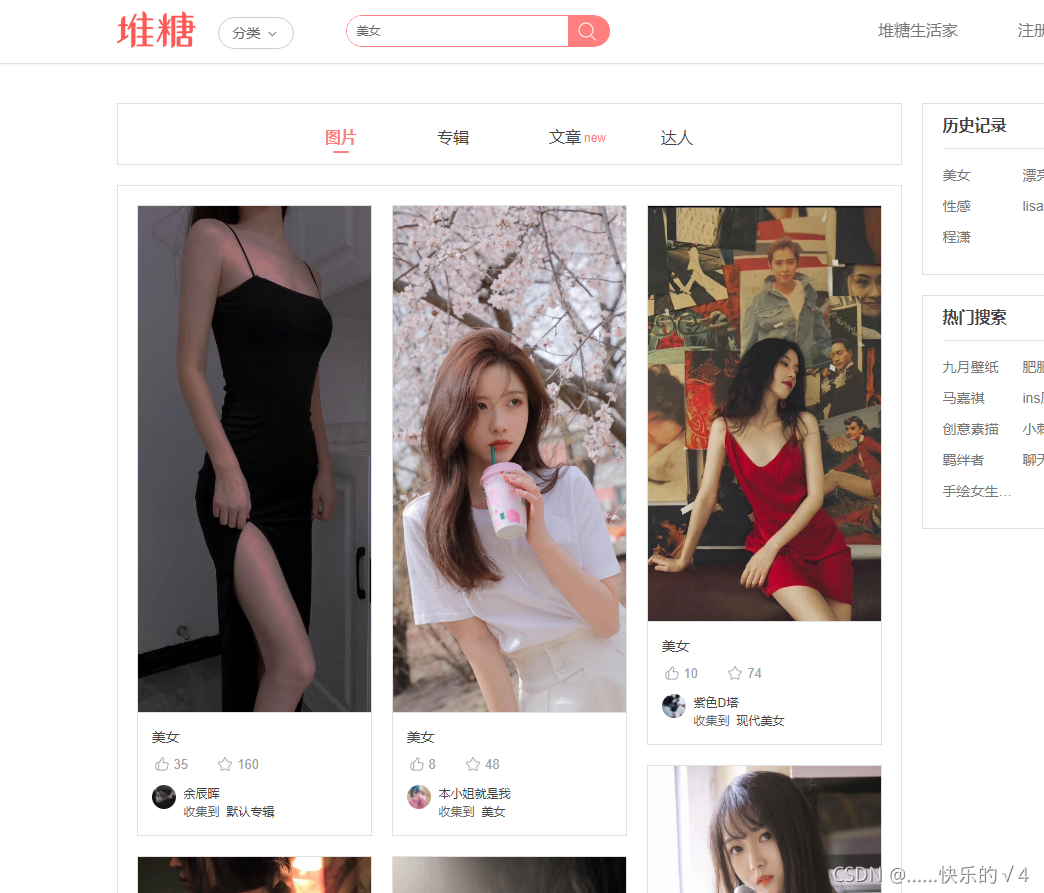
f12进入开发者模式,继续往下滑使其加载更多图片,可以看到有一个接口,有几个参数。
python代码:
import json, requests
from bs4 import BeautifulSoup
import random

img_list = []
def get_img_random():
    for j in [0,24,48,72]:
        # 获取网站数据
        url = requests.get('https://www.duitang.com/search/?kw=美女&type=feed&start={}'.format(j))
        # url.encoding = 'utf-8' #如果需要用到页面中的汉字内容,则需要进行解码,否则中文会出现乱码
        html = url.text
        # 解析网页
        soup = BeautifulSoup(html, 'html.parser')
        # 获取所有的img标签
        movie = soup.find_all('div', class_='mbpho')
        # print(movie)
        # 获取src路径
        for i in movie:
            imgsrc = i.find_all('img')[0].get('src')
            img_list.append(imgsrc)
    return img_list
i = random.randint(0, len(img_list))
print(get_img_random()[i])
得到一个随机图片地址。
我根据这个写了一个网页版,页面入口:关键词随机图片
2、生日书
这个需要的是聚合数据的API接口,这个已经在第二篇文章介绍过了,大家可以去看看。
第二篇文章:搭建一个QQ机器人陪女朋友聊天并叫她起床
看一下返回的数据:

直接上代码(需要先去官网申请这个接口获取请求key):
import requests

def birthday_book(birthday,key):
    url = "http://apis.juhe.cn/fapig/birthdayBook/query?" + 'keyword={}&key=你申请api的请求key'.format(birthday)
    # 发送get请求
    r = requests.get(url)
    # 获取返回的json数据
    result = r.json()['result'][key].replace('<p>','').replace('</p>','')
    return result

dict={
    '性格':'nature','爱情':'love','财运':'money','事业':'business','健康':'health','幸运数字':'lucky_num','适合的恋爱对象':'in_love','适合的朋友对象':'friend'}
word='适合的恋爱对象'
print(birthday_book('08-14',str(dict[word])))
3、获取歌词和分享音乐
参考文章:网易云音乐的常用API(搜索,歌词,mp3下载)
(1)获取歌词
URL:http://music.163.com/api/search/pc
提交方式:POST
参数:
s:歌曲名
offset:偏移量
limit:获取歌曲数
type:类型(歌曲:1、专辑:10、歌手:100、歌单:1000、用户:1002、mv:1004)
python代码:
import requests
import json

def get_lyric(song):
    url = "http://music.163.com/api/search/pc"
    pyload = {
    "s": song, "offset": 0, "limit": 1, 'type': 1}
    response = requests.post(url, data=pyload).json()
    artists = response['result']['songs'][0]['artists']
    name = ''
    for i in artists:
        name = name + '/' + i['name']
    id = response['result']['songs'][0]['id']
    url = 'http://music.163.com/api/song/media?id=' + str(id)
    r = requests.get(url)
    try:
        if len(r.json()['lyric']) <= 1:
            return '暂无歌词'
        else:
            return '歌手:' + name + '\n' + str(r.json()['lyric'])
    except:
        return '纯音乐,无歌词'

print(get_lyric('你的眼睛像星星'))
返回结果:
搭建到机器人上需要获取一个参数,歌曲关键词(可以带作者)
(2)分享音乐
首先需要获取歌曲的id,然后通过机器人框架的cqcode去分享。目前好像只支持群聊的发送,私聊没有反应。
文档地址:http://docs.go-cqhttp.org/cqcode/#音乐分享
获取音乐id函数:
def get_id(song):
    url = "http://music.163.com/api/search/pc"
    pyload = {
    "s": song, "offset": 0, "limit": 1, 'type': 1}
    response = requests.post(url, data=pyload).json()
    id = response['result']['songs'][0]['id']
    return id
搭建到机器人上需要获取一个参数,歌曲关键词(可以带作者)
完整项目下载地址(配置了python环境)
完整项目包括框架、代码和详细使用说明可以去链接下载:
QQ机器人基础版(文章1-2所有功能)
QQ机器人多功能版(文章1-3所有功能)
下载完只需要按照使用说明修改几处地方即可搭建成功!!

完整项目下载地址(电脑没有python环境)
电脑没有python环境或者觉得配置太麻烦可直接购买exe版本,只要有电脑就可以运行!!
QQ机器人基础版exe
QQ机器人多功能版exe
同样里面都有使用说明,配置更加方便(强烈推荐)!!
但是这也有一个坏处,就是不可编程修改,功能已经固定了,十分适合新手!!
个人主页(含网页版机器人、舔狗语录在线生成和关键词随机图片等功能):皮小孩的个人站点
边栏推荐
- 基于STM32设计的宠物投喂器
- 多线程习题
- 2022 gdevops global agile operation and maintenance summit - essence playback of Guangzhou station (with PPT download)
- Go 字符串比较
- How to pass values to onclick events in thymeleaf
- Developer, you may have some misunderstandings about cloud computing
- UEFI source code learning 3.7 - norflashdxe
- Install using snap in opencloudos NET 6
- Unable to enter the system normally, press F8 to select other items to try to enter
- Game of life of leetcode topic analysis
猜你喜欢
Typora set up image upload service

ICLR 2022 | dynamic convolution tadaconv in video and efficient convolution video understanding model tadaconvnext

Servlet-02 lifecycle

I have been promoted. How can I get along with my former colleagues at the same level?

xml相关面试题

#gStore-weekly | gStore源码解析(四):安全机制之黑白名单配置解析

Unity技术手册 - 生命周期内速度限制(Limit Velocity Over Lifetime)子模块和速度继承(Inherit Velocity)子模块

Comic | code review is driving me crazy!

文件IO(1)

UEFI source code learning 3.7 - norflashdxe
随机推荐
Install using snap in opencloudos NET 6
Nuxt.js spa与ssr的区别
Gesture recognition based on mediapipe
2022高考季征文获奖名单公布
SQL教程之SQL 中数据透视表的不同方法
NIO例子
高性能算力中心 — NVMe/NVMe-oF — NVMe-oF Overview
UEFI source code learning 3.7 - norflashdxe
几款实用软件分享
Game of life of leetcode topic analysis
开发者,你对云计算可能有些误解
Jog sport mode
NiO example
Successful experience in postgraduate entrance examination for MTI master of English translation major of Beijing University of science and technology in 2023
Difference between global shutter and roller shutter
135137138445 unable to remotely connect to the database due to disabling
RPC kernel details you must know (worth collecting)!!!
oracle中遇到的bug
【CTF】 2018_ rop
File IO (1)