当前位置:网站首页>Sudo rosdep init error ROS installation problem solution
Sudo rosdep init error ROS installation problem solution
2022-07-25 14:42:00 【The world is darker than pupils】
sudo rosdep init error Problem solution
A brief description of the problem
operating system :Ubuntu18.04
ROS edition :melodic
For a long time , Due to my computer problem , Only through VMWare Software installation Ubuntu The virtual machine of the operating system ROS Relevant learning and Application , And accidentally and repeatedly found that after installing the system , Conduct ROS During installation , Follow the official installation tutorial to the command line posted below , An error prompt appears as shown in the figure below :
sudo rosdep init
ERROR: cannot download default sources list from:
https://raw.githubusercontent.com/ros/rosdistro/master/rosdep/sources.list.d/20-default.list
Website may be down.
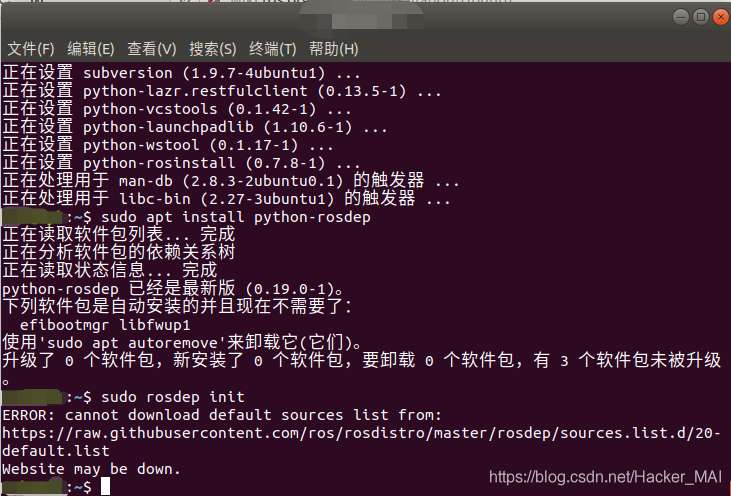
So try to access through the browser error The website mentioned in : Browser launch ——!!!
Found that the website can't be opened , So try the following code ,ping Check this website
ping raw.githubusercontent.com
But I found that it was actually through the terminal ping The way , We can visit the above web address 
So what? error What is the content of the address returned in , So it was installed from one ROS On the computer , We visited this error The website mentioned in , You can see some information of this website page from the following figure .
So after installation ROS I read the relevant documents on my computer , Found in /etc/ros/rosdep/sources.list.d There is a name under the file directory 20-default.list file , Open the display as follows , Through comparison, we found that , The content of this document is similar to error The content of the returned website is consistent , So I guess sudo rosdep init Link to the above URL , Download related files (20-default.list) To the above Directory , And through rosdep update Access the relevant address in the file , Download related files .

Solution
Solution 0x01
If you are experiencing this problem , Then the first solution is , Replace the network , You can try using your mobile hotspot , Then continue to try the following instructions , If you succeed , Then you can finish reading this article , Of course, you are welcome to continue reading .
sudo rosdep init
rosdep update
Solution 0x02
This solution is aimed at the following two problems that cannot be accessed normally , But it can ping through , So modify hosts file , Add the following two URLs IP Address to achieve access .
sudo gedit /etc/hosts

199.232.28.133 raw.githubusercontent.com
151.101.228.133 raw.github.com
After the modification is completed , Execute at the terminal
sudo rosdep init
rosdep update
Solution 0x03
If you use a solution 0x01 Still can't solve your problem , Then you can try the following steps , The principle of this solution is based on manual completion sudo rosdep init Steps for , And then through rosdep update Complete the implementation of the whole scheme .
Step one : First open a terminal , Execute the following command to create root And switch to root user
sudo passwd    // Then prompt for UNIX password , Just enter your user password
sudo su // perhaps su root  Then enter the password and switch to root user
sudo mkdir -p /etc/ros/rosdep/sources.list.d
cd /etc/ros/rosdep/sources.list.d
sudo gedit 20-default.list
Step two : Copy the following into 20-default.list In file
# os-specific listings first
yaml https://raw.githubusercontent.com/ros/rosdistro/master/rosdep/osx-homebrew.yaml osx

# generic
yaml https://raw.githubusercontent.com/ros/rosdistro/master/rosdep/base.yaml
yaml https://raw.githubusercontent.com/ros/rosdistro/master/rosdep/python.yaml
yaml https://raw.githubusercontent.com/ros/rosdistro/master/rosdep/ruby.yaml
gbpdistro https://raw.githubusercontent.com/ros/rosdistro/master/releases/fuerte.yaml fuerte

# newer distributions (Groovy, Hydro, ...) must not be listed anymore, they are being fetched from the rosdistro index.yaml instead
Step three : Execute the following instructions
exit // sign out root user
rosdep update
If you succeed , Then you can finish reading this article , Of course, you are welcome to continue reading .
But maybe you will encounter the problems shown in the figure below , Find out 20-default.list The addresses in cannot be connected , At this point, you can 20-default.list Replace with the following , the raw.githubusercontent.com Replace with raw.github.com Then save the file , Execute... In the terminal
rosdep update
If you succeed , Then you can finish reading this article , Of course, you are welcome to continue reading 
# os-specific listings first
yaml https://raw.github.com/ros/rosdistro/master/rosdep/osx-homebrew.yaml osx

# generic
yaml https://raw.github.com/ros/rosdistro/master/rosdep/base.yaml
yaml https://raw.github.com/ros/rosdistro/master/rosdep/python.yaml
yaml https://raw.github.com/ros/rosdistro/master/rosdep/ruby.yaml
gbpdistro https://raw.github.com/ros/rosdistro/master/releases/fuerte.yaml fuerte

# newer distributions (Groovy, Hydro, ...) must not be listed anymore, they are being fetched from the rosdistro index.yaml instead
Step four : Set pieces
Maybe you have finished the above steps , The message you receive in the terminal , The connection is still rejected , Or time out leads to interruption , At this point, you can execute the following instructions 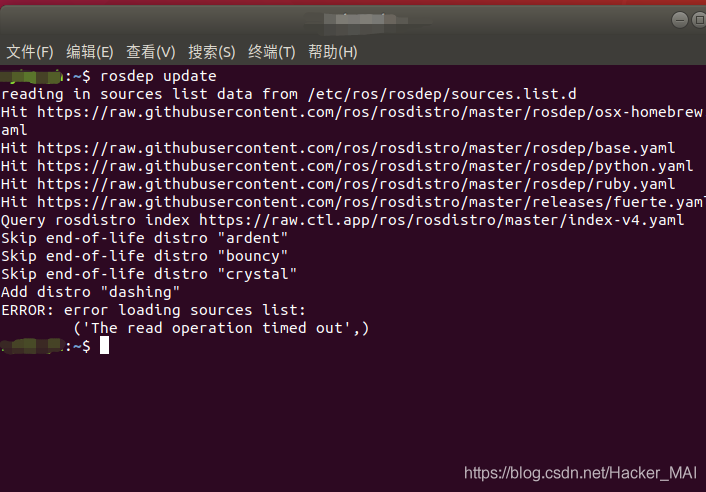
sudo su
sudo gedit /etc/hosts
stay hosts Add the following to and save , Continue after execution rosdep update
199.232.28.133 raw.githubusercontent.com
151.101.228.133 raw.github.com
Solution 0x04- The ultimate
If the above steps still cannot solve your problem , Then you can proceed to this last step .
Execute the following instructions ,
sudo rosdep init
The system prompts that it already exists 20-default.list( Solution oriented 0x02 establish ), Then delete the file below
sudo su
cd /etc/ros/rosdep/sources.list.d
sudo rm 20-default.list
exit
Open a new terminal after removing the file
sudo rosdep init
rosdep update
Virtual machine network problems
The author is using virtual machine to install ubuntu Operating system installation ros Encountered the above problems in the process , After completing the above steps, be tolerant to appear time out Error reporting of , Even mobile phone hotspots can't solve the problem , So I thought about whether it was the network configuration of virtual machines . First, open the settings of the virtual machine , We can see that the default network adapter of the virtual machine is NET Pattern : For sharing hosts IP Address ;
Step one : Switch the network adapter to bridge mode
If you directly set it to the bridge mode through the above setting panel and start the virtual machine , You will find that the virtual machine has no network . The reason is that the bridging network setting of the virtual machine is automatic by default , But this automation is not intelligent , So how to change this setting , Click Edit in the menu bar above , Choose virtual network editor 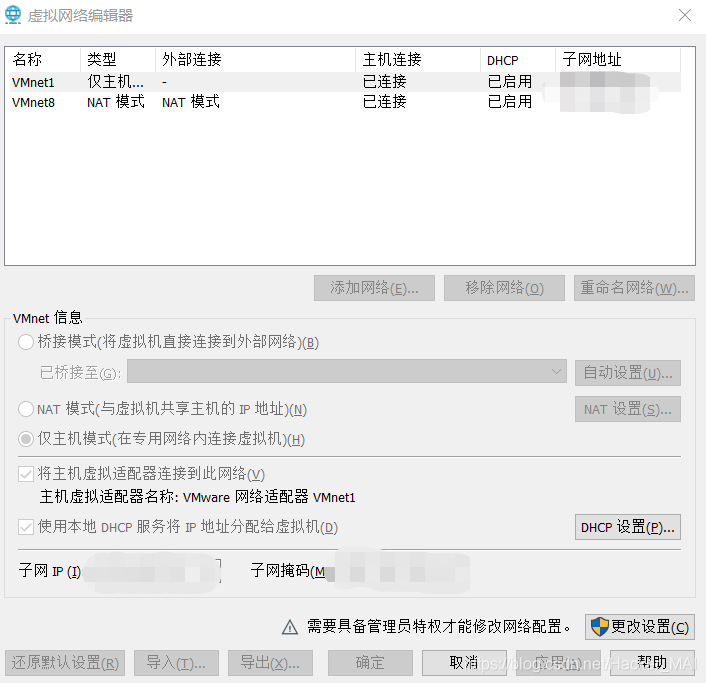
We can't see the bridging network from the picture , Click change settings , Then the panel disappears , Then click Edit in the menu bar , Choose virtual network editor , At this point, you can see the bridging mode , And bridge the lower Automatically Change to Computer network card 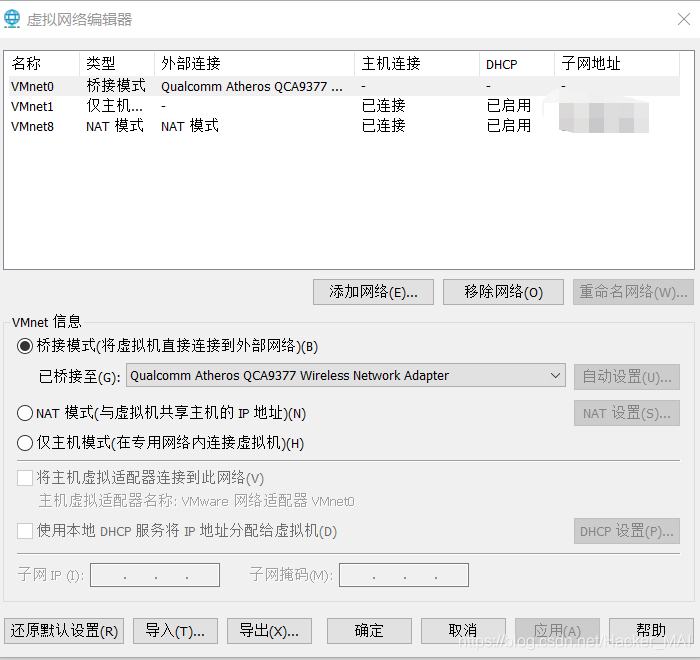
thus , The virtual machine network consists of NET Mode goes to bridge mode , At this point in the process rosdep update Can solve time out problem .
At the end
The above solution has been verified several times to be feasible , If this scheme is adopted , Solved the problem you encountered , If it's convenient , Please stamp on the message ( Leaving a message. ), It is convenient for those who find this article later to believe the authenticity and feasibility of this article . I wish you all on the road of study and scientific research , everything is going smoothly !
边栏推荐
猜你喜欢

Resource not found: rgbd_launch 解决方案

How to design a high concurrency system?

为什么中建、中铁都需要这本证书?究竟是什么原因?

06、类神经网络
![Number of high-quality number pairs [bit operation characteristics + abstract ability evaluation + grouping fast statistics]](/img/c9/8f8f0934111f7ae8f8abd656d92f12.png)
Number of high-quality number pairs [bit operation characteristics + abstract ability evaluation + grouping fast statistics]

SQL优化的一些建议,希望可以帮到和我一样被SQL折磨的你

Gameframework making games (II) making UI interface

41 图片背景综合-五彩导航图

English grammar_ Indefinite pronoun - other / other
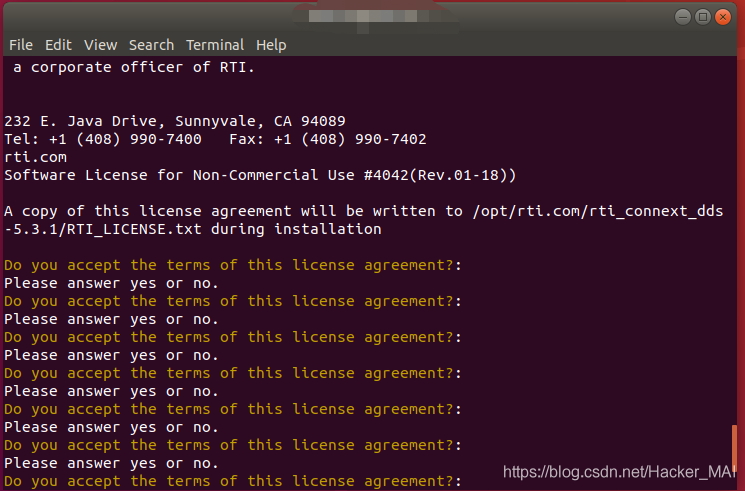
The solution to the problem that the progress bar of ros2 installation connext RMW is stuck at 13%
随机推荐
thymeleaf通过样式控制display是否显示
Gameframework making games (I)
Live classroom system 05 background management system
Application practice: Great integrator of the paddy classification model [paddlehub, finetune, prompt]
没错,请求DNS服务器还可以使用UDP协议
结构体大小
Products on Apple's official website can save 600 yuan by buying iPhone 13 Pro max at a discount
Runtimeerror: CUDA out of memory (solved) [easy to understand]
QObject source code analysis -d pointer and Q pointer
39 简洁版小米侧边栏练习
kibana操作es
冈萨雷斯 数字图像处理 第一章绪论
awk从入门到入土(20)awk解析命令行参数
关于ROS2安装connext RMW的进度条卡在13%问题的解决办法
【口才】谈判说服技巧及策略
Software testing -- 1. Outline of software testing knowledge
Dpkg package download addresses of various platforms (including arm64)
Syntax summary of easygui
物理量与单位符号的书写标准
Under the epidemic, the biomedical industry may usher in breakthrough development