当前位置:网站首页>Docker redis cluster configuration
Docker redis cluster configuration
2022-06-23 23:51:00 【Align right--】
docker Installation and deployment redis
With 6 Cluster relationship of machines as an example :
3 Lord 3 from redis Cluster configuration
Create a container
docker run -d --name=redis-node-1 --net host --privileged=true -v /data/server/docker_redis_share/redis-node-1/data:/data redis:6.2.1 --cluster-enabled yes --appendonly yes --port 6381
docker run -d --name=redis-node-2 --net host --privileged=true -v /data/server/docker_redis_share/redis-node-2/data:/data redis:6.2.1 --cluster-enabled yes --appendonly yes --port 6382
docker run -d --name=redis-node-3 --net host --privileged=true -v /data/server/docker_redis_share/redis-node-3/data:/data redis:6.2.1 --cluster-enabled yes --appendonly yes --port 6383
docker run -d --name=redis-node-4 --net host --privileged=true -v /data/server/docker_redis_share/redis-node-4/data:/data redis:6.2.1 --cluster-enabled yes --appendonly yes --port 6384
docker run -d --name=redis-node-5 --net host --privileged=true -v /data/server/docker_redis_share/redis-node-5/data:/data redis:6.2.1 --cluster-enabled yes --appendonly yes --port 6385
docker run -d --name=redis-node-6 --net host --privileged=true -v /data/server/docker_redis_share/redis-node-6/data:/data redis:6.2.1 --cluster-enabled yes --appendonly yes --port 6386
explain :
--name Container name
--net host Using the host ip And port
--privileged=true Get the root jurisdiction
-v /data/server/docker_redis_share/redis-node-1/data:/data The container volume , Host address : Address of the container
redis:6.2.1 redis Image and version number
--cluster-enabled yes Open clusters
--appendonly yes Turn on persistence
--port 6386 Port number
Building cluster relationships
Select any container to execute
[[email protected] server]# docker exec  -it  redis-node-1 /bin/bash
[email protected]:/data# redis-cli --cluster create 192.168.0.130:6381 192.168.0.130:6382 192.168.0.130:6383 192.168.0.130:6384 192.168.0.130:6385 192.168.0.130:6386 --cluster-replicas 1
explain :
192.168.0.130 The host machine ip Address
--cluster-replicas 1 For each master Create a slave node
Execution results :

View cluster relationships
With 6381 Node as an example to view the cluster relationship
redis-cli -p 6381
cluster info View cluster information

cluster nodes View the cluster build status , Here you can also see the master-slave correspondence

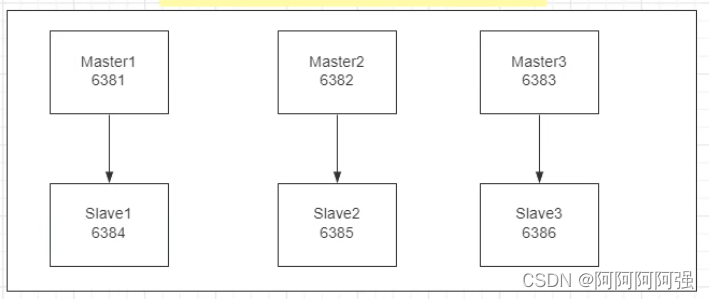
Master slave failover migration
Data read / write storage
The lower slot of the hash slot is divided into 3 paragraph ,3 Duan represents 3 Host computer ,key Where and how to realize the background sharing of data transmission in the cluster after entering
Appears when using the stand-alone command (error) MOVED 12706 192.168.0.130:6383 error Because it is higher than the slot range of the current container


At this time need Prevent route failure and add parameters -c

Different key There are different corresponding ranges of slots , So there will be redirects to other redis service
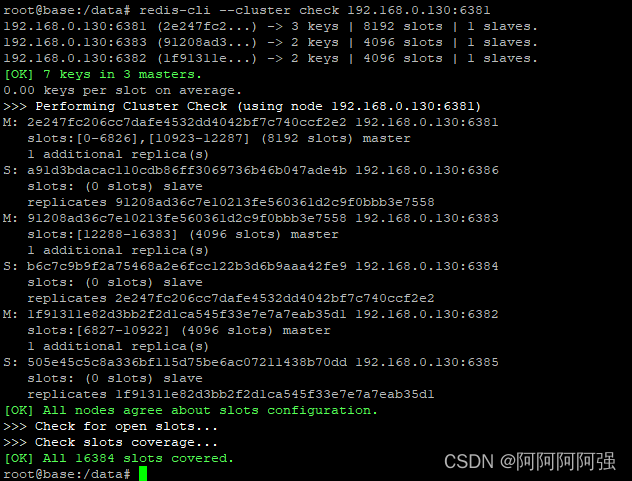
View cluster information
redis-cli --cluster check 192.168.0.130:6381

Failover migration

Current cluster status
 Shut down the engine 6381, Get into 6382 View the cluster

Also, you can still find the newly deposited key

Restart 6381, View the cluster
 What you can see is 6381 After new startup ,6384 Is still master, To revert to the previous 3 Lord 3 From need to start 6381 Then close 6384 Start again in a few minutes 6384
Master slave capacity expansion
High concurrency 3 Lord 3 From being unable to meet the current data needs to be expanded to 4 Lord 4 Since then ,6387(master) Hang on 6388(slave) Next , How to allocate the slot of the hash slot

newly build 2 Nodes
docker run -d --name=redis-node-7 --net host --privileged=true -v /data/server/docker_redis_share/redis-node-7/data:/data redis:6.2.1 --cluster-enabled yes --appendonly yes --port 6387
docker run -d --name=redis-node-8 --net host --privileged=true -v /data/server/docker_redis_share/redis-node-8/data:/data redis:6.2.1 --cluster-enabled yes --appendonly yes --port 6388
Get into 6387 Containers
docker exec -it redis-node-7 /bin/bash
Will add 6387 node ( Empty slot number ) As master The node joins the original cluster

redis-cli --cluster add-node 192.168.0.130:6387 192.168.0.130:6381
View the cluster
redis-cli --cluster check 192.168.0.130:6387

Reassign slot numbers
command redis-cli --cluster reshard IP Address : Port number
redis-cli --cluster reshard 192.168.0.130:63871. After the new node is added, the cards need to be reshuffled ,4 Nodes AA Distribute (16384/4=4096)
2. To assign to the newly added machine ( What you need to input is the node id Number )

Look at the cluster again

Why? 6387 yes 3 A new interval , It used to be continuous : Reallocation costs are too high , So before 3 Each family sets aside a part , from 6381/6382/6383 Separate out the three old nodes 1364 A pit for the new node 6387

Master node 6387 Assign slave nodes 6388
command : redis-cli --cluster add-node ip: new slave port ip: new master port --cluster-slave --cluster-master-id New host node id Number
redis-cli --cluster add-node 192.168.0.130:6388 192.168.0.130:6387 --cluster-slave --cluster-master-id ded65a8e2342b01efc6a8874946fef2412d2f55b
Look at the cluster again
redis-cli --cluster check 192.168.0.130:6381

Finally, the cluster situation

Master slave volume reduction
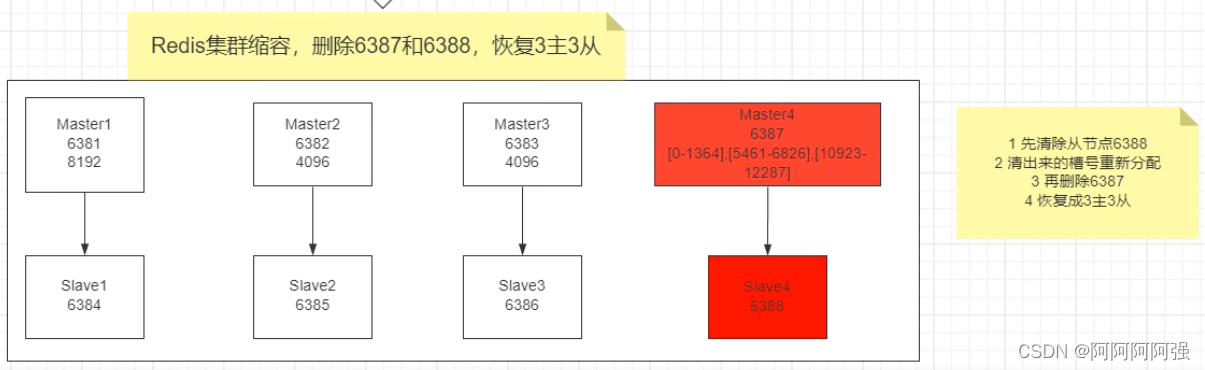
Purpose :6387(master) and 6388(slave) Offline
Detect cluster conditions , Get the slave 6388 node id Number

Delete 6388 From the node
command : redis-cli --cluster del-node ip: Slave port Slave node id
redis-cli --cluster del-node 192.168.0.130:6388 f4a2ede9a29eb7816bb065999a31427cae8f327cCommand execution result

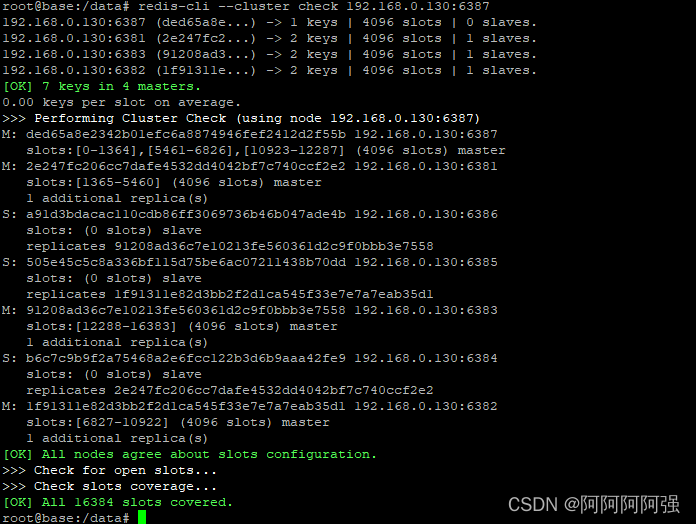 take 6387 Empty the slot number , Redistribution , Assign the cleared slot numbers to 6381
redis-cli --cluster reshard 192.168.0.130:6381

Detect cluster conditions
redis-cli --cluster check 192.168.0.130:6381
( At this time, the 4096 All the slots are pointed out to 6381, It became 8192 Slots , It is equivalent to giving all 6381)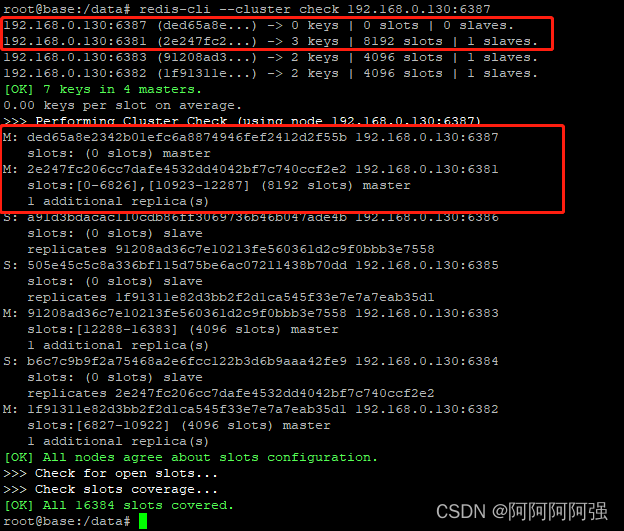
Delete 6387
redis-cli --cluster del-node 192.168.0.130:6387 ded65a8e2342b01efc6a8874946fef2412d2f55b
Detect cluster conditions
redis-cli --cluster check 192.168.0.130:6381
边栏推荐
- Task queue of laravel
- Tupu software intelligent wind power: operation and maintenance of digital twin 3D wind turbine intelligent equipment
- 产线工控安全有什么好的解决方案
- 三维向量场中的通量
- 2018/gan:self attention generating adversarial networks
- Why can't the netherworld fortress machine be remotely connected to the server? What are the ways to solve such problems?
- 如何保证高速公路供电可靠
- 19 MySQL optimizations commonly used in projects
- Postman return value Chinese garbled????
- The input parameter is object, but it was passed as [object object] because it needs to be converted to JSON format
猜你喜欢

《德阳市餐饮服务业油烟污染防治管理办法(征求意见稿)》之创新油烟监管

如何保证高速公路供电可靠
docker redis集群配置

Notepad++实用功能分享(正则行尾行首替换常用方法、文本比对功能等)

Classical Chinese can be programmed???

Stm32-------adc (voltage detection)

老龄化下背景下,综合能效管理平台为医院保驾护航

High imitation Book flag novel flutter edition, learn it

电子元器件行业B2B交易管理系统:提升数据化驱动能力,促进企业销售业绩增长

2022山东健博会,济南国际大健康产业博览会,中国营养健康展
随机推荐
组合总数II[每个元素只能用一次 + 去重复解集]
List<? extends T>和List<?super T>区别
6 大完整开源项目,一次学个够
1004. 最大连续1的个数 III ●●
2018/GAN:Self-Attention Generative Adversarial Networks自我注意生成对抗网络
解决Slf4j日志不打印问题
【Proteus仿真】T6963C驱动PG12864示例(带中英文显示)
BroadcastReciver 和LocalBroadcastManager区别
冶金行业数字化供应链管理系统:平台精益化企业管理,助力产业高质量发展
NLog details
How to ensure reliable power supply of Expressway
Niuke.com: the double pointer problem of receiving rainwater
Several guesses about the design of Tencent conference number
APP性能优化之启动流程分析
CVPR2019/图像翻译:TransGaGa: Geometry-Aware Unsupervised Image-to-Image Translation几何感知的无监督图像到图像的翻译
完整开源项目之诗词吧 APP
Improvement of DC power distribution with open hall current sensor
MySQL导致索引失效的情况详解
19 MySQL optimizations commonly used in projects
【Bug】C# IQueryable里的元素更改不了值