当前位置:网站首页>Teach you how to configure S2E to UDP working mode through MCU
Teach you how to configure S2E to UDP working mode through MCU
2022-07-25 11:42:00 【WIZnet】
W5500S2E-S1 It is an industrial serial port to Ethernet module , Support TCP Server、TCP Client and UDP Three working modes , Serial port baud rate up to 1.152Mbps, And provide the matching upper computer configuration software , It is also available through the web page or AT Command and other ways to easily configure .
W5500S2E-S1 The module integrates all hardware TCP/IP Protocol stack Ethernet interface chip W5500, Network communication is faster 、 Stable 、 Security . Users only need to design the schematic diagram according to the reference recommended in the manual , Can quickly complete the design of hardware circuit , Reduce the difficulty of development , Save development time .
Today, let's actually touch W5500S2E-S1 be based on UDP What is the specific operation process of the working mode , Let's take a look :
1、 Specific operation process
(1)、 Wiring way :
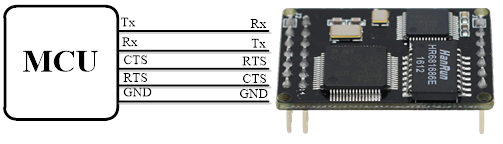
(2)、 Routine description :
open “ adopt MCU To configure S2E by UDP routine ”, The first part of the main program TIM3_Init(); Is to set a time timer for frame interruption , This is because of the routine MCU The serial port of is received through frame interrupt AT Command configuration S2E Of the data returned after .

The second part USARTX_Init(); initialization MCU Serial port used , Here we use USART1_Config(); yes printf function , Used to view debugging information .USART2_Config(); Used for configuration S2E, It should be noted that the configuration parameters of the serial port should be the same as S2E The serial port configuration parameters of are consistent , Otherwise, the configuration fails .

01 /****************************************************
02 Function name : UDP_Mode
03 Shape parameter : nothing
04 Return value : nothing
05 The functionality : To configure S2E by UDP Pattern
06 ****************************************************/
07 volatile uint8_t SendFlag=0;
08 09 void UDP_Mode(void)
10 {
11 uint8_t RecvFlag=1;
12 char *state;
13
14 switch(SendFlag)
15 {
16 case 0:
17 {
18 Usart_Send(USART2,"AT\r\n");
19 // Terminal detection command
20 while(RecvFlag)
21 {
22 if(RX2_Point & FRAME_LEN)
23 // If data is received
24 {
25 state=strstr((char *)RecvBuff,"OK");
26 if(state!=NULL)
27 {
28 RX2_Point=0;
29 // Receive flag position zero
30 RecvFlag=0;
31 // Status flag position zero
32 SendFlag=1;
33 printf("Recv:%s\r\n",RecvBuff);
34 memset(RecvBuff,0,RECV_LEN);
35 }
36 else{
37 SendFlag=100;
38 RecvFlag=0;
39 }
40 }
41 }
42 }break;
43 case 1:
44 {
45 Usart_Send(USART2,"AT+ECHO=0\r\n");
46 // Turn on (1)/ close (0) Echo command
47 RecvFlag=1;
48 while(RecvFlag)
49 {
50 if(RX2_Point & FRAME_LEN)// If data is received
51 {
52 state=strstr((char *)RecvBuff,"OK");
53 if(state!=NULL)
54 {
55 RX2_Point=0;
56 RecvFlag=0;
57 SendFlag=2;
58 printf("Recv:%s\r\n",RecvBuff);
59 memset(RecvBuff,0,RECV_LEN);
60 }
61 else{
62 SendFlag=100;
63 RecvFlag=0;
64 }
65 }
66 }
67 }break;
68 case 2:
69 {
70 Usart_Send(USART2,"AT+C1_OP=2\r\n");
71 // Configure to UDP Mode command
72 RecvFlag=1;
73 while(RecvFlag)
74 {
75 if(RX2_Point & FRAME_LEN)// If data is received
76 {
77 state=strstr((char *)RecvBuff,"OK");
78 if(state!=NULL)
79 {
80 RX2_Point=0;
81 RecvFlag=0;
82 SendFlag=3; // Status flag position zero
83 printf("Recv:%s\r\n",RecvBuff);
84 memset(RecvBuff,0,RECV_LEN);
85 }
86 else{
87 SendFlag=100;
88 RecvFlag=0;
89 }
90 }
91 }
92 }break;
93 case 3:
94 {
95 Usart_Send(USART2,"AT+IP_MODE=1\r\n");
96 // Configure to DHCP Pattern
97 RecvFlag=1;
98 while(RecvFlag)
99 {
100 if(RX2_Point & FRAME_LEN)// If data is received
101 {
102 state=strstr((char *)RecvBuff,"OK");
103 if(state!=NULL)
104 {
105 RX2_Point=0;
106 RecvFlag=0;
107 SendFlag=4; // Status flag position zero
108 printf("Recv:%s\r\n",RecvBuff);
109 memset(RecvBuff,0,RECV_LEN);
110 }
111 else{
112 SendFlag=100;
113 RecvFlag=0;
114 }
115 }
116 }
117 }break;
118 case 4:
119 {
120 Usart_Send(USART2,"AT+C1_PORT=5000\r\n");
121 // Configure the local port number
122 RecvFlag=1;
123 while(RecvFlag)
124 {
125 if(RX2_Point & FRAME_LEN)// If data is received
126 {
127 state=strstr((char *)RecvBuff,"OK");
128 if(state!=NULL)
129 {
130 RX2_Point=0;
131 RecvFlag=0;
132 SendFlag=5; // Status flag position zero
133 printf("Recv:%s\r\n",RecvBuff);
134 memset(RecvBuff,0,RECV_LEN);
135 }
136 else{
137 SendFlag=100;
138 RecvFlag=0;
139 }
140 }
141 }
142 }break;
143 case 5:
144 {
145 Usart_Send(USART2,"AT+C1_CLI_IP1=192.168.1.100\r\n");
146 // Configure remote host IP Address
147 RecvFlag=1;
148 while(RecvFlag)
149 {
150 if(RX2_Point & FRAME_LEN)// If data is received
151 {
152 state=strstr((char *)RecvBuff,"OK");
153 if(state!=NULL)
154 {
155 RX2_Point=0;
156 RecvFlag=0;
157 SendFlag=6; // Status flag position zero
158 printf("Recv:%s\r\n",RecvBuff);
159 memset(RecvBuff,0,RECV_LEN);
160 }
161 else{
162 SendFlag=100;
163 RecvFlag=0;
164 }
165 }
166 }
167 }break;
168 case 6:
169 {
170 Usart_Send(USART2,"AT+C1_CLI_PP1=5000\r\n");
171 // Configure the local remote port number
172 RecvFlag=1;
173 while(RecvFlag)
174 {
175 if(RX2_Point & FRAME_LEN)// If data is received
176 {
177 state=strstr((char *)RecvBuff,"OK");
178 if(state!=NULL)
179 {
180 RX2_Point=0;
181 RecvFlag=0;
182 SendFlag=7; // Status flag position zero
183 printf("Recv:%s\r\n",RecvBuff);
184 memset(RecvBuff,0,RECV_LEN);
185 }
186 else{
187 SendFlag=100;
188 RecvFlag=0;
189 }
190 }
191 }
192 }break;
193 case 7:
194 {
195 Usart_Send(USART2,"AT+START_MODE=0\r\n");
196 // Configure startup mode (0--AT Pattern ,1-- Data patterns )
197 RecvFlag=1;
198 while(RecvFlag)
199 {
200 if(RX2_Point & FRAME_LEN)// If data is received
201 {
202 state=strstr((char *)RecvBuff,"OK");
203 if(state!=NULL)
204 {
205 RX2_Point=0;
206 RecvFlag=0;
207 SendFlag=8; // Status flag position zero
208 printf("Recv:%s\r\n",RecvBuff);
209 memset(RecvBuff,0,RECV_LEN);
210 }
211 else{
212 SendFlag=100;
213 RecvFlag=0;
214 }
215 }
216 }
217 }break;
218 case 8:
219 {
220 Usart_Send(USART2,"AT+EXIT\r\n");
221 // Save the configuration and enter data mode
222 RecvFlag=1;
223 while(RecvFlag)
224 {
225 if(RX2_Point & FRAME_LEN)// If data is received
226 {
227 state=strstr((char *)RecvBuff,"OK");
228 if(state!=NULL)
229 {
230 RX2_Point=0;
231 RecvFlag=0;
232 SendFlag=99; // Status flag position zero
233 printf("Recv:%s\r\n",RecvBuff);
234 memset(RecvBuff,0,RECV_LEN);
235 }
236 else{
237 SendFlag=100;
238 RecvFlag=0;
239 }
240 }
241 }
242 }break;
243 case 99:
244 {
245 printf("UDP Config Success!\r\n");
246 Config_OK=1;
247 }
248 default:
249 RecvFlag=100;break;
250 case 100:
251 {
252 printf("UDP Config Fail!\r\n");
253 Config_OK=1;
254 }break;
255 }
256 }
In the next article “ Teach you how to pass MCU take S2E Configure to TCP Server Working mode of ” in , I will continue to share with you WIZnet W5500S2E-S1 Function realization , Please wait and see .
WIZnet Official website :http://www.iwiznet.cn/
More Internet of things applications , Focus on WIZnet Official wechat :

边栏推荐
- Nowcodertop1-6 - continuous updating
- Use three.js to realize the cool cyberpunk style 3D digital earth large screen
- LVS负载均衡之LVS-NAT搭建Web群集
- 大话DevOps监控,团队如何选择监控工具?
- Detailed explanation of lvs-nat and lvs-dr modes of LVS load balancing
- Summary of combination problems of Li Kou brush questions (backtracking)
- Reinforcement learning (IV)
- My colleague looked at my code and exclaimed: how can I use a singleton in unity
- W5500通过上位机控制实现调节LED灯带的亮度
- The principle analysis of filter to solve the request parameter garbled code
猜你喜欢

相似矩阵,可对角化条件
W5500在处于TCP_Server模式下,在交换机/路由器网络中无法ping通也无法通讯。

Reinforcement learning (IV)

WIZnet嵌入式以太网技术培训公开课(免费!!!)

Small program of vegetable distribution in community

【mysql学习08】
如何解决“W5500芯片在TCP_Client模式下,断电重启之后无法立即连接到服务器”的问题

Activity registration | play with kubernetes container service improvement class officially opened!
There is a newline problem when passing shell script parameters \r

Mlx90640 infrared thermal imager temperature measurement module development notes (V)
随机推荐
Shell - Chapter 6 exercise
Oracle parsing XML with the same name
The most efficient note taking method in the world (change your old version of note taking method)
flinksql client 连接kafka select * from table没有数据报错,如何解决?
Review recitation finishing version
Shell fourth day homework
Esp8266 uses drv8833 drive board to drive N20 motor
SQL language (V)
cookie and session
世界上最高效的笔记方法(改变你那老版的记笔记方法吧)
Reptile foundation I
Multiply Floyd "suggestions collection"
[dynamic planning] 70. Climbing stairs
硬件外设=maixpy3
Miidock Brief
SQL language (III)
教你如何通过MCU将S2E配置为UDP的工作模式
绘图==PYQT5
SQL language (II)
Greedy problem 01_ Activity arrangement code analysis