当前位置:网站首页>Koa frame
Koa frame
2022-06-25 12:54:00 【BloggerM】
Koa frame
know Koa
- We have learned before express, Another very popular Node Web The server framework is Koa.
- Koa Official introduction :
koa:next generation web framework for node.js;koa:node.jsThe next generation ofwebframe ;
- in fact ,
koayesexpressA new one developed by the same teamWebframe :- At present, the core developers of the team
TJOur main energy is also in maintenanceKoa,expressIt has been handed over to the team for maintenance ; KoaFor the purpose ofWebApplications andAPIProvide smaller 、 Richer and stronger capabilities ;- be relative to
expressIt has stronger asynchronous processing ability ( We will compare it later ); KoaThe core code of is1600+That's ok , Is a more lightweight framework , We can install and use middleware as needed ;
- At present, the core developers of the team
- Actually, I learned
expressafter , StudykoaThe process is very simple ;
Koa First experience
Let's experience
koaOfWebThe serverCreate a new folder on the desktop
learn_koaOpen the terminal initialization project
npm init -ystay
package.jsonThe configuration script{ "name": "learn_koa", "version": "1.0.0", "description": "", "main": "index.js", "scripts": { "start": "nodemon ./src/app.js" }, "keywords": [], "author": "", "license": "ISC", "dependencies": { "koa": "^2.13.4", "nodemon": "^2.0.16" } }Create a new file according to the script
src, In the filesrcNext, create a new folderapp.jsinstall
koaframenpm i koa
Start project
npm start
koaThe registered middleware provides two parameters :ctx: Context (Context) object ;koaDid not likeexpressequally , takereqandresSeparate , But asctxProperties of ;ctxRepresents the context objects requested in turn ;ctx.request: Get request object ;ctx.response: Get the response object ;const Koa = require("koa"); const app = new Koa(); // context Context object // Contains two main objects request responst app.use((context, next) => { console.log(context); console.log(" Common middleware "); }); app.listen(8888, () => { console.log(" The server is turned on successfully "); });
next: It's essentially adispatch, Similar to the previousnext;
Koa middleware
koaBy creatingappobject , Registered middleware can only be registered throughuseMethod :KoaIt didn't providemethodsTo register middleware ;- There is no provision for
pathMiddleware to match the path ;
- But in real development, how do we compare the path and
methodSeparation ?- Mode one : according to
requestJudge for yourself ; - Mode two : Use third-party routing middleware ;
- Mode one : according to
Use of routes
koaThe official does not provide us with a routing library , We can choose a third-party library :koa-routernpm install koa-router
We can encapsulate a
user.router.jsThe file of :// router/user.js const Router = require("koa-router"); const userRouter = new Router({ prefix: "/user", }); userRouter.get("/", (ctx) => { // In response to the results ctx.body = " User list "; }); userRouter.post("/", (ctx) => { // In response to the results ctx.body = " Add success "; }); userRouter.delete("/", (ctx) => { // In response to the results ctx.body = " Delete successful "; }); userRouter.patch("/", (ctx) => { // In response to the results ctx.body = " Modification successful "; }); module.exports.userRouter = userRouter;stay
appLieutenant generalrouter.routes()Register as middleware :const Koa = require("koa"); const { userRouter } = require("./router/user"); const app = new Koa(); // Register routing middleware // userRouter.routes() Load routing rules // userRouter.allowedMethods() Respond correctly to requests that are not implemented or used app.use(userRouter.routes()).use(userRouter.allowedMethods()); app.listen(8888, () => { console.log(" The server is turned on successfully "); });Be careful :
allowedMethodsUsed to judge a certainmethodDo you support :- If we ask
get, Then it's a normal request , Because we have realizedget; - If we ask
put、delete、patch, Then an error will be reported automatically :Method Not Allowed, Status code :405; - If we ask
link、copy、lock, Then an error will be reported automatically :Not Implemented, Status code :501;
- If we ask
Argument parsing :params - query
Request address :
localhost:8888/user/2obtain
params:// router/user.js const Router = require("koa-router"); const userRouter = new Router({ prefix: "/user", }); userRouter.get("/:id", (ctx) => { // params Mode reference console.log(ctx.params.id); // In response to the results ctx.body = " User list "; }); module.exports.userRouter = userRouter;
Request address :
localhost:8888/user?name= Zhang San &age=21obtain
query:// router/user.js const Router = require("koa-router"); const userRouter = new Router({ prefix: "/user", }); userRouter.get("/", (ctx) => { // query Mode reference console.log(ctx.query); // In response to the results ctx.body = " User list "; }); module.exports.userRouter = userRouter;
Argument parsing :json
Request address :
http://localhost:8888/userbodyyesjsonFormat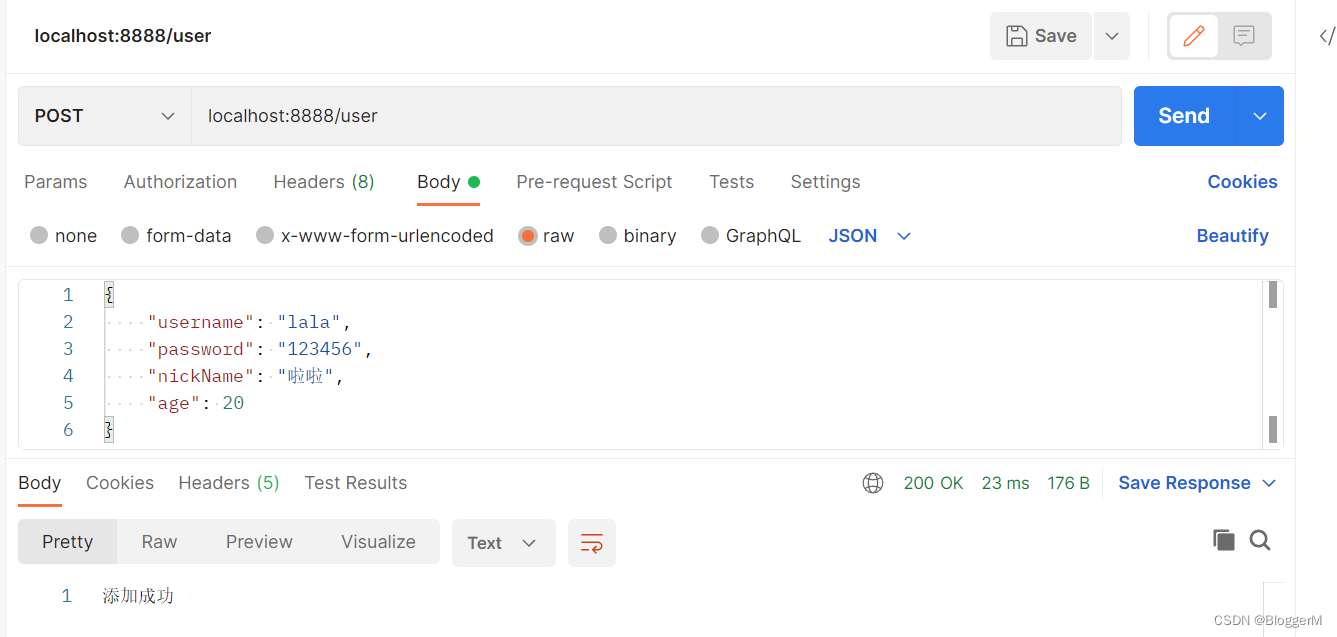
obtain
jsondata :Installation dependency :
npm install koa-bodyparser;
Use
koa-bodyparserMiddleware ;At the entrance file
index.jsinconst Koa = require("koa"); const bodyParser = require("koa-bodyparser"); const { userRouter } = require("./router/user"); const app = new Koa(); // bodyParser() analysis json Data middleware app.use(bodyParser()); // Register routing middleware // userRouter.routes() Load routing rules // userRouter.allowedMethods() Respond correctly to requests that are not implemented or used app.use(userRouter.routes()).use(userRouter.allowedMethods()); app.listen(8888, () => { console.log(" The server is turned on successfully "); });stay
routerBelow the fileuser.jsin// router/user.js const Router = require("koa-router"); const userRouter = new Router({ prefix: "/user", }); userRouter.post("/", (ctx) => { // json Mode reference console.log(ctx.request.body); // In response to the results ctx.body = " Add success "; }); module.exports.userRouter = userRouter;
Argument parsing :x-www-form-urlencoded
Request address :
http://localhost:8888/userbodyyesx-www-form-urlencodedFormat :
obtain
jsondata :( andjsonIt's consistent )Installation dependency :
npm install koa-bodyparser;Use
koa-bodyparserMiddleware ;At the entrance file
index.jsinconst Koa = require("koa"); const bodyParser = require("koa-bodyparser"); const { userRouter } = require("./router/user"); const app = new Koa(); // bodyParser() analysis json Data middleware app.use(bodyParser()); // Register routing middleware // userRouter.routes() Load routing rules // userRouter.allowedMethods() Respond correctly to requests that are not implemented or used app.use(userRouter.routes()).use(userRouter.allowedMethods()); app.listen(8888, () => { console.log(" The server is turned on successfully "); });stay
routerBelow the fileuser.jsin// router/user.js const Router = require("koa-router"); const userRouter = new Router({ prefix: "/user", }); userRouter.put("/", (ctx) => { // json Mode reference console.log(ctx.request.body); // In response to the results ctx.body = " Modification successful "; }); module.exports.userRouter = userRouter;
Argument parsing :form-data
Request address :
http://localhost:8888/user/uploadbodyyesform-dataFormat
analysis body Data in , We need to use multer
Installation dependency :
npm install koa-multer;
Use
multermiddleware ;// router/user.js const Router = require("koa-router"); const multer = require("koa-multer"); // Pay attention to what I have installed here nanoid yes 3.x Version of , Other versions may report errors const { nanoid } = require("nanoid"); const { extname } = require("path"); const userRouter = new Router({ prefix: "/user", }); const storage = multer.diskStorage({ destination(req, file, cb) { cb(null, "uploads/"); }, filename(req, file, cb) { // file name const fileName = nanoid(); // The suffix of the file const extName = extname(file.originalname); cb(null, fileName + extName); }, }); // Upload files const upload = multer({ storage, }); userRouter.post("/upload", upload.single("file"), (ctx) => { // form-data Mode reference // file information console.log(ctx.req.file); // The form data console.log(ctx.req.body); // In response to the results ctx.body = " File upload succeeded "; }); module.exports.userRouter = userRouter;
Data response
Output results :
bodySet the response body to one of the following :string: String datactx.response.body = "hello world";Buffer:BufferdataStream: Stream dataObject|| Array: Object or array// Object ctx.body = { name: "why", age: 18, height: 1.88, };// Array ctx.body = ["abc", "def", "nba"];null: Don't output anythingIf
response.statusNot set yet ,KoaWill automatically set the status to200or204.
Request status :
statusctx.status = 201; ctx.response.status = 204;
Static servers
koa There is no built-in deployment related functionality , So we need to use a third-party library :
npm install koa-static
The deployment process is similar to
express:const Koa = require("koa"); const bodyParser = require("koa-bodyparser"); const static = require("koa-static"); const { userRouter } = require("./router/user"); const app = new Koa(); // bodyParser() analysis json Data middleware app.use(bodyParser()); app.use(static("./dist/index.html")); // Register routing middleware // userRouter.routes() Load routing rules // userRouter.allowedMethods() Respond correctly to requests that are not implemented or used app.use(userRouter.routes()).use(userRouter.allowedMethods()); app.listen(8888, () => { console.log(" The server is turned on successfully "); });
and express contrast
- After learning the two frameworks , We should have found
koaandexpressThe difference between : - In terms of Architecture Design :
expressIs complete and powerful , It helps us build in many easy-to-use functions ;koaIs simple and free , It only contains the most core functions , There will be no restrictions on our use of other middleware .- Even in
appZhonglian's most basicget、postDidn't provide us with ; - We need to judge the request mode or other functions by ourselves or the origin ;
- Even in
- because
expressandkoaThe core of the framework is middleware :- But their middleware actually , The execution mechanism of their middleware is different , Especially when asynchronous operations are included in a middleware ;
边栏推荐
猜你喜欢

Elemntui's select+tree implements the search function
Singleton mode in PHP to reduce memory consumption

三入职场!你可以从我身上学到这些(附毕业Vlog)

初识CANOpen

(4) Pyqt5 tutorial -- > Custom signal and slot (super winding...)
First acquaintance with CANopen
顺序表的折半查找法

Geospatial search - > R tree index

Possible problems when idea encounters errors occurred while compiling module (solved)

Jeecgboot startup popup configuration is still incorrect
随机推荐
@Scheduled implementation of scheduled tasks (concurrent execution of multiple scheduled tasks)
JVM参数解释
Node child processes and threads
Total number of MySQL statistics, used and unused
Jupyter Notebook主题字体设置及自动代码补全
20220620 面试复盘
为何数据库也云原生了?
yolov5训练使用的负样本图片
Guess Tongyuan B
(3) Pyqt5 tutorial -- > signal and slot preliminary test
百度搜索稳定性问题分析的故事
架构师必备的七种能力
5 kinds of viewer for browser
Differences between JS and JQ operation objects
Laravel multi project mutual access
Write regular isosceles triangle and inverse isosceles triangle with for loop in JS
Elemtnui select control combined with tree control to realize user-defined search method
MySQL and excel tables importing database data (Excel for MySQL)
架构师需要具备的能力
Methods of strings in JS charat(), charcodeat(), fromcharcode(), concat(), indexof(), split(), slice(), substring()