当前位置:网站首页>Use of file class filenamefilter & filefilter in io
Use of file class filenamefilter & filefilter in io
2022-06-25 00:42:00 【Aiqing】
File Class Basics :
1. structure File Class object (3 Ways of planting )
		File a=new File("E:\\java\\day22\\day22");
		System.out.println(a);
		File b=new File("E:\\java\\day22","day22");
		System.out.println(b);
		File c=new File("E:\\java\\day22");
		File d=new File(c,"day22");
		System.out.println(d);
 result :	E:\java\day22\day22
		E:\java\day22\day22
		E:\java\day22\day22
2.listFiles() Methods to introduce : Get all files in a directory or folders in a directory 
		File a=new File("E:\\java\\day22\\day22");
		String [] list=a.list();// Get the name of the current file and folder in the directory .
		for(String k:list) {

			System.out.println(k);
		}
		System.out.println();

		File[] list2=a.listFiles();// Get the current file and file object in the directory , Just get the file object
		for(File k:list2) {

			System.out.println(k.getName());//.getname() See common methods at the end of the article
			// If not getName The result will be prefixed with the pathname E:\java\day22\day22\
		}
		System.out.println();
 The two results are the same :	250.txt
				day22-(File) Lesson plans .doc
				day22-File.pptx
				day22_code
				day22_source
				day22_video
				day22 Homework & preview
				IO The first part .xmind
FilenameFilter Use : It is mainly used to filter the files needed
public class test2 {

	public static void main(String[] args) {

		File a=new File("E:\\java\\day22\\day22");
		File[] b=a.listFiles(new myfilenamefilter());// Get the file with the specified extension , Due to the extension filtering for all files , So calling methods requires passing filters
		for(File c:b) {

			System.out.println(c);
		}
	}
}
// Custom class inheritance  FilenameFilter Interface , You can write filter conditions for any file you need
class myfilenamefilter implements FilenameFilter{

	public boolean accept(File dir, String name) {

		return name.endsWith(".txt");
	}
}
 result :250.txt
FileFilter Use : It is mainly used to filter the directories needed for file directory filtering
public class test3 {

	public static void main(String[] args) {

		File a=new File("E:\\java\\day22\\day22");
		File[] b=a.listFiles(new myfilefilter());
		for(File k:b) {

			System.out.println(k.getName());
		}
	}
}
class myfilefilter implements FileFilter{

	public boolean accept(File path) {

		return path.isDirectory();
	}
}
 result :	day22_code
		day22_source
		day22_video
		day22 Homework & preview
File Common methods
One 、 Get file information class 
Code demonstration :
		File a=new File("E:\\java\\day22\\day22");
		String abspath=a.getAbsolutePath();
		String path=a.getPath();
		String filename=a.getName();
		long size=a.length();
		System.out.println("abspath:"+abspath);
		System.out.println("path:"+path);
		System.out.println("fname:"+filename);
		System.out.println("size:"+size);
 result :
		abspath:E:\java\day22\day22
		path:E:\java\day22\day22
		fname:day22
		size:4096
Two 、 Creation and deletion of files and folders 
		File a=new File("E:\\java\\day22\\day22");
		File x=new File("E:\\java\\day22\\day22\\nice");
		File java=new File(a,"250.txt");
		boolean b1=java.createNewFile();// If the file is not created, return ture, If the file exists, it will not be created and returned false
		System.out.println("b1:"+b1);
		boolean b2=java.exists();
		System.out.println("b2:"+b2);
		boolean x1=x.mkdir();
		System.out.println(x1);
		System.out.println(java.isFile());
		System.out.println(a.isDirectory());
 result :
b1:false// Because it has been run once before and has been created, it returns false
b2:true
true
true
true
Effect in folder :
边栏推荐
- Xcode preview displays a bug in the content of the list view and its solution
- iNFTnews | 国内NFT发展仅限于数字藏品吗?
- Kibana installation via kubernetes visual interface (rancher)
- Tiktok wallpaper applet, starlight wallpaper applet version 2.0, upgraded version
- The acceleration of 100 km is only 5.92 seconds, and the willanda high-performance version leads with the strength of high-energy products
- Single blind box removal, social blind box and friend blind box program source code
- Android SQLite database
- [issue 25] face to face experience of golang Engineer in the rightmost social recruitment
- Adding, deleting, modifying and checking in low build code
- ros(25):rqt_ image_ View reports an error unable to load plugin for transport 'compressed', error string
猜你喜欢

ros(25):rqt_ image_ View reports an error unable to load plugin for transport 'compressed', error string

Collective example
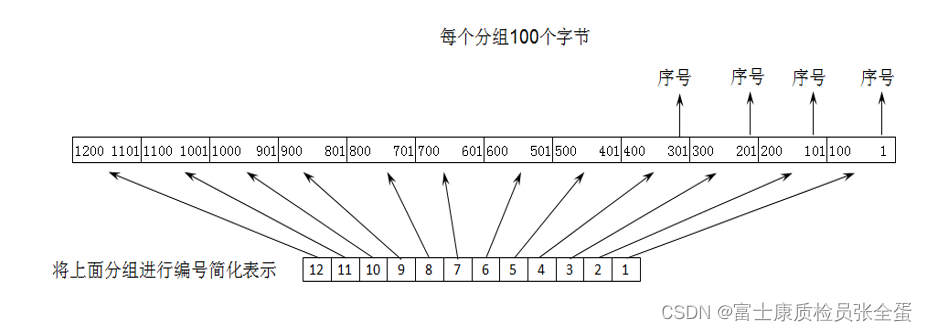
传输层 以字节为单位的滑动窗口技术

【Redis实现秒杀业务②】超卖问题的解决方案

Source code analysis the problem that fragments cannot be displayed in the custom ViewGroup
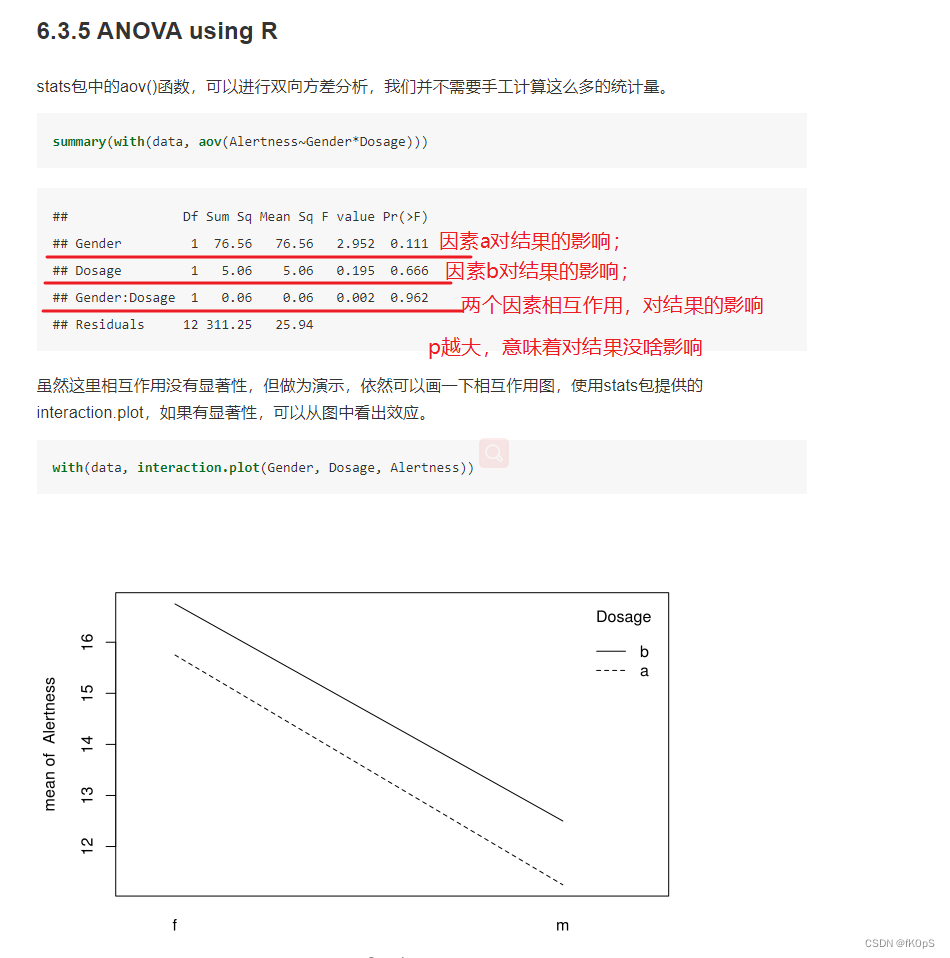
What is the difference between one way and two way ANOVA analysis, and how to use SPSS or prism for statistical analysis
![[leaderboard] Carla leaderboard leaderboard leaderboard operation and participation in hands-on teaching](/img/bd/b176e93ee6fa2125f021bcad3025c2.png)
[leaderboard] Carla leaderboard leaderboard leaderboard operation and participation in hands-on teaching

Apk slimming compression experience
Microsoft won the title of "leader" in the magic quadrant of Gartner industrial Internet of things platform again!

VNC viewer remote connection raspberry pie without display

随机推荐
Xcode预览(Preview)显示List视图内容的一个Bug及解决
Eliminate duplicate dependencies
Svg line animation background JS effect
Helm chart仓库操作
百公里加速仅5.92秒,威兰达高性能版以高能产品实力领跑
Unmanned driving: Some Thoughts on multi-sensor fusion
从数字化过渡到智能制造
【Redis实现秒杀业务④】一人一单,不可重复购买
Qiniu cloud uploads video to get the first frame of video
How to use promise Race() and promise any() ?
ros(25):rqt_ image_ View reports an error unable to load plugin for transport 'compressed', error string
Discrete mathematics and its application detailed explanation of exercises in the final exam of spring and summer semester of 2018-2019 academic year
@mysql
Jar package merging using Apache ant
[leaderboard] Carla leaderboard leaderboard leaderboard operation and participation in hands-on teaching
I suddenly find that the request dependent package in NPM has been discarded. What should I do?
December 6, 2019 what happens after the browser enters a URL
Interesting checkbox counters
What is the difference between one way and two way ANOVA analysis, and how to use SPSS or prism for statistical analysis
腾讯云国际云服务器网络访问丢包问题解决办法