Problem description
In the first two blog posts , Yes NodeJS Express application Use MSAL + AAD Realize user login and obtain user information , obtain Authorization Information ( ID Token, Access Token).
- 【Azure Application service 】NodeJS Express + MSAL Application implementation AAD Integrated login and deployment in App Service Linux Implementation steps in the environment
- 【Azure Application service 】NodeJS Express + MSAL Application implementation AAD Log in and get AccessToken -- cca.acquireTokenByCode(tokenRequest)
In the current blog post , We will achieve the following objectives :
1) by NodeJS API Application configuration Bearer Token Verify components passport and passport-azure-ad
2) Implementations use idToken Verify and access API

Implementation steps
At the completion of Azure AD Register the application configuration in and according to the blog “ NodeJS Express + MSAL Application implementation AAD Log in and get AccessToken -- cca.acquireTokenByCode(tokenRequest): https://www.cnblogs.com/lulight/p/16357246.html” After the user logs in to the front-end application , Refer to the official example “Enable authentication in your own Node.js web API by using Azure Active Directory B2C : https://docs.microsoft.com/en-us/azure/active-directory-b2c/enable-authentication-in-node-web-app-with-api”.
First step : Download sample code
git clone https://github.com/Azure-Samples/active-directory-b2c-javascript-nodejs-webapi.git
Install app dependencies
cd active-directory-b2c-javascript-nodejs-webapi

npm install

npm update
The downloaded file structure is :

The second step : modify config.json Document and index.js Medium identityMetadata value
options Middle is BearerStrategy Configuration parameters for , Because it is not applicable at present AAD B2C, But directly AAD, therefore isB2C It needs to be set to false,
const options = {
    identityMetadata: 'https://login.partner.microsoftonline.cn/xxxxxxxx-66d7-xxxx-8f9f-xxxxxxxxxxxx/v2.0/.well-known/openid-configuration',
    clientID: ##clientID,
    audience: ##clientID,
    validateIssuer: true,
    loggingLevel: 'info',
    passReqToCallback: false
}
Because the test used in the reference document AAD B2C To certify Token, In this example, we use AAD To certify Token, So many parameter configurations are slightly different . BearerStrategy The detailed parameters of are as follows :
identityMetadata(Required)The metadata endpoint provided by the Microsoft Identity Portal that provides the keys and other important information at runtime. Examples:
- v1 tenant-specific endpoint
https://login.microsoftonline.com/your_tenant_name.onmicrosoft.com/.well-known/openid-configuration https://login.microsoftonline.com/your_tenant_guid/.well-known/openid-configuration- v1 common endpoint
https://login.microsoftonline.com/common/.well-known/openid-configuration- v2 tenant-specific endpoint
https://login.microsoftonline.com/your_tenant_name.onmicrosoft.com/v2.0/.well-known/openid-configuration https://login.microsoftonline.com/your_tenant_guid/v2.0/.well-known/openid-configuration- v2 common endpoint
https://login.microsoftonline.com/common/v2.0/.well-known/openid-configurationFor B2C, you can only use v2 tenant-specific endpoint.
clientID(Required)The client ID of your application in AAD (Azure Active Directory)
passReqToCallback(Conditional)Required to set to true if using
reqas the first paramter in the verify function, default value is false. See section 4.2.1.3 for more details.isB2C(Conditional)Required to set to true if you are using B2C tenant.
policyName(Conditional)Required if you are using B2C tenant. It is a string starting with 'B2C_1_' (case insensitive).
validateIssuer(Conditional)Required to set to false if you don't want to validate issuer, default value is true. We validate the
issclaim in id_token against user providedissuervalues and the issuer value we get from tenant-specific endpoint. If you use common endpoint foridentityMetadataand you want to validate issuer, then you must provideissuer, or providetenantIdOrNamein passport.authenticate.issuer(Conditional)This can be a string or an array of strings. See
validateIssuerfor the situation that requiresissuer.allowMultiAudiencesInToken(Conditional)Required if you allow access_token whose
audclaim contains multiple values.scope(Optional)This value is an array of scopes you accept. If this value is provided, we will check if the token contains one of these accepted scopes. If this value is not provided, we won't check token scopes.
audience(Optional)Must be a string or an array of strings. We invalidate the
audclaim in access_token againstaudience. The default value foraudienceisclientID.loggingLevel(Optional)Logging level. 'info', 'warn' or 'error'.
loggingNoPII(Optional)If this is set to true, no personal information such as tokens and claims will be logged. The default value is true.
clockSkew(Optional)This value is the clock skew (in seconds) allowed in token validation. It must be a positive integer. The default value is 300 seconds.
proxy(optional)
This value is the proxy settings object: { port: 'proxyport', host: 'proxyhost', protocol: 'http' }
Document address :https://github.com/AzureAD/passport-azure-ad#42-bearerstrategy
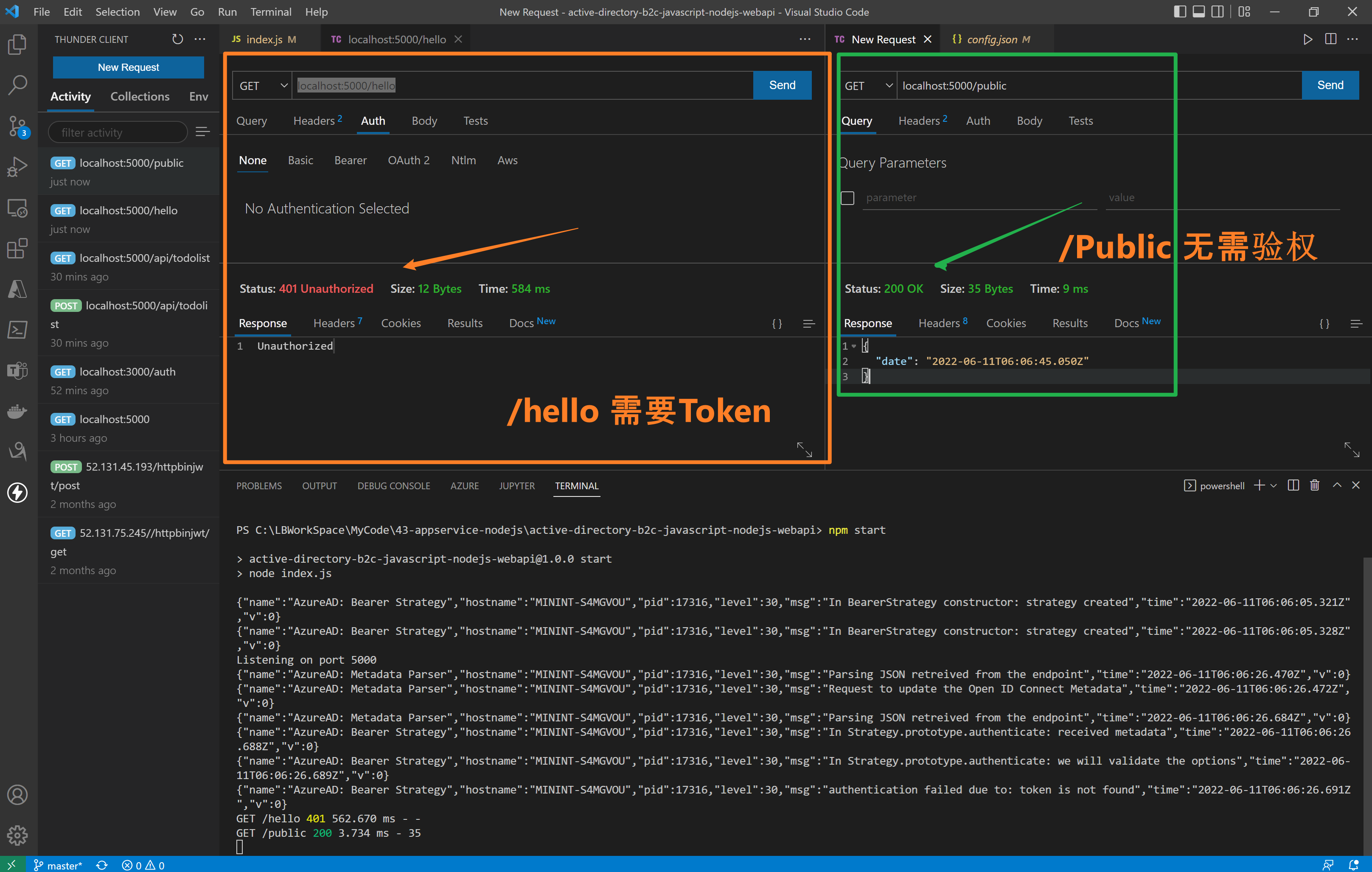
The third step : visit API Interface (/hello need Authorization, /public Unwanted Authorization)
stay index.js In the code , Two interfaces are implemented /hello and /public. /hello Interface added passport.authenticate authentication , Access needs to carry Authorization (JWT Token), and /public No certification is required .
//<ms_docref_protected_api_endpoint>
// API endpoint, one must present a bearer accessToken to access this endpoint
app.get('/hello',
    passport.authenticate('oauth-bearer', {session: false}),
    (req, res) => {
        console.log(req.headers.authorization);
        console.log('Validated claims: ', req.authInfo);


        // Service relies on the name claim.
        res.status(200).json({'name': req.authInfo['name']});
    }
);
//</ms_docref_protected_api_endpoint>

//<ms_docref_anonymous_api_endpoint>
// API anonymous endpoint, returns a date to the caller.
app.get('/public', (req, res) => res.send( {'date': new Date() } ));
//</ms_docref_anonymous_api_endpoint>
Verification effect :
Step four : verification idToken and accessToken
On the front end UI After logging in, you can get Token Information , http://localhost:3000/auth

Verify presentation animation :
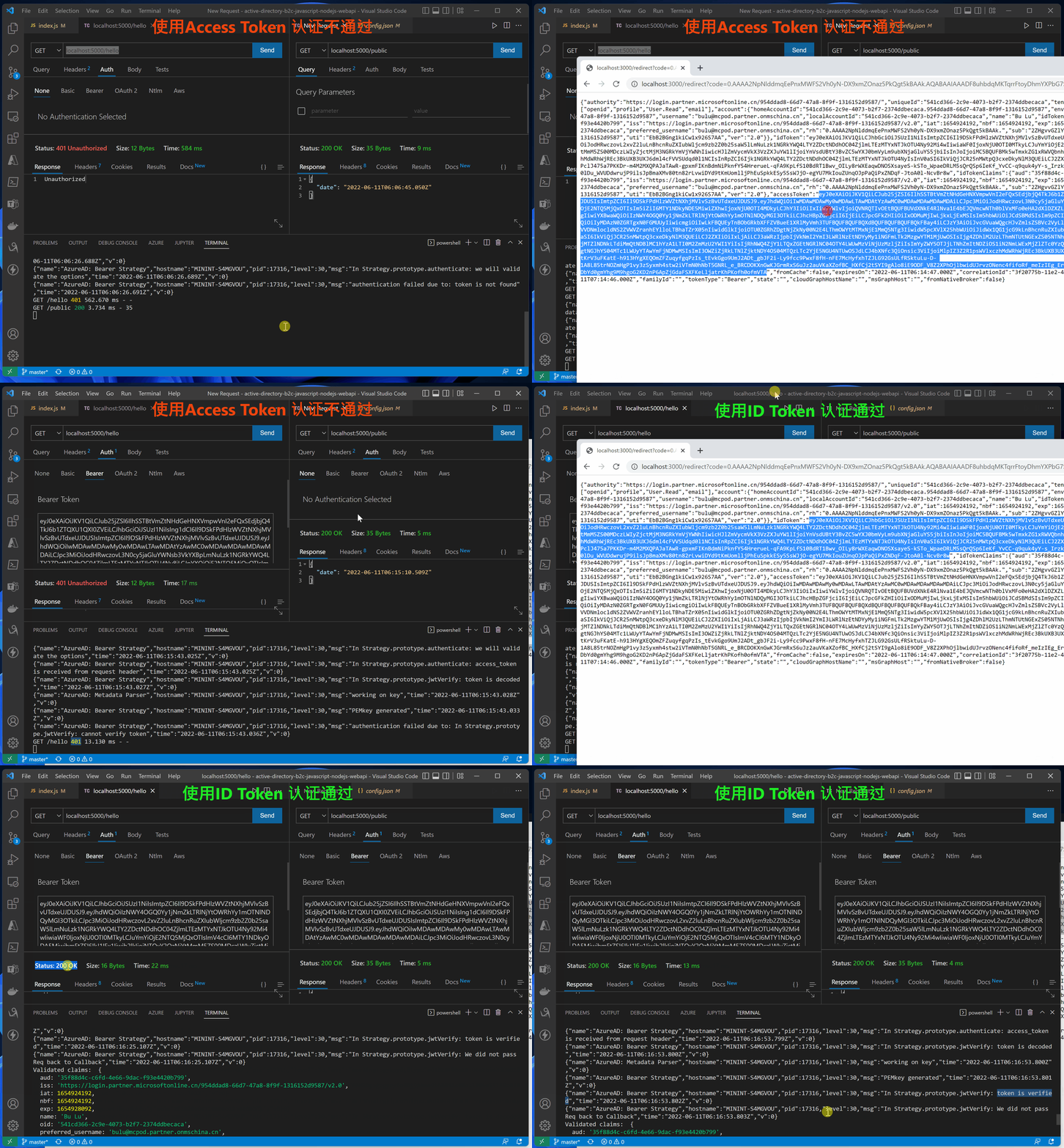
Use accessTokne Error log for
{"name":"AzureAD: Bearer Strategy","hostname":"MININT-S4MGVOU","pid":17316,"level":30,"msg":"In Strategy.prototype.authenticate: received metadata","time":"2022-06-11T06:15:43.024Z","v":0}
{"name":"AzureAD: Bearer Strategy","hostname":"MININT-S4MGVOU","pid":17316,"level":30,"msg":"In Strategy.prototype.authenticate: we will validate the options","time":"2022-06-11T06:15:43.025Z","v":0}
{"name":"AzureAD: Bearer Strategy","hostname":"MININT-S4MGVOU","pid":17316,"level":30,"msg":"In Strategy.prototype.authenticate: access_token is received from request header","time":"2022-06-11T06:15:43.025Z","v":0}
{"name":"AzureAD: Bearer Strategy","hostname":"MININT-S4MGVOU","pid":17316,"level":30,"msg":"In Strategy.prototype.jwtVerify: token is decoded","time":"2022-06-11T06:15:43.027Z","v":0}
{"name":"AzureAD: Metadata Parser","hostname":"MININT-S4MGVOU","pid":17316,"level":30,"msg":"working on key","time":"2022-06-11T06:15:43.028Z","v":0}
{"name":"AzureAD: Bearer Strategy","hostname":"MININT-S4MGVOU","pid":17316,"level":30,"msg":"PEMkey generated","time":"2022-06-11T06:15:43.033Z","v":0}
{"name":"AzureAD: Bearer Strategy","hostname":"MININT-S4MGVOU","pid":17316,"level":30,"msg":"authentication failed due to: In Strategy.prototype.jwtVerify: cannot verify token","time":"2022-06-11T06:15:43.036Z","v":0}
GET /hello 401 1.556 ms - -
Use idToken Correct log for
{"name":"AzureAD: Bearer Strategy","hostname":"MININT-S4MGVOU","pid":17316,"level":30,"msg":"In Strategy.prototype.authenticate: received metadata","time":"2022-06-11T06:16:25.102Z","v":0}
{"name":"AzureAD: Bearer Strategy","hostname":"MININT-S4MGVOU","pid":17316,"level":30,"msg":"In Strategy.prototype.authenticate: we will validate the options","time":"2022-06-11T06:16:25.102Z","v":0}
{"name":"AzureAD: Bearer Strategy","hostname":"MININT-S4MGVOU","pid":17316,"level":30,"msg":"In Strategy.prototype.authenticate: access_token is received from request header","time":"2022-06-11T06:16:25.103Z","v":0}
{"name":"AzureAD: Bearer Strategy","hostname":"MININT-S4MGVOU","pid":17316,"level":30,"msg":"In Strategy.prototype.jwtVerify: token is decoded","time":"2022-06-11T06:16:25.104Z","v":0}
{"name":"AzureAD: Metadata Parser","hostname":"MININT-S4MGVOU","pid":17316,"level":30,"msg":"working on key","time":"2022-06-11T06:16:25.104Z","v":0}
{"name":"AzureAD: Bearer Strategy","hostname":"MININT-S4MGVOU","pid":17316,"level":30,"msg":"PEMkey generated","time":"2022-06-11T06:16:25.105Z","v":0}
{"name":"AzureAD: Bearer Strategy","hostname":"MININT-S4MGVOU","pid":17316,"level":30,"msg":"In Strategy.prototype.jwtVerify: token is verified","time":"2022-06-11T06:16:25.107Z","v":0}
{"name":"AzureAD: Bearer Strategy","hostname":"MININT-S4MGVOU","pid":17316,"level":30,"msg":"In Strategy.prototype.jwtVerify: We did not pass Req back to Callback","time":"2022-06-11T06:16:25.107Z","v":0}
Validated claims:  {
  aud: 'xxxxx-c6fd-xxx-9dac-xxxxxx',
  iss: 'https://login.partner.microsoftonline.cn/xxxxx-c6fd-xxx-9dac-xxxxxx/v2.0',
  iat: 1654924192,
  nbf: 1654924192,
  exp: 1654928092,
  name: 'your name here',
  oid: 'xxxxx-c6fd-xxx-9dac-xxxxxx',
  preferred_username: '[email protected]',
  rh: '0.xxxxxxxxx-xxxxxxxxxxxxxx.',
  sub: 'xxxxxxxxxxxxxxxxxxxxxxxxxxxx',
  tid: 'x-66d7-47a8-xx-xxx',
  uti: 'xxxxxxxxxxxxxxxxxxxxxxxxx',
  ver: '2.0'
}
GET /hello 200 11.557 ms - 16
[ Optional ] Step five : modify AAD Sign up for the app accessTokenAcceptedVersion
Because China AAD Currently generated Token by OAuth v1.0, And in the API Application identityMetadata It uses v2.0 Of openid-configration. So you need to be in ADD Modify the manifest file of the current registered application (Mainfest) in

- Sign in Azure Gateway , choice Azure AD.
- Click on App registrations And choose your own application , As in this example “ExpressWebApp”
- Entry application Overview After the page , Select left navigation “Manifest” List page . modify accessTokenAcceptedVersion The value of is 2, Save it .
Reference material
Configure authentication in a sample Node.js web API by using Azure Active Directory B2C: https://docs.microsoft.com/en-us/azure/active-directory-b2c/configure-authentication-in-sample-node-web-app-with-api#step-4-get-the-web-api-sample-code
Microsoft Azure Active Directory Passport.js Plug-In:https://github.com/AzureAD/passport-azure-ad#42-bearerstrategy
Tutorial: Sign in users and acquire a token for Microsoft Graph in a Node.js & Express web app: https://docs.microsoft.com/en-us/azure/active-directory/develop/tutorial-v2-nodejs-webapp-msal
Example: Acquiring tokens with ADAL Node vs. MSAL Node:https://docs.microsoft.com/en-us/azure/active-directory/develop/msal-node-migration#example-acquiring-tokens-with-adal-node-vs-msal-node
NodeJS Express + MSAL Application implementation AAD Integrated login and deployment in App Service Linux Implementation steps in the environment :https://www.cnblogs.com/lulight/p/16353145.html
NodeJS Express + MSAL Application implementation AAD Log in and get AccessToken -- cca.acquireTokenByCode(tokenRequest):https://www.cnblogs.com/lulight/p/16357246.html


![[process blocks and methods of SystemVerilog] ~ domain, always process block, initial process block, function, task, life cycle](/img/c7/ff28df36b8d5dda704aa829dd5264f.png)


