当前位置:网站首页>Shadertoy basic teaching 01. Circle drawing (explanation of smoothstep() function)
Shadertoy basic teaching 01. Circle drawing (explanation of smoothstep() function)
2022-06-23 04:57:00 【Zonghao duolao】
1、 Link to the original teaching video
2、Shadertoy Website links
List of articles
Edit the pixel shader code on this website , There are two things to understand :
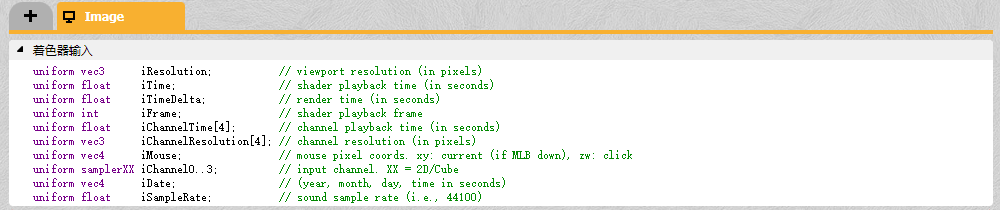
- The input of the pixel shader is shown in the following figure , These properties can be used directly
- function void mainImage(out vec4 fragColor, in vec2 fragCoord)
- out vec4 fragColor : The color value of the current pixel output
- in vec2 fragCoord: In the screen space of the current pixel x,y coordinate
1 A circle
1.1 Basic explanation
First , We map the screen space coordinates to the texture coordinate space [0,1]. Can pass Divide by viewport resolution To achieve
vec2 uv = fragCoord/iResolution.xy;
For convenience , You can select the origin of the coordinate system (0,0) Move to the center of the screen
uv -= vec2(0.5, 0.5);
Our viewports are not usually square , such as 800x600 This resolution , therefore x The number of pixels on the axis is greater than y More shafts 200 One of the , And ours x,y The range of coordinate values is [0,1], This will lead to For each pixel ,x The length of the shaft is longer than y Smaller on the shaft . therefore : On the vertical axis ,(0,0) To (0,3) Yes 3 Pixel , And on the horizontal axis (0,0) To (3,0) Yes 4 Pixel . In this case, draw a circle directly , What you get is an ellipse , Because the pixels on the final display are Square . On vertical axis 3 Pixel , On the horizontal axis 4 Pixel , You must get an ellipse


therefore , You need to turn the pixels in the texture space into squares , Obviously, the horizontal length of each pixel is Width It's not enough. , Therefore, the texture coordinates of the x Component times Viewport aspect ratio
uv.x *= iResolution.x / iResolution.y;
1.2 smoothstep() Use of built-in functions ( Optional )
Make the boundary of the circle smoother , Let's not talk about the principle , It's simple , You can refer to This article . I didn't search its source code , But its pseudo code is as follows .
It's very common with clamp() The only difference between the two is
- Those outside the boundary do not directly return the boundary value , It is 0 、1
- Values within the bounds do not directly range t Oneself , But a little operation , Make the curve smoother
float smoothstep(float t1, float t2, float t)
{

	//  The case of equality in the branch is not written , indifferent , You can put it in any section
	if (t1 < t2)
	{

		if (t < t1)
			return 0;
		else if (t > t1 && t < t2)
			return f(t);
		else if (t > t2)
			return 1;
	}
	if (t1 > t2)
	{

		if (t < t1)
			return 1;
		else if (t > t1 && t < t2)
			return f(t);
		else if (t > t2)
			return 0;
	}
	if (t1 == t2)
	{

		if (t < t1)
			return 0;
		else
			return 1;
	}

}
1.3 Complete code
void mainImage( out vec4 fragColor, in vec2 fragCoord )
{

    vec2 uv = fragCoord/iResolution.xy;

    uv -= 0.5;     //  The lower left corner (-0.5,-0.5), Upper right corner (0.5,0.5)
    uv.x *= iResolution.x / iResolution.y; //  Make pixels square ,  The interval has also changed , Don't bother to forget , The obvious x The upper limit of the axis is larger

    float d = length(uv);
    float r = 0.3;
    if (d > r)
    	c = 1.0;
    else
    	c = 0.0;
    fragColor = vec4(vec3(c), 1.0);
}
Result chart , serrate 
If the smoothstep() Smooth over
void mainImage( out vec4 fragColor, in vec2 fragCoord )
{

    vec2 uv = fragCoord/iResolution.xy;// [0,1]

    uv -= 0.5;// [-0.5,0.5]
    uv.x *= iResolution.x / iResolution.y; //  Make pixels square

    float d = length(uv);
    float r = 0.3;
    float c = smoothstep(r, r + .2, d);

    fragColor = vec4(vec3(c), 1.);
}
Is it very slippery 
If you change the parameters , You can also achieve a more blurred effect 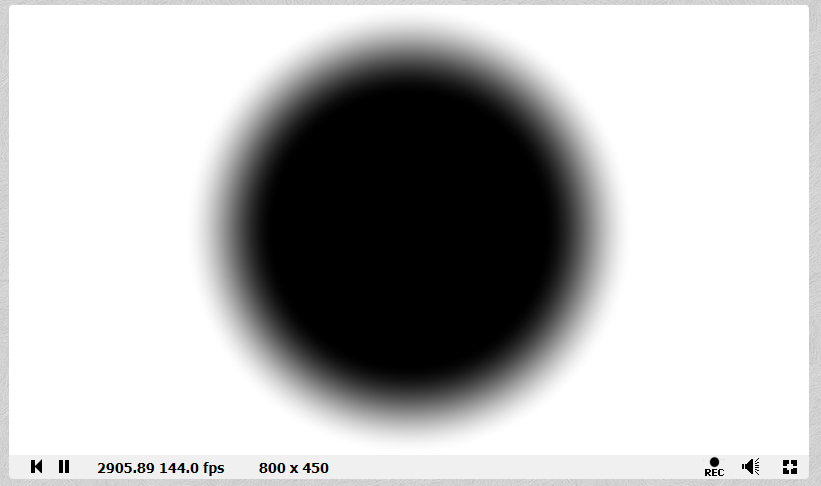
边栏推荐
- laravel 8.4 路由问题,结尾处是编辑器左侧对照表,小白可看懂
- Bootstrap drive, top switching power supply and Optocoupler
- PCB -- bridge between theory and reality
- 左值与右值
- altium designer 09丝印靠近焊盘显示绿色警告,如何阻止其报警?
- Laravel 通过服务提供者来自定义分页样式
- MySQL导入大文件(可以是百万级,也可以是百级)
- Question bank and answers of 2022 hoisting machinery safety management examination
- mysql json
- PCB----理论与现实的桥梁
猜你喜欢

The solution to prompt "this dictionary creation could be rewritten as a dictionary literal" when updating the dictionary key value in pychart

Cocos learning diary 1 - node

ApiPost接口测试的用法之------Get
开发一年不到,来面试居然敢开口要20K,面完连8K都不想给~

Usage of API interface test ------ post

PCB----理论与现实的桥梁

电流继电器HDL-A/1-110VDC-1
Static two position relay xjls-84/440/dc220v
Current relay hdl-a/1-110vdc-1

Abnova 荧光染料 510-M 链霉亲和素方案
随机推荐
Project summary 1 (header file, switch, &, bit variables)
Composer by installation laravel
在Pycharm中使用append()方法对列表添加元素时提示“This list creation could be rewritten as a list literal“的解决方法
Static two position relay xjls-84/440/dc220v
Current relay jdl-1002a
Chrome调试技巧
Amazing tips for using live chat to drive business sales
Abnova PSMA磁珠解决方案
Usage of API interface test ------ post
[paper reading] semi supervised learning with ladder networks
Abnova fluorescent dye 510-m streptavidin scheme
Reinstallation of cadence16.3, failure and success
Li Kou today's question 513 Find the value in the lower left corner of the tree
Volatile and threads
如何解决独立站多渠道客户沟通难题?这款跨境电商插件一定要知道!
Banner 标语 旗帜
Three operation directions of integral mall
左值与右值
Abnova abcb10 (human) recombinant protein specification
Shadertoy基础教学01、画圆(smoothstep()函数讲解)