当前位置:网站首页>刷脸认证如何实现人脸又快又准完成校验?
刷脸认证如何实现人脸又快又准完成校验?
2022-06-10 18:54:00 【HMS Core】
互联网飞速发展的今天,各种App的验证方法也越来越方便用户,从一开始的密码输入,到后来的指纹解锁,演变成如今的刷脸认证。刷个脸,就可以解锁设备、在线/线下支付、通过门禁、快速检票等。与此同时也伴随了很多安全问题,首要就是如何判断用户的真实性。
HMS Core机器学习服务(ML Kit)的人脸比对和活体检测能力能够快速捕捉人脸,通过识别并提取模板中的人脸特征,不需要用户配合做动作就可以判断是真实人脸,还是人脸攻击,同时将模板人像和人脸进行高精度比对,输出相似度值,进而判断两者是否为同一个人。
基于此,开发者可以快速构建人脸检测能力,比如在金融类App中,比对用户身份证照片和人脸检测结果,判断用户信息真实性,可提供快速安全的身份核验流程,适用于互联网远程开户、刷脸支付等金融业务。在办公App中,可采取刷脸考勤,识别是否为本人,有效防止代打卡等行为。
效果展示
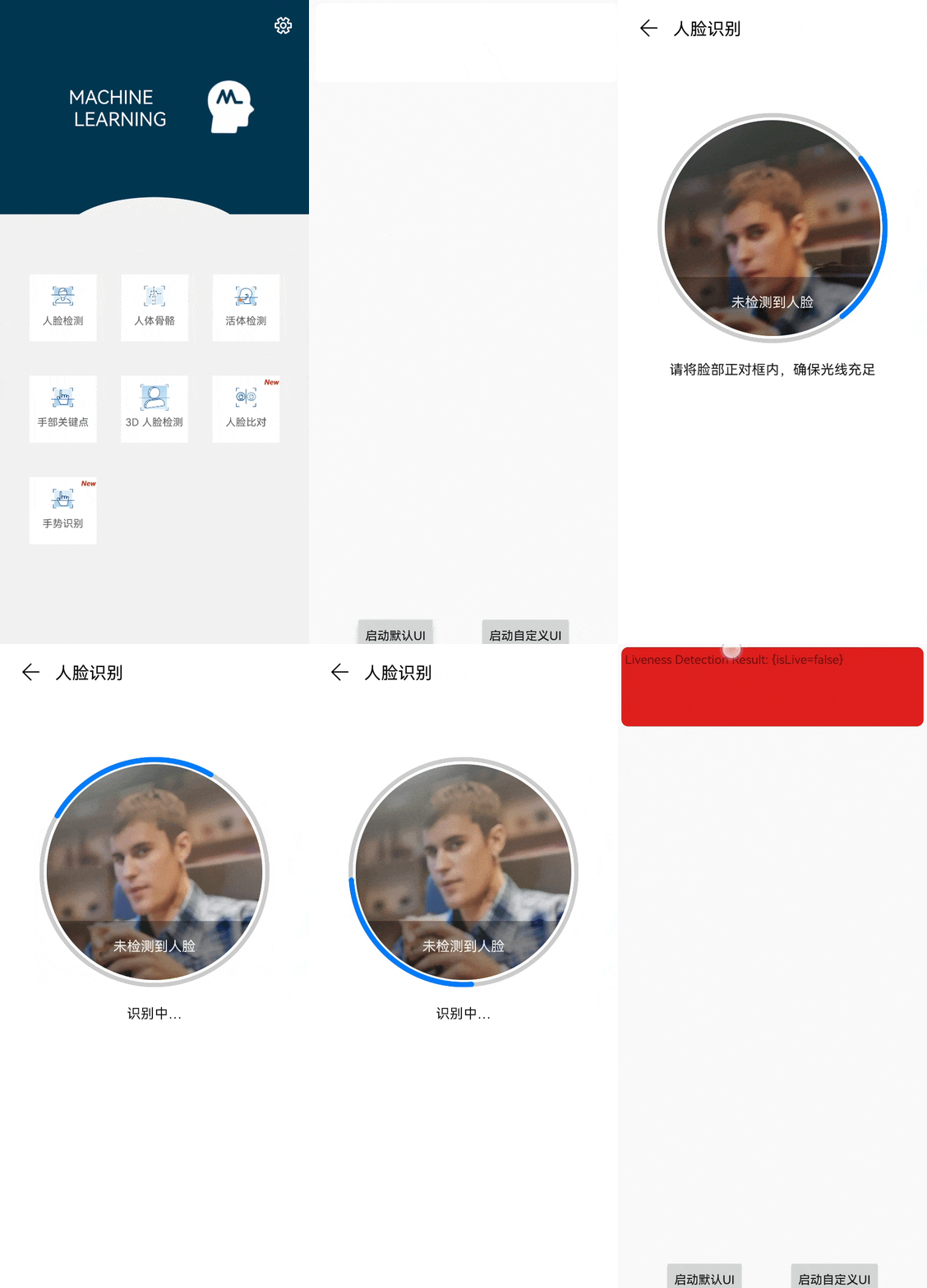
从效果展示图来看,活体检测几秒钟就可以完成精准识别手机上的假照片。
开发步骤
开发准备
在AppGallery Connect中配置相关信息,具体开发准备可以参考文档。
配置HMS Core SDK的Maven仓地址。
打开Android Studio项目级“build.gradle”文件。
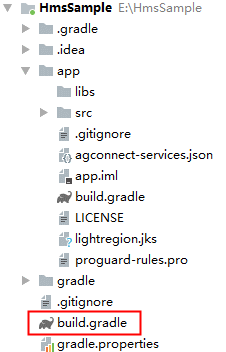
添加AppGallery Connect插件以及Maven代码库。
在“allprojects”>“repositories”里面配置HMS Core SDK的Maven仓地址。
allprojects { repositories { google() jcenter() maven {url 'https://developer.huawei.com/repo/'} } }在“buildscript”>“repositories”里面配置HMS Core SDK的Maven仓地址。
buildscript { repositories { google() jcenter() maven {url 'https://developer.huawei.com/repo/'} } }在“buildscript”>“dependencies”里面增加AppGallery Connect插件配置。
buildscript{ dependencies { classpath 'com.huawei.agconnect:agcp:1.3.1.300' } }人脸比对功能开发
- 创建人脸比对检测器实例。
MLFaceVerificationAnalyzer analyzer = MLFaceVerificationAnalyzerFactory.getInstance().getFaceVerificationAnalyzer();- 通过android.graphics.Bitmap创建MLFrame对象用于设置模版图片,支持的图片格式包括:JPG、JPEG、PNG、BMP。
// 通过bitmap创建MLFrameMLFrame templateFrame = MLFrame.fromBitmap(bitmap);- 设置人脸比对模版图片。如果模板中无人脸,则表示模板设置失败,保持该实例上一次设置的模板不变。
List<MLFaceTemplateResult> results = analyzer.setTemplateFace(templateFrame);for (int i = 0; i < results.size(); i++) { // 处理模板图片识别结果}- 通过android.graphics.Bitmap创建MLFrame对象用于设置比对图片。支持的图片格式包括:JPG、JPEG、PNG、BMP。
// 通过bitmap创建MLFrameMLFrame compareFrame = MLFrame.fromBitmap(bitmap);- 调用同步或异步方法进行人脸比对。检测结果主要包括比对图片中检测到的人脸信息、检测到的人脸信息与模板人脸是同一个人的置信度。详细信息请参见MLFaceVerificationResult。
• 异步方法示例代码:
Task<List<MLFaceVerificationResult>> task = analyzer.asyncAnalyseFrame(compareFrame);task.addOnSuccessListener(new OnSuccessListener<List<MLFaceVerificationResult>>() { @Override public void onSuccess(List<MLFaceVerificationResult> results) { // 检测成功 }}).addOnFailureListener(new OnFailureListener() { @Override public void onFailure(Exception e) { // 检测失败 }});• 同步方法示例代码:
SparseArray<MLFaceVerificationResult> results = analyzer.analyseFrame(compareFrame);for (int i = 0; i < results.size(); i++) { // 检测结果处理}- 检测完成,停止分析器,释放检测资源。
if (analyzer != null) { analyzer.stop();}活体检测功能开发
默认扫描界面
- 创建静默活体检测结果回调,用于获取检测结果。
private MLLivenessCapture.Callback callback = new MLLivenessCapture.Callback() { @Override public void onSuccess(MLLivenessCaptureResult result) { //检测成功的处理逻辑,检测结果可能是活体或者非活体。 } @Override public void onFailure(int errorCode) { //检测未完成,如相机异常CAMERA_ERROR,添加失败的处理逻辑。 }};- 创建静默活体检测实例,启动检测。
MLLivenessCapture capture = MLLivenessCapture.getInstance();capture.startDetect(activity, callback);了解更多详情>>
访问华为开发者联盟官网
获取开发指导文档
华为移动服务开源仓库地址:GitHub、Gitee
关注我们,第一时间了解 HMS Core 最新技术资讯~
边栏推荐
- 大厂测试员年薪30万到月薪8K,吐槽工资太低,反被网友群嘲?
- frp reverse proxy
- This article introduces you to j.u.c's futuretask, fork/join framework and BlockingQueue
- 云图说|每个成功的业务系统都离不开APIG的保驾护航
- mixin-- 混入
- Complete knapsack problem and optimization tips
- Mongodb index unique
- Cet article vous donne un aperçu de la tâche future de j.u.c, du cadre Fork / join et de la file d'attente de blocage
- Source code analysis of Tencent libco collaboration open source library (III) -- Exploring collaboration switching process assembly register saving and efficient collaboration environment
- 如何在VR全景作品中添加独立热点?
猜你喜欢

2022.05.28 (lc_5_longest palindrome substring)

性能测试方案(计划)模板

首批!青藤通过信通院CWPP能力评估检验

618 great promotion is coming, mining bad reviews with AI and realizing emotional analysis of 100 million comments with zero code
领域驱动设计(六) - 架构设计浅谈

100003字,带你解密 双11、618电商大促场景下的系统架构体系

Trilogy to solve the problem of playing chess first and then

【C语言】一不小心写出bug?凡人教你如何写出好代码【详解vs中调试技巧】

MATLAB 根据任意角度、取样点数(分辨率)、位置、大小画椭圆代码

C (pointer 02)
随机推荐
[advanced C language] data storage [Part 2] [ten thousand words summary]
VR全景作品中各式各样的嵌入功能是如何做到的?
Deep understanding of lightgbm
Computer:成功教你如何使用一招—就能找回以前的密码(曾经保存的密码但当前显示为******号的密码)
Esp8266 system environment setup
Rmarkdown easily input mathematical formula
C (pointer 02)
[advanced C language] advanced pointer [Part 2]
MySQL数据库设计概念(多表查询&事务操作)
Rmarkdown 轻松录入数学公式
用一个性能提升了666倍的小案例说明在TiDB中正确使用索引的重要性
Developers changing the world - Yao Guang teenagers playing Tetris
DDD landing practice repeat record of theoretical training & Event storm
Soft deletion of data - when? How to realize it?
2022.05.24 (lc_674_longest continuous increasing sequence)
掌握高性能计算前,我们先了解一下它的历史
高考后选择哪所学校?VR全景校园全方位展示
轻松学Pytorch-全卷积神经网络实现表情识别
How to add independent hotspots in VR panoramic works?
On the development trend of enterprise storage: cold thoughts on open source storage