当前位置:网站首页>Debian 10 NTP Service Configuration
Debian 10 NTP Service Configuration
2022-08-02 03:34:00 【live and dream】
目录
三、Test screenshots and scoring requirements
一、题目要求
NTP
安装 ntp(使用其他 ntp 软件,None of the following features will be scored);
在 AppSrv 和 StorageSrv 上创建 CRON 计划任务;
使用 ntpdate 指令,每隔五分钟进行一次时间同步;
二、配置过程
IspSrv
1.下载ntp服务
[email protected]:~# apt -y install ntp2.进入ntp配置文件
[email protected]:~# vim /etc/ntp.conf 3.修改ntp配置文件
 23 #pool 0.debian.pool.ntp.org iburst                #注释,Turn off sync from the web
 24 #pool 1.debian.pool.ntp.org iburst
 25 #pool 2.debian.pool.ntp.org iburst
 26 #pool 3.debian.pool.ntp.org iburst
 27 server 127.127.1.0                                #server指定ntp服务器的地址 将当前主机作为时间服务器
 28 fudge 127.127.1.0  stratum 5                     #fudge设置时间服务器的层级 stratum 0~15  ,0:表示顶级 , 10:通常用于给局域网主机提供时间服务
                                                      #注意:fudge必须和server一块用, 而且是在server的下一行

41 #restrict -4 default kod notrap nomodify nopeer no query limited        #注释
42 #restrict -6 default kod notrap nomodify nopeer no query limited

46 restrict 81.6.63.0 mask 255.255.255.0           #Which network segments are allowed to sync time here
4.重启ntp服务
[email protected]:~# systemctl restart ntp.service5.放开防火墙端口
[email protected]:~# iptables -A INPUT -p udp --dport 123 -j ACCEPT
[email protected]:~# iptables -A OUTPUT -p udp --sport 123 -j ACCEPT
6.保存规则
[email protected]:~# netfilter-persistent saveRouterSrv
1.放开iptableson the corresponding port
[email protected]:~# iptables -A FORWARD -p udp --dport 123 -j ACCEPT2.保存规则
[email protected]:~# netfilter-persistent saveAppSrv
1.安装ntpdate指令
[email protected]:~# apt -y install ntpdate2.进入CRON服务配置文件
[email protected]:~# vim /etc/crontab 3.创建 CRON 计划任务,每5Minutes to sync automatically4.
*/5 * * * * root /usr/sbin/ntpdate 81.6.63.100 #每5分钟到81.6.63.100自动同步时间4.重新启动下CRON计划任务
[email protected]:~# systemctl restart cron.service5.Open the port corresponding to the firewall
[email protected]:~# iptables -A INPUT -p udp --sport 123 -j ACCEPT
[email protected]:~# netfilter-persistent save
StorageSrv
1.安装ntpdate指令
[email protected]:~# apt -y install ntpdate2.进入CRON服务配置文件
[email protected]:~# vim /etc/crontab 3.创建 CRON 计划任务,每5Minutes to sync automatically4.
*/5 * * * * root /usr/sbin/ntpdate 81.6.63.100 #每5分钟到81.6.63.100自动同步时间4.重新启动下CRON计划任务
[email protected]:~# systemctl restart cron.service5.Open the port corresponding to the firewall
[email protected]:~# iptables -A INPUT -p udp --sport 123 -j ACCEPT
[email protected]:~# netfilter-persistent save
三、Test screenshots and scoring requirements
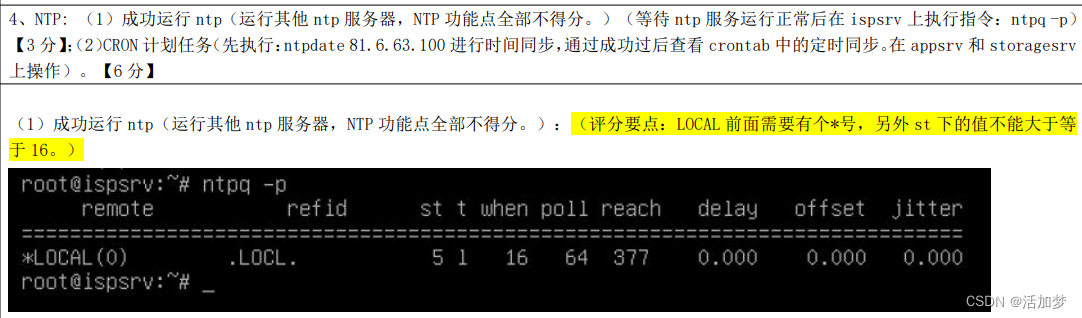
测试:IspSrv

评分细则:
测试:AppSrv与StorageSrv


评分细则:

边栏推荐
猜你喜欢

Redis简单学习笔记

HCIP第十一天_MPLS实验

【深度学习】从LeNet-5识别手写数字入门深度学习
redis进行持久化时,有新的写操作将如何解决——写时复制

MySQL中字符串比较大小(日期字符串比较问题)

MongoDB文档存储
![[Basic Tutorial of Remote Control Development 1] Crazy Shell Open Source Formation Drone-GPIO (Remote Control Indicator Light Control)](/img/da/5f6b1ed89cb3fed3cbe6aea840f473.png)
[Basic Tutorial of Remote Control Development 1] Crazy Shell Open Source Formation Drone-GPIO (Remote Control Indicator Light Control)

(forwarded) HashCode summary (2)

(Repost) HashCode Summary (1)

黑马案例--实现 clock 时钟的web服务器
随机推荐
DSPE-PEG-Silane,DSPE-PEG-SIL,磷脂-聚乙二醇-硅烷修饰活性基团
磷脂-聚乙二醇-靶向新生血管靶向肽APRPG,DSPE-PEG-APRPG
Keil开发环境安装教程
About cross-domain issues
错误:with open(txt_path,‘r‘) as f: FileNotFoundError: [Errno 2] No such file or directory:
parser = argparse.ArgumentParser()解析
MySQL8.0安装教程,在Linux环境安装MySQL8.0教程,最新教程 超详细
PCL—点云数据分割
JJWT工具类
二维数组实战项目--------《三子棋》
AttributeError: ‘Upsample‘ object has no attribute ‘recompute_scale_factor‘
LeetCode:第304场周赛【总结】
5.nodejs--cross domain, CORS, JSONP, Proxy
Redis安装,基本命令,持久化方式,集群
@Autowired详解[email protected]在static属性上的使用
Freeswitch操作基本配置
Small program (necessary common sense for development) 1
第十一天&shell脚本
Redis simple study notes
RHCSA第三天