当前位置:网站首页>AutoUpdater. Net client custom update file
AutoUpdater. Net client custom update file
2022-06-30 09:25:00 【LongtengGensSupreme】
AutoUpdater.NET The client updates the specified file , The specific use is as follows
1、 New projects windows Form item --WindowsFormTestUpdate
2、 add to NuGet Program management pack
Right click the item , choice “ management NuGet Package ”, Search for “Autoupdater.NET.Official”, choice , Click on the install

3、 The form code is as follows :
Interface

Code
using System;
using System.Collections.Generic;
using System.ComponentModel;
using System.Data;
using System.Drawing;
using System.IO;
using System.Linq;
using System.Net;
using System.Text;
using System.Threading;
using System.Threading.Tasks;
using System.Windows.Forms;
using AutoUpdaterDotNET;
using Newtonsoft.Json;

namespace WindowsFormTestUpdate
{
    public partial class TestUpdateForm : Form
    {
        public TestUpdateForm()
        {
            InitializeComponent();
        }

        private void TestUpdateForm_Load(object sender, EventArgs e)
        {
            lblVersion.Text = " edition :" + Application.ProductName + Application.ProductVersion;
        }

        private void btnAutoUpdate_Click(object sender, EventArgs e)
        {
            AutoUpdater.ReportErrors = true;
            //1、 According to the update file of the server update.xml Of version Check whether it is consistent with the current application version , Need to update .
            //AutoUpdater.Start("http://localhost:8082/TestAutoUpdate/update.xml");

            //2、 According to the update file of the server update.xml Of version Check whether it is consistent with the specified myAssembly Consistent application versions , Need to update .
            //AutoUpdater.Start("http://rbsoft.org/updates/AutoUpdaterTest.xml", System.Reflection.Assembly.GetExecutingAssembly()/*this.GetType().Assembly*/);

            //3、 according to FTP Server update file update.xml Of version Check whether it is consistent with the specified myAssembly Consistent application versions , Need to update .
            //AutoUpdater.Start("ftp://127.0.0.1/TestAutoUpdate/update.xml", new NetworkCredential("myuser", "mypassword"));

            // Other attribute settings
            // Set the size of the update pop-up window
            //AutoUpdater.UpdateFormSize = new System.Drawing.Size(800, 600);

            AutoUpdater.AppCastURL = "";// Server update file update.xml
            AutoUpdater.InstalledVersion = new Version("1.3");
            //AutoUpdater.AppTitle = " Update pop ups ";// Pop up form title
            AutoUpdater.DownloadPath = "";// Upgrade download package path
            AutoUpdater.PersistenceProvider = "";// Upgrade download package path
            AutoUpdater.Mandatory = true;
            AutoUpdater.Mandatory = true;
            AutoUpdater.UpdateMode = Mode.Forced;
            //AutoUpdater.ShowRemindLaterButton = true;// Show reminder button later
            AutoUpdater.LetUserSelectRemindLater = false;
            AutoUpdater.RemindLaterTimeSpan = RemindLaterFormat.Days;
            AutoUpdater.RemindLaterAt = 2;

            //AutoUpdater.ShowSkipButton = true;// Show reminder button later
            //AutoUpdater.Synchronous = true;// Show reminder button later
            var proxy = new WebProxy("ProxyIP:ProxyPort", true)
            {
                Credentials = new NetworkCredential("ProxyUserName", "ProxyPassword")
            };
            AutoUpdater.Proxy = proxy;


             Set voucher
            BasicAuthentication basicAuthentication = new BasicAuthentication("myUserName", "myPassword");
            AutoUpdater.BasicAuthXML = AutoUpdater.BasicAuthDownload = AutoUpdater.BasicAuthChangeLog = basicAuthentication;

             Browser open download
            AutoUpdater.OpenDownloadPage = true;

            //string jsonPath = Path.Combine(Environment.CurrentDirectory, "settings.json");
            //AutoUpdater.PersistenceProvider = new JsonFilePersistenceProvider(jsonPath);


            Handling Application exit logic manually, After the user-defined update succeeds
            //AutoUpdater.ApplicationExitEvent += AutoUpdater_ApplicationExitEvent;
            // Custom update
            //AutoUpdater.CheckForUpdateEvent += AutoUpdaterOnCheckForUpdateEvent;

            // Custom update file conversion , You can specify json Files of type , as follows
            //AutoUpdater.ParseUpdateInfoEvent += AutoUpdaterOnParseUpdateInfoEvent;
            //AutoUpdater.Start("http://localhost:8082/AutoUpdaterTest.json");

            #region  Appoint json Files of type
            //         {
            //             "version":"2.0.0.0",
            //"url":"http://rbsoft.org/downloads/AutoUpdaterTest.zip",
            //"changelog":"https://github.com/ravibpatel/AutoUpdater.NET/releases",
            //"mandatory":{
            //                 "value":true,
            //   "minVersion": "2.0.0.0",
            //   "mode":1
            //},
            //"checksum":{
            //                 "value":"E5F59E50FC91A9E52634FFCB11F32BD37FE0E2F1",
            //   "hashingAlgorithm":"SHA1"
            //}
            //         }

            #endregion

            //Text = Application.StartupPath;
            AutoUpdater.Start("http://localhost:8082/TestAutoUpdate/update.xml");
        }
        private void AutoUpdater_ApplicationExitEvent()
        {
            //Text = @"Closing application...";
            Thread.Sleep(5000);
            //Application.Exit();
            //string exepath = @"C:\Users\Administrator\Desktop\Debug\AutoUpdaterTest";
            //var currentDirectory = new DirectoryInfo(Application.StartupPath);
            //if (currentDirectory.Parent != null)
            //{
            //    exepath = Path.Combine(currentDirectory.Parent.FullName, "TestAutoUpdate", "WindowsFormTestUpdate.exe");
            //}

            //lblVersion.Text = lblVersion.Text + $"----{exepath}";
            //System.Diagnostics.Process.Start(exepath);
        }


        private void AutoUpdaterOnCheckForUpdateEvent(UpdateInfoEventArgs args)
        {
            if (args.Error == null)
            {
                if (args.IsUpdateAvailable)
                {
                    DialogResult dialogResult;
                    if (args.Mandatory.Value)
                    {
                        dialogResult =
                            MessageBox.Show(
                                [email protected]"There is new version {args.CurrentVersion} available. You are using version {args.InstalledVersion}. This is required update. Press Ok to begin updating the application.", @"Update Available",
                                MessageBoxButtons.OK,
                                MessageBoxIcon.Information);
                    }
                    else
                    {
                        dialogResult =
                            MessageBox.Show(
                                [email protected]"There is new version {args.CurrentVersion} available. You are using version {
                                        args.InstalledVersion
                                    }. Do you want to update the application now?", @"Update Available",
                                MessageBoxButtons.YesNo,
                                MessageBoxIcon.Information);
                    }

                    // Uncomment the following line if you want to show standard update dialog instead.
                    // AutoUpdater.ShowUpdateForm(args);

                    if (dialogResult.Equals(DialogResult.Yes) || dialogResult.Equals(DialogResult.OK))
                    {
                        try
                        {
                            if (AutoUpdater.DownloadUpdate(args))
                            {
                                Application.Exit();
                            }
                        }
                        catch (Exception exception)
                        {
                            MessageBox.Show(exception.Message, exception.GetType().ToString(), MessageBoxButtons.OK,
                                MessageBoxIcon.Error);
                        }
                    }
                }
                else
                {
                    MessageBox.Show(@"There is no update available please try again later.", @"No update available",
                        MessageBoxButtons.OK, MessageBoxIcon.Information);
                }
            }
            else
            {
                if (args.Error is WebException)
                {
                    MessageBox.Show(
                        @"There is a problem reaching update server. Please check your internet connection and try again later.",
                        @"Update Check Failed", MessageBoxButtons.OK, MessageBoxIcon.Error);
                }
                else
                {
                    MessageBox.Show(args.Error.Message,
                        args.Error.GetType().ToString(), MessageBoxButtons.OK,
                        MessageBoxIcon.Error);
                }
            }
        }

        private void AutoUpdaterOnParseUpdateInfoEvent(ParseUpdateInfoEventArgs args)
        {
            dynamic json = JsonConvert.DeserializeObject(args.RemoteData);
            args.UpdateInfo = new UpdateInfoEventArgs
            {
                CurrentVersion = json.version,
                ChangelogURL = json.changelog,
                DownloadURL = json.url,
                Mandatory = new Mandatory
                {
                    Value = json.mandatory.value,
                    UpdateMode = json.mandatory.mode,
                    MinimumVersion = json.mandatory.minVersion
                },
                CheckSum = new CheckSum
                {
                    Value = json.checksum.value,
                    HashingAlgorithm = json.checksum.hashingAlgorithm
                }
            };
        }
    }
}
Be careful :
1、 The way to get the configuration file can be web server , It can also be ftp The server , The configuration file can be xml Of , Of course, it can also be in other formats , But other formats , Such as json, The method of obtaining is different (AutoUpdater.Start("http://localhost:8082/AutoUpdaterTest.json"))
It is generally used as follows :
//1、 According to the update file of the server update.xml Of version Check whether it is consistent with the current application version , Need to update .
AutoUpdater.Start("http://localhost:8082/TestAutoUpdate/update.xml");
//2、 According to the update file of the server update.xml Of version Check whether it is consistent with the specified myAssembly Consistent application versions , Need to update .
AutoUpdater.Start("http://rbsoft.org/updates/AutoUpdaterTest.xml", System.Reflection.Assembly.GetExecutingAssembly()/*this.GetType().Assembly*/);
//3、 according to FTP Server update file update.xml Of version Check whether it is consistent with the specified myAssembly Consistent application versions , Need to update .
AutoUpdater.Start("ftp://127.0.0.1/TestAutoUpdate/update.xml", new NetworkCredential("myuser", "mypassword"));
2、 Assembly version ( Different versions of assemblies can be controlled by assembly version , In order to show the difference between )

4、 Running results


5、 For other configurations, please refer to :
https://github.com/ravibpatel/AutoUpdater.NET
边栏推荐
- Opencv learning notes -day13 pixel value statistics calculation of maximum and minimum values, average values and standard deviations (use of minmaxloc() and meanstddev() functions)
- Maxiouassigner of mmdet line by line interpretation
- Dart basic notes
- Set, map and modularity
- Understanding of MVVM and MVC
- About MySQL Boolean and tinyint (1)
- Do you want the dialog box that pops up from the click?
- Opencv learning notes -day 11 (split() channel separation function and merge() channel merge function)
- ES6 learning path (II) let & const
- Talk about the job experience of kotlin cooperation process
猜你喜欢

Talk about how the kotlin process started?
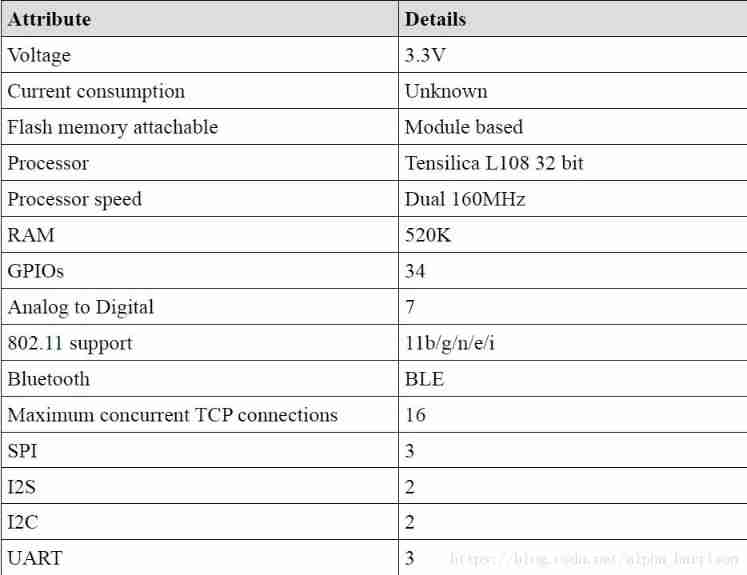
Esp32 things (II): sharpening the knife without mistaking firewood - make preparations before project development

Mmdet line by line deltaxywhbboxcoder

Opencv learning notes-day6-7 (scroll bar operation demonstration is used to adjust image brightness and contrast, and createtrackbar() creates a scroll bar function)

Opencv learning notes-day14 drawing of image geometry (rect class rotatedrect class, rectangle drawing rectangle circle drawing circular function line drawing line function ellipse drawing elliptic fu

Opencv learning notes -day4 image pixel reading and writing operations (array traversal and pointer traversal implementation, uchar vec3b data type and mat class functions mat:: at(), mat:: ptr())

Opencv learning notes -day8 (keyboard typing (waitkey()); Wait for typing) action: triggers some action when the appropriate character is typed using the keyboard)

Deep understanding of continuation principle

Esp32 things (3): overview of the overall system design

9.JNI_ Necessary optimization design
随机推荐
Deep understanding of kotlin collaboration context coroutinecontext
Esp32 (4): overview of the overall code architecture
ES6 learning path (II) let & const
Handwriting sorter component
Talking about kotlin process exception handling mechanism
Installation, use and explanation of vulnerability scanning tool OpenVAS
Flink Sql -- toAppendStream doesn‘t support consuming update and delete changes which
Row column (vertical and horizontal table) conversion of SQL
The elegant combination of walle and Jianbao
QT downloading files through URL
Esp32 (6): Bluetooth and WiFi functions for function development
Esp32 things (x): other functions
9.JNI_ Necessary optimization design
Flink Exception -- No ExecutorFactory found to execute the application
Flutter theme (skin) changes
C#訪問SQL Server數據庫兩種方式的比較(SqlDataReader vs SqlDataAdapter)
Small program learning path 1 - getting to know small programs
About Lombok's @data annotation
C # get the current timestamp
Opencv learning notes -day13 pixel value statistics calculation of maximum and minimum values, average values and standard deviations (use of minmaxloc() and meanstddev() functions)