当前位置:网站首页>How to install redis version 5.0.8 on the pagoda panel
How to install redis version 5.0.8 on the pagoda panel
2022-06-23 03:07:00 【Qwe7】
Now the default on the pagoda Redis The version is 6.0.2 Of , It's very hard to use , There are a lot of unknown problems , You can only lower the version installation 5.0.8 Version of
If it cannot be installed directly 5.0.8 Version of Redis, You can use the following method .
1. First in php Extended installation defaults redis, The default is 6.0.2 edition , After installation , We are uninstalling this version of .
2. find redis Installation file , The path is usually this :/www/server/panel/install/redis.sh.
3. On the fourth line of the installed file ;redis_version=5.0.8, Just change to this .
4. Then log in ssh Execute the installation command ;bash /www/server/panel/install/redis.sh install
Wait a moment and you will be prompted that the installation is complete , Then go back to the pagoda panel to see , It becomes 5.0.8 Version of , Other versions can do the same
边栏推荐
- JS event delegation (event agent)
- Aiot application innovation competition -- I am the master of my project, and use gn+ninja to complete the system construction (vscode Development)
- PowerShell automated reinstallation of cloudbase init to version 1.1.2
- Reinforcement learning series (IV) -policygradient example
- Great WPF open source control library newbeecoder UI
- How to make keyword targeted layout based on search sources?
- Line to line interviewer | one side of ByteDance
- Blue screen and abnormal downtime DMP file and system log collection
- How does easyplayer embed a video snapshot into a demo?
- Supervisor multi process management exception automatic restart visual management
猜你喜欢
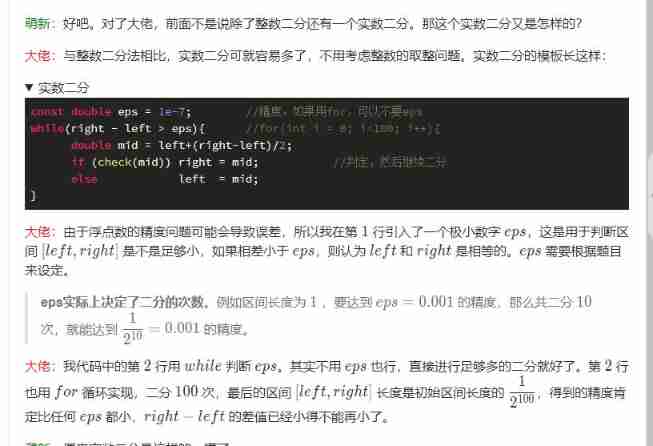
6. template for integer and real number dichotomy

Soft exam information system project manager_ Information system comprehensive testing and management - Senior Information System Project Manager of soft test 027

Soft exam information system project manager_ Contract Law_ Copyright_ Implementation Regulations - Senior Information System Project Manager of soft exam 030

How to store, manage and view family photos in an orderly manner?

Vulnhub DC-5

5. concept of ruler method

8. greed
随机推荐
Simple implementation of promise basic method
The difference between the use of return, break and continue in the if statement in JS
Vs code remote SSH configuration
2022 opening H5 mobile page special effects
Vulnhub DC-5
Goframe framework (RK boot): Based on cloud native environment, distinguish configuration files (config)
How to generate IATA barcode in batch through TXT file
Troubleshooting and solution of error 400 in easygbs video platform
HTTP cache
Great WPF open source control library newbeecoder UI
Summary of website navigation design and website link optimization
Concept and function of ES6 symbol
Record a penetration caused by log4j
Aiot application innovation competition -- I am the master of my project, and use gn+ninja to complete the system construction (vscode Development)
Storage resources revitalize the system and redefine "hyper fusion"
Pytest common summary
Integrate Tencent maps with micro build and low code
JS to realize character case switching
The performance of the new Tokio scheduler is improved by 10 times
Enterprise official website applet building tutorial - solution