当前位置:网站首页>Spark项目打包优化实践
Spark项目打包优化实践
2022-06-24 06:39:00 【Angryshark_128】
问题描述
在使用Scala/Java进行Spark项目开发过程中,常涉及项目构建和打包上传,因项目依赖Spark基础相关类包一般较大,打包后若涉及远程开发调试,每次打包都消耗多很多时间,因此需对此过程进行优化。
优化方案
方案1:一次全量上传jar包,后续增量更新class
POM文件配置(Maven)
  <dependencies>
    <dependency>
      <groupId>org.apache.spark</groupId>
      <artifactId>spark-core_2.11</artifactId>
      <version>${spark.version}</version>
    </dependency>

    ........

    <dependency>
      <groupId>junit</groupId>
      <artifactId>junit</artifactId>
      <version>4.4</version>
      <scope>test</scope>
    </dependency>
  </dependencies>

  <!-- 构建配置 -->
  <build>
    <resources>
      <resource>
        <directory>src/main/resources</directory>
      </resource>
    </resources>
    <plugins>
      <plugin>
        <groupId>net.alchim31.maven</groupId>
        <artifactId>scala-maven-plugin</artifactId>
        <version>3.2.2</version>
        <configuration>
          <recompileMode>incremental</recompileMode>
        </configuration>
        <executions>
          <execution>
            <goals>
              <goal>compile</goal>
              <goal>testCompile</goal>
            </goals>
          </execution>
        </executions>
      </plugin>
      <plugin>
        <groupId>org.apache.maven.plugins</groupId>
        <artifactId>maven-assembly-plugin</artifactId>
        <version>2.4.1</version>
        <configuration>
          <!-- get all project dependencies -->
          <descriptorRefs>
            <descriptorRef>jar-with-dependencies</descriptorRef>
          </descriptorRefs>
        </configuration>
        <executions>
          <execution>
            <id>make-assembly</id>
            <!-- bind to the packaging phase -->
            <phase>package</phase>
            <goals>
              <goal>single</goal>
            </goals>
          </execution>
        </executions>
      </plugin>
    </plugins>
  </build>
按照如上配置进行打包,会得到*-1.0-SNAPSHOT.jar和*-1.0-SNAPSHOT-jar-with-dependencies.jar两个jar包,后者是可单独执行的jar包,但因打包进去很多无用依赖,导致即便一个很简单的项目,也要一两百M。
原理须知:jar包其实只是一个普通的rar压缩包,解压后内部由相关jar包和编译后的class文件、静态资源文件等组成。也就是说,我们每次修改代码重新打包后,只是更新了其中个别class或静态资源文件,因而后续更新只需替换更新代码后的class文件即可。
例:
写一个简单的sparktest项目,打包后会出现sparktest-1.0-SNAPSHOT.jar和sparktest-1.0-SNAPSHOT-jar-with-dependencies.jar两个jar包。

其中sparktest-1.0-SNAPSHOT-jar-with-dependencies.jar为单独可执行jar包,上传至服务器即可执行,使用解压软件打开该jar可看到目录结构。

其中,App*.class文件即为主代码对应的编译文件,

修改App.scala代码后,执行重新compile一下,在target/classes目录下即可看到新的App*.class
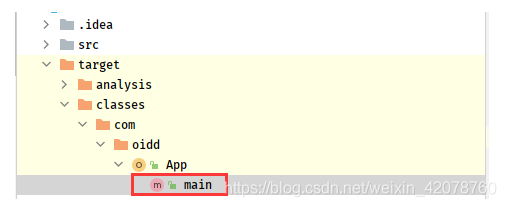
将更新后的class文件,上传至服务器jar包同目录下,替换即可
jar uvf sparktest-1.0-SNAPSHOT-jar-with-dependencies.jar App*.class
注:若该class文件不在jar包根目录下,则创建相同目录,然后替换,如
jar uvf sparktest-1.0-SNAPSHOT-jar-with-dependencies.jar com/example/App*.class
方案2:依赖与项目分开上传,后续单独更新项目jar包
POM文件配置(Maven)
<dependencies>
        <dependency>
            <groupId>org.scala-lang</groupId>
            <artifactId>scala-library</artifactId>
            <version>${scala.version}</version>
        </dependency>
        <dependency>
            <groupId>org.apache.spark</groupId>
            <artifactId>spark-core_2.11</artifactId>
            <version>${spark.version}</version>
        </dependency>
        ......
        <dependency>
            <groupId>junit</groupId>
            <artifactId>junit</artifactId>
            <version>4.4</version>
            <scope>test</scope>
        </dependency>
    </dependencies>

    <build>
    <plugins>
        <plugin>
            <groupId>org.apache.maven.plugins</groupId>
            <artifactId>maven-dependency-plugin</artifactId>
            <executions>
                <execution>
                    <id>copy-dependencies</id>
                    <phase>package</phase>
                    <goals>
                        <goal>copy-dependencies</goal>
                    </goals>
                    <configuration>
                        <outputDirectory>target/lib</outputDirectory>
                        <excludeTransitive>false</excludeTransitive>
                        <stripVersion>true</stripVersion>
                    </configuration>
                </execution>
            </executions>
        </plugin>
        <!--scala打包插件-->
        <plugin>
            <groupId>net.alchim31.maven</groupId>
            <artifactId>scala-maven-plugin</artifactId>
            <version>3.3.1</version>
            <executions>
                <execution>
                    <goals>
                        <goal>compile</goal>
                        <goal>testCompile</goal>
                    </goals>
                    <configuration>
                        <args>
                            <arg>-dependencyfile</arg>
                            <arg>${project.build.directory}/.scala_dependencies</arg>
                        </args>
                    </configuration>
                </execution>
            </executions>
        </plugin>
        <!--java代码打包插件,不会将依赖也打包-->
        <plugin>
            <groupId>org.apache.maven.plugins</groupId>
            <artifactId>maven-jar-plugin</artifactId>
            <configuration>
                <archive>
                    <manifest>
                        <!-- <addClasspath>true</addClasspath> -->
                        <mainClass>com.oidd.App</mainClass>
                    </manifest>
                </archive>
            </configuration>
        </plugin>
    </plugins>
打包完成后,会出现单独jar包和lib目录

上传jar包和lib文件夹至服务器,后续更新只需要替换jar包即可,执行spark-submit时,只需要添加–jars *\lib*.jar目录即可。
边栏推荐
- Interpreting top-level design of AI robot industry development
- Command ‘[‘where‘, ‘cl‘]‘ returned non-zero exit status 1.
- Free and easy-to-use screen recording and video cutting tool sharing
- Flutter environment installation & operation
- MAUI使用Masa blazor组件库
- Become TD hero, a superhero who changes the world with Technology | invitation from tdengine community
- What are the easy-to-use character recognition software? Which are the mobile terminal and PC terminal respectively
- File system notes
- What are the audio formats? Can the audio format be converted
- LuChen technology was invited to join NVIDIA startup acceleration program
猜你喜欢

leetcode:85. Max rectangle

云上本地化运营,东非第一大电商平台Kilimall的出海经

网吧管理系统与数据库
File system notes

开源与创新

leetcode:84. 柱状图中最大的矩形

数据库 存储过程 begin end

C language student management system - can check the legitimacy of user input, two-way leading circular linked list

Application of intelligent reservoir management based on 3D GIS system

MAUI使用Masa blazor组件库
随机推荐
网吧管理系统与数据库
How do I reinstall the system? How to install win10 system with USB flash disk?
Nine unique skills of Huawei cloud low latency Technology
Domain name purchase method good domain name selection principle
Let's talk about BOM and DOM (5): dom of all large Rovers and the pits in BOM compatibility
如何低成本构建一个APP
typescript vscode /bin/sh: ts-node: command not found
If you want to learn programming well, don't recite the code!
About Stacked Generalization
Application of O & M work order
Five minute run through 3D map demo
【愚公系列】2022年6月 ASP.NET Core下CellReport报表工具基本介绍和使用
缓存操作rockscache原理图
Go excel export tool encapsulation
Overview of new features in mongodb5.0
FreeRTOS MPU使系统更健壮!
leetcode:1856. Maximum value of minimum product of subarray
leetcode:84. 柱状图中最大的矩形
Source code analysis of current limiting component uber/ratelimit
开源与创新