当前位置:网站首页>Flutter environment installation & operation
Flutter environment installation & operation
2022-06-24 06:28:00 【Mokong 9081】
Flutter Environmental installation && function
background
Flutter Environment configuration to run , Problem memo record . For example, meet Android sdkmanager tool not found and Running Gradle task 'assembleDebug'...
<!--more-->
Flutter install
Flutter Environment building
- First download Flutter Installation package , Download address :https://flutter.dev/docs/development/tools/sdk/releases?tab=macos
- secondly , Unzip the downloaded file , Put the file in the specified directory , Be careful : It is recommended to put it in the root directory of the user , Because you need to specify bin File address , It's better that this directory doesn't change very often
- then , Configure environment variables open terminal, If it is zsh, Input
open .zshrc;( If it is bash, Then input.open .baseprofile) Add the following code at the end of the file , amongpwdFor the just unzipped flutter/bin File address ,export PATH="$PATH:`pwd`/flutter/bin"
meanwhile , For domestic reasons , You can also add the following two environment variables
```
export PUB_HOSTED_URL=https://pub.flutter-io.cn
export FLUTTER_STORAGE_BASE_URL=https://storage.flutter-io.cn
```
Here's the picture :
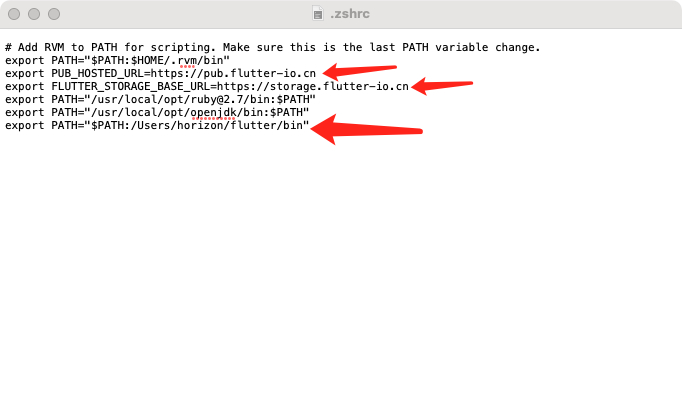
Edit finish `.zshrc`( perhaps `.bashprofile`) After the document , Keep close , function
```
source .zshrc
// Edit if .bashprofile, Then input. source .bashprofile
```
And then run `flutter doctor`, You can judge flutter Is it installed well .
Editor installation
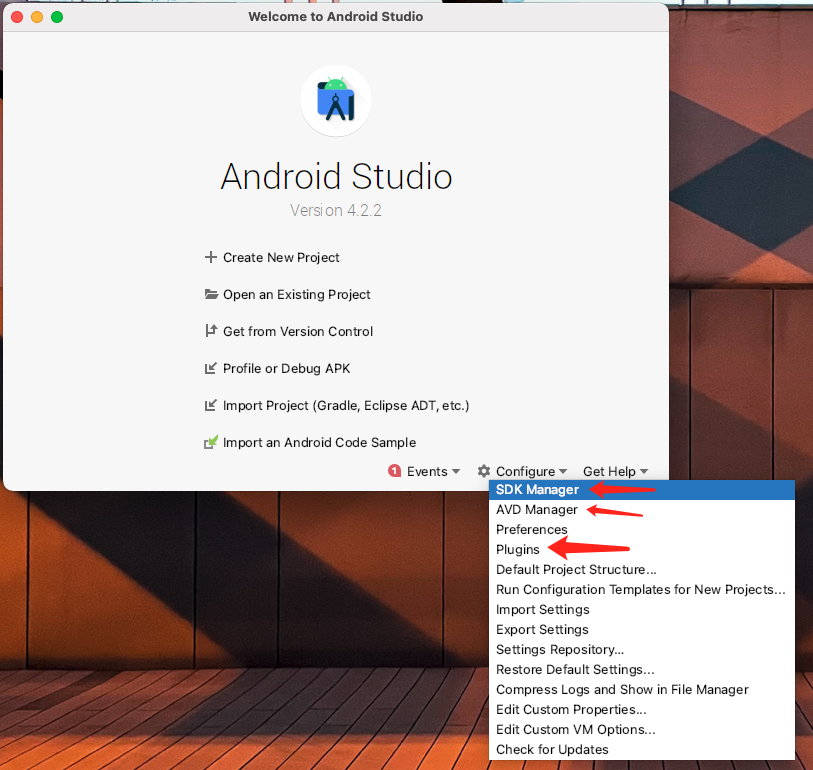
- Android Studio Download and install Android Studio after , There are also three places to install
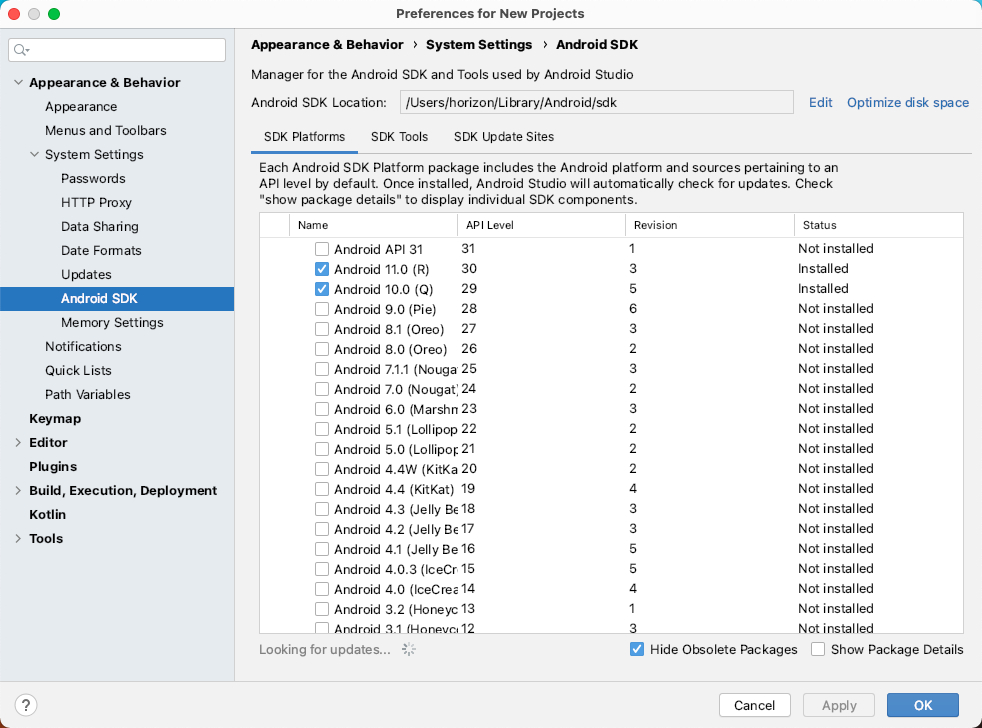
- SDK Manager, install SDK Platforms, Add the required Android version according to the actual common
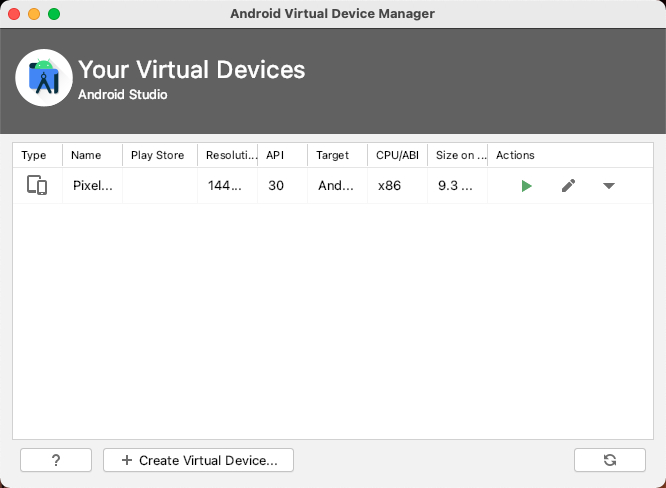
- AVD Manager, Add Android emulator
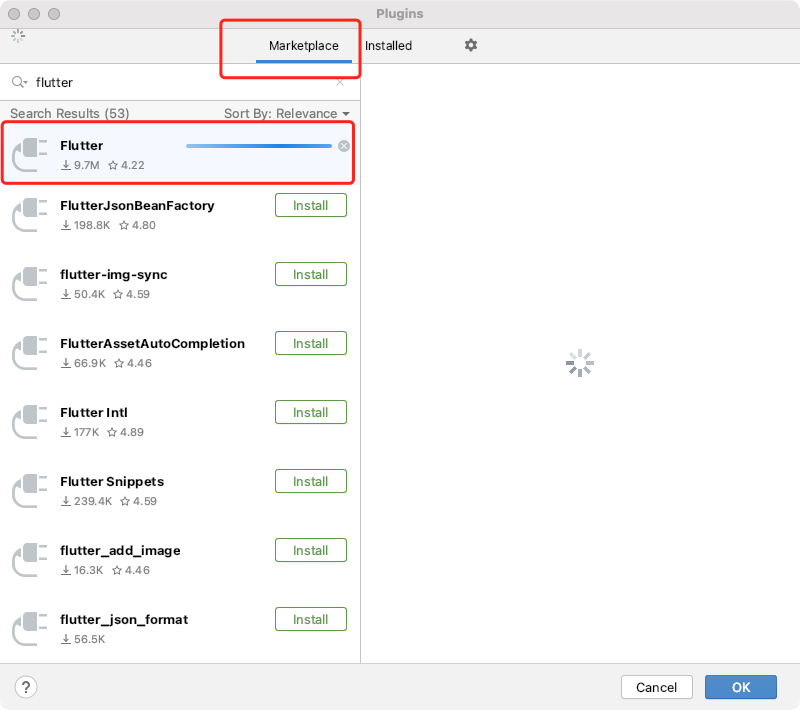
- Plugins, add to Flutter and Dart plug-in unit
Here's the picture :
- Xcode, Download and install directly , Then open it once .
- VSCode, open VSCode Plug-in interface , Search for Flutter, Can be installed .
Verification environment
Input flutter doctor, Judge whether the environment is installed according to the prompt , There may be problems , Refer to the problem record below
Input flutter doctor --android-licenses, You will be prompted to choose y/N, All choices y that will do .
Create project
Use VSCode establish Flutter project , open VSCode( Remember to install Flutter plug-in unit ), Press at the same time CMD+Shift+P, Invoke shortcut commands , Input Flutter, choice Flutter: New Applicaiton Project, Here's the picture
Then select the project storage address , Project name , that will do
Running simulator
List supported emulators
flutter emulator
give the result as follows :
Open the specified simulator
flutter emulators --launch xxx
Running simulator
flutter run
Then select the simulator to run , as follows :
The problem record
- function
flutter doctor, Report errors :Android sdkmanager tool not found
modify : open Android Studio, Click on Config->SDK Manager, Choose SDK Tools, Deselect the bottom `Hide Obsolete Packages`, Then you can see `Android SDK Tools(Obsolete)`, Check Apply, When the download is completed .
- function
flutter doctor --android-licenses, Report errors :Failed to install android-sdk: “java.lang.NoClassDefFoundError:
modify : open Android Studio, Click on Config->SDK Manager, Choose SDK Tools, Deselect the bottom `Hide Obsolete Packages`, Can see `Android SDK Command-line Tools(latest)`, Check Apply, When the download is completed .
![[email protected]](https://inews.gtimg.com/newsapp_ls/0/13772656300/0.png)
- The boot simulator is stuck
Running Gradle task 'assembleDebug'...
background : Good configuration flutter After the environment , Select Android emulator , Startup time , Consistency stuck in `Running Gradle task 'assembleDebug'...`
reason :Gradle Of Maven The warehouse is abroad , Therefore, you need to use the alicloud image address .
modify :
`andriod/build.gradle` In file repositories It is amended as follows
maven { url 'https://maven.aliyun.com/repository/google' }
maven { url 'https://maven.aliyun.com/repository/jcenter' }
maven { url 'http://maven.aliyun.com/nexus/content/groups/public' }
as follows :
边栏推荐
- Rhel8 series update image Yum source is Tencent cloud Yum source
- When easynvs is deployed on the project site, easynvr cannot view the corresponding channel. Troubleshooting
- Analysis of official template of wechat personnel recruitment management system (II)
- Double non students, self-taught programming, counter attack Baidu one year after graduation!
- What is the role of website domain name
- Comparison of common layout solutions (media query, percentage, REM and vw/vh)
- How to bind the most formal domain name? What are the precautions for binding domain names?
- What is Druid
- A cigarette of time to talk with you about how novices transform from functional testing to advanced automated testing
- The errorcontrol registry of the third-party service is 3, which may cause the system to cycle restart. For example, ldpkit introduced by WPS
猜你喜欢

What is the difference between a white box test and a black box test
Fault analysis | using --force to batch import data leads to partial data loss
Oracle case: ohasd crash on AIX

Solution to the 39th weekly game of acwing

The product layout is strengthened, the transformation of digital intelligence is accelerated, and FAW Toyota has hit 2022million annual sales

ServiceStack. Source code analysis of redis (connection and connection pool)

Technology is a double-edged sword, which needs to be well kept
![[fault announcement] one stored procedure brings down the entire database](/img/7c/e5adda73a077fe4b8f04b59d1e0e1e.jpg)
[fault announcement] one stored procedure brings down the entire database

One line of keyboard

Manual for automatic testing and learning of anti stepping pits, one for each tester


随机推荐
How to check whether the domain name is filed? Must the domain name be filed for use?
Get the short video! Batch download of Kwai video (with source code)
Rhel8 series update image Yum source is Tencent cloud Yum source
Vscode1.58 version update record Previous + related article summary
How does easyplayer RTSP configure sending heartbeat information to the server?
Implementation of code rate and frame rate statistics in easyplayer RTSP player
The company is worried about customer frustration and brand damage caused by DDoS Attacks
WordPress applet build applet from zero to one [server configuration]
How to select cloud game platforms? Just pay attention to two points
What are the common network protocols
WordPress pill applet build applet from zero to one [wordpress pagoda configure SSL pseudo static]
Tencent cloud VPC machine, no image when installing monitoring components
Fault analysis | using --force to batch import data leads to partial data loss
What are the categories of edge computing devices
Micro build low code supports Excel to import data source
How to give full play to the advantages of Internet of things by edge computing intelligent gateway
Semantic web, semantic web, linked data and knowledge map
Member management system PC side building tutorial (I)
Basic concepts of complex networks
Technology is a double-edged sword, which needs to be well kept