当前位置:网站首页>File details
File details
2022-07-25 07:45:00 【Cloud C】
List of articles
Preliminary understanding of documents
What is a document
In the life , We have paper documents ; In the network , We are C disc 、D There are various documents on the disk , These documents record information .
In programming , Let's talk about it from the perspective of file function , Documents are generally divided into two types : Program files 、 Data files .
Program files
Source file program ( The suffix is
.c)、 Target file (windows Suffix in environment.obj)、 Executable program (windows In the environment, the suffix is.exe).
Data files
The content of the file is not necessarily a program , It's the data read when the program runs , For example, the file from which the program needs to read data , Or output content file .
This section discusses data files .
What is a file name
A file must have a unique file ID , So that users can identify and reference
The file name consists of three parts : File path + File name trunk + file extension
for example :c:code\test.txt
For convenience , Document identification is often called file name .
Why use files
When we are learning program language , Usually I have written my address book , When the address book runs , We can enter information into the address book , Add, delete, check and modify , At this time, the input data runs in memory , And when the program exits , Memory free , The data we input into memory does not exist , Wait until the next time you run the address book , The data has to be re entered , This kind of address book is very painful to use .
The address book should have a function to save the information we enter , And when we delete it subjectively , Information is deleted , Otherwise, information will always exist . The method is that we need to save the data to disk file 、 Database and so on .
Opening and closing of files
The file pointer
While the program is running , Each used file has a corresponding file information area in memory , It is used to store information about files ( Such as file name 、 File status 、 The current location of the file, etc ). This information is stored in a structure variable . The struct type is declared by the system , The name FILE.
for example ,VS2013 The compiler environment provides stdio.h The following file type declarations exist in the header file :
struct _iobuf {

        char *_ptr;
        int   _cnt;
        char *_base;
        int   _flag;
        int   _file;
        int   _charbuf;
        int   _bufsiz;
        char *_tmpfname;
        };
typedef struct _iobuf FILE;
Different C Compiler FILE Types don't contain exactly the same content , But it's the same .
Every time you open a file , The system will automatically create a FILE Structural variables , And fill in the information , Users don't have to care about details .
This variable is usually passed through a FILE Type pointer to maintain , This is more convenient to use .
In the buffered file system , The key concept is **“ File pointer type ”, abbreviation “ The file pointer ”**.
So let's create one FILE* Pointer variable for :
FILE* pf;// File pointer variable
Definition pf It's a point FILE Pointer variable of type data . You can make pf Point to the file information area of a file ( A structure variable ). Through the information in the file information area, you can access the file . in other words , Through the file pointer variable, you can find the file associated with it .
such as :

Open and close
Files should be read and written first Open file , After use, you should Close file .
During the operation of the program , When you open the file, you will return a FILE* The pointer to the file , It is equivalent to establishing the relationship between pointer and file .
ANSIC To prescribe the use of fopen Function to open a file ,fclose Function to close the file .
// Open file
FILE* fopen(const void* filename, const char* mode);
// Close file
int fclose(FILE* stream);
Open it as follows :
| How files are used | meaning | If the specified file does not exist |
|---|---|---|
| “r”( read-only ) | To enter data , Open an existing text file | error |
| “w”( Just write ) | To output data , Open a text file | Create a new text file |
| “a”( Additional ) | Add data to the end of the text file | Create a new text file |
| “rb”( read-only ) | To enter data , Open an existing binary file | error |
| “wb”( Just write ) | To output data , Open a binary file | Create a new binary |
| “ab”( Additional ) | Add data to the end of the binary file | Create a new binary |
| “r+”( Reading and writing ) | To input and output data , Open an existing text file | error |
| “w+”( Reading and writing ) | To input and output data , Open a text file | Create a new text file |
| “a+”( Reading and writing ) | Input and output data to the end of the text file | Create a new text file |
| “rb+”( Reading and writing ) | To input and output data , Open an existing binary file | error |
| “wb+”( Reading and writing ) | To input and output data , Open a binary file | Create a new binary |
| “ab+”( Reading and writing ) | Input and output data to the end of the binary file | Create a new binary |
Sample code :
#include <stdio.h>
int main()
{

  // Create a FILE* Variable pfile Receive on filename File returned FILE* The address of
  FILE* pfile = fopen("filename", "w");
  // When opening a file fails , Returns the NULL;
  if(file == NULL){

    perror("fopen");
    exit(-1);
  }
  // Open the success , Write a string to a file
  fputs("fopen example", file);
  // Finished using the file , Close file
  fclose(pfile);
  pfile = NULL;
  return 0;
}
Sequential reading and writing of files
Read and write related functions in sequence
C Related functions about sequential reading and writing of files in language :
| Function name | function | Apply to |
|---|---|---|
| fgetc | Read a character from the stream | All input streams |
| fputc | Output a character to the stream | All output streams |
| fgets | Read a line of characters from the stream | All input streams |
| fputs | Output a line of characters to the stream | All output streams |
| fscanf | Format and read data from the stream | All input streams |
| fprintf | Format the output data into the stream | All output streams |
| fread | Read data in binary form from the stream | Documents only |
| fwrite | Output data in binary form to the stream | Documents only |
The concept of file read-write and stream
Reading and writing of documents
The file to read : Read the data in the hard disk file into the program memory , Input operation , Correlation function :fgetc、fgets、fscanf、fread
File write : Write the data in the program memory to the hard disk file , Output operation , Correlation function :fputc、fputs、fprintf、fwrite

flow
As a programmer , We can not only read and write files , We can also check the screen 、U disc 、 Network and other devices for reading and writing , Different devices may have different ways of reading and writing , But we usually don't know all the ways of reading and writing , therefore C Language encapsulates a layer called flow between reading and writing , Data will be read and written into the stream first , Then read and write from the stream .
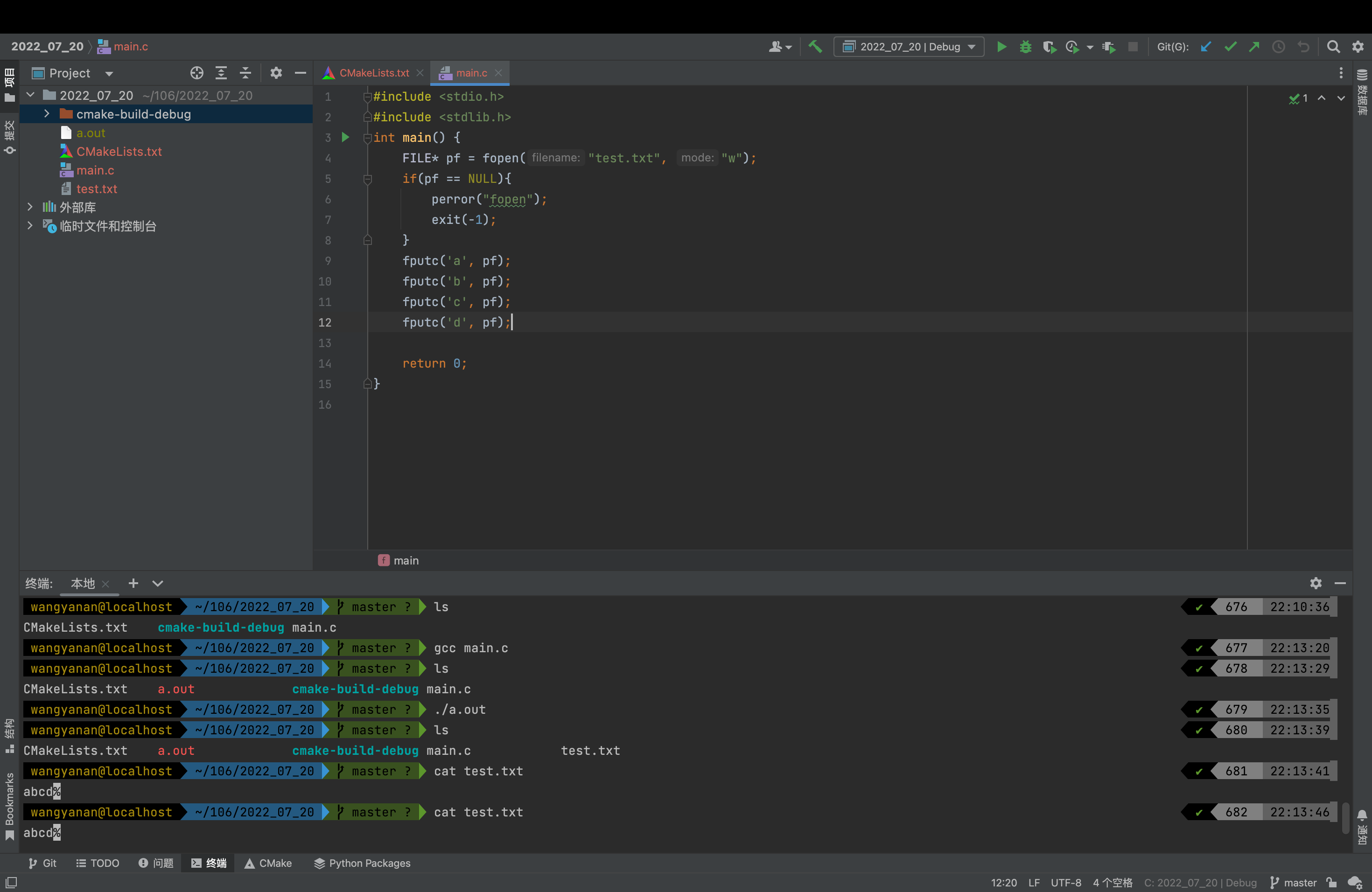
fgetc And fputc

explain :
Returns the character currently pointed to by the internal file location indicator of the specified stream , The internal file position indicator advances to the next character .
If you call , The stream is at the end of the file , Then the function returns EOF And set the end of file indicator of the stream feof.
If a read error occurs , This function returns EOF And set the error indicator of the stream ferror.
fgetc and getc It is equivalent. , It's just getc In some libraries, it can be implemented as a macro .


explain :
Write a character to the stream and advance the position indicator .
The position indicated by the internal position indicator of the character write stream , Then automatically advance one .
fgets And fputs

explain :
Get strings from the stream and treat them as C The string is stored in str in , Until read (num-1) Characters or reaching a newline or the end of the file , Whichever comes first .
Line breaks make fgets Stop reading , But it is regarded as a valid character by the function and included in the copy to str In the string of .
After copying to str A terminating null character will be automatically appended after the character .
Please note that ,fgets And gets Completely different : Not only fgets Accept flow parameters , But it is also allowed to specify str To the maximum size , And any ending newline character in the string .


explain :
take str Point to the C Write string to stream .
The function starts from the specified address (str) Start copying , Until the end null character is reached (‘\0’). This terminating null character is not copied to the stream .
Please note that :fputs And puts The difference is not just that you can specify the target flow , and fputs No extra characters will be written , and puts A newline character will be automatically added at the end .

fscanf And fprintf

explain :
Read the data from the stream and store them in the location pointed to by the additional parameters according to the parameter format .
Additional parameters should point to the assigned object , Its type is specified by the corresponding format specifier in the format string .


explain :
Point the format to C Write string to stream . If the format contains a format specifier ( With % The first subsequence ), Then the additional parameters after the format will be formatted and inserted into the result string , Replace their respective specifiers .
After the format parameter , This function requires at least as many additional parameters as the format specifies .


fread And fwrite

explain :
Read the count element array from the stream , The size of each element is size byte , And store them in ptr In the specified memory .
The position indicator of the stream advances by the total number of bytes read .
If it works , The total number of bytes read is (size*count).


explain :
from ptr The memory block pointed to writes an array of count elements to the current position in the stream , The size of each element is size byte .
The position indicator of the stream advances by the total number of bytes written .
In the internal , This function will ptr The block pointed to is interpreted as an unsigned character type (size*count) Array of elements , And write them to the stream in order , It's like every byte calls fputc equally .

expand :sscanf And sprintf

explain :
from s Reading data , And store it in the location given by the additional parameters according to the parameter format , It's like using scanf equally , But from s Instead of standard input (stdin) Reading data .
Additional parameters should point to objects already assigned , The type of the object is specified by its corresponding format specifier in the format string .

explain :
Make a string , The string is the same as in printf The text to be printed is the same when the format controller is used on , But the content is not printed , But as a C The string is stored in str In the buffer pointed to .
The size of the buffer should be large enough , To contain the entire result string ( see also snprintf Get a safer version ).
A terminating null character will be automatically added after the content .
stay format After formal parameter , The function needs to be at least the same as format The same number of additional arguments required .

scanf、printf And fscanf、fprintf as well as sscanf、sprintf The connection and difference between
contact :
All three are formatted input and output functions
difference :
scanf、printf Only applicable to standard input ( Output ) flow ( The default ):stdin( keyboard )、stdout( Monitor ).
fscanf、fprintf Applicable to all inputs ( Output ) flow .
sscanf、sprintf Only for Strings .
Random reading and writing of documents
The above describes the sequential reading and writing of files , That is, read and write data from beginning to end in order , It's clumsy , So in order to operate files more flexibly , There is another kind of file operation function .
| Function name | function |
|---|---|
| fseek | Reposition the flow position indicator |
| ftell | Gets the current position in the stream |
| rewind | Set the position of the flow to the starting position |
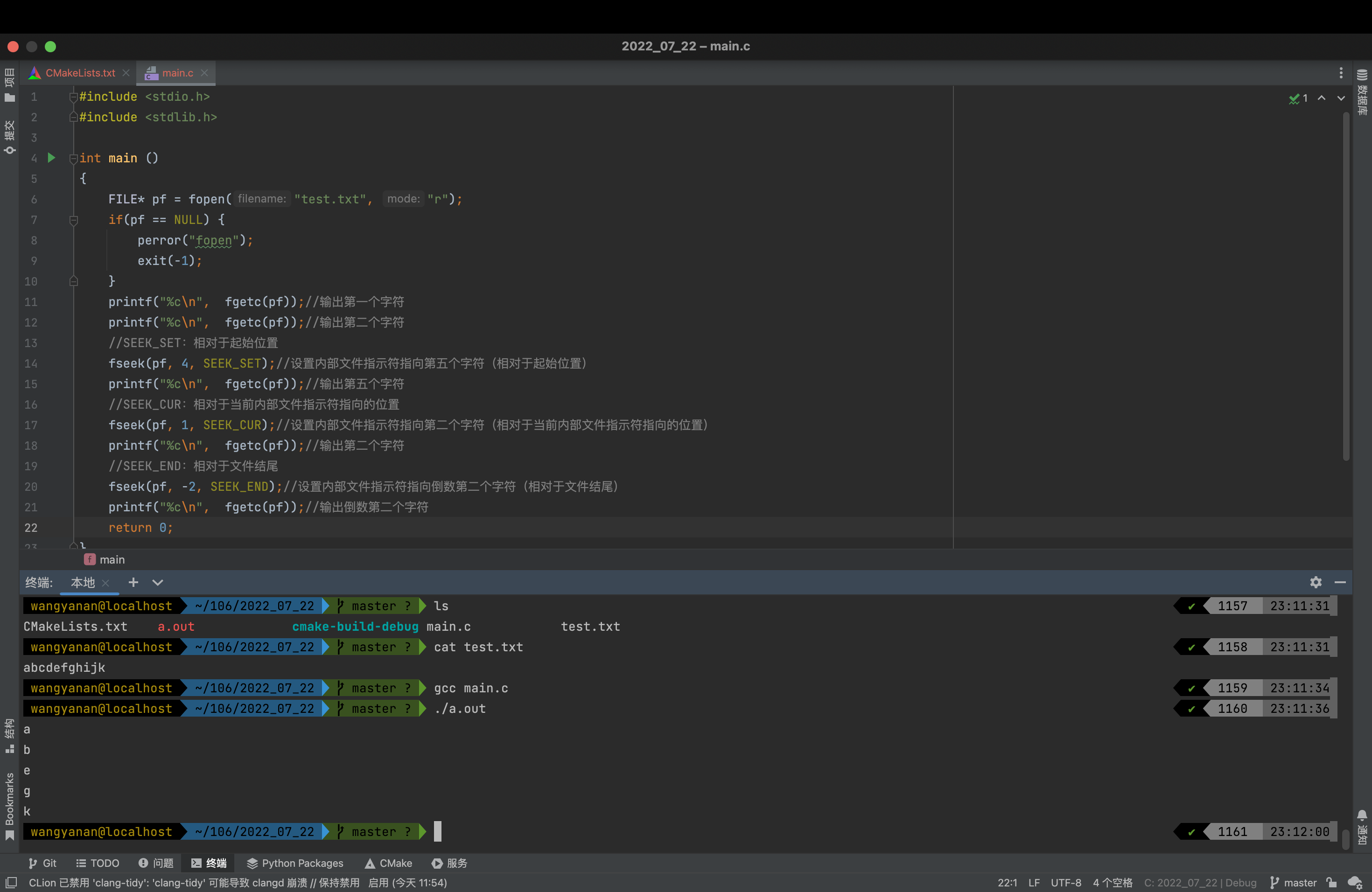
fseek

explain :
Set the position indicator associated with the flow to a new position .
For streams opened in binary mode , The new position is defined by adding an offset to the reference position specified by the origin .
For streams opened in text mode , The offset is either 0, Or call before ftell The value returned , The origin must be SEEK_SET.
If the function is called with other values of these parameters , Support depends on the specific system and library implementation ( It's not portable ).
After successfully calling this function , The end of file internal indicator of the stream will be cleared , And delete the previous call ungetc All effects on the flow .
For open update ( read + Write ) Reading stream , call fseek You can switch between reading and writing .
origin Possible values of parameters
| constant | Reference position |
|---|---|
| SEEK_SET | The starting position of the file |
| SEEK_CUR | The current location of the file pointer |
| SEEK_END | The end of the document |
ftell

explain :
Returns the current value of the flow position indicator .
For binary streams , Is the number of bytes from the beginning of the file .
For text streams , This value may not be meaningful , But it can still be used later fseek Restore the location to the same location ( If you use ungetc Put the characters that are still to be read back , The behavior is undefined ).

rewind

explain :
Set the position indicator associated with the flow to the beginning of the file .
After successfully calling this function , The end of file and error internal indicators associated with the stream will be cleared , Previous call ungetc All influences on this flow will be removed .
Open update ( read + Write ) On the stream of . call rewind You can switch between reading and writing .

Text files and binaries
According to the organization of data , Data files are called text file perhaps Binary .
Data is stored in memory in binary form , If the output without conversion is to external memory , Namely Binary .
If it's required to use ASCII In the form of code , You need to convert before storing . With ASCII The file stored in the form of characters is text file .
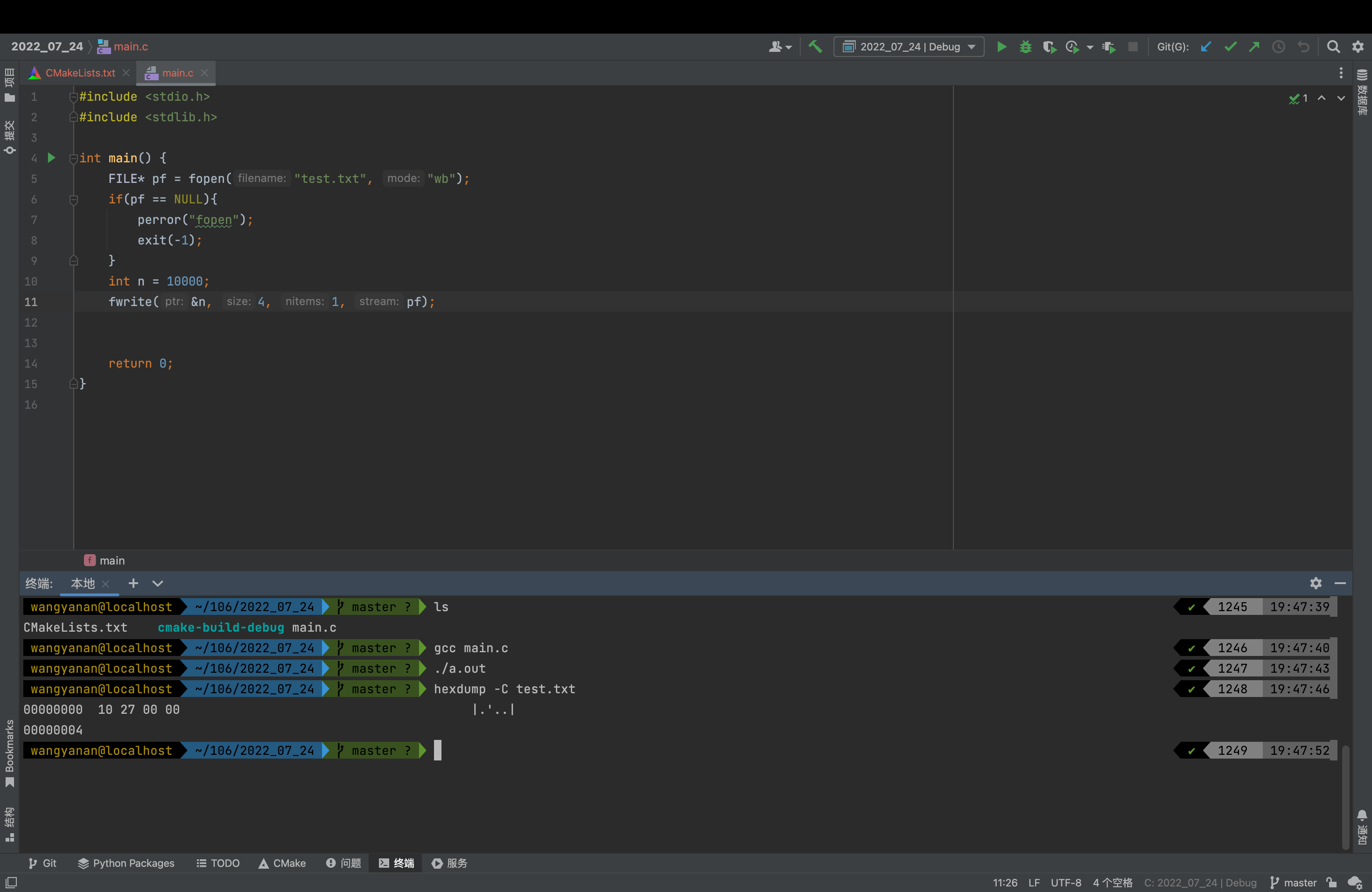
How is a data stored in memory ?
All characters are written in ASCII stored , Numerical data can be used either ASCII stored , It can also be stored in binary form .
Such as integers 10000, If the ASCII stored , In the disk 5 Bytes ( One character, one byte ), And stored in binary form , Then occupy 4 Bytes .
ASCII form
Integers 10000 Be treated as five characters ’1‘、‘0’、‘0’、‘0’、‘0’

Binary form
Determination of the end of file reading
Correlation function
| Function name | function |
|---|---|
| feof | Check the end of file indicator ( Yes return no 0, No return 0) |
| ferror | Check the error indicator ( Yes return no 0, No return 0) |
Misused feof
During file reading , Out-of-service feof The return value of the function is directly used to determine whether the file ends .
Instead, it applies when the file reading ends , The judgment is that the read failed and ended , Or end of file .
Whether the reading of text file is finished , Determine whether the return value is
EOF(fgetc), orNULL(fgets).Whether the binary file reading is over , Judge fread Is the return value of less than the actual number to read .
Use... Correctly :
Examples of text files :
#include <stdio.h>
#include <stdlib.h>
int main()
{

  int c = 0;//  Be careful :int, Not char, Ask to deal with EOF
  FILE* pf = fopen("test.txt", "r");
  if(pf == NULL){

    printf("fopen");
    exit(-1);
  }
  //fgetc  When reading fails or the end of the file is encountered , Will return to EOF
  while((c = fgetc(pf)) != EOF){
    //  standard C I/O Read file cycle
    putchar(c);
  }
  // Judge why it ended
  if(ferror(pf)){

    printf("I/O error when reading!\n");
  }
  else if(feof(pf)){

    printf("End of file reached successfully!\n");
  }
  fclose(pf);
  pf = NULL;
  return 0;
}
Examples of binary files
#include <stdlib.h>
#include <stdio.h>
#define SIZE 5
int main()
{

    int a[SIZE] = {
    1,2,3,4,5};
    FILE* pw = fopen("test.txt", "wb");//  Binary mode must be used
    if(pw == NULL){

        perror("fopen");
        exit(-1);
    }
  	fwrite(a, sizeof(a[0]), SIZE, pw);
    fclose(pw);
    pw = NULL;
    int b[SIZE] = {
     0 };
    FILE* pr = fopen("test.txt", "r");
    size_t n = fread(b, sizeof(b[0]), SIZE, pr);
    if(n == SIZE){

        printf("Array read successfully, contents: ");
        for(int i = 0; i < SIZE; i++){

            printf("%d ", b[i]);
        }
        printf("\n");
    }
    else{

        if(feof(pr)){

            printf("End of file reached successfully!\n");
        }
        else if(ferror(pr)){

            printf("I/O error when reading!\n");
        }
    }
    fclose(pr);
    pr = NULL;
    return 0;
}
File buffer
ANSIC The standard is to adopt **“ Buffer file system ” Processing data files , The so-called buffer file system means that the system automatically opens up a block in memory for each file being used in the program “ File buffer ”**. Data output from memory to disk is first sent to a buffer in memory , After the buffer is filled, it is sent to the disk together . If you read data from disk to computer , Then read the data from the disk file and input it into the memory buffer ( Fill the buffer ), And then send the data from the buffer to the program data area one by one ( Program variables, etc ). The size of the buffer depends on C The compilation system determines .

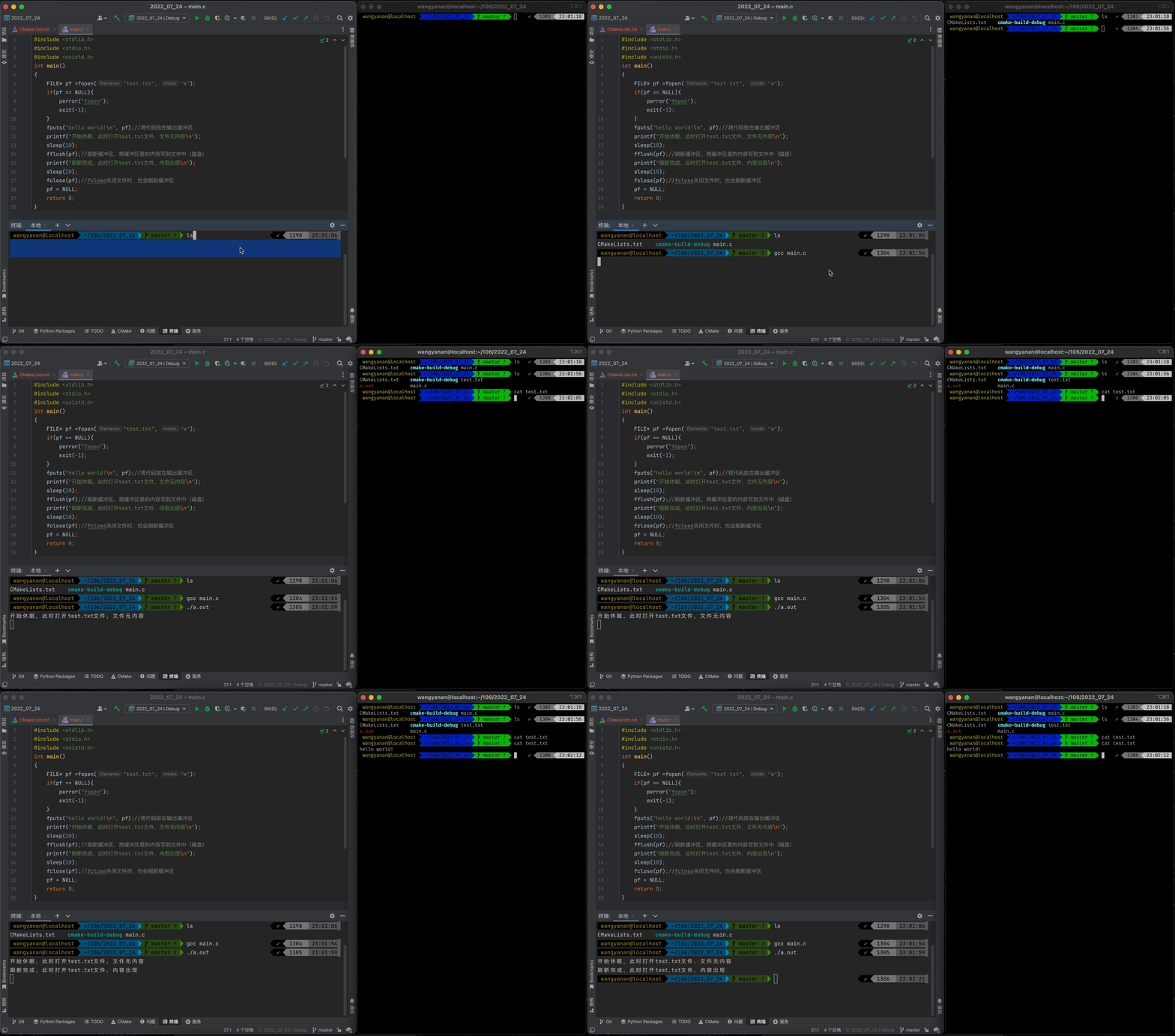
Here's a conclusion :
Because there is a buffer ,C Language when operating files , You need to flush the buffer or close the file at the end of the file operation .
If you don't do , May cause problems in reading and writing files .
边栏推荐
- The value of integer a after bitwise negation (~) is - (a+1)
- 3. Promise
- 2-6.自动化采集
- Line generation (matrix ')
- [unity introduction plan] interface Introduction (2) -games view & hierarchy & Project & Inspector
- app耗电量测试
- 【PyTorch】最常见的view的作用
- 交叉熵计算公式
- Acnet: asymmetric convolution for image hypersegmentation (with implementation code)
- webflux默认io线程数
猜你喜欢

Gan series of confrontation generation network -- Gan principle and small case of handwritten digit generation
![[unity entry program] make my first little game](/img/e7/5dcb113c7fabd73ed632fb29619369.png)
[unity entry program] make my first little game

深度学习训练和测试时出现问题:error: the following arguments are required: --dataroot,解决:训练文件的配置方法和测试文件的配置方法

Bingbing's learning notes: classes and objects (Part 1)
![[paper notes] progressive layered extraction (PLE): a novel multi task learning (MTL) model for personalized](/img/a8/c5d14ec5f4a22f7925c6d7454b5a58.png)
[paper notes] progressive layered extraction (PLE): a novel multi task learning (MTL) model for personalized

【Unity入门计划】界面介绍(2)-Games视图&Hierarchy&Project&Inspector
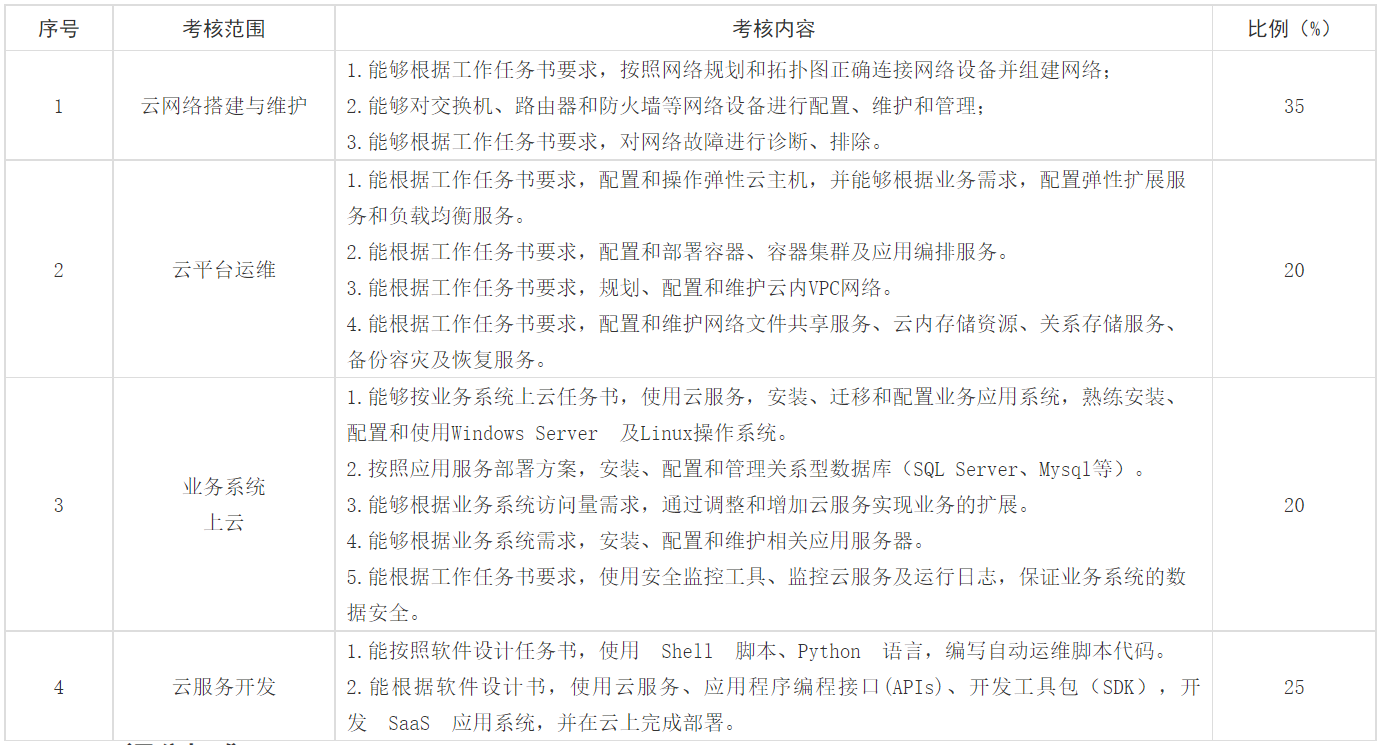
第十七届振兴杯计算机程序设计员(云计算平台运维与开发)决赛

CSDN custom T-shirts are waiting for you to get, and the benefits of new programmer are coming!
【Unity入门计划】制作我的第一个小游戏

全新8.6版本SEO快排系统(可源码级搭建)
随机推荐
Huawei wireless device configuration wpa2-802.1x-aes security policy
全新8.6版本SEO快排系统(可源码级搭建)
How to do a good job in safety development?
pom容易忽略的问题
【论文笔记】Progressive Layered Extraction (PLE): A Novel Multi-Task Learning (MTL) Model for Personalized
The application of for loop and if judgment statement
P1086 [noip2004 popularization group question 2] peanut picking
Introduction to Manhattan distance
redis客户端工具redis-insight推荐
Teach you to use cann to convert photos into cartoon style
[unity introduction plan] interface Introduction (2) -games view & hierarchy & Project & Inspector
Tunnel broadcasting and wireless trunking communication broadcasting system - the case of Tiantaishan tunnel
转行学什么成为了一大部分人的难题,那么为什么很多人学习软件测试呢?
Oracle19 adopts automatic memory management. The AWR report shows that the settings of SGA and PGA are too small?
DJI push code (one code for one use, limited time push)
Network file storage system (II) practical operation of Minio distributed file system
UNIPRO multi terminal deployment to meet customers' diversified needs
Nailing the latest version, how to clear the login phone number history data
cesium简介
QT learning diary 20 - aircraft war project