当前位置:网站首页>tkinter绘制组件(31)——支点标题
tkinter绘制组件(31)——支点标题
2022-07-29 21:21:00 【Smart-Space】
引言
看到这四个字——支点标题,是不是很疑惑?
其实……我写下来的时候也挺疑惑的。
这个名称(pivot)取自winui的Pivot控件,中文就是支点的意思。在winui中pivot类似于标题栏,可以让使用者决定现在要看哪一个标题对应的窗口或者内容。
当然,在TinUI中,支点标题仅仅是标题,类似于单选组控件,提高编写者对于窗口切换代码编写的高自由度。除此之外,TinUI中的支点标题可以同时横向与纵向布局,也是类似于单选组控件。虽然pivot和radiobox有很多相似之处,但是对于使用者来说则是两个完全不同的交互控件。
布局
函数结构
    def add_pivot(self,pos:tuple,fg='#959595',bg='',activefg='#525252',activecolor='#5969e0',content=(('a-title','tag1'),('b-title','tag2'),'',('c-title','tag3')),font='微软雅黑 16',padx=10,pady=10,command=None):#绘制支点标题
    ''' pos::位置 fg::字体颜色 bg::创建时的保留参数 activefg::激活时字体颜色 activecolor::提示色 content::内容,空字符串代表下一行 font::字体 padx::横向间距 pady::纵向间距 command::响应函数,必须接受一个参数,所选标题的tag '''
标题标签
标题标签指的是content参数中,每个常规元素的第二个元素,这样标题被点击时返回的不是标题名称,而是这个标签,这里叫做tag。
布局框架
之前我们创建了单选组控件(radiobox),这里的布局逻辑与其相似,不清楚的可以翻回那一篇文章看看。
        texts=[]#[(text,tag,text-uid),...]
        count=-1
        select=-1#当前选定
        t_bbox=None
        nowx,nowy=pos#x坐标为左上角插入坐标,y坐标为底部坐标
        uid='pivot'+str(id(content))
        line=self.create_line((pos[0],pos[1],pos[0]+5,pos[1]),fill=activecolor,width=3,capstyle='round',tags=(uid))
        for i in content:
            count+=1#计数
            if i=='':
                if t_bbox==None:#没有底部坐标数据
                    nowy+=pady
                else:
                    nowy=t_bbox[3]+pady
                nowx=pos[0]
                texts.append(('\n','\n',None))
                continue
            #...
这里面的line是随意位置创建的,这个元素是标题提示线。
for循环中,省略的部分就是常规标题创建,代码如下:
            text=self.create_text((nowx,nowy),font=font,text=i[0],fill=fg,anchor='nw',tags=(uid))
            t_bbox=self.bbox(text)
            width=t_bbox[2]-t_bbox[0]
            nowx=nowx+width+padx
            texts.append((i[0],i[1],text))
            self.tag_bind(text,'<Enter>',lambda event,num=count,tag=text:button_in(num,tag))
            self.tag_bind(text,'<Leave>',lambda event,num=count,tag=text:button_out(num,tag))
            self.tag_bind(text,'<Button-1>',lambda event,num=count,tag=text,tagname=i[1]:sel_it(num,tag,tagname))
绑定事件
上文中已经可以看到标题绑定了三种事件,三种事件的处理如下:
        def button_in(num,text_uid):
            if num!=select:
                self.itemconfig(text_uid,fill=activefg)
        def button_out(num,text_uid):
            if num!=select:
                self.itemconfig(text_uid,fill=fg)
        def sel_it(num,text_uid,tag):
            nonlocal select
            if num==select:
                return
            self.itemconfig(texts[select][2],fill=fg)
            select=num
            self.itemconfig(text_uid,fill=activefg)
            bbox=self.bbox(text_uid)
            self.coords(line,(bbox[0],bbox[3]+2,bbox[2],bbox[3]+2))
            if command!=None:
                command(tag)
注意的有两点:
sel_it中,先恢复之前选定标题,载重新设置当前选中select别忘了提示线移动(重绘)
默认选值
因为这个是标题内容,因此不能向单选组控件一样有空值。
在结尾加上一段代码。
sel_it(0,texts[0][2],texts[0][1])
完整代码函数
    def add_pivot(self,pos:tuple,fg='#959595',bg='',activefg='#525252',activecolor='#5969e0',content=(('a-title','tag1'),('b-title','tag2'),'',('c-title','tag3')),font='微软雅黑 16',padx=10,pady=10,command=None):#绘制支点标题
        def button_in(num,text_uid):
            if num!=select:
                self.itemconfig(text_uid,fill=activefg)
        def button_out(num,text_uid):
            if num!=select:
                self.itemconfig(text_uid,fill=fg)
        def sel_it(num,text_uid,tag):
            nonlocal select
            if num==select:
                return
            self.itemconfig(texts[select][2],fill=fg)
            select=num
            self.itemconfig(text_uid,fill=activefg)
            bbox=self.bbox(text_uid)
            self.coords(line,(bbox[0],bbox[3]+2,bbox[2],bbox[3]+2))
            if command!=None:
                command(tag)
        texts=[]#[(text,tag,text-uid),...]
        count=-1
        select=-1#当前选定
        t_bbox=None
        nowx,nowy=pos#x坐标为左上角插入坐标,y坐标为底部坐标
        uid='pivot'+str(id(content))
        line=self.create_line((pos[0],pos[1],pos[0]+5,pos[1]),fill=activecolor,width=3,capstyle='round',tags=(uid))
        for i in content:
            count+=1#计数
            if i=='':
                if t_bbox==None:#没有底部坐标数据
                    nowy+=pady
                else:
                    nowy=t_bbox[3]+pady
                nowx=pos[0]
                texts.append(('\n','\n',None))
                continue
            text=self.create_text((nowx,nowy),font=font,text=i[0],fill=fg,anchor='nw',tags=(uid))
            t_bbox=self.bbox(text)
            width=t_bbox[2]-t_bbox[0]
            nowx=nowx+width+padx
            texts.append((i[0],i[1],text))
            self.tag_bind(text,'<Enter>',lambda event,num=count,tag=text:button_in(num,tag))
            self.tag_bind(text,'<Leave>',lambda event,num=count,tag=text:button_out(num,tag))
            self.tag_bind(text,'<Button-1>',lambda event,num=count,tag=text,tagname=i[1]:sel_it(num,tag,tagname))
        sel_it(0,texts[0][2],texts[0][1])
        return texts,uid
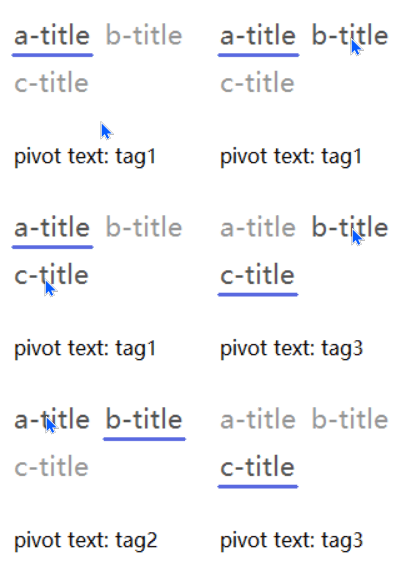
效果
测试代码
    #...
    b.add_pivot((1200,300),command=test10)
    #...
最终效果
github项目
pip下载
pip install tinui
结语
自我感觉,这个比tkinter原生的标题框好看多了。
tkinter创新
边栏推荐
- WeChat Mini Program 30 Customizing Templates and Obtaining User Login Credentials
- 4. Implementation Guide for GET_ENTITYSET Method of SAP ABAP OData Service Data Provider Class
- 【AD】【持续更新ing】关于AD设计过程中一些小细节
- Get the Qiniu cloud address file and save it locally
- 336. Palindromic Pairs
- 方法的传递
- Writing Elegant Kotlin Code: Talk About What I Think "Kotlinic"
- LeetCode 593 Valid Squares [Math] HERODING's Road to LeetCode
- install mysql using script
- 第二好PyTorch新手课程;论文写作指南;使用µGo语言开发迷你编译器;超高效使用Transformer的扩展库;前沿论文 | ShowMeAI资讯日报
猜你喜欢

华为畅享50 Pro评测:HarmonyOS加持 更流畅更安全

刘畊宏男孩女孩看过来!运动数据分析挖掘!(附全套代码和数据集)

笔记:fgets函数详解

初识网络的简单概念

网络通信编程基础,BIO,NIO
Liu Genghong, boys and girls, come here!Sports data analysis and mining!(with a full set of code and data sets)

给pdf添加已作废标识

全自动化机器学习建模!效果吊打初级炼丹师!
Fully automated machine learning modeling!The effect hangs the primary alchemist!

解决报错 WARNING: IPv4 forwarding is disabled. Networking will not work.
随机推荐
Xshell 7 prompts "To continue using this program, you must apply the latest update or use a new version"
第二好PyTorch新手课程;论文写作指南;使用µGo语言开发迷你编译器;超高效使用Transformer的扩展库;前沿论文 | ShowMeAI资讯日报
7 行代码搞崩溃 B 站,原因令人唏嘘!
全球都热炸了,谷歌服务器已经崩掉了
GBASE 8s自定义存储过程和函数介绍
UDP协议详解
install mysql using script
给pdf添加已作废标识
【Verilog 设计】Verilog 实现偶数、奇数分频和任意小数分频
WeChat Mini Program 31 Subcontracting Mechanism
网络通信编程基础,BIO,NIO
惠普服务器硬盘指示灯不亮或显示蓝色
普洛斯荣获两项“数据中心绿色等级评估”5A级认证
4. Implementation Guide for GET_ENTITYSET Method of SAP ABAP OData Service Data Provider Class
Xshell 7 提示 “要继续使用此程序,您必须应用最新的更新或使用新版本”
Get the Qiniu cloud address file and save it locally
在Ferora35中安装oracle-database-xe-21c
第3章业务功能开发(线索关联市场活动,动态搜索)
Fully automated machine learning modeling!The effect hangs the primary alchemist!
The world is on fire, Google servers have crashed