当前位置:网站首页>WeChat Mini Program 30 Customizing Templates and Obtaining User Login Credentials
WeChat Mini Program 30 Customizing Templates and Obtaining User Login Credentials
2022-07-29 21:33:00 【Mu Quanyu[Dark Cat]】
30.1 自定义模板
WXML Template support is provided.即 代码片段,就是你可以 Write a piece of code into a template.Then in a different place 就可以 调用!!
- 定义模板
<template name="msgItem">
	<view>
		<text>{
   {index}}:{
   {msg}}</text>
		<text>Time:{
   {time}}</text>
	</view>
</template>
template 里面的 就是你要 封装的 代码片段.
- 调用/使用 模板
<template is = "msgItem" data="{
     {...item}}"/>
es6运算符 三个点(…)
对象中的扩展运算符(…)用于取出参数对象中的所有可遍历属性,拷贝到当前对象之中.说白了就是 拆包.就是如果 你想要 把数据 传递到 into the template,那么就必须要 这样做.js properties there 也必须 写到 这个 item 里面.

30.2 测试自定义模板
无论使用 模板的 wxml 还是 wxss 都需要 进行 import 导入!
模板
<!--自定义模板-->
<template name="myTmp">
    <view>
        <view class="title">This is my custom template content</view>
        <view class="userInfo">
            <view class="userName">用户名:{
   {username}}</view>
            <view class="age">年龄:{
   {age}}</view>
        </view>
    </view>
</template>

.title {

    font-size: 40rpx;
    color: red;
}
使用 模板
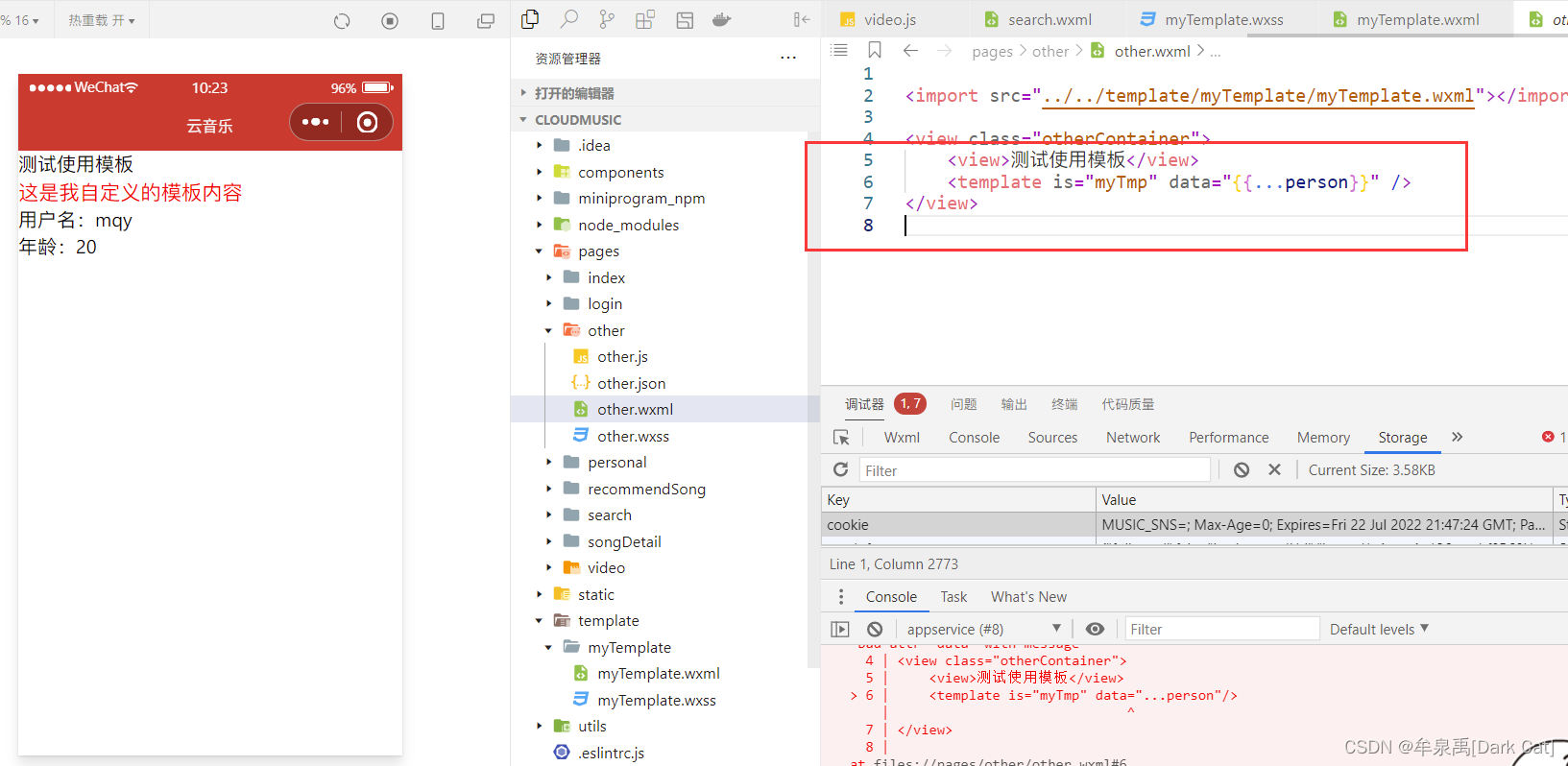
<import src="../../template/myTemplate/myTemplate.wxml"></import>

<view class="otherContainer">
    <view>Test using templates</view>
    <template is="myTmp" data="{
     {...person}}" />
</view>
30.2 获取用户登录凭证
wx.login():调用接口获取登录凭证.
AppSecret(小程序密钥):de2aaa64fd066cae9e954784b6f4766f

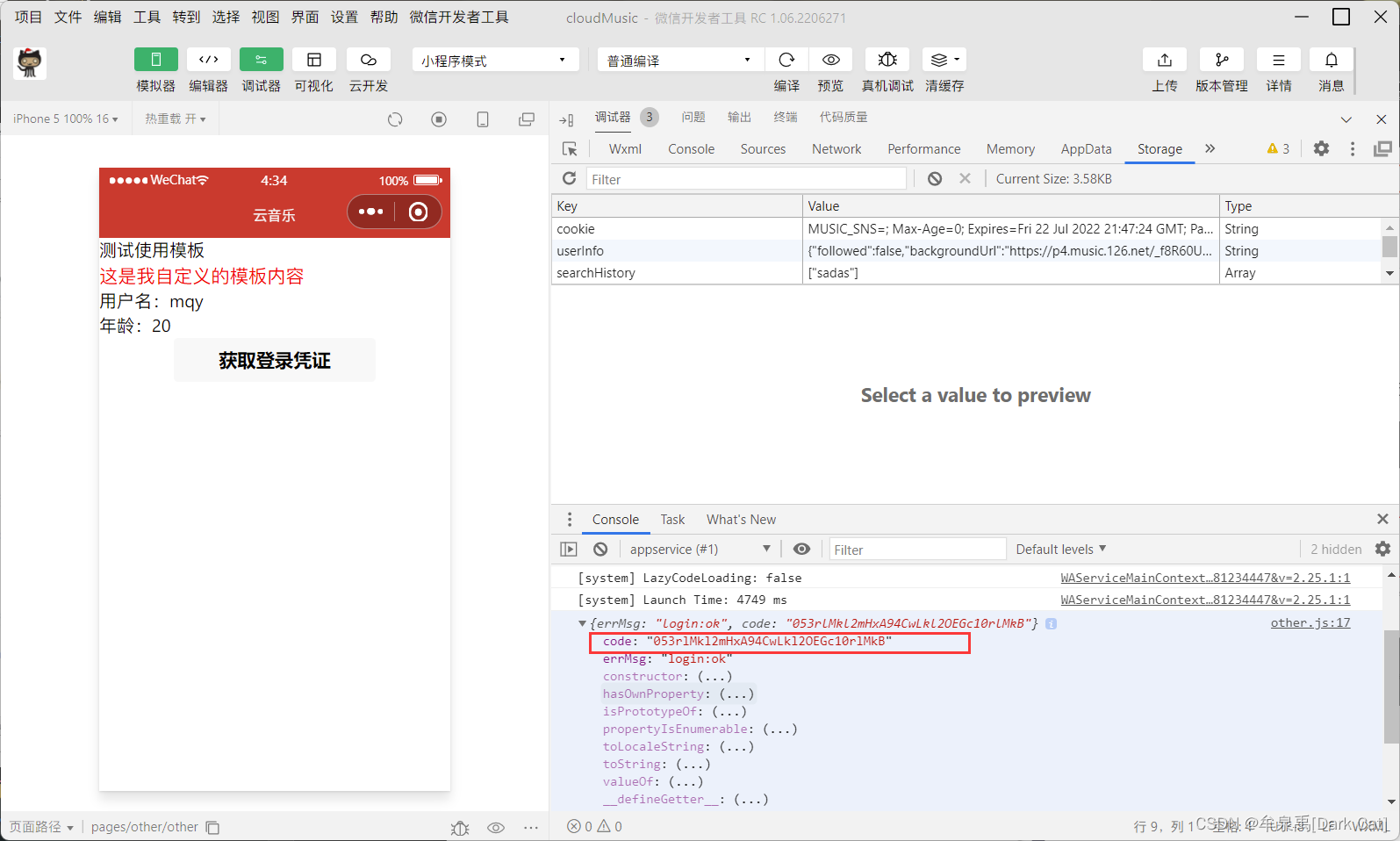
我们拿到这个 code 之后,用 wx.request() 携带 code 向 The developer server sends the request.
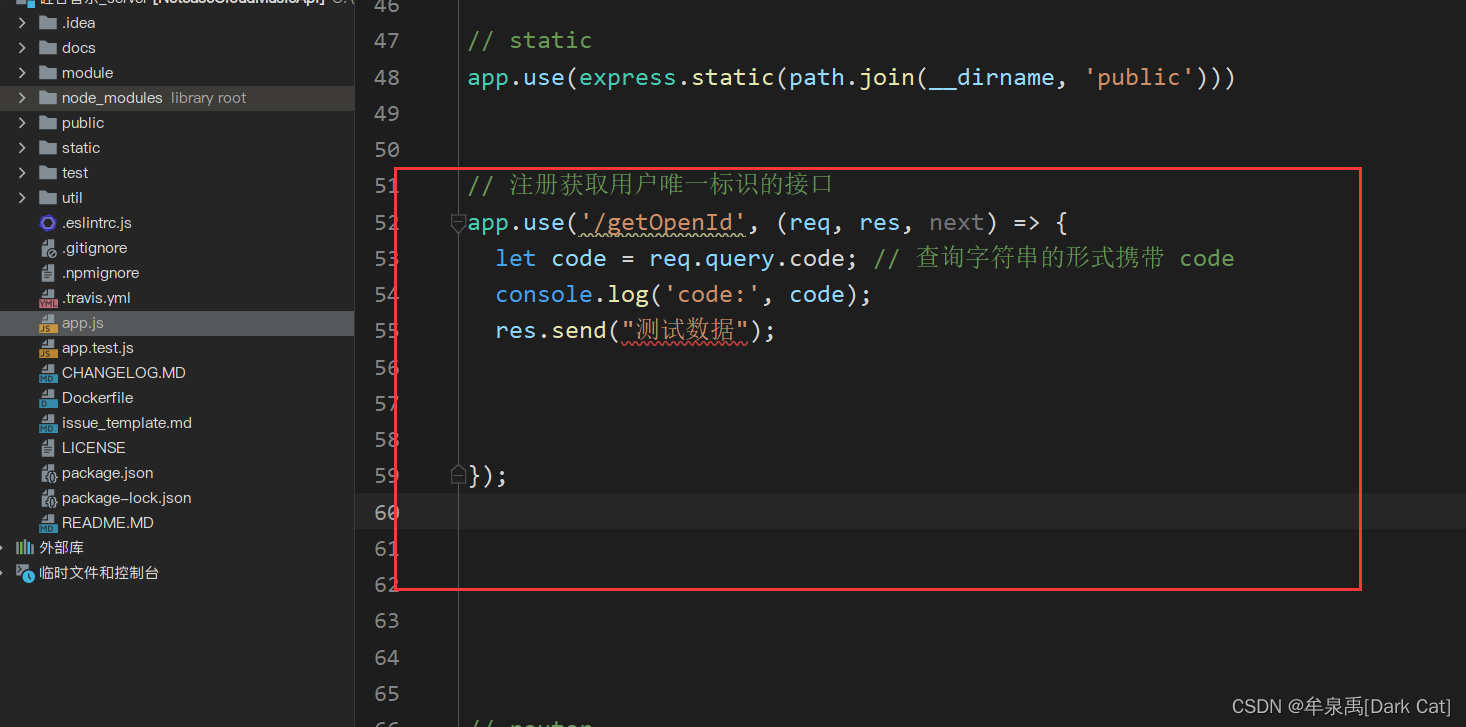
- 用 node.js 去自己写一个 请求接口
    handleGetOpenId(){

      wx.login({

          success: async (res) => {

              console.log(res);
              let code = res.code;
              let ret = await request("getOpenId", {
    code});
              console.log(ret);
          },
      })
    },

接口:GET https://api.weixin.qq.com/sns/jscode2session?appid=APPID&secret=SECRET&js_code=JSCODE&grant_type=authorization_code
- 下载安装 Fly 库
它是一个 基于 Promise 的请求库,相较于 axios There are more powerful functions 和 灵活性,并且 兼容多个环境.比如我们的 小程序 和 node,它就可以 同时 支持!而 axios 不可以.
npm install flyio

导入 Flyio 库,并且 创建 一个 对象 fly
const Fly = require('flyio/src/node');
const fly = new Fly;
使用 fly 进行 异步的 get 请求 并且 拿到 json 数据
// Register the interface for obtaining the user's unique ID
app.use('/getOpenId', async (req, res, next) => {

  let code = req.query.code; // It is carried in the form of a query string code
  let appId = 'wxff8c196698bf9308';
  let appSecret = 'de2aaa64fd066cae9e954784b6f4766f';
  // 发请求给 微信接口服务器 获取 openId
  let url = `https://api.weixin.qq.com/sns/jscode2session?appid=${
      appId}&secret=${
      appSecret}&js_code=${
      code}&grant_type=authorization_code`

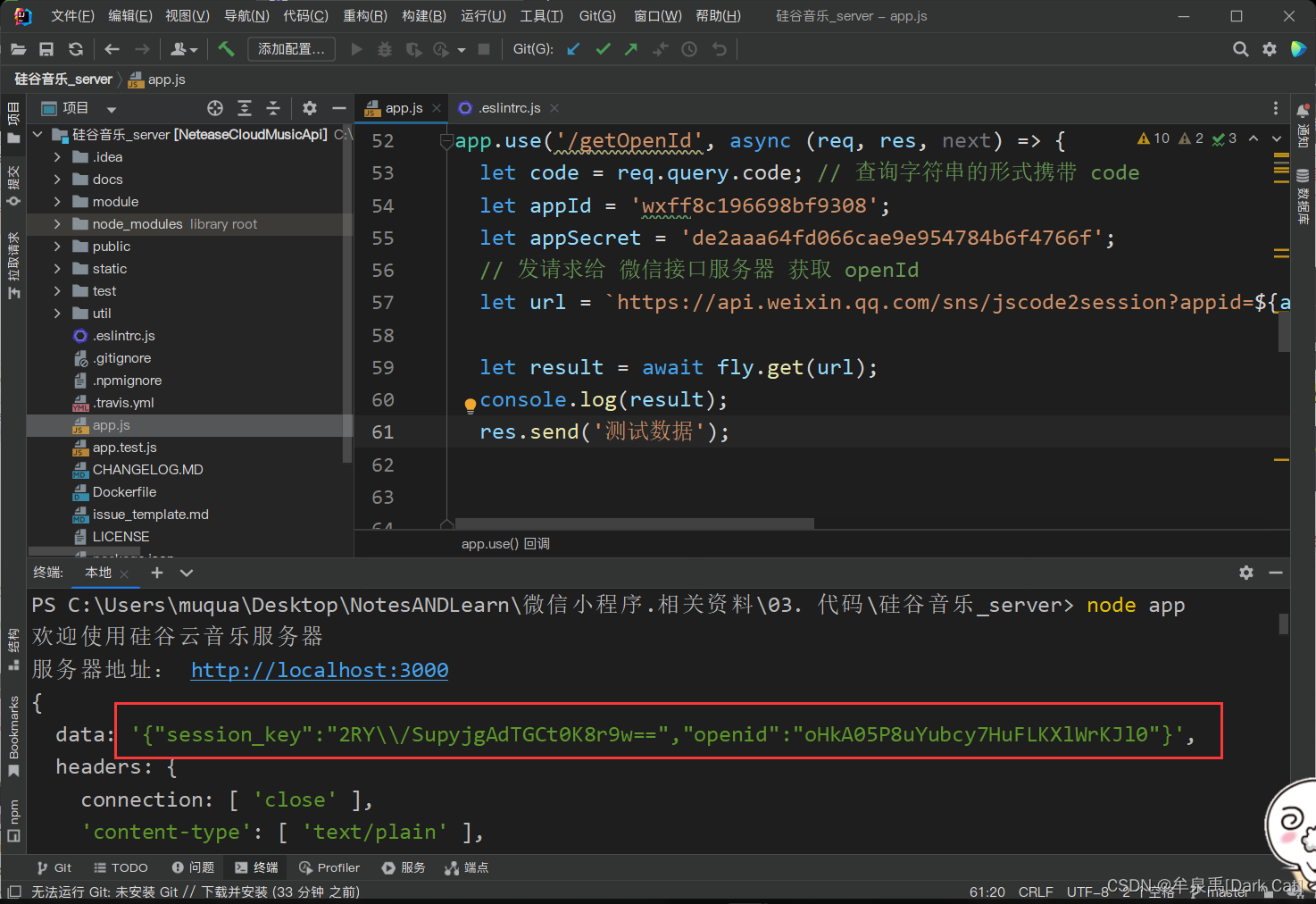
  let result = await fly.get(url);
  console.log(result);
  res.send('测试数据');
});
这样我们 就成功 拿到了 openid 和 session_key了.
- 自定义登录态
自定义登录态 其实 就是拿 用户的基本信息 和 openidsession_key 进行一个关联.(封装到 一个 js 对象 里面就完事了.)

  let user = {

    username: 'MQy',
    age: 20,
    session_key: data.session_key,
    openid: data.openid
  }
这个 openid 是 用户登录后的 唯一标识,所以很重要!We can get through it 来 确定 一个用户.所以 肯定 要 给 自定义登录态 加密的.
使用 jsonwebtoken 库 对 自定义登录态 加密
npm install json
const jwt = require('jsonwebtoken');
加密编码:jwt.sign(user, 'MuQuanyu');
Decryption and decoding:jwt.verify(user, 'MuQuanyu');
// Register the interface for obtaining the user's unique ID
app.use('/getOpenId', async (req, res, next) => {

  let code = req.query.code; // It is carried in the form of a query string code
  let appId = 'wxff8c196698bf9308';
  let appSecret = 'de2aaa64fd066cae9e954784b6f4766f';
  // 发请求给 微信接口服务器 获取 openId
  let url = `https://api.weixin.qq.com/sns/jscode2session?appid=${
      appId}&secret=${
      appSecret}&js_code=${
      code}&grant_type=authorization_code`

  let result = await fly.get(url);
  let data = JSON.parse(result.data);
  let user = {

    username: 'MQy',
    age: 20,
    session_key: data.session_key,
    openid: data.openid
  }

  let token = jwt.sign(user, 'MuQuanyu');
  res.send(token);
});

app.use('/parseToken', (req, res, next) => {

  let token = req.query.token; // It is carried in the form of a query string token
  let ret = jwt.verify(user, 'MuQuanyu');
  res.send(ret);
});
    handleGetOpenId(){

      wx.login({

          success: async (res) => {

              console.log(res);
              let code = res.code;
              let token = await request("getOpenId", {
    code});
              console.log(token);
              this.setData({

                  token
              })
          },
      })
    },

    async handleParseToken() {

        let user = await request("parseToken", {
    token: this.data.token});
        console.log(user);
    },

边栏推荐
- RNA的化学修饰原理|Gal-PEG-siRNA|siRNA-S-S-DSPE|siRNA-s-s-PEG|cholesterol-siRNA
- 无文件落地免杀的初尝试思考(上)
- MySQL Data Query - Simple Query
- 尿素偶联Urea-siRNA Conjugates|Cyclodextrin-siRNA-β-CD环糊精修饰RNA核酸(解析说明)
- Kotlin - 协程作用域 CoroutineScope、协程构建器 CoroutineBuilder、协程作用域函数 CoroutineScope Functiom
- The difference between analog, digital and switching
- 第二好PyTorch新手课程;论文写作指南;使用µGo语言开发迷你编译器;超高效使用Transformer的扩展库;前沿论文 | ShowMeAI资讯日报
- 聚丙烯微孔膜的等离子体改性及DNA|有机自由基改性DNA-阳离子脂质复合体的应用
- Safe Browser will have these hidden features that will let you play around with your browser
- 378. 有序矩阵中第 K 小的元素
猜你喜欢


随机推荐
Samba server configuration (when a server is required)
Oracle问题: ORA-01882: 未找到时区
【无标题】
[ACTF2020 Freshman Competition]Exec 1
SAP ABAP OData 服务 Data Provider Class 的 GET_ENTITYSET 方法实现指南试读版
Mass data query scheme mysql_Mysql massive data storage and solution 2 - Mysql sub-table query massive data... [easy to understand]
A dish hold up valuations billions of mt. Pickled fish, can move beyond the edge food safety?
MySQL Data Query - Union Query
Sasser virus source code (ransomware source code)
MySQL数据查询 - 联合查询
Kotlin - 协程作用域 CoroutineScope、协程构建器 CoroutineBuilder、协程作用域函数 CoroutineScope Functiom
模拟量、数字量与开关量的区别
mos管闩锁效应理解学习
分析少年派2中的Crypto
es6语法使用默认参数和解构
In the past six months, I have done those things about the automatic return of the transaction link...
Is it safe to use the MD5 encrypted string to store the password?Hash algorithm you have to know
The difference between analog, digital and switching
用对象字面量或Map替代Switch/if语句
Minimal jvm source code analysis