当前位置:网站首页>Source code analysis of warning notification for skywalking series learning
Source code analysis of warning notification for skywalking series learning
2022-07-27 03:11:00 【snail-jie】
Preface
Previous posts , We already know that skywalking Link data can be collected , But how to notify if there is an exception in the link ? This article takes the response time timeout as an example to analyze the source code skywalking Alarm flow of the
ServiceDispatcher How to generate
- stay OALRuntime#start when , analysis oal/core.oal The configuration file , Dynamic generation ServiceDispatcher
public void start(ClassLoader currentClassLoader) throws ModuleStartException, OALCompileException { // Read oal/core.oal The configuration file Reader read = ResourceUtils.read(oalDefine.getConfigFile()); // analysis oal/core.oal The configuration file ScriptParser scriptParser = ScriptParser.createFromFile(read, oalDefine.getSourcePackage()); OALScripts oalScripts = scriptParser.parse(); // Generate corresponding Dispatcher class this.generateClassAtRuntime(oalScripts); } - OALRuntime#generateClassAtRuntime Generate ServiceDispatcher
 private void generateClassAtRuntime(OALScripts oalScripts) throws OALCompileException {
    List<AnalysisResult> metricsStmts = oalScripts.getMetricsStmts();
    /**
      * 1.  Take out metricsStmt Of from Attribute sourceName ---> Service
      * 2.   take sourceName And DispatcherContext Form a mapping relationship :OALRuntime$allDispatcherContext$allContext
      * 3.   Will belong to sourceName Of metricsStmt Put it in DispatcherContext Of metrics Properties of the
      **/
    metricsStmts.forEach(this::buildDispatcherContext);

    for (AnalysisResult metricsStmt : metricsStmts) {
       /**
          * generateMetricsClass Generate Metrics class ( for example ServiceRespTimeMetrics)
          *  Inherit LongAvgMetrics, Realization WithMetadata Interface  -->  by ServiceRespTimeMetrics Add method (hashCode Method in metrics/hashCode.ftl)
          * */
        metricsClasses.add(generateMetricsClass(metricsStmt));
        generateMetricsBuilderClass(metricsStmt);
    }

    for (Map.Entry<String, DispatcherContext> entry : allDispatcherContext.getAllContext().entrySet()) {
    	// generateDispatcherClass Generate Dispatcher class
        dispatcherClasses.add(generateDispatcherClass(entry.getKey(), entry.getValue()));
    }

    oalScripts.getDisableCollection().getAllDisableSources().forEach(disable -> {
        DisableRegister.INSTANCE.add(disable);
    });
}
OALRuntime#generateDispatcherClass Generate ServiceDispatcher
private Class generateDispatcherClass(String scopeName,
                                          DispatcherContext dispatcherContext) throws OALCompileException {
        //  adopt javassist Dynamic generation ServiceDispatcher class
        String className = dispatcherClassName(scopeName, false);
        CtClass dispatcherClass = classPool.makeClass(dispatcherClassName(scopeName, true));


       //  by ServiceDispatcher add to Service scope metrics Methods ( The method template is dispatcher/doMetrics.ftl)--> For example, below doServiceRespTime Method
       for (AnalysisResult dispatcherContextMetric : dispatcherContext.getMetrics()) {
       		StringWriter methodEntity = new StringWriter();
       		configuration.getTemplate("dispatcher/doMetrics.ftl").process(dispatcherContextMetric, methodEntity);
            dispatcherClass.addMethod(CtNewMethod.make(methodEntity.toString(), dispatcherClass));
       }

       //  by ServiceDispatcher add to dispatch Method ( Will call the above method set , The method template is dispatcher/dispatch.ftl)
	   StringWriter methodEntity = new StringWriter();
       configuration.getTemplate("dispatcher/dispatch.ftl").process(dispatcherContext, methodEntity);
       dispatcherClass.addMethod(CtNewMethod.make(methodEntity.toString(), dispatcherClass));

}
- by ServiceDispatcher add to Service scope metrics Methods ( With ServiceRespTime For example )
private void doServiceRespTime(org.apache.skywalking.oap.server.core.source.Service source) {
	org.apache.skywalking.oap.server.core.source.oal.rt.metrics.ServiceRespTimeMetrics metrics =
						new org.apache.skywalking.oap.server.core.source.oal.rt.metrics.ServiceRespTimeMetrics();
	metrics.setTimeBucket(source.getTimeBucket());
    metrics.setEntityId(source.getEntityId());
	metrics.combine( (long)(source.getLatency()), (long)(1));
	org.apache.skywalking.oap.server.core.analysis.worker.MetricsStreamProcessor.getInstance().in(metrics);
}
- by ServiceDispatcher add to dispatch Method
public void dispatch(org.apache.skywalking.oap.server.core.source.ISource source) {
	org.apache.skywalking.oap.server.core.source.Service _source = (org.apache.skywalking.oap.server.core.source.Service)source;
    doServiceRespTime(_source);
    doServiceSla(_source);
    doServiceCpm(_source);
    doServicePercentile(_source);
    doServiceApdex(_source);
    doServiceMqConsumeCount(_source);
    doServiceMqConsumeLatency(_source);
}
ServiceDispatcher Generate ServiceRespTimeMetrics data
TraceSegmentReportServiceHandler Receive link data SegmentObject Report , Core source code process :
TraceSegmentReportServiceHandler#collect#onNext --> SegmentParserServiceImpl#send --> TraceAnalyzer#doAnalysis --> RPCAnalysisListener#parseEntry --> RPCAnalysisListener#build --> SourceReceiverImpl#receive --> dispatcherManager#forward --> XXXDispatcher#dispatchnotifyEntryListener Call in RPCAnalysisListener#parseEntry, Improve the upstream and downstream link information to sourceBuilder in ( Including link time ), To add to callingInTraffic in

public void parseEntry(SpanObject span, SegmentObject segmentObject) {
	RPCTrafficSourceBuilder sourceBuilder = new RPCTrafficSourceBuilder(namingControl);
    sourceBuilder.setSourceServiceName(Const.USER_SERVICE_NAME);
    sourceBuilder.setSourceServiceInstanceName(Const.USER_INSTANCE_NAME);
    sourceBuilder.setSourceEndpointName(Const.USER_ENDPOINT_NAME);
    sourceBuilder.setSourceLayer(Layer.UNDEFINED);
    sourceBuilder.setDestServiceInstanceName(segmentObject.getServiceInstance());
    sourceBuilder.setDestServiceName(segmentObject.getService());
    sourceBuilder.setDestLayer(identifyServiceLayer(span.getSpanLayer()));
    sourceBuilder.setDestEndpointName(span.getOperationName());
    sourceBuilder.setDetectPoint(DetectPoint.SERVER);
    sourceBuilder.setComponentId(span.getComponentId());

	//  involve latency Calculation :startTime-endTime,TimeBucke:StartTime Minute timing ->202207232324
    setPublicAttrs(sourceBuilder, span);
    callingInTraffic.add(sourceBuilder);
}
From below RPCAnalysisListener#build You can see in the code snippet that it contains Service、ServiceInstance、ServiceRelation、ServiceInstanceRelation These types of Source; And these Source Submit to sourceReceiver, Its bottom layer is encapsulated DispatcherManager Will be based on Source Select the corresponding SourceDispatcher, By means of dispatch Further treatment
public void build() {
	callingInTraffic.forEach(callingIn -> {
        callingIn.prepare();
        sourceReceiver.receive(callingIn.toService());
        sourceReceiver.receive(callingIn.toServiceInstance());
        sourceReceiver.receive(callingIn.toServiceRelation());
        sourceReceiver.receive(callingIn.toServiceInstanceRelation());
        ....
    });
    .......
}
SourceDispatcher How classes are generated and related to Source The mapping relationship is in the directory (ServiceDispatcher How to generate ) It has been analyzed ,ServiceDispatcher#dispatch
public void dispatch(org.apache.skywalking.oap.server.core.source.ISource source) {
	org.apache.skywalking.oap.server.core.source.Service _source = (org.apache.skywalking.oap.server.core.source.Service)source;
    doServiceRespTime(_source);
    doServiceSla(_source);
    doServiceCpm(_source);
    doServicePercentile(_source);
    doServiceApdex(_source);
    doServiceMqConsumeCount(_source);
    doServiceMqConsumeLatency(_source);
}
ServiceDispatcher#doServiceRespTime Generate ServiceRespTimeMetrics After the call MetricsStreamProcessor Conduct Metrics Aggregate processing
private void doServiceRespTime(org.apache.skywalking.oap.server.core.source.Service source) {
	org.apache.skywalking.oap.server.core.source.oal.rt.metrics.ServiceRespTimeMetrics metrics =
						new org.apache.skywalking.oap.server.core.source.oal.rt.metrics.ServiceRespTimeMetrics();
	metrics.setTimeBucket(source.getTimeBucket());
    metrics.setEntityId(source.getEntityId());
	metrics.combine( (long)(source.getLatency()), (long)(1));
	org.apache.skywalking.oap.server.core.analysis.worker.MetricsStreamProcessor.getInstance().in(metrics);
}
ServiceRespTimeMetrics Data alarm processing
- NotifyHandler receive Metrics, according to scope encapsulation MetaInAlarm Information , obtain MetricsName be-all RunningRule aggregate , Traverse the execution in() Add to Window in
public void notify(Metrics metrics) {
    WithMetadata withMetadata = (WithMetadata) metrics;
    MetricsMetaInfo meta = withMetadata.getMeta();
    int scope = meta.getScope();
	.....
	//  according to scope encapsulation MetaInAlarm Information
	 MetaInAlarm metaInAlarm;
    if (DefaultScopeDefine.inServiceCatalog(scope)) {
        final String serviceId = meta.getId();
        final IDManager.ServiceID.ServiceIDDefinition serviceIDDefinition = IDManager.ServiceID.analysisId(
            serviceId);
        ServiceMetaInAlarm serviceMetaInAlarm = new ServiceMetaInAlarm();
        serviceMetaInAlarm.setMetricsName(meta.getMetricsName());
        serviceMetaInAlarm.setId(serviceId);
        serviceMetaInAlarm.setName(serviceIDDefinition.getName());
        metaInAlarm = serviceMetaInAlarm;
    }
	......
	//  obtain MetricsName be-all RunningRule aggregate
	List<RunningRule> runningRules = core.findRunningRule(meta.getMetricsName());
    if (runningRules == null) {
        return;
    }
    runningRules.forEach(rule -> rule.in(metaInAlarm, metrics));
}
- RunningRule#in(MetaInAlarm meta, Metrics metrics) add to metrics To window in ( Keep only the latest N(period) bucket --> silent 10 Avoid repeated alarms )
- AlarmCore Start timing task , Every time 10s check
Executors.newSingleThreadScheduledExecutor().scheduleAtFixedRate(() -> {
	LocalDateTime checkTime = LocalDateTime.now();
	//  How many minutes before the last inspection
    int minutes = Minutes.minutesBetween(lastExecuteTime, checkTime).getMinutes();
     alarmRulesWatcher.getRunningContext().values().forEach(ruleList -> ruleList.forEach(runningRule -> {
     	//  The inspection interval is 1 Minutes or more
     	if (minutes > 0) {
     		//  Move the window
     		runningRule.moveTo(checkTime);
     		//  Second scale greater than 15
     		if (checkTime.getSecondOfMinute() > 15) {
     		 	 //  Inspection conditions , Decide whether to trigger the alarm , Alarm threshold actual judgment logic : The service invocation time exceeds the threshold and the number reaches the threshold
                 alarmMessageList.addAll(runningRule.check());
            }
     	}
     }));
     if (!alarmMessageList.isEmpty()) {
    	//  Warning notice ( Native support 9 Alarm notification )
   		allCallbacks.forEach(callback -> callback.doAlarm(filteredMessages));
     }
}, 10, 10, TimeUnit.SECONDS);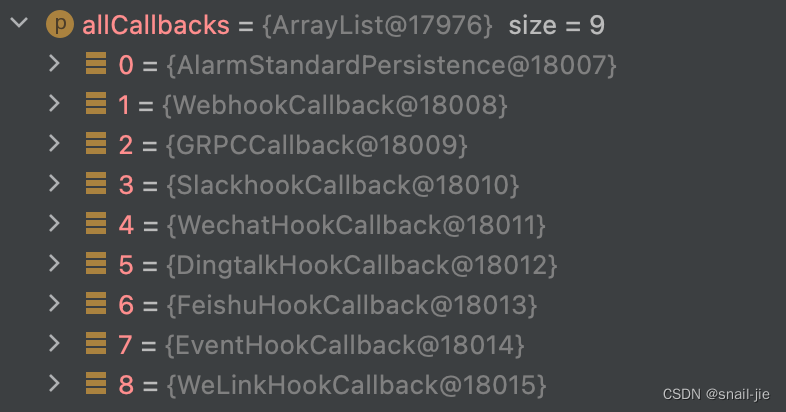
- Response time exceeds threshold , Nail the alarm notice

Bundle language
This article first introduces ServiceDispatcher How to generate , Then analysis ServiceDispatcher How to generate ServiceRespTimeMetrics data , Finally pass the inspection ServiceRespTimeMetrics Data for alarm notification , The whole link is analyzed , I believe you also have a certain understanding of the whole link . In order to ensure the main idea , Some details are ignored , for example Metrics How to aggregate ? Let's continue the analysis later
边栏推荐
- 手动从0搭建ABP框架-ABP官方完整解决方案和手动搭建简化解决方案实践
- 浅浅梳理一下双轴快排(DualPivotQuickSort)
- Ansible series: do not collect host information gather_ facts: False
- 商城小程序项目完整源码(微信小程序)
- 2513: Xiao Yong's academic score (common divisor problem)
- Okaleido tiger is about to log in to binance NFT in the second round, which has aroused heated discussion in the community
- Inftnews | "traffic + experience" white lining e Digital Fashion Festival leads the new changes of digital fashion
- Favicon web page collection icon online production PHP website source code /ico image online generation / support multiple image format conversion
- 2649: 段位计算
- Quick sort
猜你喜欢

After two years of graduation, I switched to software testing and got 12k+, and my dream of not taking the postgraduate entrance examination with a monthly salary of more than 10000 was realized

八皇后编程实现

How to use devaxpress WPF to create the first MVVM application in winui?

Use the most primitive method to manually implement the common 20 array methods

CS224W fall 课程 ---- 1.1 why Graphs ?

196. 删除重复的电子邮箱
Cs224w fall course - --- 1.1 why graphs?

What is a process?

OD-Paper【3】:Faster R-CNN: Towards Real-Time Object Detection with Region Proposal Networks

An error in the fourth edition of the red book?
随机推荐
Naive Bayes -- Document Classification
The EXE compiled by QT is started with administrator privileges
Kubernetes Dashboard 部署应用以及访问
论构造函数的原型是谁
Bulk copy baby upload prompt garbled, how to solve?
day6
Cs224w fall course - --- 1.1 why graphs?
对象创建的流程分析
素因子分解--C(gcc)--PTA
一体式水利视频监控站 遥测终端视频图像水位水质水量流速监测
My crawler notes (VII) blog traffic +1 through Crawlers
五、MFC视图窗口和文档
阿里云解决方案架构师张平:云原生数字化安全生产的体系建设
朴素贝叶斯——文档分类
Marqueeview realizes sliding display effect
[动态规划简单题] LeetCode 53. 最大子数组和
Skywalking系列学习之告警通知源码分析
Plato Farm通过LaaS协议Elephant Swap,为社区用户带来全新体验
iNFTnews | “流量+体验”白衬e数字时装节引领数字时装新变迁
CS224W fall 1.2 Applications of Graph ML