当前位置:网站首页>Jetpack--了解ViewModel和LiveData的使用
Jetpack--了解ViewModel和LiveData的使用
2022-07-29 01:23:00 【Y.IU.】
ViewModel有什么用?
在应用配置发生改变时,比如屏幕旋转、语言切换等,Activity/Fragment就可能被销毁,当再次启动时,Activity/Fragment上的数据就可能丢失,而ViewModel可以保存这些数据,并且在应用配置发生改变时,ViewModel对象会保留下来,进而ViewModel保存的数据可以供下一个Activity/Fragment使用,所以在处理页面上的数据时,确保将这些数据保存到ViewModel对象中去。
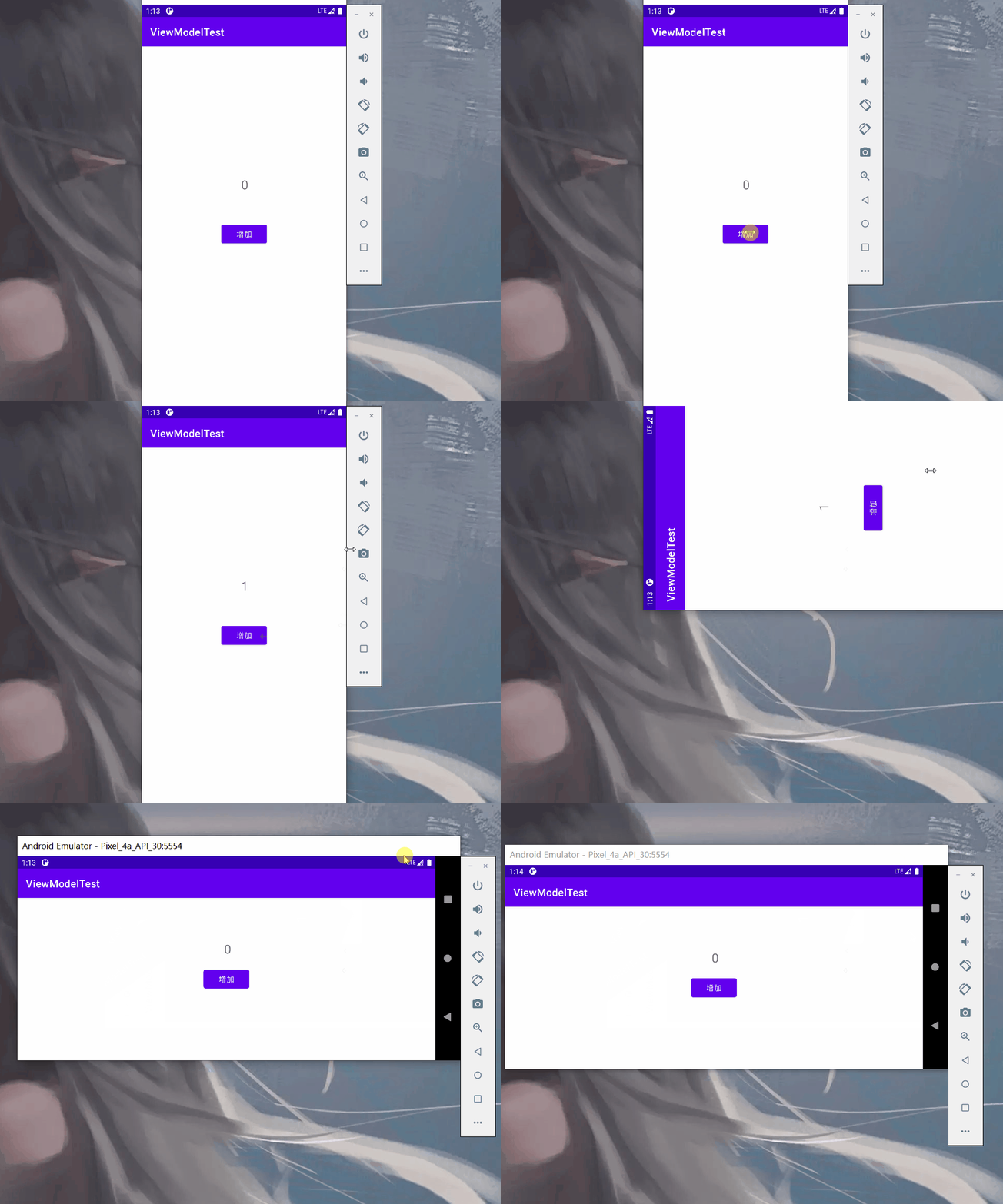
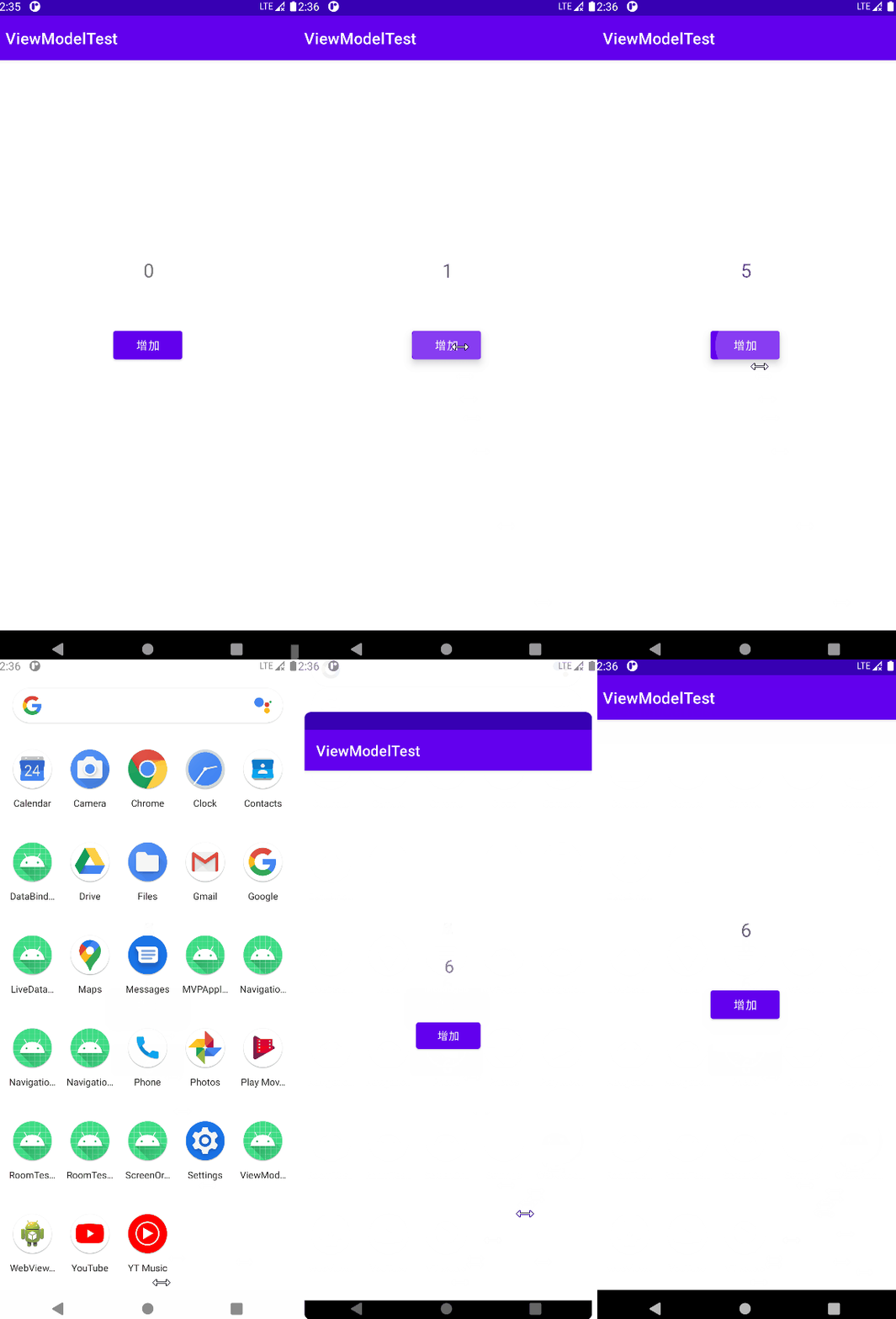
下图动画可以看出,在屏幕旋转之后,原先的1变成了最初的0,说明数据丢失了。
ViewModel如何使用?
我们需要自定义一个继承于ViewModel的类,然后在里面声明需要保存的值。
public class MyViewModel extends ViewModel {

    int num = 0;
}
然后再MainActivity.java中获取自定义ViewModel的实例。
public class MainActivity extends AppCompatActivity {


    private TextView textView;
    private Button button;
    private ActivityMainBinding binding;
    private MyViewModel viewModel;

    @Override
    protected void onCreate(Bundle savedInstanceState) {

        super.onCreate(savedInstanceState);
        setContentView(R.layout.activity_main);

        textView = (TextView) findViewById(R.id.textView);
        button = (Button) findViewById(R.id.button);

        viewModel = new ViewModelProvider(this).get(MyViewModel.class);

        textView.setText(String.valueOf(viewModel.num));
        button.setOnClickListener(new View.OnClickListener() {

            @Override
            public void onClick(View v) {

                viewModel.num = viewModel.num + 1;
                textView.setText(String.valueOf(viewModel.num));
            }
        });
    }
}
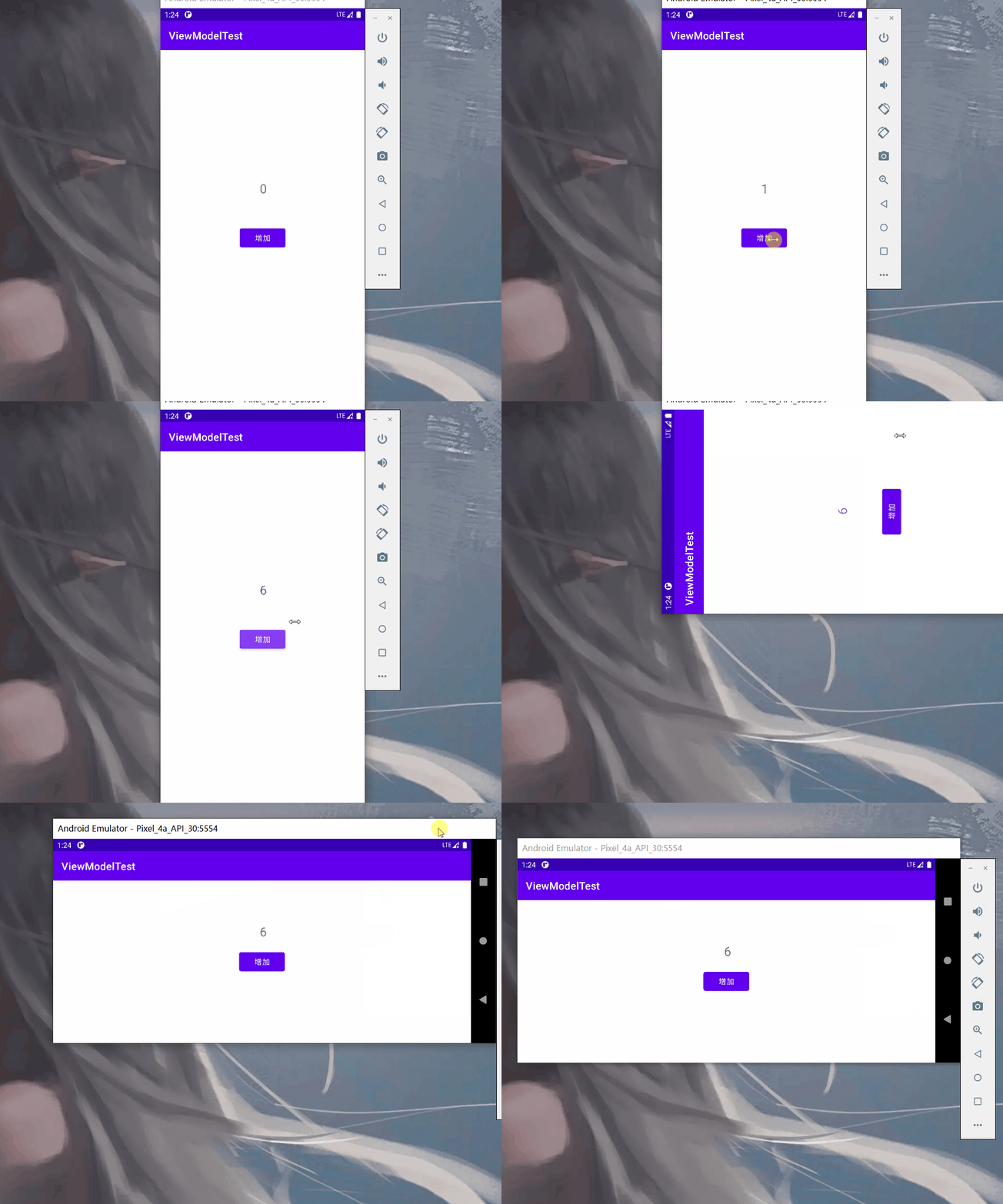
形成的效果如下,可以看到在屏幕旋转之后,TextView中的内容没有发生改变。
LiveData
LiveData可以用来监听数据的变化,进而UI界面可以作出响应。下面对自定义ViewModel做出改变。
这里我们将需要保存的数据定义为MutableLiveData类型,而不是LiveData,因为LiveData没有对外公开数据,而MutableLiveData是LiveData的子类,可以通过setValue和getValue来设置和修改数据。
public class MyViewModel extends ViewModel {


    public MutableLiveData<Integer> currentNum;

    public MutableLiveData<Integer> getCurrentNum() {

        if(currentNum == null) {

            currentNum = new MutableLiveData<Integer>();
            currentNum.setValue(0); // 必须在创建实例或设置初值,否则在调用getValue时可能发生空指针异常
        }
        return currentNum;
    }

    public void add(int num) {

        currentNum.setValue(currentNum.getValue() + num);
    }

}
根据MyViewModel实例获取MutableLiveData实例,然后调用observe方法,这个方法就是实现了对数据的监听,一旦数据发生改变,onChanged方法将会执行。
viewModel.getCurrentNum().observe(this, new Observer<Integer>() {

    @Override
    public void onChanged(Integer integer) {

        // TODO 视图响应
        textView.setText(String.valueOf(integer));
    }
});
MainActivity.java
public class MainActivity extends AppCompatActivity {


    private TextView textView;
    private Button button;
    private ActivityMainBinding binding;
    private MyViewModel viewModel;

    @Override
    protected void onCreate(Bundle savedInstanceState) {

        super.onCreate(savedInstanceState);
        setContentView(R.layout.activity_main);

        textView = (TextView) findViewById(R.id.textView);
        button = (Button) findViewById(R.id.button);

        viewModel = new ViewModelProvider(this).get(MyViewModel.class);

        viewModel.getCurrentNum().observe(this, new Observer<Integer>() {

            @Override
            public void onChanged(Integer integer) {

                textView.setText(String.valueOf(integer));
            }
        });

        button.setOnClickListener(new View.OnClickListener() {

            @Override
            public void onClick(View v) {

                viewModel.add(1);
            }
        });
    }
}
DataBinding 实现数据绑定
使用DataBinding可以直接在XML文件中修改文本等组件的内容。具体使用方法如下:
首先在app/build.gradle文件内的defaultConfig中加入如下代码。
dataBinding {
    enabled true
}
然后再需要进行数据绑定的XML文件中按照如下方法编写代码。
其中variable标签中的type是类名,类名必须是完整的,name是变量名,指向了这个类。具体使用方法是:
@{},然后再大括号内编写类似于Java的代码,比如:
android:text="@{String.valueOf(data.getCurrentNum)}"
<layout xmlns:android="http://schemas.android.com/apk/res/android" xmlns:app="http://schemas.android.com/apk/res-auto" xmlns:tools="http://schemas.android.com/tools">

    <data>

        <variable name="data" type="com.example.viewmodeltest.MyViewModel" />
    </data>


    <!-- 这部分写实现布局的代码-->

</layout>
完整代码:
<?xml version="1.0" encoding="utf-8"?>
<layout xmlns:android="http://schemas.android.com/apk/res/android" xmlns:app="http://schemas.android.com/apk/res-auto" xmlns:tools="http://schemas.android.com/tools">

    <data>

        <variable name="data" type="com.example.viewmodeltest.MyViewModel" />
    </data>

<!-- 这部分写实现布局的代码-->

    <androidx.constraintlayout.widget.ConstraintLayout android:layout_width="match_parent" android:layout_height="match_parent" tools:context=".MainActivity">


        <Button android:id="@+id/button" android:layout_width="wrap_content" android:layout_height="wrap_content" android:text="增加" app:layout_constraintBottom_toBottomOf="parent" app:layout_constraintEnd_toEndOf="parent" app:layout_constraintHorizontal_bias="0.5" app:layout_constraintStart_toStartOf="parent" app:layout_constraintTop_toTopOf="parent" />

        <TextView android:id="@+id/textView" android:layout_width="wrap_content" android:layout_height="wrap_content" android:text="@{String.valueOf(data.getCurrentNum)}" android:textSize="24sp" app:layout_constraintBottom_toTopOf="@+id/button" app:layout_constraintEnd_toEndOf="parent" app:layout_constraintHorizontal_bias="0.503" app:layout_constraintStart_toStartOf="parent" app:layout_constraintTop_toTopOf="parent" app:layout_constraintVertical_bias="0.819" />
    </androidx.constraintlayout.widget.ConstraintLayout>
</layout>
然后在MainActivity类中获取DataBinding实例,其中ActivityMainBinding,这是xml文件名+Binding的形式。
ActivityMainBinding binding = DataBindingUtil.setContentView(this,R.layout.activity_main);
binding.setData(viewModel);
binding.setLifecycleOwner(this);
完整代码:
public class MainActivity extends AppCompatActivity {


    private TextView textView;
    private Button button;
    private ActivityMainBinding binding;
    private MyViewModel viewModel;

    @Override
    protected void onCreate(Bundle savedInstanceState) {

        super.onCreate(savedInstanceState);
        binding = DataBindingUtil.setContentView(this,R.layout.activity_main);

        textView = (TextView) findViewById(R.id.textView);
        button = (Button) findViewById(R.id.button);

        viewModel = new ViewModelProvider(this).get(MyViewModel.class);

        binding.setData(viewModel);
        binding.setLifecycleOwner(this);
        button.setOnClickListener(new View.OnClickListener() {

            @Override
            public void onClick(View v) {

                viewModel.add(1);
            }
        });
    }
}
在ViewModel中使用SavedStateHandle,避免进程杀死导致数据丢失
下面先演示进程被杀死后,页面中数据的变化。
为了实现这个进程被杀死,我们需要进入开发者模式,然后在设置中开启Don’t keep Activities选项,这样只要app进入后台就一定会被杀死。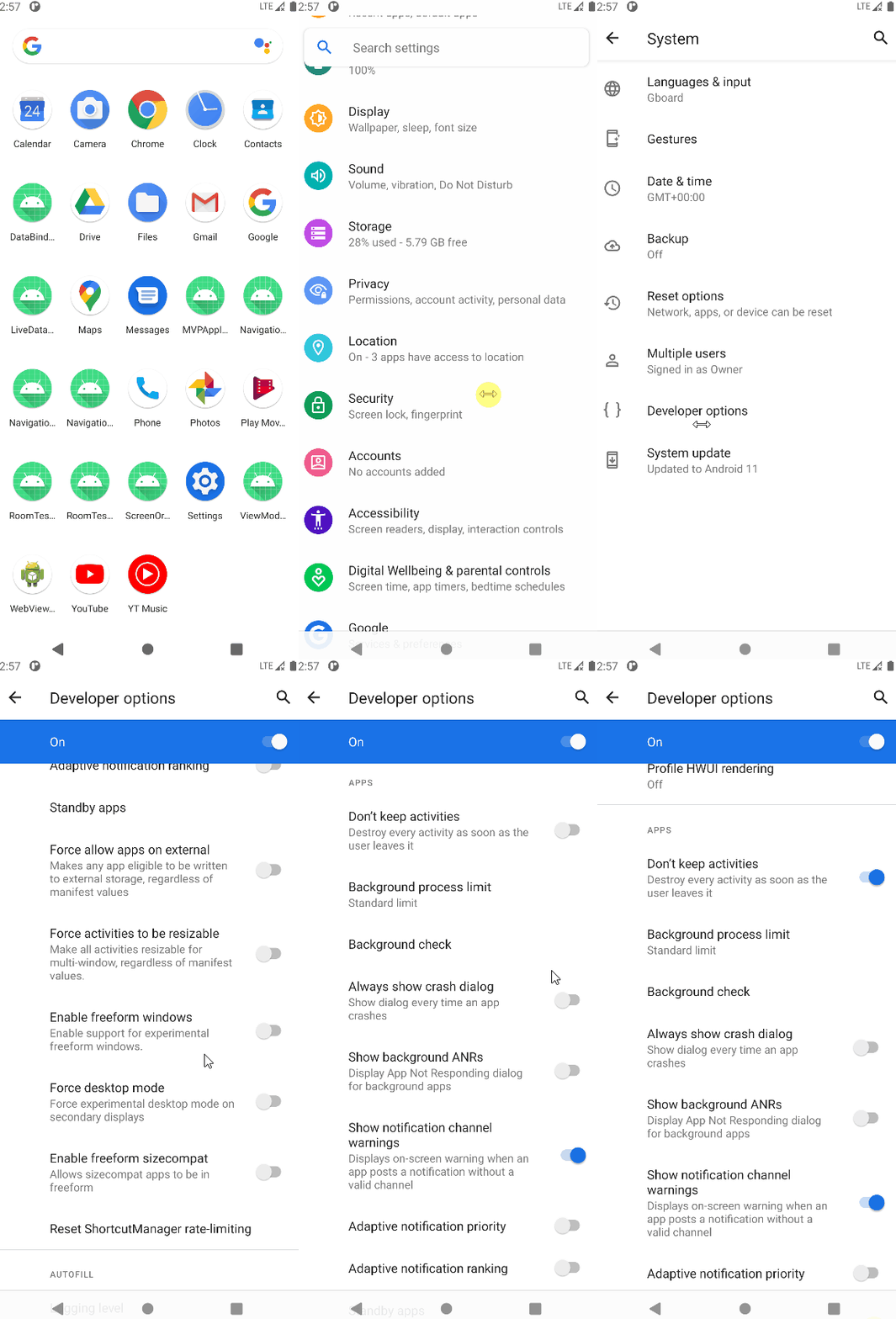
可以看到,应用进程被删除之后,数据没有保持删除前的内容,而是变成了最初的0。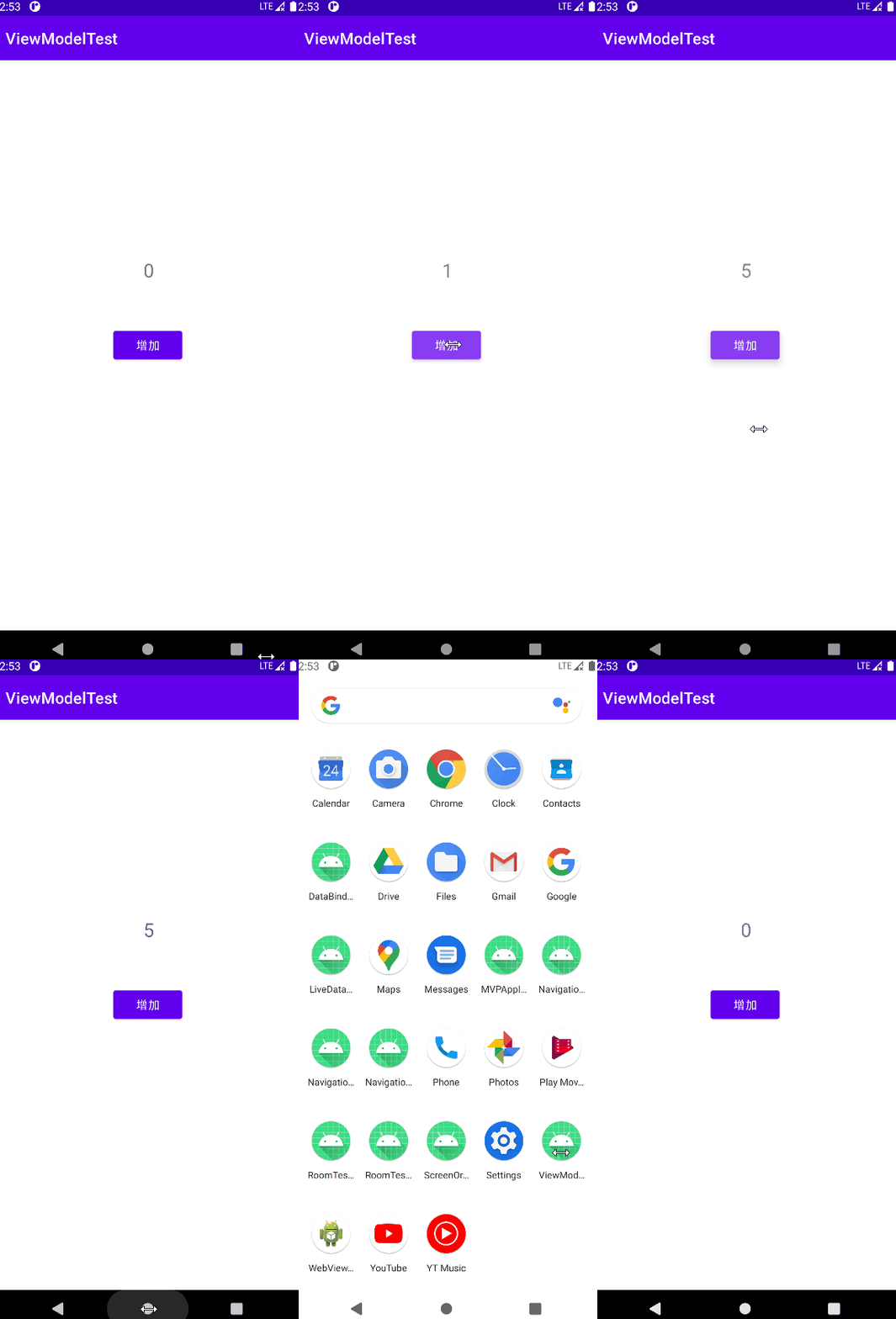
下面继续对MyViewModel进行修改,以键值对的形式将数据存入到SavedStateHandle实例中去。
public class MyViewModel extends ViewModel {


    private SavedStateHandle handle;
    static final String KEY = "KEY";

    public MyViewModel(SavedStateHandle handle) {

        this.handle = handle;
    }

    public MutableLiveData<Integer> getCurrentNum() {


// 这些可以防止进程被杀死是数据丢失
        if(!handle.contains(KEY)){

            handle.set(KEY,0);
        }
        return handle.getLiveData(KEY);
    }

    public void add(int num) {

        getCurrentNum().setValue(getCurrentNum().getValue() + num);
    }

}
在MainActivity类中唯一的修改就是修改获取MyViewModel实例的方法。
viewModel = new ViewModelProvider(this,new SavedStateViewModelFactory(getApplication(),this)).get(MyViewModel.class);
最终效果如下,数据在进程被杀死后依然保持不变。
边栏推荐
- Lua third-party byte stream serialization and deserialization module --lpack
- Ciscn 2022 central China Misc
- FPGA实现10M多功能信号发生器
- Mathematical modeling - location of police stations
- Stonedb invites you to participate in the open source community monthly meeting!
- leetcode/和大于等于target的连续最短子数组
- As long as I run fast enough, it won't catch me. How does a high school student achieve a 70% salary increase under the epidemic?
- Planning mathematics final exam simulation II
- [the road of Exile - Chapter 8]
- Force deduction brush question (1): sum of two numbers
猜你喜欢

Stonedb invites you to participate in the open source community monthly meeting!
![[the road of Exile - Chapter 2]](/img/98/0a0558dc385141dbb4f97bc0e68b70.png)
[the road of Exile - Chapter 2]

2022年编程语言排名,官方数据来了,让人大开眼界
StoneDB 为何敢称业界唯一开源的 MySQL 原生 HTAP 数据库?

Sigma-DSP-OUTPUT

使用POI,实现excel文件导出,图片url导出文件,图片和excel文件导出压缩包
![[circuit design] convert AC AC to DC](/img/b4/67df7f4555379c63694e89055499bb.jpg)
[circuit design] convert AC AC to DC

【流放之路-第八章】
![[the road of Exile - Chapter 4]](/img/76/e1e249ddb2f963abb5d2b617a5f178.png)
[the road of Exile - Chapter 4]

Mathematical modeling -- cold proof simulation of low temperature protective clothing with phase change materials
随机推荐
MySQL安装常见报错处理大全
Wonderful use of data analysis
为什么 BI 软件都搞不定关联分析
Yocto project download and compilation
The scientific research environment has a great impact on people
【公开课预告】:快手GPU/FPGA/ASIC异构平台的应用探索
[electronic components] zener diode
Stonedb invites you to participate in the open source community monthly meeting!
Blind separation of speech signals based on ICA and DL
[MySQL] SQL aliases the table
The basic concept of transaction and the implementation principle of MySQL transaction
在Qt中如何编写插件,加载插件和卸载插件
[7.21-26] code source - [sports festival] [Dan fishing war] [maximum weight division]
Sword finger offer special assault edition day 13
Practical experience of Google cloud spanner
Stonedb invites you to participate in the open source community monthly meeting!
Js DOM2 和 DOM3
leetcode/和大于等于target的连续最短子数组
Promise解决异步
数学建模——红酒品质分类