当前位置:网站首页>How to use JMeter function and mockjs function in metersphere interface test
How to use JMeter function and mockjs function in metersphere interface test
2022-07-01 17:16:00 【Fit2cloud flying cloud】
MeterSphere Interface testing of open source continuous testing platform 、 Performance tests are based on JMeter Realization , And compatible JMeter The function in . In the use of MeterSphere Do interface tests 、 When preparing test data , Need to be used frequently JMeter Function to construct test data that generates interface tests .
Because the data preparation process often needs to check and explore JMeter The scope and method of function , For memo and easy viewing , In order to reduce the time of exploration and experiment , This article will summarize and demonstrate this part , I hope that's helpful .
- JMeter Function settings use
stay MeterSphere platform ,JMeter Functions can be in the interface 、 Interface use case request parameters QUERY Parameters 、REST Parameters 、 Request body 、 Pre operation script 、 Set the use in the post operation script .
1.1 frequently-used JMeter Functions and calls
JMeter All supported functions can be viewed through JMeter Official documents , Or Baidu search related articles and other ways to understand .
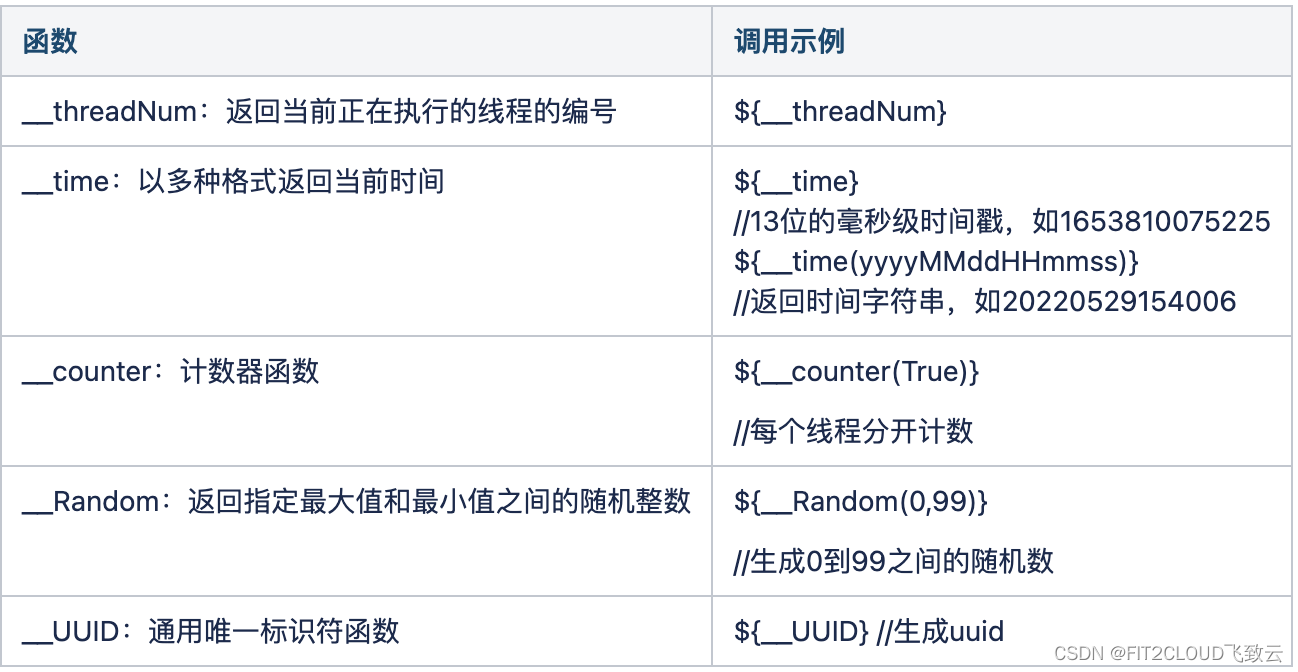
The format of the function call is :${__functionName(var1,var2,var3)}.
among ,__functionName For function name , In parentheses are the parameters of the function , Brackets can be omitted when there are no parameters , for example ${_UUID}.
The following are some commonly used functions and use examples :
1.2 Use JMeter function
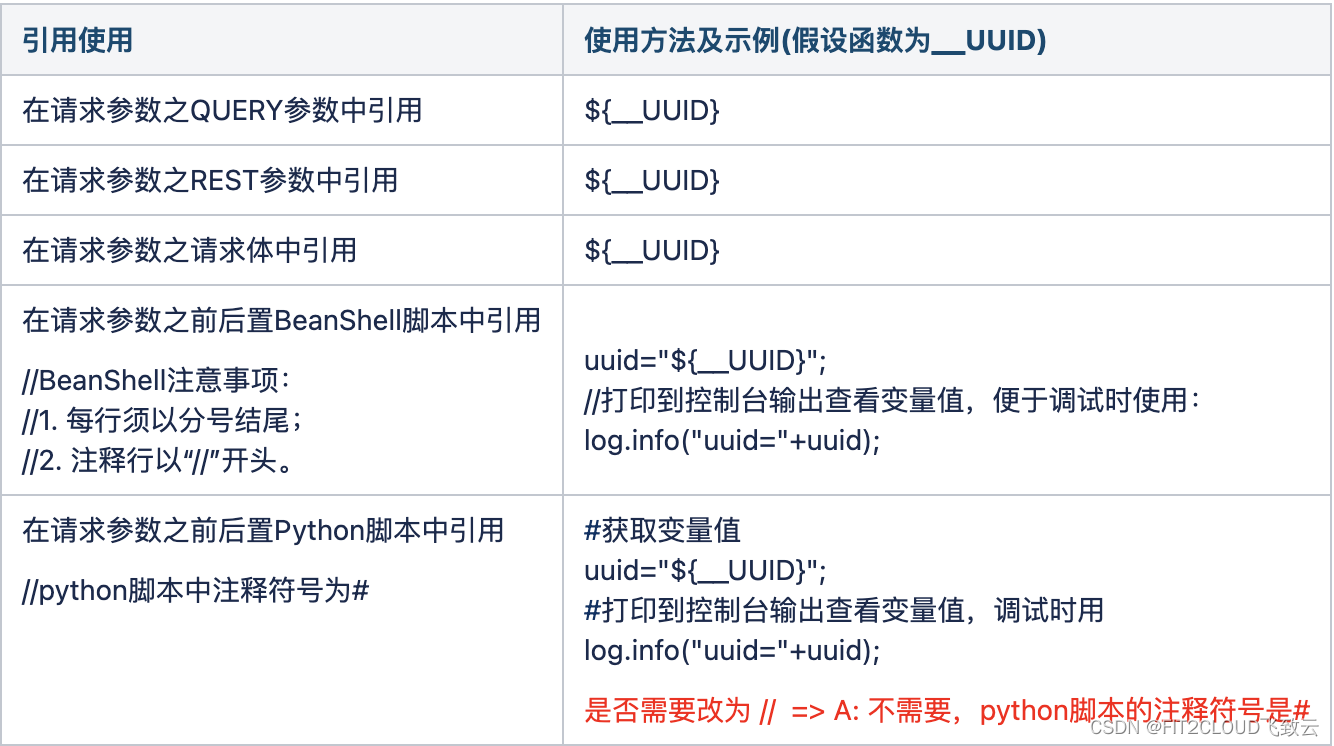
stay MeterSphere in , Parameters can be requested in interface use cases QUERY Parameters 、REST Parameters 、 Request body 、 Reference in pre and post scripts JMeter function .
The quotation and use method are shown in the following table ( To generate UUID Function as an example ):
One thing to note is that , In front / The post script can also be referenced JMeter Functional .
Specific usage :
① Enter the calling method of the function in double quotation marks , Pictured 1-1 Shown ;
② With Python Take the reference in the script as an example , stay “ Inquire about database List interface use cases ” On the page , Set the following script content as the pre script content , Pictured 1-1 Shown ;
③ Then execute the use case , stay “ Console ” You can see the printed uuid and time Timestamp generated by function , Pictured 1-2 Shown .
uuid="${__UUID()}";
strTime="${__time()}";
log.info("--------pre script begin-------------");
log.info("uuid="+uuid);
log.info("strTime="+strTime);
log.info("--------pre script end-------------");

chart 1-1 Use in pre script JMeter function

chart 1-2 Console output JMeter function
1.3 stay QUERY Parameters 、REST Use in parameter JMeter function
stay QUERY Parameters 、REST Parameter is set to use JMeter function , The specific operation method is :
Get into “ Interface use cases ” page , stay “ Request parameters ” Panel “QUERY Parameters ” Tab , Selection as shown 1-3 Pencil icon shown “ edit ” Button , open “ Parameter setting ” Dialog box , Select settings in the dialog box and save , Pictured 1-4 Shown ; You can also directly enter “$”, Then pull down JMeter Select the function to be used in the function list JMeter function , Pictured 1-5 Shown ;
After setting , When executing use cases , The platform will pass JMeter The parameter value generated by the function sends a request .

chart 1-3 Choose to open “ Parameter setting ” Dialog box

chart 1-4 Parameter setting - Set up JMeter function

chart 1-5 Parameter setting - Input $ Choose... From the drop-down list JMeter function
1.4 Specific scenario demonstration examples
Now we use InfluxDB The process of writing interface test scenarios , To demonstrate JMeter Use of functions .
call InfluxDB write in API Of CURL The order is as follows , We can use API Definition and CURL Commands create interface definitions and interface use cases .
# Write interface API curl call
curl -i -XPOST 'http://10.1.13.12:8086/write?db=monitoringdb' --data-binary 'cpu_usage,host=10.1.10.131,app=dataease value=0.10 1632761023000000000'
#cpu_usage by measurement, Similar to tables in relational databases , host For the host ID,app by dataease
The operation steps are as follows :
① stay “ Interface list ” page , establish “InfluxDB Write interface ”, Set the request protocol to “POST”, Path is “/write”, Pictured 1-6 Shown ;
② stay “CASE” page , choice “+ add to ” Button , open “ Create interface use cases ” page , Create write interface use cases , Pictured 1-7、 chart 1-8 Shown ;
③ according to CURL command , You can see that we need to set QUERY Parameters db, And the request body raw Content . Pictured 1-9 Shown , add to QUERY Parameters db, The setting value uses the environment variable ${dbname}.dbname Variables have been set in the environment , The value is “monitoringdb”. Pictured 1-10 Shown , Set request body , Format selection “raw”, The content is set to :
cpu_usage,host=${
    _UUID},app=dataease value=${
    usage} ${
    _time()}000000
■ Use JMeter function __UUID As host ID;
■ Use __time Function generation 13 Bit time stamp ;
■ Use usage Variable ,usage Variables are used in pre scripts python random Function calculation , The results are stored in usage variable .
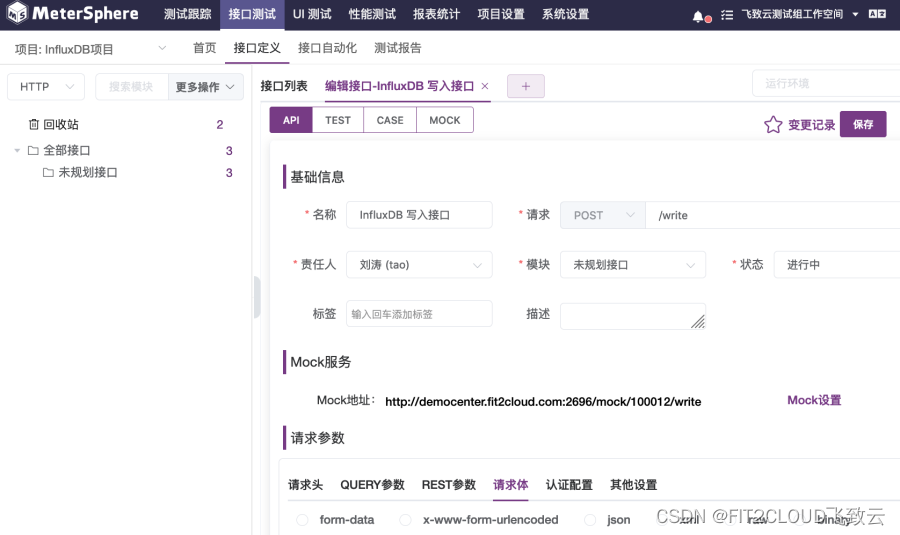
chart 1-6 Create a write interface
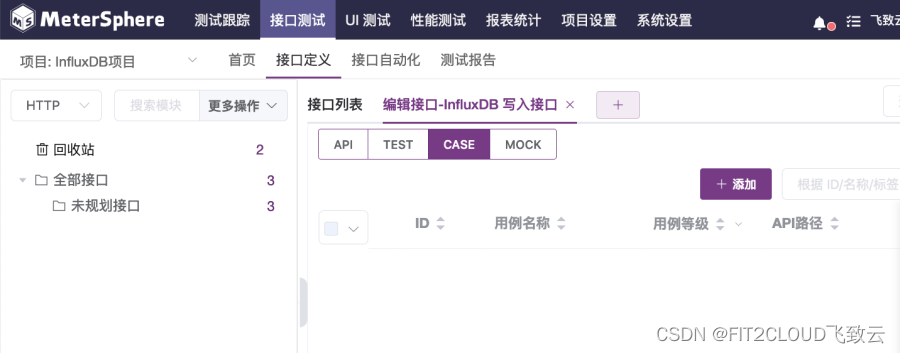
chart 1-7 Select Create write interface use case
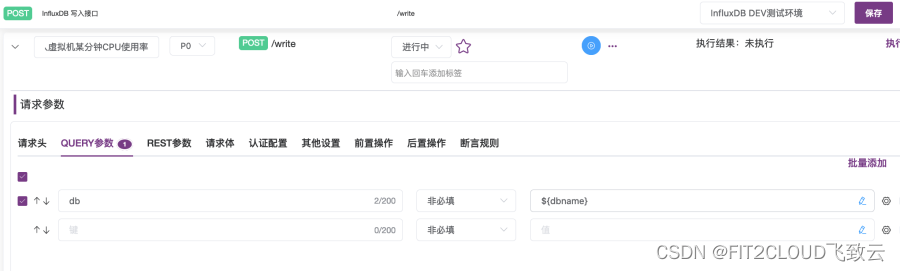
chart 1-8 Add settings QUERY Parameters db

chart 1-9 Set request body - Monitoring data
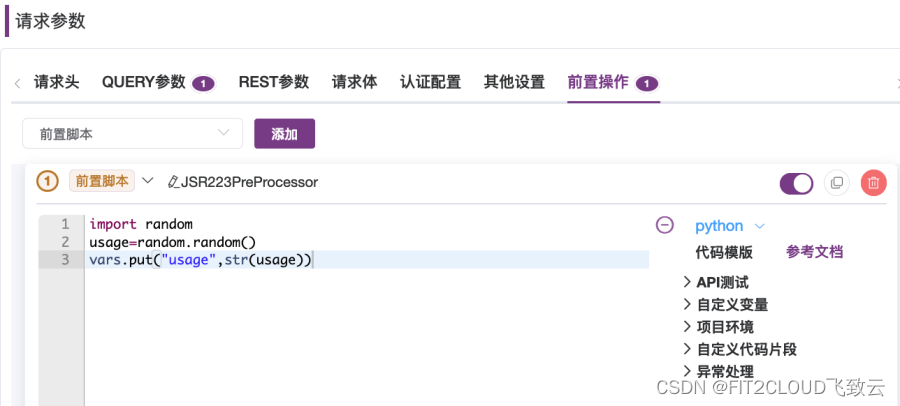
chart 1-10 Set the leading position python Script - Generate usage And save it to the variable
④ Save and execute the use case , stay “ Response content ” In the catalog “ Request content ” in , View request content POST data, Pictured 1-11 Shown . You can see the use of JMeter The value generated by the function , as well as python random The value generated by the function .
cpu_usage,host=e48222aa-e98e-4974-8dfb-df9a1aecc4cc,app=dataease value=0.00309123923176 1652670605313000000
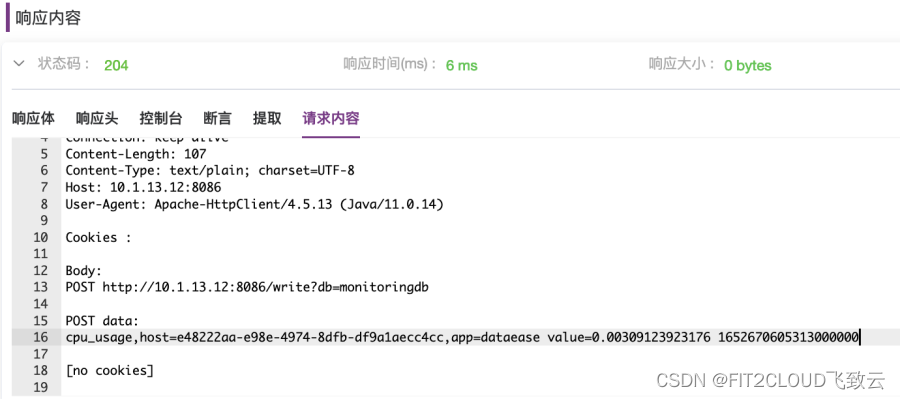
chart 1-11 View request content
- MockJS Function settings use
stay MeterSphere You can set the request parameters in QUERY Parameters 、REST Use... For parameter values MockJS function .
It should be noted that :
■ MockJS A function cannot be in the body of a request parameter 、 Used in pre and post scripts ;
■ MockJS Function can select multiple function combinations to generate parameter values .
The specific use method is as follows :
① stay “ Interface use cases “ page , choice ” Request parameters “ In the panel “QUERY Parameters ” label , open “QUERY Parameters ” tab ;
② stay “QUERY Parameters ” Tab , Selection as shown 2-1 Pencil icon shown “ edit ” Button , open “ Parameter setting ” Dialog box ;
③ stay “ Parameter setting ” In the dialog box , choice “Mock data ” label , open “Mock data ” tab , In the tab MockJS Select Add... From the list MockJS function , Pictured 2-2 Shown .
MockJS Function supports random generation of Boolean values 、 Natural number 、 Integers 、 Floating point numbers 、 character 、 character string 、 date 、 Time 、 Date time 、 Current time isoparametric value , The details can be found in MockJS View in the function list , And you can click “ preview ” Button to view the generation effect .
chart 2-1 Choose to open “ Parameter setting ” Dialog box

chart 2-2 Parameter setting - choice MockJS function
You can also directly enter “@”, Then pull down MockJS Select the function to be used in the function list MockJS function , Pictured 2-3 Shown .

chart 2-3 Directly enter... In the parameter value input box @ Character list MockJS And select
Next, a scenario of creating interface use cases and setting parameter values is used to demonstrate the specific use :
Pictured 2-4 Shown , stay “ Interface use cases ” On the page , Add two QUERY Parameters : One key is “pretty”, The value is “@boolean”; One key is “serverName”, The value is “@[email protected]”. After executing the use case , It can be found in “ Request content ” Tab to view the random values generated by these functions , Pictured 2-5 Of “ Request content ” Shown .
■ “pretty” Of @boolean The function generates false;
■ “serverName” Of @[email protected] The function generates gl8Im02011-12-2116:10:31.
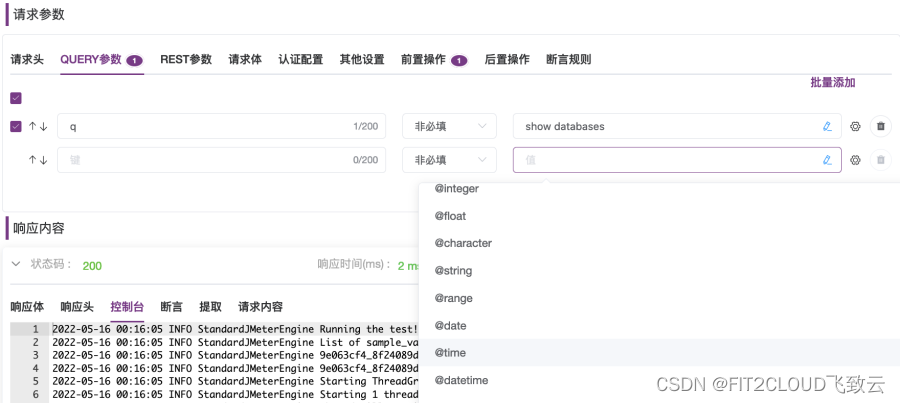
chart 2-4 MockJS function ( With @ start )
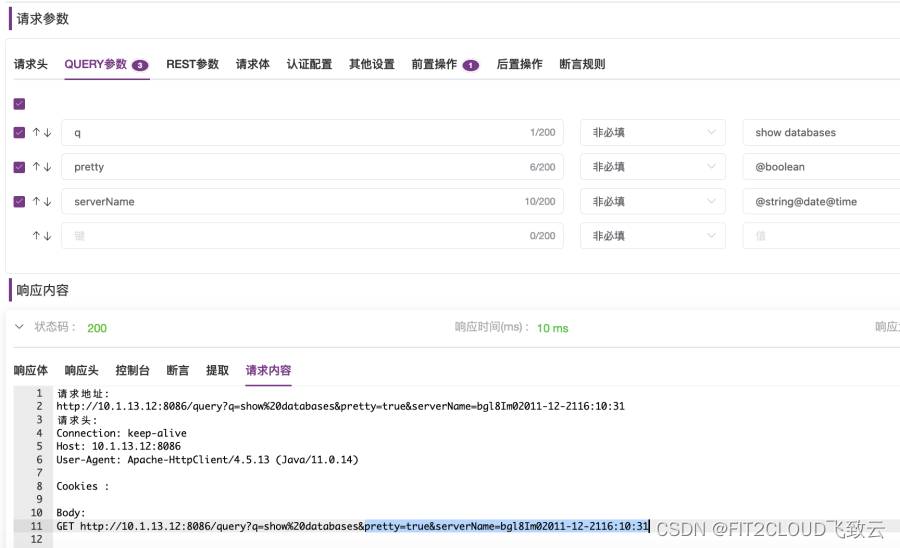
chart 2-5 Check the function output in the request content
- summary
In this paper, we sum up our experience in MeterSphere Open source continuous testing platform JMeter function 、MockJS Methods and precautions of function , And through specific interface test scenarios JMeter Functions and MockJS Use , Hope to be helpful to the majority of community users .
边栏推荐
- Gold, silver and four want to change jobs, so we should seize the time to make up
- 在MeterSphere接口测试中如何使用JMeter函数和MockJS函数
- String class
- Is the securities account given by the head teacher of goucai school safe? Can I open an account?
- SQL question brushing 1050 Actors and directors who have worked together at least three times
- Shenyu gateway development: enable and run locally
- SQL question brushing 627 Change gender
- Girls who want to do software testing look here
- ACM MM 2022视频理解挑战赛视频分类赛道冠军AutoX团队技术分享
- 整形数组合并【JS】
猜你喜欢
![[pyg] document summary and project experience (continuously updated](/img/b4/75da8c3e657069be4e3e3bfd5b2dc0.png)
[pyg] document summary and project experience (continuously updated

如何写出好代码 — 防御式编程指南
重磅披露!上百个重要信息系统被入侵,主机成为重点攻击目标

(27) Open operation, close operation, morphological gradient, top hat, black hat

National Security Agency (NSA) "sour Fox" vulnerability attack weapon platform technical analysis report
【C语言基础】12 字符串
整形数组合并【JS】
Integer array merge [JS]
ShenYu 网关开发:在本地启用运行

In aks, use secret in CSI driver mount key vault
随机推荐
Openlayers 自定义气泡框以及定位到气泡框
In depth evaluation and development trend prediction report of China's ice cream market (2022 Edition)
Maizeer: the two batches of products reported by the media have been taken off the shelves and sealed, and consumer appeals are accepted
Judge whether a binary tree is a balanced binary tree
SystemVerilog-结构体(二)
剑指 Offer 20. 表示数值的字符串
提交review时ReviewBoard出现500错误解决方法
求求你们,别再刷 Star 了!这跟“爱国”没关系!
FRP intranet penetration, reverse proxy
Research and investment strategy report of hydroxypropyl beta cyclodextrin industry in China (2022 Edition)
DNS
深度优先遍历和广度优先遍历[通俗易懂]
SQL question brushing 627 Change gender
Integer array merge [JS]
[mathematical modeling] [matlab] implementation of two-dimensional rectangular packing code
(十六)ADC转换实验
判断一棵二叉树是否为平衡二叉树
Research Report on development monitoring and investment prospects of China's smart environmental protection industry (2022 Edition)
GaussDB(for MySQL) :Partial Result Cache,通过缓存中间结果对算子进行加速
MySQL learning summary