当前位置:网站首页>Idea generate class diagram plug-in UML (super detailed)
Idea generate class diagram plug-in UML (super detailed)
2022-07-28 22:27:00 【Alan-analysis】
Use Idea Of Diagram Role view UML Class diagram
Idea Is a very powerful development environment , Generate in new project according to UML Class diagram to reflect the class association of new application software projects and the construction of classes and methods . This can better help you implement specific application plans , Including programming 、 Source analysis 、 Common troubleshooting, etc . Now , Let's see how to use Idea Of Diagram Special tool generation 、 Show and analyze UML Class diagram .
1. stay Idea To view the class diagram in, you need to install UML plug-in unit , If you have not installed the plug-in, please install the plug-in by yourself , And guarantee that UML The plug-in is in effect .

2. Look at the class diagram
You can check in the Class Use shortcut keys in tabs Ctrl+Alt+Shift+U and Ctrl+Alt+U Look at the class diagram .
Ctrl+Alt+Shift+U and Ctrl+Alt+U Is the difference between the , The former uses Tab Page open the class diagram page , The latter uses The suspended window opens the class diagram page .

It can also be in Class In the tab or Class Click on the file Right click , Choose in turn Diagrams -> Show Diagram -> Java Classes .

Show Diagram and Show Diagram Popup Is the difference between the , The former uses Tab Page open the class diagram page , The latter uses The suspended window opens the class diagram page . The former in this article is an example , After clicking the option, you will get a class diagram similar to the following :
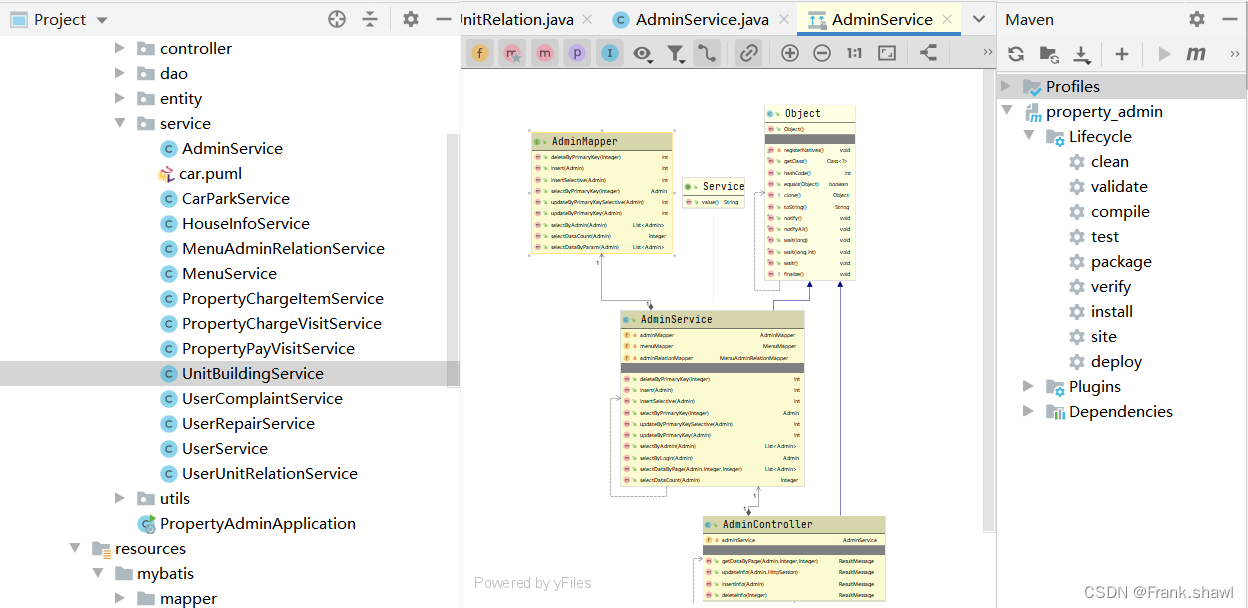
By default , The arrows in the figure represent the following meanings , The color of the center line and font may change with Idea Use different themes to change .

The arrow represents the implementation of the class (implements) Relationship

The arrow represents the inheritance of the class (extends) Relationship

The pattern represents the relationship between inner classes
Other relationship arrows can be referred to UML Appointment
Select a class and right-click to select Jump to Source Option or press the shortcut key F4 , You can jump to the source code file of this class .
In the class diagram, press Ctrl+F12 You can view the list of classes in the diagram and navigate between them .
If you think the word in the current class diagram is too small , Or you can't see clearly , You can use the zoom in button of the toolbar , You can also press and hold... On the keyboard on the class diagram Alt key , And move the mouse , It will have the function of a magnifying glass .
3. How do you use it?
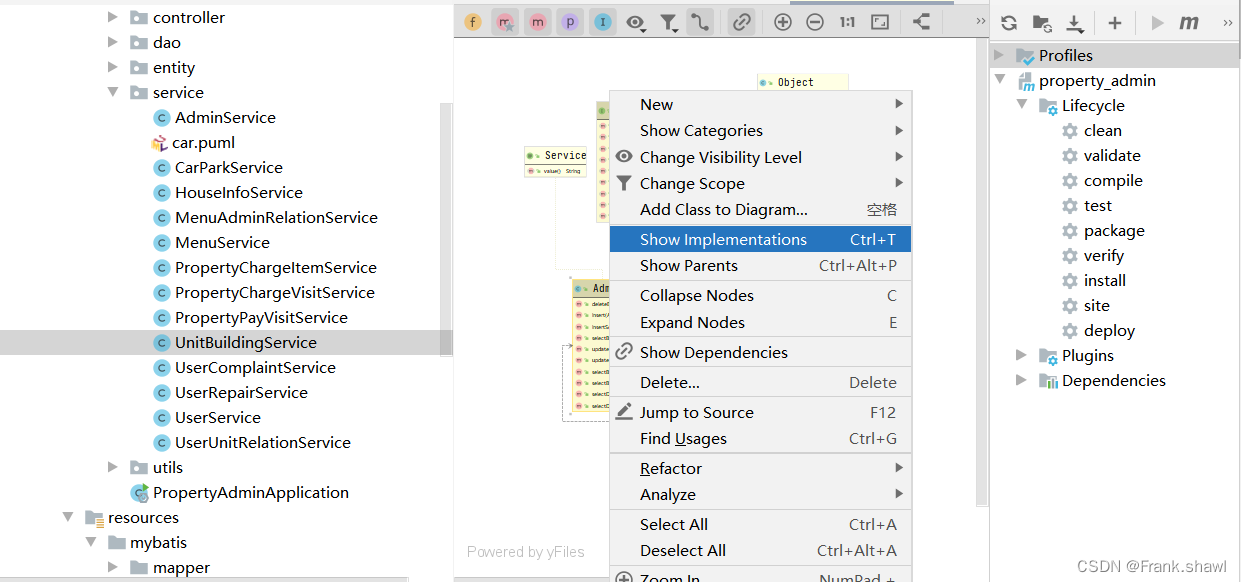
Class diagram Tab Right click menu in page
New: Create a new node element or member , Shortcut key Alt+Insert.
Add class to diagram: Add other classes to the class diagram , Shortcut key Space.
Collapse nodes: Shrink the class diagram of the selected class node , Shortcut key C.
Expand nodes: Expand the class diagram of the selected class node , Shortcut key E.
Management class diagram
Show class details
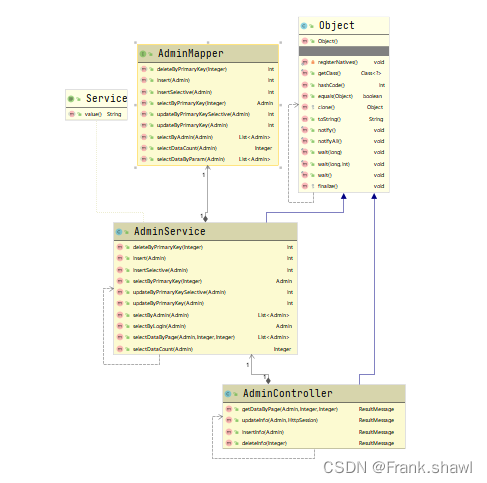
Use the toolbar above or the right-click menu , You can select the details of the class you want to display , You can choose to display the member variables of the class , attribute , Construction method , Method , Internal classes and other information , You can also control the visibility level or the display range of the file .
Add classes to the class diagram
When we need to check the relationship between other classes and the current class diagram , It can be added to the current class diagram for analysis .
In the class diagram, use the Add class to diagram Options or use shortcut keys Space , Enter and select the class you want to add in the open search box , Or directly drag the class file to the class diagram with the mouse . If the class you want to add is in a third-party package , You can check Include non-project items Select the box and search again .

Delete class nodes from the class diagram
In the class diagram, some classes are not what we want to care about , Or we want the current class diagram to analyze the class relationships we want to see more accurately , We can directly select the class nodes we don't want to see in the class diagram , Then use the delete Key to delete .
View the implementation class and parent class
Select the class node you want to view in the class diagram , Use Show Parents and Show Implementations Options , You can view the parent class and implementation class information of the current class respectively .
Adjust the class diagram layout
Use Layout Options , Then select the sub menu item , You can change the display layout of the current class diagram , To better show the class diagram relationship .(Layout The sub options inside can display the class diagram relationship according to your preferences )

边栏推荐
猜你喜欢

MySQL built-in functions

105. Construct binary tree from preorder and inorder traversal sequence (medium binary tree DFS hash table binary tree)

Less than a year after its establishment! MIT derivative quantum computing company completed financing of US $9million

Changes in the history of oscilloscope development

hcip实验(14)

SQL注入 Less34(POST型宽字节注入+布尔盲注)

C语言编程规范学习笔记和总结

Data visualization news, different forms of news reports

Static details of static members

Which is the file transfer command in the basic services of the Internet
随机推荐
SQL注入 Less38(堆叠注入)
记录Flutter解决A RenderFlex overflowed by 7.3 pixels on the bottom溢出问题
HCIP(10)
Ruiji takeout project - development of business development function Day2
Sword finger offer II 065. The shortest word code (medium dictionary tree string array)
hcip实验(12)
Learn kotlin - extension function
Part 8: creating camera classes
tutorial/detailed_ workflow. Ipynb quantitative finance qlib Library
普源示波器实际的使用效果怎么样
The binary search boundary value processing based on leetcode35 is used to clarify the boundary value of the judgment condition using the idea of interval
Record the fluent to solve the problem of a renderflex overflowed by 7.3 pixels on the bottom
HCIP(15)
LVS+KeepAlived高可用部署实战应用
静态成员static详解
Aimbetter insight into your database, DPM and APM solutions
Form validation and cascading drop-down lists (multiple implementations)
HCIP(11)
[Ruiji takeout project]day4 - dish management
网易云信 2022Q2 产品补给站,快来获取你的产品补给计划吧!