In order to better help the martyr's family members and volunteers looking for relatives , The use of the Internet + The martyrs' search for relatives has developed the wechat applet of junkegui martyrs' search for relatives . The main contents are :
1, Analyze the advantages and disadvantages of the current domestic martyr tracing platform , Finally, wechat applet was selected as the development platform for martyrs' family search and economic , operation , Design feasibility analysis .
2, Research and develop the development technology used in the martyr tracing system , For example, wechat applet development , Resources on the cloud , database ,Vue+Element-Ui Applet development ,Springboot etc. .
3, The real needs and actual use habits of family members and volunteers looking for relatives were investigated through questionnaires , Design software functional requirements .4, Use relevant development technologies to complete the overall software architecture deployment instructions , Through function module diagram , database E-R Figure shows the overall structure of the system .
5, Conduct actual scenario simulation debugging and evaluation for the developed software, and finally deploy the system in the cloud for practical application .
6, The family searching system can be realized through web End , Small program side and other multi-terminal access .
7. The applet has been open source in github On , welcome star️
giuhub Address :
https://github.com/061501/junkegui-wechat/tree/main
The first 1 Chapter Preface
The wechat applet I developed is mainly based on the powerful user resources of wechat and relying on the wechat development platform to develop the wechat applet of junkegui looking for relatives , Through the demand survey of the martyrs' relatives seeking volunteers and relatives in the early stage , Analyze according to actual demand , And combine the advantages of the current martyr's way of looking for relatives , Improve on its shortcomings , Complete the development of junkegui applet . The main work of this paper is :
(1) Summarize the current ways for martyrs to find relatives , Analyze the current technologies of martyr's family search platform and its advantages and disadvantages in family search .
(2) Investigate the relatives and volunteers of martyrs seeking relatives , Understand their specific needs and suggestions for improvement , Design the system module of the junkegui martyr tracing platform and analyze the feasibility of the system .
(3) Design system database and data table , The database mainly includes the registration information of martyrs seeking relatives , The registration information and volunteer administrator information in the wechat client application .
(4) The system test , After the background development of small programs and volunteer administrators is completed , Conduct stability test on the whole system , Test input and output boundary conditions , Hardware resources required for parallel execution and optimization
(5) The app . After testing the system locally , It needs to be reviewed and launched on the wechat public platform and the front and back end of the system , Databases are deployed to Huawei cloud servers for public use .
1.1 Feasibility analysis
The junkegui family search system mainly conducts economic feasibility analysis from the aspect of small program capital investment , From the use of development technology and development platform for technical feasibility analysis , And analyze the operational feasibility of using terminals and methods from a small program .
1.1.1 Economic feasibility
The development of junkegui wechat applet mainly uploads the applet foreground to wechat public platform after local computer development and testing , This process has no economic cost . You can purchase corresponding databases and servers for the deployment of databases and back-end servers used by the system , Domain name and other cloud resources , Can be purchased on demand , The daily expenditure level of cloud resources is about 5 yuan , The cost is relatively small . After the junkegui applet system goes online, the later maintenance and operation will no longer require other additional costs . The early development of the system 、 Post run 、 After maintenance and official launch, the cost is compared with the benefit brought by the small program operation , Its benefits far exceed the value of small program development .
1.1.2 Technical feasibility
The junkegui martyr tracing platform mainly relies on the wechat applet platform , The technologies used mainly involve technologies : Wechat applet development language +Redis+Mysql+Element-Ui+Vue2+java. The development software platforms used include IDEA+Webstorm+mysql+Sqlyog+HBuilder X+ Huawei cloud developer console , Tencent cloud developer console . Wechat applet language is mainly responsible for the design of applet interface , Data writing and reading . Data is mainly stored in Huawei cloud Mysql Cloud database , Back end volunteer administrator interface Vue2 Design . After the development is completed, the code is packaged and deployed to the cloud, which can be accessed through the public network .
1.1.3 Operational feasibility
Wechat has become a necessary software for almost every smartphone user , There is no need to download additional application software to use junkegui applet in wechat , And occupy less memory , Easy to operate . For families looking for relatives , By binding wechat information on the applet side, you can log in to the applet , Fill in the application for family tracing according to the operation . For volunteer Administrators , The web pages on both the mobile phone and the computer can realize the login function and the audit function for the family search information , Not limited by time and region .
The first 2 Chapter Development tools and related theories
2.1 Introduction of wechat applet framework
The framework of wechat applet is divided into two main parts: logic layer and view layer . Wechat applet view layer description WXSS Language and WXML Language , And use JavaScript Logical layer structure framework for development , They can interact with each other by providing data between the view layer and the logic layer , So that the coder can spend more time on the interaction between the data layer and the logic layer .
2.1.1 MINA frame
The structural framework for applets in developer tools is MINA. MINA The structure framework mainly uses the file system provided by the wechat application client 、 The underlying functions of network communication and other applications , Provide a set of integrated and efficient services for its upper layer JavaScript API, It allows wechat applet developers to easily use their own basic functions .MINA The structural view of the frame is shown in Figure 2.1 Shown .

chart 2.1 MINA Frame structure diagram
MINA The framework is mainly divided into two levels :
The first level is the page view layer , Wechat system development programmers use WXML The basic view structure of the operation page for file creation , Use WXSS File to manipulate different presentation forms of the page .
The second level is AppService, As a MINA Service core of the framework , Use the wechat terminal to open the asynchronous thread and start running separately , The applet interface loads the data used 、 The logic for interactive operation of different pages is implemented in the application logic layer .MINA The application logic layer of the structure framework uses JavaScript Language to design interactive logic 、 Network send receive request 、 Interactive processing of data . Different operation interfaces in wechat applet can be accessed through AppService Realize the sending and receiving of data 、 Network process management 、 Process lifecycle management and interface routing distribution .
MINA The structural framework provides wechat applet interface components with relevant program listening properties , Let the applet work with AppService Part of the event procedure handler functions in , To achieve different interfaces to AppService The user layer performs synchronous distribution processing of user layer data . besides ,MINA The framework provides a number of functions that will AppService The data in is bound to different interfaces of the applet in one direction . Only AppService When the data stored in changes , It will automatically trigger the corresponding page component to load again .
2.1.2 Applet file framework
The directory structure of wechat applet files is shown in the following figure 2.2 Shown .
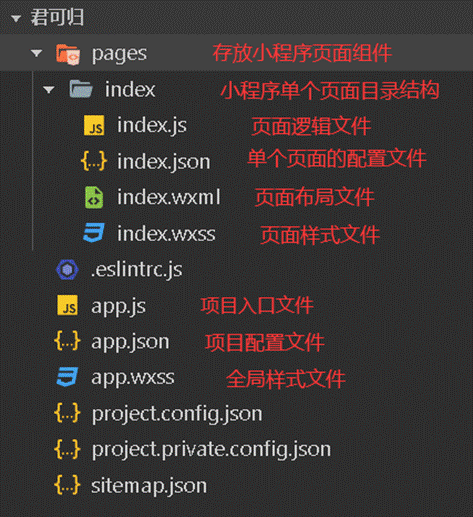
chart 2.2 Applet file directory structure
{
"pages": [ //pages The first item in the array represents the application startup page , Reference resources :https://uniapp.dcloud.io/collocation/pages
{
"path": "pages/index/index",
"style": {
"navigationBarTitleText": " home page ",
"navigationBarTextStyle":"white"
}
},
{
"path": "pages/apply/apply",
"style": {
"navigationBarTitleText": " Registration of family search information ",
"enablePullDownRefresh": false
}
},
{
"path": "pages/user/user",
"style": {
"navigationBarTitleText": " my ",
"enablePullDownRefresh": false
}
}
,{
"path" : "pages/apply/apply-Info",
"style" :
{
"navigationBarTitleText": " Details of the Martyrs ",
"enablePullDownRefresh": false
}
}
,{
"path" : "pages/user/user-Info",
"style" :
{
"navigationBarTitleText": " My information ",
"enablePullDownRefresh": false
}
}
,{
"path" : "pages/apply/apply-recode",
"style" :
{
"navigationBarTitleText": " Application record ",
"enablePullDownRefresh": false
}
}
,{
"path" : "pages/user/login",
"style" :
{
"navigationBarTitleText": "",
"enablePullDownRefresh": false
}
}
],
"tabBar": {
"color": "#7A7E83",
"selectedColor": "#3070F0",
"borderStyle": "black",
"backgroundColor": "#ffffff",
"list": [{
"pagePath": "pages/index/index",
"iconPath": "static/tabbar/index.png",
"selectedIconPath": "static/tabbar/index_selected.png",
"text": " home page "
}, {
"pagePath": "pages/apply/apply",
"iconPath": "static/tabbar/apply.png",
"selectedIconPath": "static/tabbar/apply_selected.png",
"text": " apply "
},
{
"pagePath": "pages/user/user",
"iconPath": "static/tabbar/user.png",
"selectedIconPath": "static/tabbar/user_selected.png",
"text": " my "
}
]
},
"globalStyle": {
"navigationBarTextStyle": "white",
"navigationBarTitleText": "uni-app",
"navigationBarBackgroundColor": "#3070F0",
"backgroundColor": "#F8F8F8"
},
"easycom": {
"autoscan": true,
"custom": {
"^uni-(.*)": "@/components/uni-$1.vue", // matching components In the catalogue vue file
"^vue-file-(.*)": "packageName/path/to/vue-file-$1.vue" // matching node_modules Internal vue file
}
}
}
app.js Used to initialize the applet , The initialization of the App The instance can be accessed on every page of the applet getApp() Method reference . Every wechat applet will use app.js To call App() To register applet instances , Callback the relevant handler function by binding the method of the life cycle 、 Error method listening and page does not exist .
app.json It is the global configuration file of wechat applet , It mainly contains the relative path of all pages of wechat applet 、 Page style 、 Network connection delay 、 Bottom label and other information .
app.wxss Used to store global style codes , The declared style is valid for all pages
page.json As an illustration ./logs In the file directory logs.json Configuration information associated with the corresponding wechat applet interface .
project.config.json Configuration for characterization , For example, the color configuration of the page 、 Configuration of compilation methods, etc .
Pages The project directory file is mainly used to describe all page paths contained in the currently used wechat applet , The wechat application client can receive the current applet page definition to the specific file directory .
2.2 Springboot Introduce
SpringBoot It's a WEB Server side integration framework , built-in Tomcat The server , Can be used to simplify spring Apply the initial build process and later development process .Springboot In this graduation project, it is mainly used to build the back-end server of junkegui applet .
2.3 Vue Introduce
2.3.1 Vue
Vue It is a set of progressive... Mainly used to build application pages JavaScript frame . The difference from most mainstream application frameworks is Vue Application layer by layer from bottom to top by developers .Vue The main code architecture of the application only pays attention to the applied view layer .Vue When it is used in cooperation with the mainstream tools on the market or other different support class libraries ,Vue It can also provide driver support for complex single page applications .

2.3.2 Element-Ui
Element It's based on Vue The open source UI Component library , It is developed and maintained by the hungry development team under Alibaba .Element Provides a large number of PC Components , It can effectively reduce the development difficulty of users .Vue Have the ability to follow MVVM Pattern 、 Directive 、 Three features of plug-in .
(1) follow MVVM Pattern
Vue Medium MVVM Patterns are simple 、 agile API, You can put the view UI The architecture and business logic are separated into two parts , Realize responsive data connection and composite view .
(2) Directive
Vue There are built-in instructions and custom instructions, and you can put instructions on elements .
(3) pluggable
Plug ins are functional modules used to enhance the technology stack ,Vue You can use the functions of plug-ins to expand .

2.4 Mysql Introduce
Mysql Is a relational open source database management system ,Mysql Support in linux,windows And other operating system platforms , Compared with other existing databases on the market , With less code , Fast response, etc , And it is an open source database , Developers can personalize definitions according to their own ideas . The cost of using software is relatively low . You can be used by the system MySQL5.7 Version stores the data tables used by the system .

2.5 Redis Introduce
Redis Database is a high-performance open source non relational database , And traditional service database MySQL Compared to speed up the throughput of data storage and improve the performance of the system .Redis The database is mainly used to improve the re-entry response speed of the applet , Make the front end of the applet read data faster , Enhance applet performance , meanwhile , After the user logs in to the applet at the front end , The second time you open the applet in a short time, you don't need to verify your login again , The user's temporary login authentication command will be stored in Redis.

2.6 Project packaging and cloud Introduction
The front-end code of the junkegui applet is deployed on the wechat public platform . database , Servers are deployed in Huawei cloud (huawei cloud) Resources on the public cloud , After completing the applet development test locally, deploy the applet in the cloud as a whole and set it to start automatically . Due to the online filing and review system of domestic websites . The applet cannot read data directly through the server domain name , By binding the domain name (cs2023.cn) Data access and reading .
The first 3 Chapter Demand analysis of martyr's family searching system
The system function module includes interface design , Design integration and data interaction analysis of each sub module .
3.1 User demand research
In order to better understand the real needs of relatives seeking relatives , And improve the accuracy and efficiency of the questionnaire , The questionnaire is designed and delivered mainly through the martyrs' search for relatives QQ Group delivery , These martyrs' family search service groups are mainly created by family search volunteers .
The survey method is sampling survey , Mainly to find relatives with various martyrs QQ The family members and volunteers in the group are the samples , Fill in voluntarily . A total of... Were launched in this survey 1000 Questionnaires , The valid questionnaire finally received 925 Share , The effective recovery rate of the questionnaire is 92.5%. The survey results are shown in the figure 3.1 Shown :
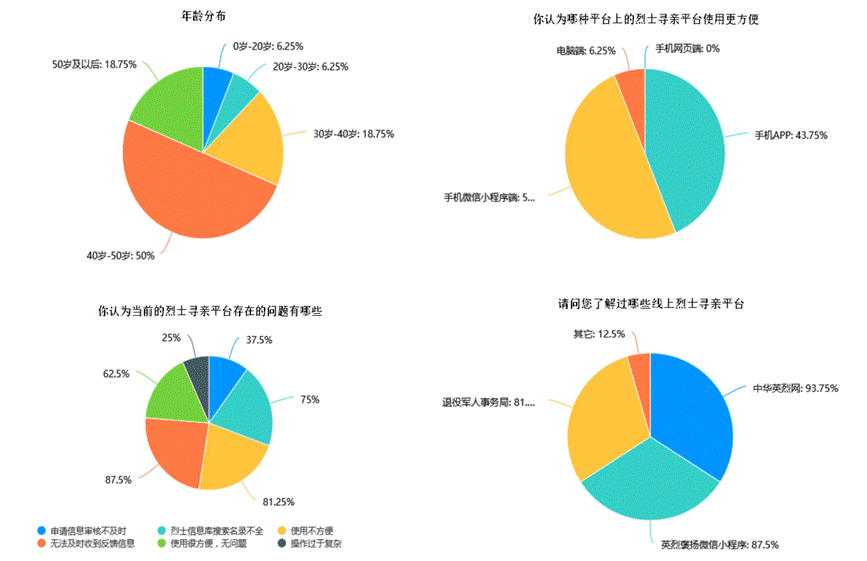
chart 3.1 The martyr's family tracing personnel have a good understanding of the existing platform
Veterans affairs departments in various localities , The Veterans' office is the competent department for the martyrs' family search , However, due to the special national conditions of our country , There are many martyrs . Because of the age , Most of them are difficult to count the specific information of the martyrs . At present, volunteer groups and families of martyrs looking for relatives all over the country have become the main body and main personnel of martyrs looking for relatives , Their understanding of each platform represents the current level of use of the martyr's family search platform . It can be seen from the chart that the age distribution of most people is 40-50 year , The frequency of Internet use among this age group is not high . therefore , Wechat applet design should consider the effect of simple and easy-to-use operation .
stay “ Which platform do you think is more convenient to use for martyr tracing platform ” In question , Nearly half said they had used wechat apps , It is much higher than the proportion of users using other network platforms . stay “ What do you think are the problems with the current martyr tracing platform ” In question , Most people think that the main problem is that the input information is not reviewed in time , Inconvenient to use , The search of the martyr list is incomplete .
The statistical chart of the on-line requirements of small programs is shown in the figure 3.2 Shown , In the questionnaire , Yes 43.74% Of people think it is necessary to launch a small program that is more convenient and better to serve the martyr's family tracing and martyr's family tracing volunteers . therefore , It is very necessary to develop a small program for finding relatives of martyrs .
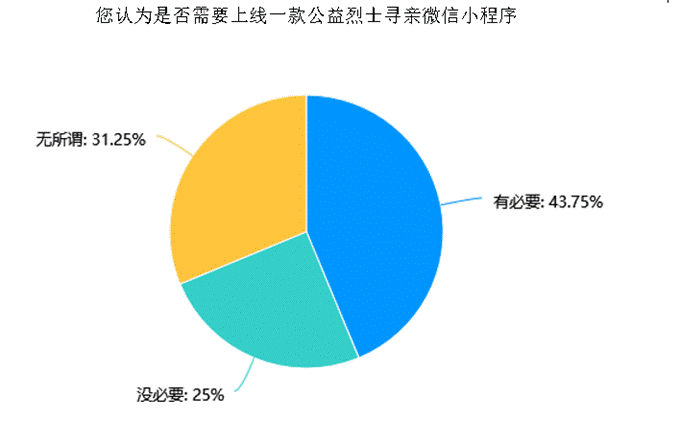
chart 3.2 Applet online demand statistics
3.2 Functional requirements analysis
You can return to the martyr's family search applet, which mainly serves the martyr's family members and family search volunteers . Through the analysis and user investigation of the functions and use methods of the existing family search platform . The user function use case diagram of the public version of the junkegui martyr tracing applet is made as shown in the figure , Relatives of martyrs seeking relatives can log in by binding the authentication information in wechat on the wechat applet , And release the application for family search , And view the details of the applied information in the personal center interface . The user end system use case model is shown in Figure 3.3.

chart 3.3 User end system use case model diagram
In the administrator interface , After logging in, the administrator can review the information about the relatives of the martyrs , After the audit, the information can be displayed at the front end of the applet , The information reviewed by the administrator is visible to those who enter the applet .
Administrator side system model diagram 1 Pictured 3.4 Shown , Administrator side system model diagram 2 Pictured 3.5 Shown .

chart 3.4 Administrator side system model diagram 1

chart 3.5 Administrator side system model diagram 2
For the application information filled in by the applicant , The information to be obtained by the administrator is mainly divided into two parts , One column is the applicant's personal information , The first column is the relevant information and supporting materials of the martyrs . To ensure the authenticity of the information obtained , First of all, the applicant's information needs to be reviewed , After the review, the information of the martyrs will be reviewed and compared , For example, there is information about martyrs in the database , Then notify the applicant , If there is no information about the martyrs in the database , After the approval, the relevant information will be displayed after the privacy information is removed .
3.3 Business process analysis
The main functions of your GUI applet are divided into three sections , The applicant applies for , Volunteer reviews , Issued after review . After entering the wechat applet, the applicant, that is, the martyr's relatives, can register and log in by binding their personal information in wechat , After logging in, you can see the family search information published by other personnel on the home page , You can apply in the application interface , Complete the application function after filling in the application information . In the column of personal information, the applicant can see the basic contents such as the registration information bound by the individual , You can also view the approval status of the application information in my application . volunteer ( Administrators ) adopt web End in PC After the information is reviewed on the web or mobile browser, the approved information will be published and displayed in the front end of the applet , For the information that has passed the audit, mark that the audit has not passed and indicate the reason . The overall business flow chart is shown in Figure 3.6 Shown .
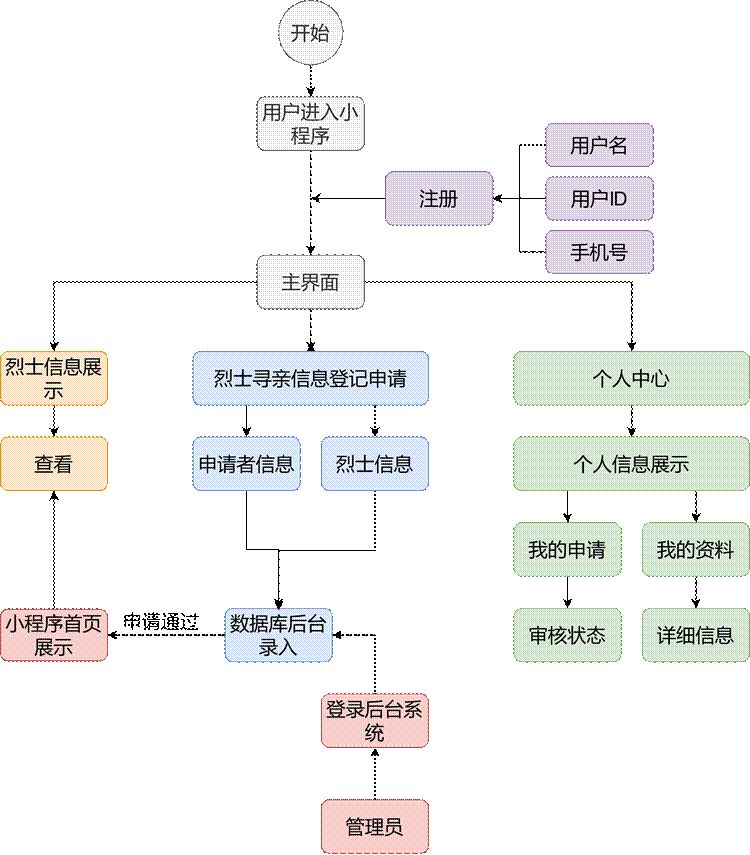
chart 3.6 Overall business flow chart
3.4 Requirements for system operation performance parameters
In addition to considering the functional requirements of the applet , The performance of the applet running environment should also be considered according to the specific use scenarios , The main consideration is compatibility , response time , Three aspects of stability .
3.4.1 Compatibility
You can use wechat applet mainly through wechat mobile terminal ( Including mobile phones and tablets ) To display , A few of them will be used on the computer . Equipment brands of different users , model , There is a large difference in size . It's easy to cause compatibility problems for applets . For example, some brand mobile phones ( Like apple phones iphone 12) The top status bar of the is larger , Some brand mobile phones ( Such as huawei mate 40) The front camera is in the upper left corner of the screen , When designing the style, it should be considered not to set operation buttons on the screen boundary of the mobile phone , Impact on user experience . Wechat applet can run on three different terminal systems :IOS System 、Android System and wechat developer tools for development and debugging , The script execution environment of these three different terminals is different from that of non-native components of wechat applets loaded . stay IOS On the operating system , Wechat applet JS The code is running in JSCore in , Use WKWebView Rendering , The running and loading environment is IOS 10 above , stay Android On the operating system , Wechat applet JS The code is through X5 JSCore To parse , On the WeChat developer tool , Wechat applet javascript The code is running in nwjs in , It's through Chrome Webview To render .. For the hardware environment of user equipment , Resolution and other conditions are different , This time, the mainstream equipment is mainly selected as the development and testing environment , Maximize the user experience .
3.4.2 response time
The response time of the applet mainly includes the loading and rendering of the front page, and the response and data acquisition of the back-end server and database data , In order to enable users to get a smooth use experience , The response time of each module shall not exceed 1 second . meanwhile , If the user does not open the applet for the first time , Wechat applet will keep the user cache in Redis In the database , There is no need to download the applet interface again the next time you open the applet , You can quickly open the applet to improve the response speed .
3.4.3 stability
During the actual online use of the small program for finding relatives of the martyrs , There may be multiple users accessing at the same time , If a large number of users access the applet in a short time , Will make the server CPU The pressure increases , Resource consumption increases , There is a risk of downtime , So in design , Consider the maximum number of concurrent programs , And improve the attributes of hardware resources such as servers deployed by applets within a reasonable range . The figure below 3.7 Configure the Huawei cloud server resources for the background .
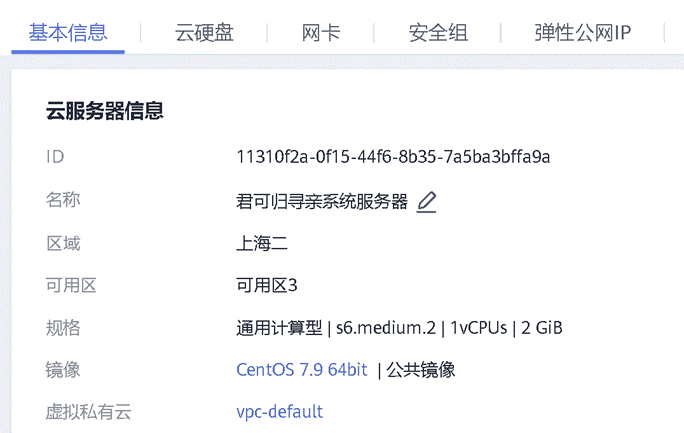
chart 3.8 Huawei cloud server resource configuration
The following figure for 3.9 The background Huawei cloud database resource configuration .
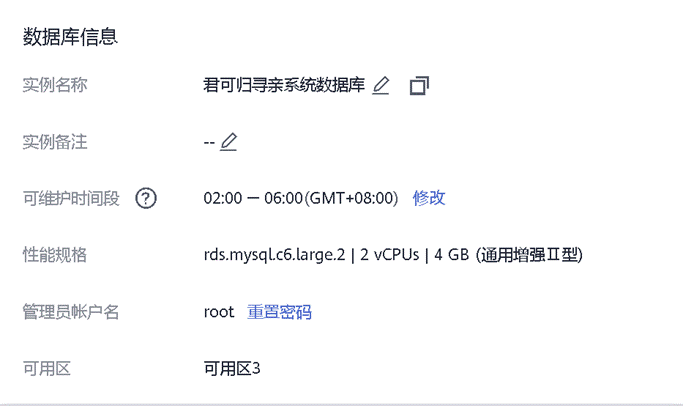
chart 3.9 Huawei cloud database information
3.5 Platform function design
Through preliminary investigation and analysis and system process analysis , Design the business framework structure of junkegui wechat applet , The system development framework is shown in the figure below , Use wechat applet +Springboot+Element-Ui+Mysql+Vue Design mode of , The design process is divided into the design of the small program end of the martyr family search system and the design of the administrator review end . The calculation and processing of data are completed at the back end , The applet gets data from the server and displays it , Provide visual services for wechat applet users .
According to the functional type of the system , Split the junkegui martyr tracing system into the following modules , They are the home page module , Application module , Registration module , Personal center module , My application module , Login module , Audit module . The overall module diagram of your GUI applet is shown in the figure 3.10 Shown .
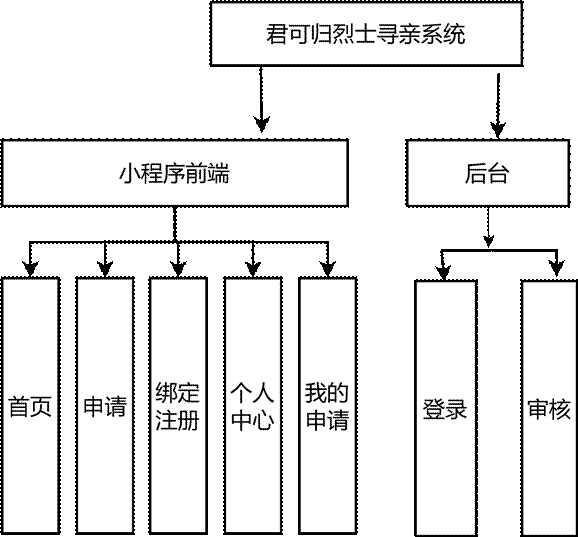
chart 3.10 You can return to the overall module diagram of the system
3.5.1 User registration login
If the applet user logs in to the applet for the first time , You need to register by binding your own wechat public personal information , When Binding user identity to obtain information, you will be prompted whether the user is allowed to obtain permission , If the user does not agree, the permission cannot be obtained , After the user agrees , The applet uploads the user's personal information to the server database , The background obtains the information of different users OpenID As a primary key to identify users who cannot be identified , Complete the login function , For each user OpenID It's not the same . If the user does not use the applet for the first time , After entering the applet, you can log in automatically without selecting login . The sequence diagram of user registration and login is shown in Figure 3.11.
Example description : Register login
The trigger condition : The first time a user logs in with a click
Process information :
(1) Click the login button
(2) Allow the applet to obtain the public information of the user's personal letter
(3) The server database verifies whether the user has registered an account
(4-a) Not registered , User information is uploaded to the server database
(4-b) Registered , Direct login
(5) The page jumps to the front page of the applet

chart 3.11 User login sequence diagram
3.5.2 Fill in application information
The user is clicking “ apply ” Button after entering the application page , Fill in the information related to the martyr's family search , The sequence diagram is shown in the figure 3.12 Shown .
Example description : Fill in application
The trigger condition : applicant ( Looking for relatives ) Click the Apply button on the main page to initiate the application
Process information :
(1) Click the Apply button on the home page
(2) Fill in the martyr related information
(3) Fill in the applicant's personal information
(4) Click Submit button , Upload application information
(5-a) Incorrect format or missing information
(5-b) The information is correct , Upload successful
(6-a) Fill in again

chart 3.12 Fill in the sequence diagram of application information
3.5.3 User personal Center
The user can view the avatar when entering the personal center interface , The details of the personal center and the status of the application information . The user's personal information includes name , Gender , Phone number etc. . For the first time, personal information is obtained by obtaining the information bound by the user's wechat , Users can also customize and modify my information when it is updated in the personal center . In the "my application" column, you can view the detailed information and approval status of my application . The sequence diagram is shown in the figure 3.13 Shown .
Example description : User personal center view
The trigger condition : The user logs in after binding wechat information , Click on “ my ” Button to enter the personal center
The basic path :
(1) The user clicks “ my ” Button
(2) View the status of personal basic data and application information
(3-a) Update or supplement your basic personal data
(3-b) Upload to the database
(4-a) View application information status
(4-b) The audit information passed
(4-b-a) Show approved
(4-c) Audit information failed
(4-c-a) Show unapproved , Reapply
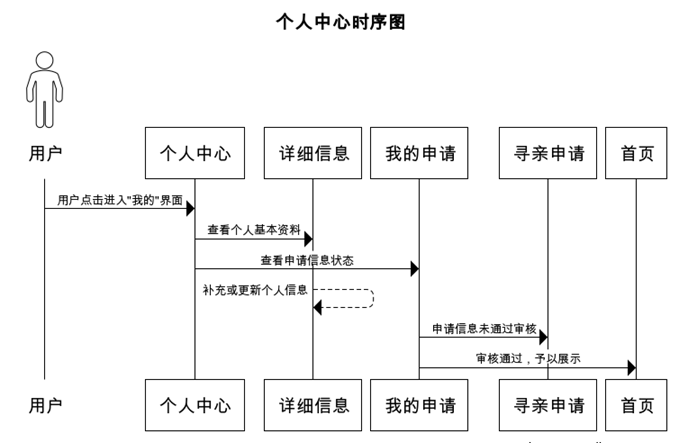
chart 3.13 User personal center sequence diagram
3.5.4 Martyr information display
Users can view the approved martyr information or the information entered by the background administrator on the home page. Due to the limited display interface of the applet , So show some information of each martyr in the form of cards . The sequence diagram is shown in the figure 3.14 Shown .
The trigger condition : The user logs in after binding wechat information , Click on “ home page ” Button to view martyr information
The basic path :
(1) Click on “ home page ” Button
(2a) Browse the martyr information that has been approved
(2b) Search for martyr information
(3a) Find the martyr , Contact administrator
(3b) No martyr information found , Fill in application
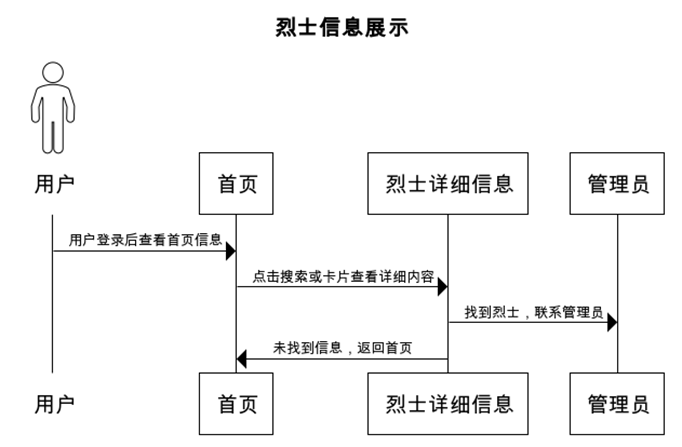
chart 3.14 Martyr information display sequence diagram
3.5.5 Background management
The backstage administrator is also a volunteer looking for relatives , After logging in, you can register multiple volunteer accounts for review , View the applicant's personal information and application information in the background , The application information that meets the requirements and is correct is allowed to be passed and displayed on the front page , For non-compliance information, notify the user to fill in the application information again . The background can also view the basic information of the registered user list . The sequence diagram is shown in the figure 3.15 Shown .
The trigger condition : Volunteers log in to the administrator background
The basic path :
(1) Volunteers log in to Web End background
(2-a) Register a new volunteer account to view the list of volunteer information
(2-b) Review application information
(2-b-a) The audit information passed , Home page display
(2-b-b) Audit information failed , Tell the user why
(2-c) View registered user information
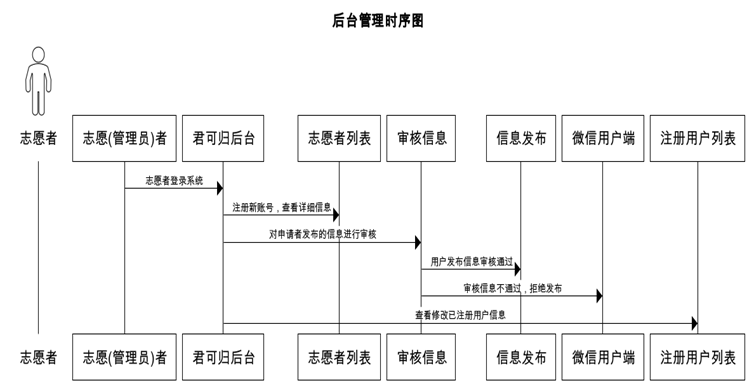
chart 3.15 Background management sequence diagram
The first 4 Chapter System function module design
The system function module includes interface design , Design integration and data interaction analysis of each sub module , The system structure hierarchy is shown in the figure below 4.1 Shown .

chart 4.1 System structure hierarchy diagram
4.1 Overall system interface design
Tabs at the bottom of the main interface of the applet : home page , apply , Personal center .
home page : You can click to enter the martyrs' information release , Martyr query displays the information entered in the martyr database system , Click a piece of information to view the details .
Application interface : Fill in the martyr's family search application information and submit the information .
Personal center : You can see “ My application ” and “ Personal information ”.
My application : View the review status of the martyr information that has been filled in .
My information : You can view your profile , full name , cell-phone number , Contact information, etc .
4.2 Function module design
You can return to the system function module is divided into registration login module , Family search information application module , Personal center module , Manage the four parts of the background module .
4.2.1 Sign up for the login module
The registration and login module of junkegui system is mainly used to authorize users to obtain wechat binding information , By calling auth.code2Session Interface , Get the user's wechat unique OpenID Bind user micro signal , To log in to the applet . The logical structure for obtaining the public information of the applet user is shown in the figure , When the junkegui applet needs to apply for the user to disclose information , The applet sends an application request , Get personal information and store it in the cloud database , Keep records of relevant data , Complete the relevant operations . The flow chart of the registration and login module is shown in the figure 4.2 Shown .
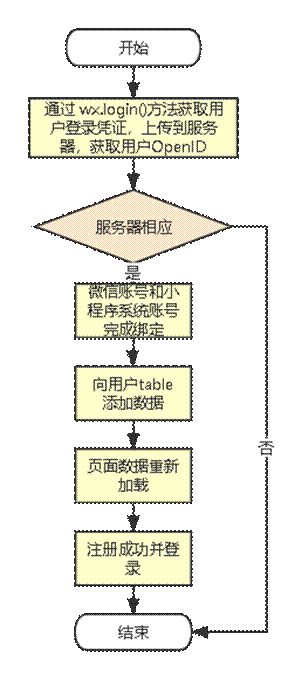
chart 4.2 Applet login flowchart
The code logic for completing the registration and login function is shown in the figure below 4.3 Shown .

chart 4.3 Register login code logic diagram
4.2.2 Family search information application module
The home page is mainly used to display the information that has been entered through the application or volunteers , Click the card on the home page to view the details , The display order of the information that has passed the application on the home page is mainly based on the order of approval by the administrator . Fill in the personal information and martyr information in the application interface and send them to the administrator background for information review .
(1) Homepage information display interface
The applet user can browse the approved martyr information after logging in , The details of the martyr and the proof picture are read from the back-end database .
(2) The application function is realized
The application information is mainly responsible for the application upload function for users to fill in the martyr's family search information , You can go back to the applet to get the user's OpenID Used to authenticate users with different identities , After filling in the information in the application interface, the user will upload the data form to the background database for volunteers ( Administrators ) Conduct information review .
(3) Review the background
The background approval interface is mainly through Vue+element-ui Realization , The backend logs in by verifying the administrator user name and password , Obtain the permission to read the information requested by the user , After reviewing the application information, return the processing result to the front end of the applet . The application information module is shown in the figure below 4.4 Shown .
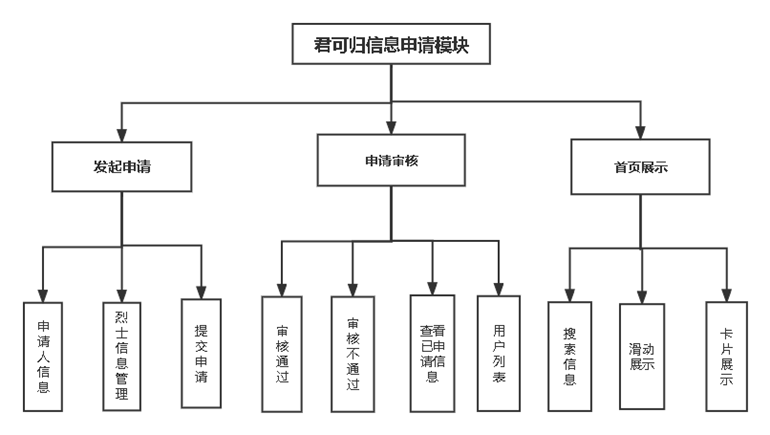
chart 4.4 Application information module diagram
4.2.3 Personal center module
After binding wechat information to register and log in, users can modify information and view my application in the personal information column , In addition to obtaining personal data through wechat , It can also be customized .
4.2.4 Manage background modules
The administrator can view and audit the information after login verification in the background , At the same time, the administrator can also register a new administrator account and view the details of the applet user list .
4.3 Database design
4.3.1 Logical structure of database
You can return to the database data table of the applet, which has a family search user information table , Volunteer administrator information form , Application information form .
The information table of family searching users mainly includes wechat bound by users OpenID, user name , full name , Gender , cell-phone number , mailbox , Personal profile, etc , volunteer ( Administrators ) The attributes included in the table are account number , password , full name , Gender , cell-phone number . The attributes included in the application information form are the applicant's name , Applicant's mobile phone number , Applicant email , The relationship between the applicant and the martyr , Applicant's ID number , Name of the martyr , The martyr's gender , The date of the martyr's enlistment , The martyr's date of birth , The date the martyr died , The place of origin of the martyr , The martyr's unit , The specific address of the martyr , Proof picture, etc . One of the users can fill in multiple application information , Users and application information are one to many . A volunteer can process applications initiated by multiple users , Administrators and users are one to many . The figure below 4.5 You can return to the martyr's family search system E-R chart .
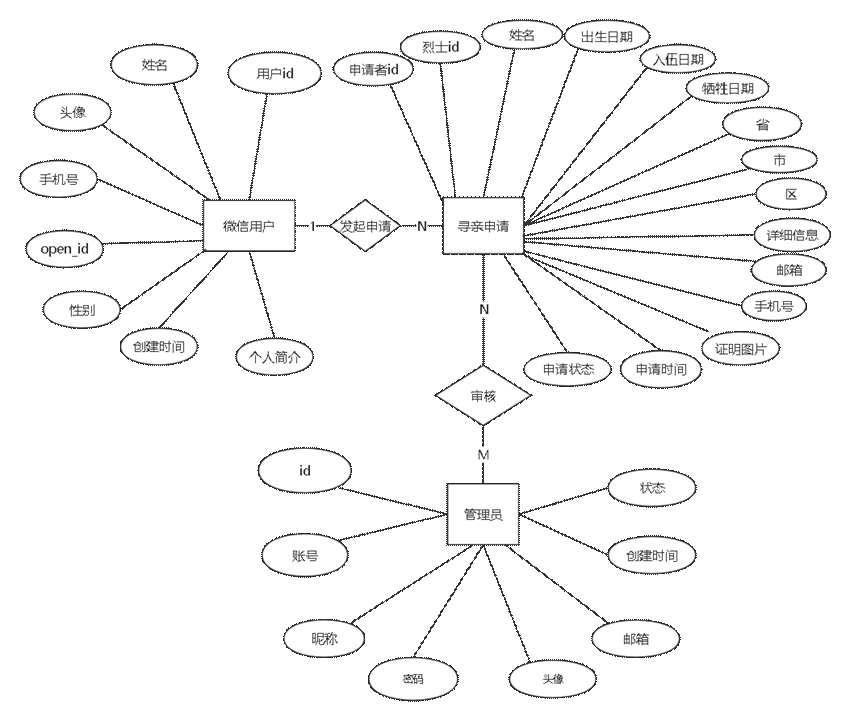
chart 4.5 You can return to the martyr's family search system E-R chart
4.3.2 Database relation description
(1) user ( user ID, full name , Head portrait , cell-phone number ,openid nickname , Gender , province , City , District , Specific address , Personal profile , Creation time , Update time , mailbox ), The relationship is shown in the table 4.1 Shown .
surface 4.1 User data sheet
Table 4.1 User data table
(2) Martyr information ( Applicant's name , cell-phone number , mailbox , The relationship between the applicant and the martyr , Applicant's ID number , Name of the martyr , The martyr's gender , The date of the martyr's enlistment , The martyr's date of birth , The date the martyr died , The place of origin of the martyr , The martyr's unit , The specific address of the martyr , Proof picture ), The relationship description is shown in table 4.2 Shown .
surface 4.2 Martyr information sheet
(3) Volunteer administrator form (id, name , Head portrait , account number , password , full name , Gender , cell-phone number ), The relationship description is shown in table 4.3 Shown .
surface 4.3 Volunteer administrator form
The first 5 Chapter You can return to the system test
The content of this chapter mainly carries out development and testing from the two dimensions of the function and performance of the junkegui system , The function test is mainly conducted by simulating the real use scenarios of users , By comparing the test results with the expected results, we can judge the implementation of each function of the small program system . In terms of performance, it mainly tests the stability of small programs , Compatibility , Response time, etc .
5.1 Test target
Through the test of each function in the small program , Find problems and logical errors in the system and modify them . After testing the individual functional modules, the whole system process shall be completely tested , Find problems in the interaction process of each functional module , By comparing the expected results , After the test, the function of the whole small program system will be more perfect , More stable .
5.2 Test environment
5.2.1 Applet side test environment
Wechat applet end test preparation equipment
(1) glory 20 PRO ( Hongmeng operating system )
(2) millet 11 urtal ( Android operating system )
(3) Apple 11(IOS operating system )
(4)windows Wechat end (windows operating system )
(5) Wechat developer tool simulator (windows operating system )
(6) Huawei matepad The tablet ( Hongmeng operating system )
(7)ipad 2019 The tablet (ipadOS operating system )
notes : To ensure the influence caused by the error of the equipment itself , Two sets are used for the same model of all equipment
The wechat version of each mobile device is the latest version , The version number is 8.0.22.
The computer wechat version number is 3.6.0.18
5.2.2 Administrator side test environment
Server side test preparation equipment
Local end test :windows 10 64 position ,macbook Pro 64 position
Server side testing : Huawei Cloud Linux centOS LTS 64 position
5.3 Module test
5.3.1 Application information display page module test
First, test the martyr information display module on the home page , The homepage personal information display module has the function of fuzzy search for martyr information , Swipe through martyr information , The information of the martyrs is displayed in the form of cards , Click the card to view the details , The test results are shown in the table 5.1 Shown , The martyr information display module on the homepage is shown in the figure 5.1 Shown .
surface 5.1 The home page information shows the test results of the module

chart 5.1 Homepage martyr information display page module
5.3.2 Application module test
Fill in the applicant's personal information and martyr information in the application interface , Include proof pictures , For the input error information or non-conforming information, a prompt message will pop up to prompt . The test results are shown in the table below 5.2, The application module page is shown in the figure 5.2 Sum graph 5.3 Shown .
surface 5.2 Apply for module test results


chart 5.2 Application module page 1

chart 5.3 Application module page 2
5.3.3 Personal center module test
The user's personal center can view my personal information details and support modification , At the same time, you can view the approval status of the application information . The test results are shown in the table below 5.4, The application module page is shown in the figure 5.4 Shown .
surface 5.3 Personal center module test results

chart 5.4 Application module page
5.3.4 The administrator reviews the module test
The administrator module can complete administrator login , to examine , View the registered user information of the front-end applet and register a new administrator account . Prompt to re-enter when the login account or password is not compliant . Click each button to operate normally , The test results are shown in the table below 5.4, The background login page of the volunteer administrator is shown in the figure 5.5 Shown , The background review interface of volunteers is shown in the figure 5.6 Shown , The wechat user management interface is shown in the figure 5.7 Shown , The volunteer account creation interface is shown in the figure 5.8 Shown .
surface 5.4 Administrator module test results
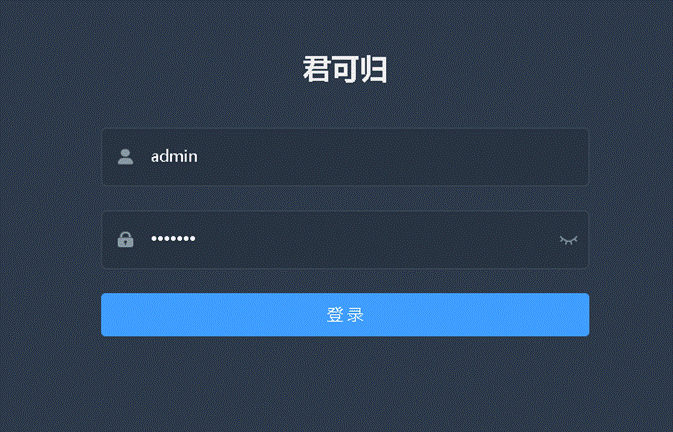
chart 5.5 Volunteer background login interface

chart 5.6 Volunteer background review interface
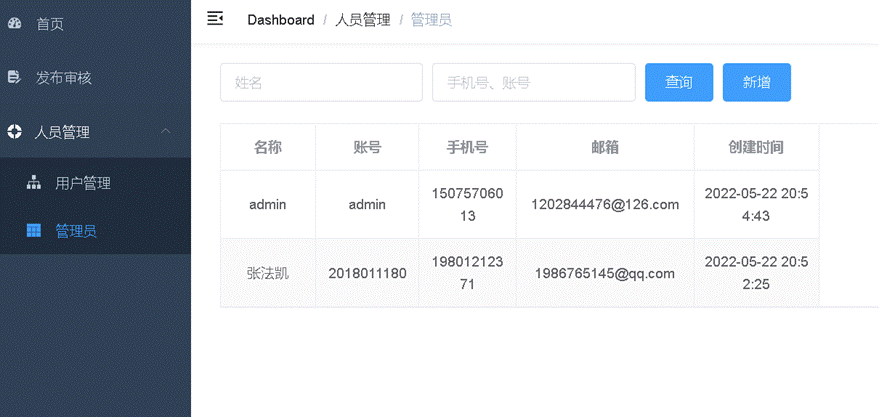
chart 5.7 Background administrator information interface

chart 5.8 Background user information interface
5.4 Performance testing
5.4.1 Device compatibility test
A total of 14 Samples , It mainly uses the current mainstream mobile phones , Tablets and personal PC To verify whether the function and page display of the junkegui martyr tracing system are normal . The system test results are shown in the following table , The trap shows you can return the applet on four different operating systems , Different versions of wechat , The display functions and operators on different resolutions are normal , Each functional module can operate normally .
The front end test results of your GUI applet are shown in the following table 5.5.
surface 5.5 Applet front end test results
You can return to the volunteers ( Administrators ) The background test results are shown in the following table 5.6.
surface 5.6 Applet background test results
Through the analysis of the test results of the small program on each device , Small programs can be displayed on different hardware devices .
5.4.2 Response time test
The front end of the junkegui applet management system is tested through wechat developer tools , In the status bar of the developer tool, you can view the response time of various functions of the applet . In order to better test the stability of the system , At the same time, ensure that the test results are accurate , All test results are test results 50 After that, take the average value of each data . When the network speed is good , After first entering the applet , The applet loading time is , The first page data acquisition time is , The upload time of application results is , After testing , Each response time is normal and within a reasonable range , It can meet the normal use of users , There will be no Caton phenomenon . The test results are shown in the following table 5.7 Shown .
surface 5.7 Corresponding time test results
It can be seen from the above table that the overall corresponding time for applet access is short , The second time you enter the applet will generally take less time to click the page than the first time you enter the applet .
5.4.3 Concurrent stability test
Due to the background database of wechat applet , Servers and other resources need to purchase cloud resources , Considering the economic feasibility , At the same time, the fluency of the small program system should be taken into account . We need to determine the amount of resources of the server and database configured by the applet within a reasonable range . The martyr tracing system does not require users to open small programs frequently , The amount of concurrency will not be particularly large . We use 100 Users or 20 Users simultaneously access the applet as a test , View the server in the server background CPU And the use of resources .
In order to simulate the actual operation more realistically , We use Huawei cloud CPTS Service for concurrent testing .
Huawei cloud performance test service CPTS It's based on HTTP/HTTPS/TCP/UDP Cloud application performance evaluation service based on such protocols .CPTS The service can quickly simulate the business peak usage scenarios of large-scale and highly concurrent users , Professional test reports will be provided after the test . We pass Hua Weiyun CPTS Service to test the overall performance of the homing system .CPTS The service configuration is shown in the figure 5.9 Shown .
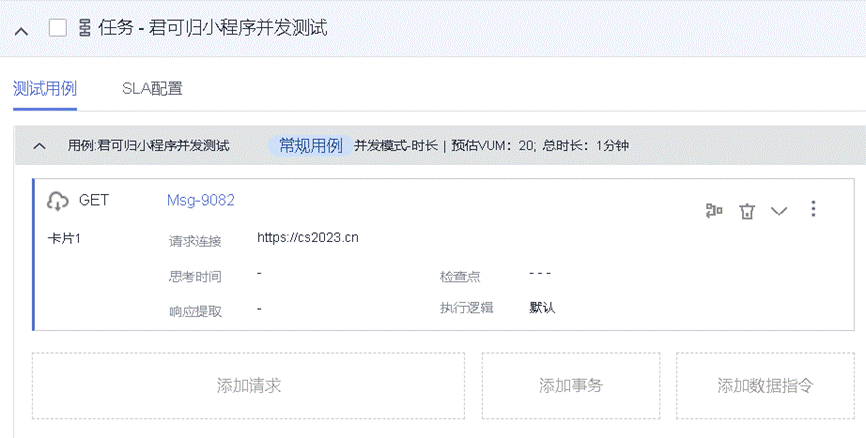
chart 5.9 You can return to the applet and access the stress test concurrently
When the concurrency is 100 when , The real-time response time and various concurrency indicators of your GUI applet are shown in the figure below 5.10 Sum graph 5.11 Shown .
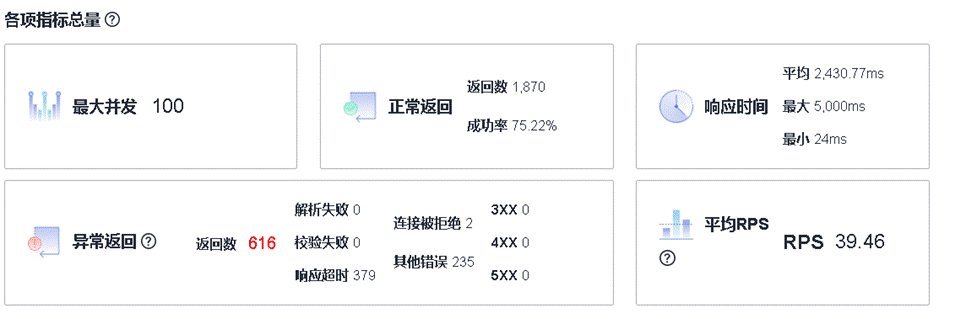
chart 5.10 Simultaneously test various indicators 100 Concurrent
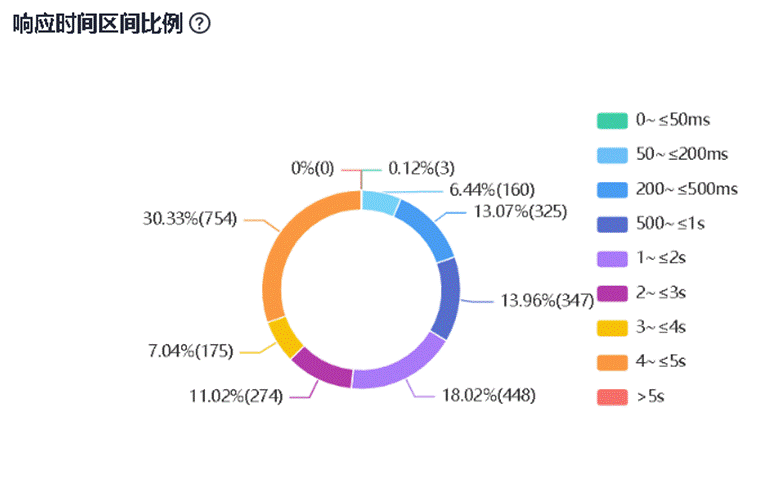
chart 5.11 Response time ratio 100 Concurrent
When the concurrency is 20 when , The real-time response time and various concurrency indicators of your GUI applet are shown in the figure below 5.12 Sum graph 5.13 Shown .
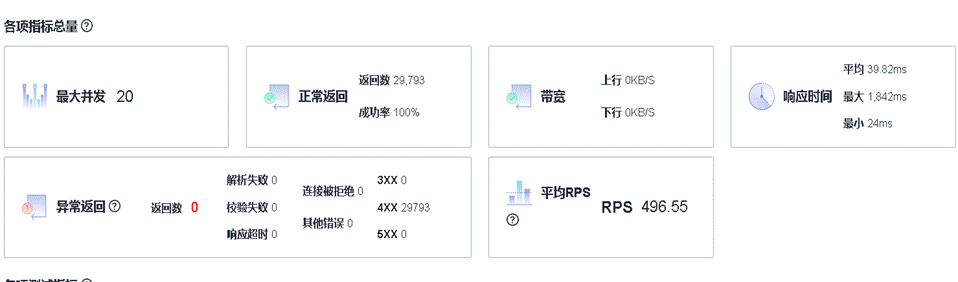
chart 5.12 Simultaneously test various indicators 20 Concurrent
Fig.5.12 Concurrency Test Each Indicator 20 Concurrency
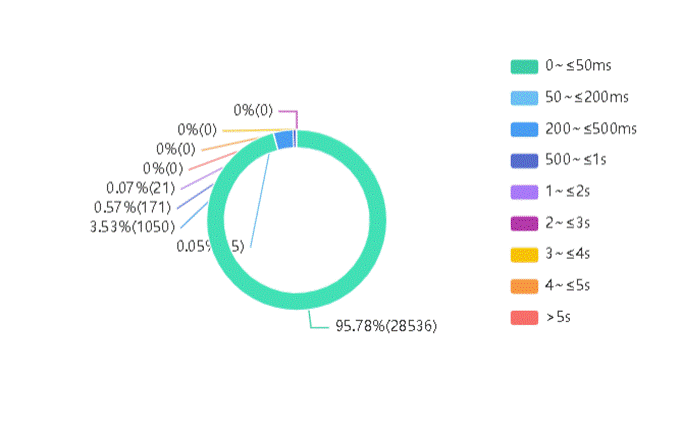
chart 5.13 Concurrent test response time 20 Concurrent
From the above results, we can see that , When the concurrency is 100 when , Long applet access time , The access success rate is only 75.43%, When the concurrent access volume is 20 when , The successful access rate of the applet is 100%. You can return to the applet is not a large number of small programs that users need to access in a short time , therefore , The current resource allocation can meet the needs of daily use .
The first 6 Chapter summary
The junkegui martyr tracing system provides a platform for information exchange for the martyrs' families and tracing volunteers , The platform should ensure the authenticity and credibility of the martyr information , And ensure the timeliness of information release , Help the martyrs' families to find the martyrs' whereabouts more quickly . Wechat users can open the junkegui applet at any wechat client to submit applications , Volunteers can be in web The platform conducts information review , It is not limited by the equipment model , It has improved the efficiency of the martyrs' search for relatives .
原网站版权声明
本文为[InfoQ]所创,转载请带上原文链接,感谢
https://yzsam.com/2022/160/202206091739469683.html


