当前位置:网站首页>QT function optimization: QT 3D gallery
QT function optimization: QT 3D gallery
2022-07-28 19:05:00 【Yunxi Zhihua】
Qt Function optimization :Qt 3D Gallery
List of articles
One 、 design sketch
As shown in the figure below :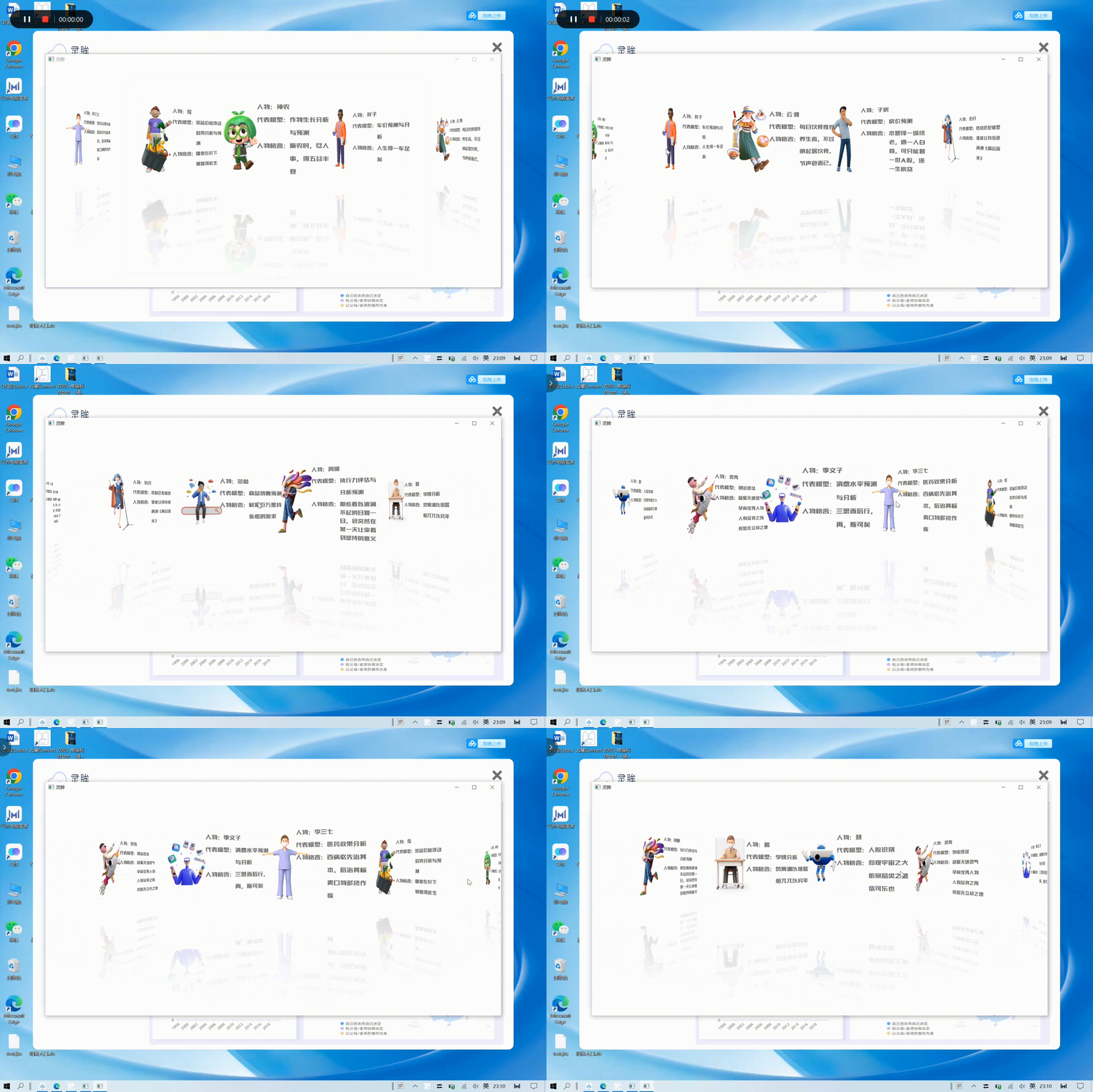
Two 、 Use steps
1. .pro part
The code is as follows :
TEMPLATE = app

QT += qml quick
CONFIG += c++11

SOURCES += main.cpp

RESOURCES += qml.qrc \
    image.qrc


# Additional import path used to resolve QML modules in Qt Creator's code model
QML_IMPORT_PATH =

# Additional import path used to resolve QML modules just for Qt Quick Designer
QML_DESIGNER_IMPORT_PATH =

# The following define makes your compiler emit warnings if you use
# any feature of Qt which as been marked deprecated (the exact warnings
# depend on your compiler). Please consult the documentation of the
# deprecated API in order to know how to port your code away from it.
DEFINES += QT_DEPRECATED_WARNINGS

# You can also make your code fail to compile if you use deprecated APIs.
# In order to do so, uncomment the following line.
# You can also select to disable deprecated APIs only up to a certain version of Qt.
#DEFINES += QT_DISABLE_DEPRECATED_BEFORE=0x060000 # disables all the APIs deprecated before Qt 6.0.0

# Default rules for deployment.
qnx: target.path = /tmp/$${
    TARGET}/bin
else: unix:!android: target.path = /opt/$${
    TARGET}/bin
!isEmpty(target.path): INSTALLS += target
2. .qml part
Demo.qml
The code is as follows :
import QtQuick 2.0
import QtGraphicalEffects 1.0

Rectangle {

    id:coverflow

    property ListModel model
    property int itemCount: 5

    PathView{

        id:pathView
        model:coverflow.model
        delegate: Item {

            id:delegateItem
            width: 530
            height: 420
            z:PathView.iconZ
            scale:PathView.iconScale

            Image{

                id:image
                source: url
                width: delegateItem.width
                height: delegateItem.height
            }
            ShaderEffect {

                anchors.top: image.bottom
                width: image.width
                height: image.height;
                anchors.left: image.left
                property variant source: image;
                property size sourceSize: Qt.size(0.5 / image.width, 0.5 / image.height);
                fragmentShader:
                        "varying highp vec2 qt_TexCoord0;
                        uniform lowp sampler2D source;
                        uniform lowp vec2 sourceSize;
                        uniform lowp float qt_Opacity;
                        void main() {


                            lowp vec2 tc = qt_TexCoord0 * vec2(1, -1) + vec2(0, 1);
                            lowp vec4 col = 0.25 * (texture2D(source, tc + sourceSize) + texture2D(source, tc- sourceSize)
                            + texture2D(source, tc + sourceSize * vec2(1, -1))
                            + texture2D(source, tc + sourceSize * vec2(-1, 1)));
                            gl_FragColor = col * qt_Opacity * (1.0 - qt_TexCoord0.y) * 0.2;
                        }"
            }


            transform: Rotation{

                origin.x:image.width/2.0
                origin.y:image.height/2.0
                axis{
    x:0;y:1;z:0}
                angle: delegateItem.PathView.iconAngle
            }
        }
        path:coverFlowPath
        pathItemCount: coverflow.itemCount
        anchors.fill: parent

        preferredHighlightBegin: 0.5
        preferredHighlightEnd: 0.5

    }

    Path{

        id:coverFlowPath
        startX: 0
        startY: coverflow.height/3

        PathAttribute{
    name:"iconZ";value: 0}
        PathAttribute{
    name:"iconAngle";value: 70}
        PathAttribute{
    name:"iconScale";value: 0.6}
        PathLine{
    x:coverflow.width/2;y:coverflow.height/3}

        PathAttribute{
    name:"iconZ";value: 100}
        PathAttribute{
    name:"iconAngle";value: 0}
        PathAttribute{
    name:"iconScale";value: 1.0}

        PathLine{
    x:coverflow.width;y:coverflow.height/3}
        PathAttribute{
    name:"iconZ";value: 0}
        PathAttribute{
    name:"iconAngle";value: -70}
        PathAttribute{
    name:"iconScale";value: 0.6}
        PathPercent{
    value:1.0}

    }

}
main.qml
The code is as follows :
import QtQuick 2.8
import QtQuick.Window 2.2

Window {

    visible: true
    width:1800
    height: 880
    title: qsTr(" Lingmou ")


    ListModel{

        id:model
        ListElement{
    url:"qrc:/image/1.png"}
        ListElement{
    url:"qrc:/image/2.png"}
        ListElement{
    url:"qrc:/image/3.png"}
        ListElement{
    url:"qrc:/image/4.png"}
        ListElement{
    url:"qrc:/image/6.png"}
        ListElement{
    url:"qrc:/image/7.png"}
        ListElement{
    url:"qrc:/image/8.png"}
        ListElement{
    url:"qrc:/image/9.png"}
        ListElement{
    url:"qrc:/image/10.png"}
        ListElement{
    url:"qrc:/image/11.png"}
        ListElement{
    url:"qrc:/image/12.png"}
        ListElement{
    url:"qrc:/image/13.png"}
        ListElement{
    url:"qrc:/image/14.png"}

    }

    CoverFlow{

        anchors.fill:parent
        model:model
    }


}
3. .cpp part
main.cpp
The code is as follows :
#include <QGuiApplication>
#include <QQmlApplicationEngine>

int main(int argc, char *argv[])
{

    QGuiApplication app(argc, argv);

    QQmlApplicationEngine engine;
    engine.load(QUrl(QStringLiteral("qrc:/main.qml")));
    if (engine.rootObjects().isEmpty())
        return -1;

    return app.exec();
}
summary
The above is part of Qt About function optimization ——Qt Function optimization :Qt 3D The complete code part of the gallery , Attached separately Qt Function optimization :Qt 3D Gallery complete material and code compression package , Users can also be Directly follow wechat official account : Yunxi Zhihua , reply “3D Gallery ”, Free access to . meanwhile , All the relevant Qt Part of interface optimization , All in the column below ——Qt Function optimization in , If you are interested, you can watch and use , I hope these articles can make everyone's Qt The software is more beautiful and perfect !!!
another , If you have time , It can also be found in the column section of the personal home page , Check out my Qt Practical column And Qt Interface optimization Column , There are Qt Relevant actual combat software and relatively practical auxiliary functions , If you are interested, please have a look at (๑><๑)
Attached separately Qt actual combat : Yunxi chat room and Qt Interface optimization : Double click the mouse effect Two related articles , You can slide down to the column at the bottom of the article , See other articles in related columns , I hope I can help you , Thank you for your support ~( ̄▽ ̄~)~
边栏推荐
- [GXYCTF2019]StrongestMind
- Is there any prospect and way out for software testing?
- Zero knowledge proof: zkp with DDH assumption
- Haproxy implements proxy configuration
- How to obtain data on mobile phones and web pages after the SCM data is uploaded to Alibaba cloud Internet of things platform?
- 真正的 HTAP 对用户和开发者意味着什么?
- [GXYCTF2019]StrongestMind
- Meta Q2 earnings: revenue fell for the first time, and metaverse will compete with apple
- LeetCode_ 343_ integer partition
- Open source database innovation in the era of digital economy | the 2022 open atom global open source summit database sub forum was successfully held
猜你喜欢

Introduction and advanced MySQL (III)

How does the mqtt server built with emqx forward data and save it to the cloud database?

EasyCVR接入设备后播放视频出现卡顿现象的原因分析及解决

QT & OpenGL lighting

JVM four reference types

Easynlp Chinese text and image generation model takes you to become an artist in seconds

Kali doesn't have an eth0 network card? What if you don't connect to the Internet

Is software testing really as good as online?
11 年膨胀 575 倍,微信为何从“小而美”变成了“大而肥”?

SwiftUI 组件之如何实现电话号码掩码隐藏部分的文本字段TextField(教程含源码)
随机推荐
Introduction and advanced level of MySQL (II)
2、 Uni app login function page Jump
The wechat installation package has expanded 575 times in 11 years, and the up owner: "98% of the documents are garbage"; Apple App store was exposed to a large number of pornographic apps; Four techn
Today in history: Microsoft acquires qdos; Model testing pioneer birth; The first laser typesetting Chinese newspaper
The login interface of modern personal blog system modstartblog v5.4.0 has been revised and the contact information has been added
Introduction and advanced MySQL (III)
Is it useful to learn software testing?
AI has changed thousands of industries. How can developers devote themselves to the new "sound" state of AI voice
CTR click through rate prediction practice project of advertising recommendation!
Kotlin:Sealed class密封类详解
Interpretation of ue4.25 slate source code
直播平台软件开发,js实现按照首字母排序
What does real HTAP mean to users and developers?
Kali doesn't have an eth0 network card? What if you don't connect to the Internet
Interviewer: what are the usage scenarios of ThreadLocal? How to avoid memory leakage?
Is zero basic software testing training reliable?
If you want to learn software testing, where can you learn zero foundation?
Is two months of software testing training reliable?
JVM tuning
How much is software testing training generally?