当前位置:网站首页>使用VRRP技术实现网关设备冗余,附详细配置实验
使用VRRP技术实现网关设备冗余,附详细配置实验
2022-07-26 03:12:00 【网络攻城狮summary】
前言
企业的网络中一般会使用三层交换机或路由器来当作网关设备,这个网关设备上面连着出口路由器或防火墙来通向外网,如果企业中的这个网关设备出现故障,就会导致内网的终端设备无法访问公网。为了避免这种情况的发生,VRRP(虚拟路由器冗余协议)技术可以实现网关设备的冗余备份,即使有一台网关设备宕机,另一台也能转发流量,保证内网的终端正常上网。
一、VRRP技术的原理
因为一个网卡只能配置一个网关地址,所以两台网关设备就共同虚拟出一个ip地址,当其中一台设备宕机时,另一台设备也能继续维护这个虚拟ip,实现网关设备的冗余备份效果。
二、VRRP实验与配置
1、实验拓扑

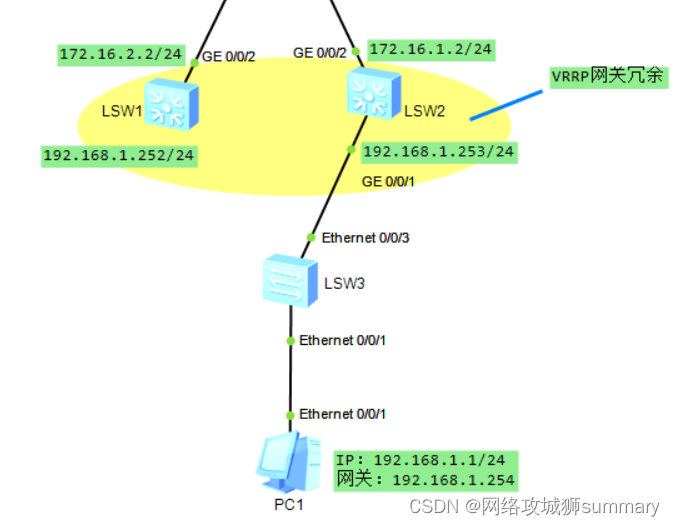
2、实验拓扑介绍
- PC1是内网的终端设备。LSW3是接入交换机。
- LSW1和LSW2是网关设备,用于实现网关冗余。LSW1的GE0/0/1口的ip地址是192.168.1.252/24,LSW2的GE0/0/1口的IP地址是192.168.1.253/24,它们使用VRRP技术共同虚拟出一个网关地址192.168.1.254/24。
- 网关设备上面是一个出口路由器。
- 路由器AR3模拟运营商网络,回环口模拟公网中的某个地址。
3、实验配置
VRRP配置命令
| 命令 | 备注 |
|---|---|
| vrrp vrid 10 virtual-ip 192.168.1.254 | 在此端口下配置VRRP,并设置虚拟地址为192.168.1.254 |
| vrrp vrid 10 priority 200 | 设置此端口的主路由优先级为200,默认优先级是100 |
| vrrp vrid 10 track interface g0/0/2 reduced 150 | 当检测到上行端口故障时,自动将优先级减少150,使备用端口变成主端口 |
| display vrrp | 显示vrrp配置结果 |
设备配置
LSW3:
vlan 10
int e0/0/2
port link-type trunk
port trunk allow-pass vlan 10 //允许带标签VLAN10的数据帧通过

int e0/0/3
port link-type trunk
port trunk allow-pass vlan 10 //允许带标签VLAN10的数据帧通过

int e0/0/1
port link-type access
port de v 10
LSW1:
vlan 10
int vlanif 10 //创建vlanif接口
ip add 192.168.1.252 24
int g0/0/1
port link-type trunk
port trunk allow-pass v 10
int vlanif 10
vrrp vrid 10 virtual-ip 192.168.1.254 //在此端口下配置VRRP,并设置虚拟地址为192.168.1.254
 vrrp vrid 10 priority 200 //设置此端口的主路由优先级为200,默认优先级是100

//当检测到上行端口故障时,自动将优先级减少150,使备用端口变成主端口
vrrp vrid 10 track interface g0/0/2 reduced  150

vlan 20
int vlanif 20
ip add 172.16.2.2 24
int g0/0/2
port link-type access
p d v 20

//在内网配置动态路由协议OSPF,保证内网通讯
ospf 1 router-id 2.2.2.2
area 0
network 172.16.2.0 0.0.0.255
network 192.168.1.0 0.0.0.255

ip route-s 0.0.0.0 0 172.16.2.1  //使用静态路由配置缺省路由
LSW2:
vlan 10
int vlanif 10
ip add 192.168.1.253 24
int g0/0/1
port link-type trunk
port trunk allow-pass v 10
int vlanif 10
 vrrp vrid 10 virtual-ip 192.168.1.254  //在此端口下配置VRRP,并设置虚拟地址为192.168.1.254

vlan 20
int vlanif 20
ip add 172.16.1.2 24
int g0/0/2
port link-type access
p d v 20

//在内网配置动态路由协议OSPF,保证内网通讯
ospf 1 router-id 1.1.1.1
area 0
network 172.16.1.0 0.0.0.255
network 192.168.1.0 0.0.0.255

ip route-s 0.0.0.0 0 172.16.1.1  //使用静态路由配置缺省路由
出口路由器:
int g0/0/0
ip add 172.16.2.1 24
int g0/0/1
ip add 172.16.1.1 24
int g0/0/2
ip add 100.1.1.2 24

//配置easy ip,使内网访问公网的数据包源地址转换成接口的公网地址
acl number 2000
 rule 5 permit
int g0/0/2
nat outbound 2000

ip route-s 0.0.0.0 0 100.1.1.1

//在内网配置动态路由协议OSPF,保证内网通讯,两台网关设备,OSPF也能起到设备冗余的作用
ospf 1 router-id 3.3.3.3
area 0
network 172.16.2.0 0.0.0.255
network 172.16.1.0 0.0.0.255
运营商路由器:
int g0/0/0
ip add 100.1.1.1 24
int loo0
ip add 3.3.3.3 32
三、实验结果
- 使用命令
display vrrp就能查看vrrp接口的状态,图中可以看到LSW1是Master主设备,虚拟ip是192.168.1.254,优先级是200。

- LSW2的状态是Backup备用设备,虚拟ip是192.168.1.254,优先级是默认的100。

- 使用PC1ping公网的地址,发现是通的。

- 当断开主链路模拟主设备宕机,过一段时间后备用设备会自动转发流量。

总结
使用VRRP对网关设备进行冗余,避免了单点故障,适合在企业的网络中部署。当然不止网关,任何重要节点的ip都可以使用两台设备进行冗余,从而增加系统稳定性。
边栏推荐
- What's good for starting a business with 10000 yuan? Is we media OK?
- Golang 中‘...‘的用法
- YOLOv3: An Incremental Improvement
- LeetCode·每日一题·剑指 Offer || 115.重建序列·拓扑排序
- STM32——串口学习笔记(一个字节、16位数据、字符串、数组)
- QT笔记——Q_Q 和Q_D 学习
- Canvas - drawing pictures - dynamic drawing production
- Digital commerce cloud DMS dealer management system solution: DMS system realizes business Omni channel and sales data collection
- Multithreaded programming
- 一切的源头,代码分支策略的选择
猜你喜欢

多线程编程

ByteDance (Tiktok) software test monthly salary 23K post, technical two-sided interview questions are newly released

How to close the case prompt icon of win11? Closing method of win11 case prompt Icon
班级里有一群学生考试结果出来了,考了语文和数学两门,请筛选出总分是第一的同学

Managing databases in a hybrid cloud: eight key considerations

Oxycon 2022 network capture frontier conference is about to open!

STM32——DMA笔记

Leetcode · 83 biweekly match · 6128. best poker hand · simulation

LeetCode·每日一题·剑指 Offer || 115.重建序列·拓扑排序

称霸薪酬榜!什么行业大有“钱”途?
随机推荐
Dataframe sorting: datetime format splitting; Delete a specific line; Group integration.
STM32 - serial port learning notes (one byte, 16 bit data, string, array)
Design of golang lottery system
重装Win7系统如何进行?
万维网、因特网和互联网的区别
经典面试问题——OOP语言的三大特征
[NOIP2001 普及组]装箱问题
Summary of Huawei virtualization fusioncompute knowledge points
Canvas - ECG design and how to clean the canvas
文件操作(一)——文件简介与文件的打开方式和关闭
els 修改光标、修改图标
STM32——DMA笔记
How to correctly calculate the CPU utilization of kubernetes container
Win11大小写提示图标怎么关闭?Win11大小写提示图标的关闭方法
78. 子集
Etcdv3 actual combat (III) -prevkv description and related operations
ue4如何进行静态渲染?5个步骤生成静态渲染
STM32——PWM学习笔记
LeetCode·83双周赛·6128.最好的扑克手牌·模拟
Istio三之VirtualService、Gateway、DestinationRule配置使用