当前位置:网站首页>【图像隐藏】基于matlab混合DWT-HD-SVD数字图像水印方法技术【含Matlab源码 2007期】
【图像隐藏】基于matlab混合DWT-HD-SVD数字图像水印方法技术【含Matlab源码 2007期】
2022-08-02 06:34:00 【海神之光】
一、SVD数字水印简介
1 水印嵌入算法
水印W和载体图像C是水印嵌入算法的输入,含水印图像C是输出。C、W、C的尺寸分别为M×M、N×N和M×M。此外,该水印方法可以容纳多个尺寸不同的水印,并对宿主图像进行r级DWT分解。水印嵌入的过程如图1所示,具体的嵌入步骤为:
(1)基于R级DWT,将C分解为LL、LH、HL、HH的分量,其中R=log2(M/N)。
(2)HD在LL上执行,显示为:
PHPT=HD(LL) (9)
(3)将SVD应用于H:
HUwHSwHVwT=SVD(H) (10)
(4)W与SVD结合使用:
UwSwVwT=SVD(W) (11)
接着使用Logistic映射产生的混沌系统对Uw、VwT的运算加密,加密后的两个组件标记为Uw1和VTw1。
(5)通过将HSw和Sw与缩放因子α的乘积相加,计算嵌入的奇异值HSw:
HSw=HSw+αSw (12)
(6)带水印的子带H是通过逆奇异值分解生成的,即:
H=HUwHSw*HVwT (13)
(7)基于给出的逆HD,重建一个新的低频近似子带LL*:
LL*=PH*PT(14)
(8)水印图像C*是通过执行逆r级小波变换获得的,水印嵌入流程图如图2所示。
图2 水印嵌入流程图
2 水印提取算法
在水印提取算法中,加水印的宿主图像C是输入,提取的水印W是输出。W*的大小为N×N。水印提取过程如图3所示,具体提取步骤为:
(1)经过水印的主图像C*通过r级DWT分解为四个子带,分别为LLw、LHw、HLw、HHw。
(2)对LLw执行HD
PwHwPwT=HD(LLw) (15)
(3)将SVD应用于Hw,
HUwHSbwHVw*T=SVD(Hw)(16)
(4)提取的奇异值Sw为:
Sw=(HSbw*-HSw*)/α (17)
(5)Uw1和Vw1T由混沌系统解密,解密的两个组件被标记为Uw2和Vw2T。提取的水印W通过逆奇异值分解(SVD)进行重构,公式为:
W=Uw2Sw*Vw2T(18)
水印提取流程图如图3所示。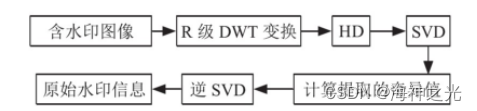
图3 水印提取流程图
二、部分源代码
clc
clear
close all

%% Import image
cover_image=imread('lena512.bmp');
watermark_logo=imread('cameraman.tif');
%% Plot cover image and watermark image
figure
subplot(1,2,1);
imshow(cover_image);
title('Cover image: 512 x 512');
subplot(1,2,2);
imshow(watermark_logo);
title('Watermark image: 256 x 256');

%% Example: watermark embedding and exraction  alpha=0.1 Attack: Sharpening
method = 'DWT-HD-SVD';          % Apply 'DWT-HD-SVD Method
alpha = 0.1;
attack = 'Motion blur';   % You can choose other attacks
param = 0.5;                    % attack parameter
[watermarked_image, extracted_watermark] = watermark(cover_image,...
    watermark_logo,method,alpha,attack,param);

% Plot results
figure;
subplot(2, 2, 1);
imshow(cover_image);
xlabel('a) Cover image');
subplot(2, 2, 2);
imshow(watermarked_image);
xlabel('b) Watermarked image');
subplot(2, 2, 3);
imshow(watermark_logo);
xlabel('c) Watermark logo');
subplot(2, 2, 4);
imshow(extracted_watermark);
xlabel('d) Extracted watermark');
sgtitle(['DWT-HD-SVD method \alpha = '+string(alpha) attack]);

%% NC vs alpha DWT-HD-SVD figure 5
%  Plot normalized correlation  for different alpha
method = 'DWT-HD-SVD';
alpha =0.005:0.005:0.2;
attacks = {
    'No Attack'; 'Gaussian low-pass filter'; 'Median';...
    'Gaussian noise'; 'Salt and pepper noise';'Speckle noise';...
    'JPEG compression'; 'JPEG2000 compression'; 'Sharpening attack';...
    'Histogram equalization'; 'Average filter'; 'Motion blur'};

% Attack papameters
params = [0; 3; 3; 0.001; 0; 0; 50; 12; 0.8; 0; 0; 0];
NC = NC_alpha(cover_image,watermark_logo,method,alpha,attacks,params);
%%  plot NC vs alpha figure 5
NC_plot(alpha,NC,attacks);

%% PSNR vs alpha DWT-HD-SVD
method = 'DWT-HD-SVD';
alpha =0.005:0.005:0.2;
attacks = {
    'No Attack'; 'Gaussian low-pass filter'; 'Median'; 'Gaussian noise';...
    'Salt and pepper noise';'Speckle noise'; 'JPEG compression';...
    'JPEG2000 compression'; 'Sharpening attack'; 'Histogram equalization';...
    'Average filter'; 'Motion blur'};
params = [0; 3; 3; 0.001; 0; 0; 50; 12; 0.8; 0; 0; 0];
PSNR = PSNR_alpha(cover_image,watermark_logo,method,alpha,attacks,params);

%% plot PSNR vs alpha
PSNR_plot(alpha,PSNR,attacks);

%% SSIM vs alpha DWT-HD-SVD figure 7 paper (see README)
method = 'DWT-HD-SVD';
alpha =0.005:0.005:0.2;
attacks = {
    'No Attack'; 'Gaussian low-pass filter'; 'Median'; 'Gaussian noise';...
    'Salt and pepper noise';'Speckle noise'; 'JPEG compression';...
    'JPEG2000 compression'; 'Sharpening attack'; 'Histogram equalization';...
    'Average filter'; 'Motion blur'};
params = [0; 3; 3; 0.001; 0; 0; 50; 12; 0.8; 0; 0; 0];
SSIM = SSIM_alpha(cover_image,watermark_logo,method,alpha,attacks,params);

%% plot SSIM vs alpha
SSIM_plot(alpha,SSIM,attacks);

%% FIGURE 8. Invisibility performance: Watermarked images and corresponding extracted
%  watermarks with various sizes and their corresponding PSNRs, SSIMs and NCs.

method = 'DWT-HD-SVD';
alpha =0.05;
attack = 'No Attack';
param = 0;

figure
for i=1:3
    watermark_logoi = imresize(watermark_logo,2^(-i+1));
    [watermarked_image, extracted_watermark] = watermark(cover_image,watermark_logoi,method,alpha,attack,param);
    PSNR = psnr(watermarked_image, cover_image);
    SSIM = ssim(watermarked_image, cover_image);
    NC = nc(watermark_logoi,extracted_watermark);
    subplot(2,3,i);
    imshow(watermarked_image);
    title(['watermarked image';'watermark size '+string(length(watermark_logoi))+'x'+string(length(watermark_logoi))]);
    xlabel(['PSNR='+string(PSNR);'SSIM='+string(SSIM)]);
    subplot(2,3,i+3);
    imshow(extracted_watermark);
    title('extracted watermark');
    xlabel('NC='+string(NC));
end
sgtitle('DWT-HD-SVD: Invisibility performance: watermarks with various sizes; alpha='+string(alpha)+'; No Attack');

%% plot watermarked image for different attacks and watermark sizes

method = 'DWT-HD-SVD';
alpha =0.05;
attacks = {
    'No Attack'; 'Gaussian low-pass filter'; 'Median'; 'Gaussian noise';...
    'Salt and pepper noise';'Speckle noise'; 'JPEG compression';...
    'JPEG2000 compression'; 'Sharpening attack'; 'Histogram equalization';...
    'Average filter'; 'Motion blur'};
params = [0; 3; 3; 0.001; 0; 0; 50; 12; 0.8; 0; 0; 0];
for i=3:-1:1
watermark_logoi = imresize(watermark_logo,2^(1-i));
figure
for j=1:length(attacks)

    attack = string(attacks(j));
    param = params(j);
    [watermarked_image, extracted_watermark] = watermark(cover_image,watermark_logoi,method,alpha,attack,param);
    PSNR = psnr(watermarked_image, cover_image);
    SSIM = ssim(watermarked_image, cover_image);
    subplot(3,4,j);
    imshow(watermarked_image);
    xlabel(['PSNR='+string(PSNR);'SSIM='+string(SSIM)]);
    title(attack);
end
sgtitle(['DWT-HD-SVD: Attacked watermarked image; Size = '+string(length(watermark_logoi))+'x'+string(length(watermark_logoi))+'; \alpha = '+string(alpha)]);
end
三、运行结果

四、matlab版本及参考文献
1 matlab版本
2014a
2 参考文献
[1]甘志超,刘丹.基于HD和SVD的DWT变换的数字图像水印[J].现代信息科技. 2022,6(01)
3 备注
简介此部分摘自互联网,仅供参考,若侵权,联系删除
边栏推荐
猜你喜欢

能与观众实时互动的Claper
System.Security.SecurityException: 未找到源,但未能搜索某些或全部事件日志。不可 访问的日志: Security

专家见解|经济低迷期把握创新机会的 3 大方法

文件上传漏洞(二)
![[npm install error report collection] - npm ERR! code ENOTEMPTY npm ERR! syscall rmdir](/img/c5/2c42e26e577506573985b30669ca6c.png)
[npm install error report collection] - npm ERR! code ENOTEMPTY npm ERR! syscall rmdir

MySQL classic 50 practice questions and the most detailed analysis of the whole network

振兴农村循环经济 和数链串起农业“生态链”

optional

实验7 MPLS实验
实例030:回文数
随机推荐
Expert Insights | 3 ways to seize innovation opportunities in a downturn
DNS resolution process
Understand C operators in one article
pointer arithmetic in c language
yml字符串读取时转成数字了怎么解决
分离轴定理SAT凸多边形精确碰撞检测
数据库概论-MySQL的数据表的基本操作
实例032:反向输出II
能与观众实时互动的Claper
The second day HCIP
PMP新考纲考试内容介绍
聊天机器人如何提升独立站的营销水平?
Connection reset by peer problem analysis
【暑期每日一题】洛谷 P1255 数楼梯
堡垒机、堡垒机的原理
【21天学习挑战赛】顺序查找
At age 94, pioneer Turing award winner, computational complexity theory, Juris Hartmanis, died
[Dataset][VOC] Eyewear dataset 6000 in VOC format
C# FileInfo class
typescript ‘props‘ is declared but its value is never read 解决办法