当前位置:网站首页>轻松带你走进turtle绘图的大门
轻松带你走进turtle绘图的大门
2022-07-22 22:13:00 【散一世繁华,颠半世琉璃】
Turtle,也叫海龟渲染器,使用Turtle库画图也叫海龟作图。Python的turtle库是Python语言中一个很流行的绘制图像的函数库,想象一个小乌龟,在一个横轴为x、纵轴为y的坐标系原点,(0,0)位置开始,它根据一组函数指令的控制,在这个平面坐标系中移动,从而在它爬行的路径上绘制了图形。
1.安装并导入turtle库
打开PyCharm终端或cmd命令行窗口,输入命令
pip install turtle
即可完成安装,安装完成后在编译器中使用import turtle导入即可
2.基本绘图命令
想象一下我们自己在图画本上绘图,在画布的正中央建立一个x-y坐标系,首先需要确定绘图的位置,其次就是绘图的方向。而在turtle中,绘图的方向默认是朝右,位置是(0,0),即画布的正中央,而画布坐标(x,y)的变化范围就是
− 220 ≤ x ≤ 220 -220 \leq x\leq 220 −220≤x≤220, − 220 ≤ y ≤ 220 -220 \leq y\leq 220 −220≤y≤220。
操纵海龟绘图有着许多的命令,这些命令可以划分为3种:
一种为画笔运动命令; 一种为画笔控制命令; 还有一种是全局控制命令;
1.画笔运动命令
| 命令 | 说明 |
|---|---|
| turtle.forward(distance) | 向画笔方向移动distance像素长度 |
| turtle.backward(distance) | 向画笔相反方向移动distance像素长度 |
| turtle.right(degree) | 顺时针移动degree度 |
| turtle.left(degree) | 逆时针移动degree度 |
| turtle.penup() | 提笔,即画笔移动时不绘制图形 |
| turtle.pendown() | 落笔,落笔后移动时便绘制图形 |
| turtle.goto(x,y) | 移动画笔到坐标为(x,y)的位置 |
| turtle.speed(speed) | 改变画笔移动的速度,speed=0的时候最大 |
| turtle.circle() | 画圆,半径为正(负),表示在画笔的左(右)边花圆 |
2.画笔控制命令
| 命令 | 说明 |
|---|---|
| turtle.pensize(width) | 设置绘制图形时的宽度 |
| turtle.pencolor(color) | 设置画笔的颜色 |
| turtle.fillcolor(color) | 设置填充图形的颜色 |
| turtle.color(color1,color2) | 同时设置画笔的颜色与填充图形的颜色 |
| turtle.begin_fill() | 准备开始填充图形 |
| turtle.end_fill() | 填充完成 |
| turtle.hideturtle() | 隐藏箭头显示 |
| turtle.showturtle() | 与hideturtle()相反,为显示箭头 |
3.全局控制命令
| 命令 | 说明 |
|---|---|
| turtle.clear(() | 清空turtle窗口,但是turtle海龟的位置和方向不会改变 |
| turtle.reset() | 清空窗口,重置turtle状态为起始状态 |
| turtle.undo() | 撤销上一个turtle动作 |
| turtle.write(s) | 将文本内容s沿当前海龟的方向写入 |
3.turtle简单案例
1.爱心
import turtle as t

t.speed(0)
def curvemove():
    for i in range(200):
        t.right(1)
        t.forward(1)
t.color('red','pink')
t.begin_fill()
t.left(140)
t.forward(111.65)
curvemove()
t.left(120)
curvemove()
t.forward(111.65)
t.end_fill()
t.hideturtle()
t.done()

2.彩球飘飘
import turtle as t
import random # 随机数
t.colormode(255)
t.speed(0)
for i in range(20):
    red = random.randint(0, 255)
    green = random.randint(0, 255)
    blue = random.randint(0, 255)

    # 随机坐标 x y
    x = random.randint(-220, 220)
    y = random.randint(0, 220)

    # 提笔
    t.penup()
    t.goto(x, y)
    t.pendown()

    t.color(red, green, blue)
    t.begin_fill()
    t.circle(30)
    t.end_fill()
    t.right(90)
    t.forward(30)
    t.left(90)

# RGB red green blue
t.hideturtle()
t.done()

3.盾牌
import turtle as t
t.speed(0)
t.penup()
t.goto(0,-200)
t.pendown()
t.color('red')
t.begin_fill()
t.circle(200)
t.end_fill()

t.penup()
t.goto(0,-150)
t.pendown()
t.color('white')
t.begin_fill()
t.circle(150)
t.end_fill()

t.penup()
t.goto(0,-100)
t.pendown()
t.color('red')
t.begin_fill()
t.circle(100)
t.end_fill()

t.penup()
t.goto(0,-50)
t.pendown()
t.color('blue')
t.begin_fill()
t.circle(50)
t.end_fill()

# 画五角星
t.penup()
t.goto(-40,10)
t.pendown()
t.color('white')
t.begin_fill()
for i in range(5):
    t.forward(80)
    t.right(144)
t.end_fill()
t.hideturtle()
t.done()
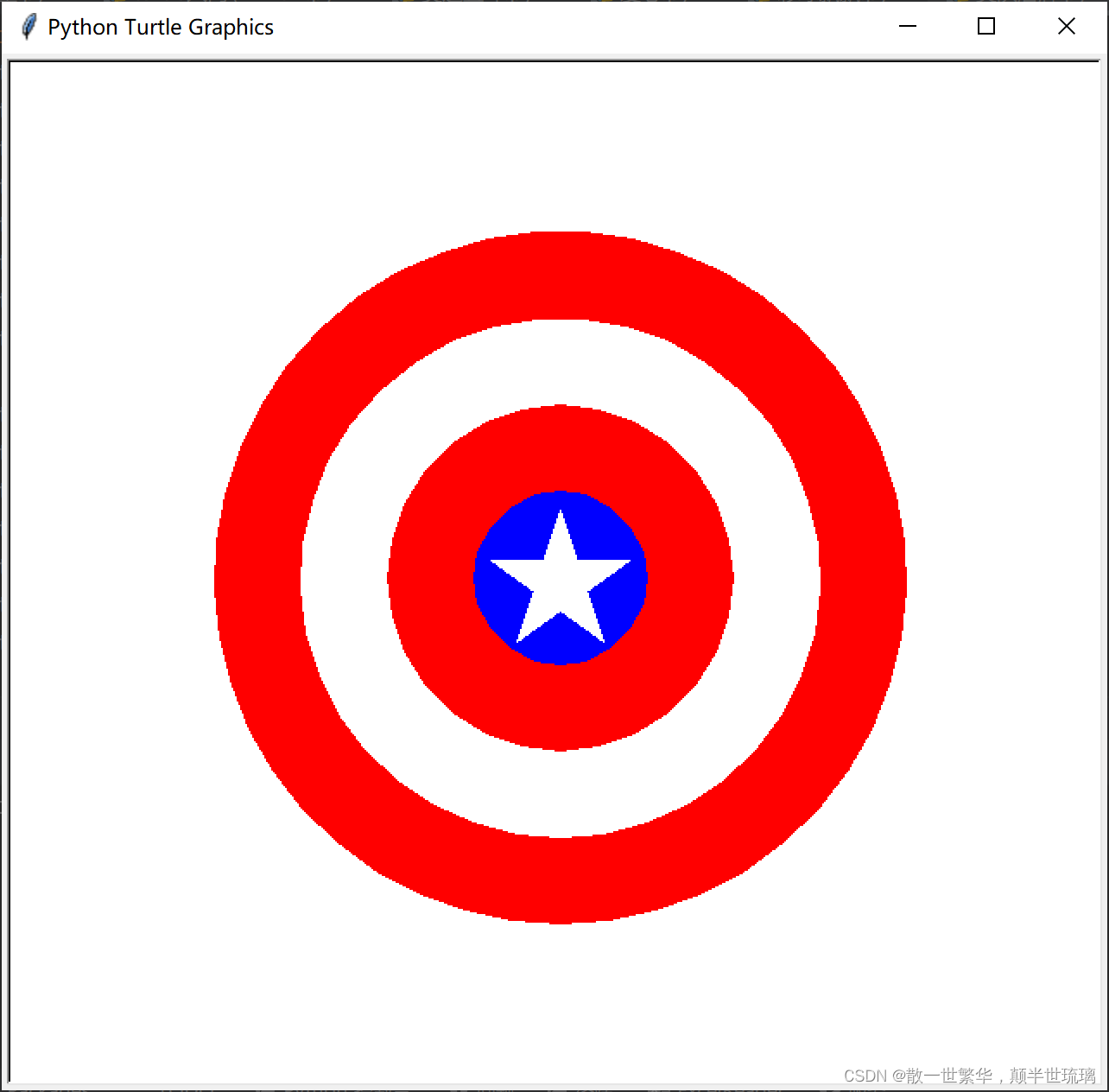
总之,只要掌握了图形的数学构成技巧与原理,任何复杂图形我们都能通过循环+turtle画图命令完成。
边栏推荐
- matlab ode45求解微分方程
- Leetcode day 26
- Live broadcast preview | live broadcast Seminar on open source security governance models and tools
- 昇思易点通 | 经典卷积神经网络的深度学习解析
- 如何高效安装MindSpore的GPU版本
- 数据库基础及安装
- Learn these SketchUp skills and improve work efficiency by half
- 数据脱敏的场景与价值【总结】
- Talking about performance optimization: analysis and optimization of APP startup process
- PostgreSQL database master-slave deployment master database suspended restore master database
猜你喜欢


随机推荐
Simulate not all endpoints registered exceptions and Solutions
数据库基础及安装
Redis 事务学习有感
Wechat applet project practice
matlab声音信号处理 频率图 信号过滤和播放声音
U盘被格式化数据能恢复吗,U盘被格式化了怎样恢复
matlab simulink 磷酸铁锂电池仿真
ProSci LAG3抗体:改善体外研究,助力癌症免疫治疗
批量可视化目标检测标注框——YOLO格式数据集
Worthington:来自酵母的己糖激酶的特性及其它参数说明
RN underlying principle -- 1. Component and purecomponent analysis
Can PHP array subscripts only start from 0
c语言扫雷
改变this指向了解一下
轮毂电机主动减振系统及其垂向性能优化
Binary tree (learning daily)
数据脱敏的场景与价值【总结】
Flick batch reading es
Worthington羟基类固醇脱氢酶技术说明及测定方案
Arduino中断实现上升沿检测,并执行其他函数