当前位置:网站首页>JVM——》类文件
JVM——》类文件
2022-06-10 00:28:00 【小仙。】
推荐链接:
总结——》【Java】
总结——》【JVM】
总结——》【Mysql】
总结——》【Spring】
总结——》【SpringBoot】
SpringBoot——》启动流程
一、类文件的结构
ClassFile {
    u4             magic;
    u2             minor_version;
    u2             major_version;
    u2             constant_pool_count;
    cp_info        constant_pool[constant_pool_count-1];
    u2             access_flags;
    u2             this_class;
    u2             super_class;
    u2             interfaces_count;
    u2             interfaces[interfaces_count];
    u2             fields_count;
    field_info     fields[fields_count];
    u2             methods_count;
    method_info    methods[methods_count];
    u2             attributes_count;
    attribute_info attributes[attributes_count];
}
u:unsigned,无符号整数
u1:1个字节
u2:2个字节
u4:4个字节
_info:表类型,是hotspot源码中的写法

二、类文件的查看
1、16进制
(1)sublime / notepad
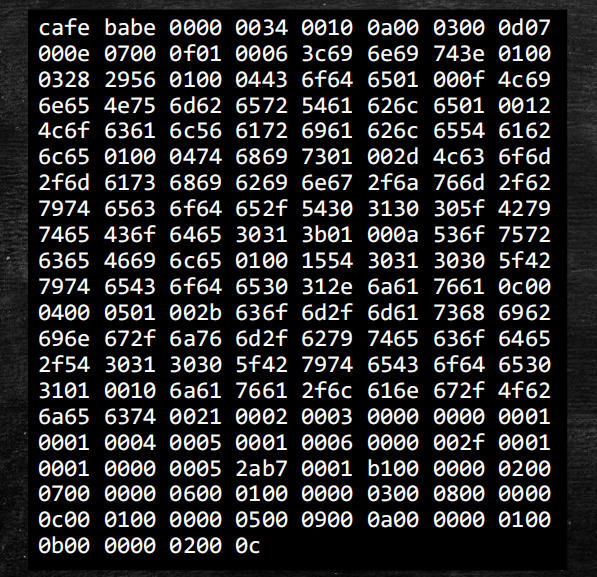
(2)idea plugin:BinEd
2、字节码
(1)javap
public class T0100_ByteCode01 {

}

/** * 1、打开cmd * 2、执行javap -v E:\IdeaProjects_mine\msb\JVM\out\production\JVM\com\mashibing\jvm\c1_bytecode\T0100_ByteCode01.class */

(2)idea plugin:Jclasslib Bytecode viewer
下载IDEA的插件:Settings->plugin->BinEd
查看view:show bytecode with jclasslib
<1>信息

<2>常量池


<3>方法


(3)JBE
边栏推荐
- Intranet penetration Chapter 4
- Collection backup | summary of some common problems about oauth2
- 试题 历届真题 成绩分析【第十一届】【省赛】【B组】
- BGP experiment
- Apply the latest ad and Txk patches
- IDC authority predicts that China's manufacturing industry will soon take advantage of the cloud
- wps合并单元格快捷键是什么
- Chapter 5 intra domain lateral movement analysis and defense
- if判断是否为空时的函数选择
- RHCSA第二天
猜你喜欢


随机推荐
冒泡排序及优化 清楚直观 C语言
shell exec 与 I/O重定向
收藏备用 | 关于OAuth2的一些常见问题总结
Intranet penetration Chapter 4
内网渗透简洁笔记
wps合并单元格后怎么将文字的位置进行调整
IDC權威預測,中國制造業即將乘雲而上
剑指 Offer II 017. 含有所有字符的最短字符串
剑指 Offer II 012. 左右两边子数组的和相等
[untitled]
Rhcsa day 1
IDC权威预测,中国制造业即将乘云而上
University of Ulm, Germany | comparative characterization of 3D protein structure
Wyn enterprise, an embedded business intelligence software, has officially entered the V5.0 era!
1049 robber Ah Fu
Score of sub series of previous test questions and [11th] [provincial competition] [group B]
BGP实验
gurobi解的状态及其属性获取
Sword finger offer II 010 Subarray with and K
Work sharing of 2018 virtual instrument competition - reconfigurable snake shaped robot based on LabVIEW, baidu map, STM32 single chip microcomputer, etc