当前位置:网站首页>QML包管理
QML包管理
2022-08-01 23:52:00 【芒果黑】
写过C++的都知道,C++是没有包的概念的,用的是#include头文件,通常头文件包含类、函数之类的结构,具体实现在cpp文件。其他语言如JAVA、Go引入其他文件是通过导入包的方式,即导入某个模块Module。C++由于其历史性,为了兼容C,编译链接模式也和C一致,所以采用的是#include头文件的方式,这其中有很多弊端:
低效:头文件的本职工作是提供前置声明,而提供前置声明的方式采用了文本拷贝,文本拷贝过程不带有语法分析,会一股脑将需要的、不需要的声明全部拷贝到源文件中。
传递性:最底层的头文件中宏、变量等实体的可见性,可以通过中间头文件“透传”给最上层的头文件,这种透传会带来很多麻烦。
降低编译速度:加入 a.h 被三个模块包含,则 a 会被展开三次、编译三次。
顺序相关:程序的行为受头文件的包含顺影响,也受是否包含某一个头文件影响,在 C++ 中尤为严重(重载)。
不确定性:同一个头文件在不同的源文件中可能表现出不同的行为,导致这些不同的原因,可能源自源文件(比如该源文件包含的其他头文件、该源文件中定义的宏等),也可能源自编译选项。
采用包的方式在一定程度上能解决#include出现的一些问题。QML作为今年才发展起来的语言,在引入其他模块方面自然会采取当前主流的方式,即导入包。本篇文章将会介绍QML包管理相关的用法。
语法
QML导入包的方式同其他Go、Python类似,使用import,如导入Qt自带的包
import QtQuick 2.15具体格式为:
import <ModuleIdentifier> <Version.Number> [as <Qualifier>]- <ModuleIdentifier> 是一个以点分 URI 表示法指定的标识符,它唯一地标识了模块提供的类型命名空间。
- <Version.Number> 是 MajorVersion.MinorVersion 形式的一个版本,它指定了由于导入而可以使用的各种对象类型和 JavaScript 资源的定义。
- <Qualifier> 是一个可选的本地命名空间标识符,模块提供的对象类型和 JavaScript 资源将被安装到该标识符中(如果给定的话)。 如果省略,模块提供的对象类型和 JavaScript 资源将被安装到全局命名空间中。
as+本地命名空间主要处理有两个同名但位于不同模块中的QML类型的情况
import QtQuick 2.0 as CoreItems
import "../textwidgets" as MyModule

CoreItems.Rectangle {
    width: 100; height: 100

    MyModule.Text { text: "Hello from my custom text item!" }
    CoreItems.Text { text: "Hello from Qt Quick!" }
}
包含.qml文件
qml引擎会自动检索同级目录下的qml文件,不用显示使用import,.qml的文件名为类型名称

import QtQuick 2.15
import QtQuick.Window 2.15

Window {
    width: 640
    height: 480
    visible: true
    title: qsTr("Hello World")

    NewRect {}
}
如果不在同级目录,则需使用import指定路径
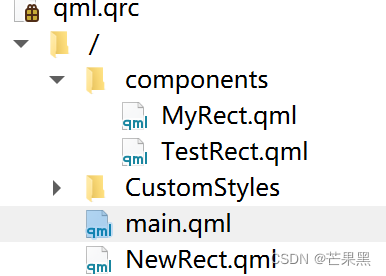
import QtQuick 2.15
import QtQuick.Window 2.15
import "./components"

Window {
    width: 640
    height: 480
    visible: true
    title: qsTr("Hello World")

    MyRect {}
    TestRect {}
}
这种方式一般是一个文件就是一个模块,比较简单,下面介绍多个文件组成一个module的封装及引入方式
qmldir管理包
基本用法
创建并导入如下的目录,其中第一种是带url的

qmldir文件内容
NewPlugins:
module NewExamplePlugins
NewRect 1.0 NewRect.qml
MyPlugins
module MyExamplePlugins
TestRect 1.0 MyRect.qml
设置导入路径,这步是必须的,告诉QML引擎该模块所在的路径
engine.addImportPath("qrc:/TestQMLPlugin/");引入module
import QtQuick 2.15
import QtQuick.Window 2.15
import MyPlugins 1.0
import com.mycompany.test.NewPlugins 1.0

Window {
    width: 640
    height: 480
    visible: true
    title: qsTr("Hello World")

    TestRect {}
    NewRect {}

}
整个流程还是挺简单清晰的
版本管理
qmldir支持版本管理,如上面例子中MyRect更新了版本为2.0,新建MyRect2.qml文件
MyRect.qml:
import QtQuick 2.0
import QtQuick.Controls 2.15

Item {
    anchors.centerIn: parent
    Rectangle {
        width: 100
        height: 100
        color: "teal"
        Label {
            width: 50
            height: 20
            text: "TestRect"
        }
    }
}
MyRect2.qml:
import QtQuick 2.0
import QtQuick.Controls 2.15

Item {
    anchors.centerIn: parent
    Rectangle {
        width: 100
        height: 100
        color: "teal"
        Label {
            width: 50
            height: 20
            text: "TestRect222"
        }
    }
}
在qmldir文件中添加
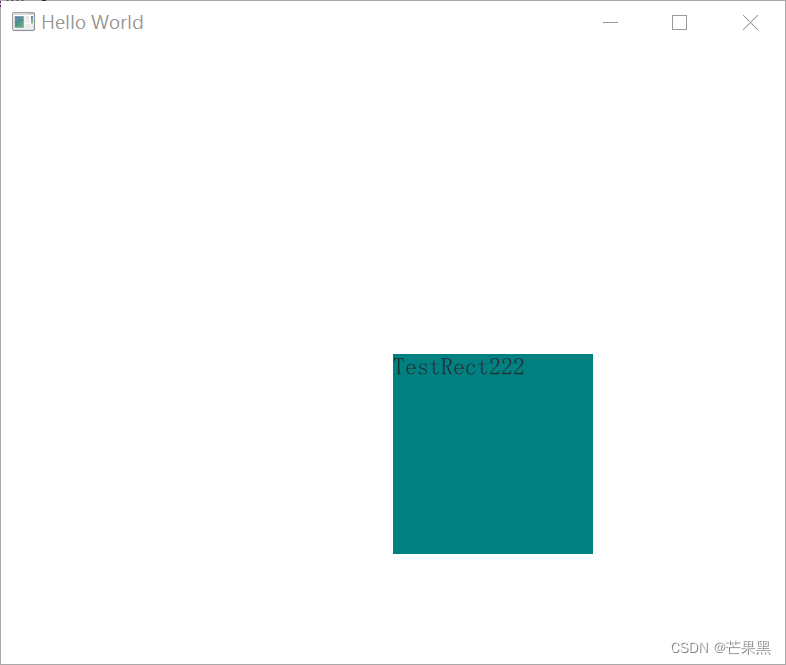
TestRect 2.0 MyRect2.qml使用时导入2.0的版本,qml会自动使用MyRect2
import QtQuick 2.15
import QtQuick.Window 2.15
import MyPlugins 2.0
import com.mycompany.test.NewPlugins 1.0

Window {
    width: 640
    height: 480
    visible: true
    title: qsTr("Hello World")

    TestRect {}
}
单例类型模块
qmldir还可以声明单例类型,单例类型在封装一些通用配置时很有用,具体用法如下
pragma Singleton
import QtQuick 2.0

QtObject {
    property int textSize: 20
    property color textColor: "green"
}
module CustomStyles
singleton Style 1.0 Style.qml
import QtQuick 2.15
import QtQuick.Window 2.15
import CustomStyles 1.0
Window {
width: 640
height: 480
visible: true
title: qsTr("Hello World")
Text {
font.pixelSize: Style.textSize
color: Style.textColor
text: "Hello World"
}
}
internal类型
声明内部的qml类型,即该类型只在模块内部使用,模块调用者无法使用
新增一个SubRect,在MyRect2中调用,把SubRect声明为internal类型
SubRect:
import QtQuick 2.0

Rectangle {
    width: 50
    height: 50
    color: "transparent"

    Text {
        id: name
        text: "subrect"
        color: "white"
    }
}
MyRect2:
import QtQuick 2.0
import QtQuick.Controls 2.15

Item {
    anchors.centerIn: parent
    Rectangle {
        width: 100
        height: 100
        color: "teal"
        Label {
            anchors.centerIn: parent
            width: 50
            height: 20
            text: "TestRect222"
        }
    }

    SubRect {}
}
qmldir
module MyExamplePlugins
TestRect 1.0 MyRect.qml
TestRect 2.0 MyRect2.qml
internal SubRectPri SubRect.qml
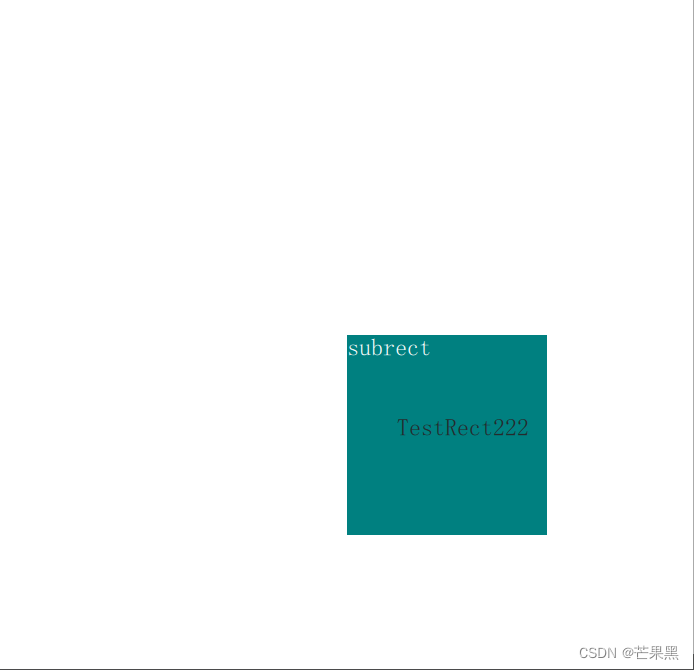
在main.qml中使用SubRect会报错

关于qmldir的更多用法,具体看官方的介绍
关于导入路径
设置的导入路径为模块所在文件夹的上一级,就是说import导入的是模块所在的文件夹名称,那QML引擎只要知道该文件夹名称的上一级目录就能够找到了。如上面例子中TestQMLPlugin包含两个模块,为MyPlugins和com.mycompany.test.NewPlugins,导入路径只需指定到TestQMLPlugin。更为直接的理解是路径加上模块名称能够找到.qml文件,如qrc:/TestQMLPlugin/+com.mycompany.test.NewPlugins就是NewRect.qml和qmldir所在的路径
QML引擎默认的导入路径包含应用程序可执行文件的目录、在 QML2_IMPORT_PATH 环境变量中指定的路径以及来自 QLibraryInfo 的内置 Qml2ImportsPath,可使用以下接口进行查看
QStringList QQmlEngine::importPathList() const打印出来看
main song ("qrc:/", "F:/PROJECT/build-QMLImportDemo-Desktop_Qt_5_15_2_MSVC2019_64bit-Debug/debug", "qrc:/qt-project.org/imports", "D:/Qt/Qt5.15.2/5.15.2/msvc2019_64/qml")导入路径默认包含应用程序可执行文件的目录,则我们的module直接放在该目录也是能够直接访问的,qml程序打包时包含很多qml文件就是如此,但这种方式有个弊端会暴露qml源码。我们上例子中都是添加到qrc资源文件中,防止了源码暴露。除了放在资源文件的方式外,还可以采用Qt插件的方式进行封装,这样也可以不暴露源码。
结语
模块的引入对于一种语言的使用来说是很基础的内容,但简单又很必要,只有了解清楚了,我们才能设计规划更好的代码结构,封装出简单易用、合乎常规的模块。关于QML包的管理就介绍到这里,后续会进行QML插件的内容module封装的介绍。
边栏推荐
- recursion: method calls itself
- 【C语言进阶】文件操作(二)
- [LeetCode304周赛] 两道关于基环树的题 6134. 找到离给定两个节点最近的节点,6135. 图中的最长环
- JAX-based activation function, softmax function and cross entropy function
- Convert LocalDateTime to Date type
- 如何进行数据库备份
- What can be done to make this SQL into a dangerous SQL?
- Enterprise firewall management, what firewall management tools are there?
- Chapter 12 End-User Task As Shell Scripts
- solidity
猜你喜欢
伸展树的特性及实现

Work for 5 years, test case design is bad?To look at the big case design summary

CDH6 Hue to open a "ASCII" codec can 't encode characters
获取小猪民宿(短租)数据
工作5年,测试用例都设计不好?来看看大厂的用例设计总结
Win10安装DBeaver连接MySQL8、导入和导出数据库详细教程
Various Joins of Sql
在CentOS下安装MySQL
Get piggy homestay (short-term rental) data

Enterprise firewall management, what firewall management tools are there?
随机推荐
With a monthly salary of 12K, the butterfly changed to a new one and moved forward bravely - she doubled her monthly salary through the career change test~
Department project source code sharing
Win10安装DBeaver连接MySQL8、导入和导出数据库详细教程
An interview question about iota in golang
ES中SQL查询详解
使用Ganache、web3.js和remix在私有链上部署并调用合约
检查 Oracle 版本的 7 种方法
[LeetCode304周赛] 两道关于基环树的题 6134. 找到离给定两个节点最近的节点,6135. 图中的最长环
A brief analysis of mobile APP security testing in software testing, shared by a third-party software testing agency in Beijing
LocalDateTime转为Date类型
【图像融合】基于加权和金字塔实现图像融合附matlab代码
经典文献阅读之--DLO
Making a Simple 3D Renderer
Excel导入和导出
problem solved
【Leetcode】1206. Design Skiplist
颜色透明参数
Classical Literature Reading--DLO
TexturePacker使用文档
Share an interface test project (very worth practicing)