当前位置:网站首页>使用promise的基本功能【四、Promise源码】
使用promise的基本功能【四、Promise源码】
2022-06-27 03:18:00 【翼遥bingo】
为手撸promise做的铺垫
配套笔记查看:promise的介绍与手撸的关键问题
一、 Promise功能体验
1-1 Promise请求抽奖界面.html

<!DOCTYPE html>
<html lang="en">

<head>
    <meta charset="UTF-8">
    <meta http-equiv="X-UA-Compatible" content="IE=edge">
    <meta name="viewport" content="width=device-width, initial-scale=1.0">
    <title>Promise请求抽奖界面</title>
</head>

<body>
    <div class="container">
        <div class="page-header">Promise初体验</div>
        <button class="btn btn-primary" id="btn">点击抽奖</button>
    </div>
    <script> // 生成随机数 function rand(m, n) {
       return Math.ceil(Math.random() * (n - m + 1) + m - 1); } /* 点击按钮, 2 s后显示是否中奖( 30 % 概率中奖) 若中奖弹出 恭喜 若未中奖弹出 再接再厉 */ // 获取元素对象 const btn = document.querySelector('#btn'); // 绑定单击事件 btn.addEventListener('click', function() {
       // setTimeout(() => {
       // // 30%, 1-100 1 2 30 // // 获取从1-100的一个随机数 // let n = rand(1, 100); // // 判断 // if (n <= 30) {
       // alert('恭喜恭喜'); // } else {
       // alert("zaijiezailin"); // } // }, 1000) const p = new Promise((resolve, reject) => {
       setTimeout(() => {
       // 30%, 1-100 1 2 30 // 获取从1-100的一个随机数 let n = rand(1, 100); // 判断 if (n <= 30) {
       resolve(n); // 将promise对象的转台设置为成功 } else {
       reject(n); // 将promise对象的状态设置为失败 } }, 1000) }); console.log(p); // 调用then方法 p.then((value) => {
       alert('恭喜恭喜,奖品为10万' + value); }, (reason) => {
       alert('再接再厉' + reason); }) }) // Promise 形式实现 // resolve 解决 函数类型的数据 // reject 拒绝 函数类型的数据 </script>
</body>

</html>
1-2 fs读取文件.js
按照对应路径创建 content.txt
const fs = require('fs');

// 回调函数形式
// fs.readFile('./content.txt', (err, data) => {

// // 如果出错,则抛出错误
// if (err) throw err;
// // 输出文件内容
// console.log(data.toString());
// })

//Promise 形式
let p = new Promise((resolve, reject) => {

    fs.readFile('./content.txt', (err, data) => {

        // 如果出错,则抛出错误
        if (err) reject(err);
        // 输出文件内容
        resolve(data);
    })
})

p.then((value) => {

    console.log(value.toString());
}, reason => {

    console.log(reason);
})
1-3 Ajax请求.html
<!DOCTYPE html>
<html lang="en">

<head>
    <meta charset="UTF-8">
    <meta http-equiv="X-UA-Compatible" content="IE=edge">
    <meta name="viewport" content="width=device-width, initial-scale=1.0">
    <title>Promise封装Ajax请求</title>
</head>


<body>
    <div class="container">
        <h2 class="page-header">Promise封装 AJAX 操作</h2>
        <button class="btn btn-primary" id="btn">点击发送 AJAX</button>
    </div>
    <script> const btn = document.querySelector('#btn'); btn.addEventListener('click', function() {
       const p = new Promise((resolve, reject) => {
       const xhr = new XMLHttpRequest(); xhr.open('GET', 'https://netease-cloud-music-api-crete722p-hannah-bingo.vercel.app/user/detail?uid=32953014'); xhr.send(); xhr.onreadystatechange = function() {
       if (xhr.readyState === 4) {
       if (xhr.status >= 200 && xhr.status < 300) {
       resolve(xhr.response); } else {
       reject(xhr.status); } } } }) p.then(value => {
       console.log(value); }, reason => {
       console.warn(reason); }) }) </script>
</body>

</html>

1-4 promise封装联系-fs模块
/* 封装一个函数 mineReadFile 读取文件 参数: path 文件路径 返回: promise 对象 */

const {
     readFile } = require('fs');

function mineReadFile(path) {

    return new Promise((resolve, reject) => {

        // 读取文件
        require('fs').readFile(path, (err, data) => {

            // 判断
            if (err) reject(err);
            // 成功
            resolve(data);
        })
    })
}


mineReadFile('./content.txt')
    .then(value => {

        // 输出文件内容
        console.log(value.toString());
    }, reason => {

        console.log(reason);
    })

1-5 promise封装AJAX请求.html
<!DOCTYPE html>
<html lang="en">

<head>
    <meta charset="UTF-8">
    <meta http-equiv="X-UA-Compatible" content="IE=edge">
    <meta name="viewport" content="width=device-width, initial-scale=1.0">
    <title>Promise封装Ajax请求</title>
</head>

<body>
    <!-- 封装一个函数sendAJAX发送 GET AJAX 请求 参数 URL 返回结果 Promise 对象 -->
    <script> function sendAJAX(url) {
       return new Promise((resolve, reject) => {
       // 创建一个异步调用对象 const xhr = new XMLHttpRequest(); // 指定该HTTP请求的方法,URL及验证信息 xhr.open("GET", url); // 发送HTTP请求 xhr.send(); // 处理结果 // 设置响应HTTP请求状态变化的函数 xhr.onreadystatechange = function() {
       if (xhr.readyState === 4) {
       if (xhr.status >= 200 && xhr.status < 300) {
       resolve(xhr.response); } else {
       reject(error); } } } }) } sendAJAX('https://netease-cloud-music-api-crete722p-hannah-bingo.vercel.app/user/detail?uid=32953014') .then(value => {
       console.log(value); }, reason => {
       console.log(reason); }) </script>
</body>

</html>
1-6 Promise的构造函数catch
<!DOCTYPE html>
<html lang="en">

<head>
    <meta charset="UTF-8">
    <meta http-equiv="X-UA-Compatible" content="IE=edge">
    <meta name="viewport" content="width=device-width, initial-scale=1.0">
    <title>Promise API</title>
</head>

<body>
    <script> let p = new Promise((resolve, reject) => {
       // 同步调用的 // console.log(111); // 修改promise 对象的状态 reject('uu'); }) console.log(p); // 执行 catch方法 p.catch(reason => {
       console.log(reason); }) </script>

</body>

</html>

1-7 Promise API - resolve.html
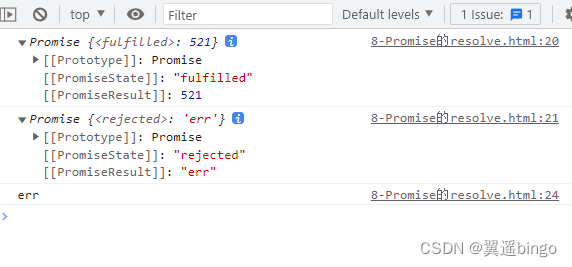
<!DOCTYPE html>
<html lang="en">

<head>
    <meta charset="UTF-8">
    <meta http-equiv="X-UA-Compatible" content="IE=edge">
    <meta name="viewport" content="width=device-width, initial-scale=1.0">
    <title>Promise API - resolve</title>
</head>

<body>
    <script> let p1 = Promise.resolve(521); // 如果传入的参数为非Promise类型的对象,则返回的结果为 成功promise对象 // 如果传入参数为Promise对象,则参数的结果决定了 resolve的结果 let p2 = Promise.resolve(new Promise((resolve, reject) => {
       // resolve('ok'); reject('err'); })) console.log(p1); console.log(p2); p2.catch(reason => {
       console.log(reason); }) </script>

</body>

</html>
1-8 Promise API - reject.html
<!DOCTYPE html>
<html lang="en">

<head>
    <meta charset="UTF-8">
    <meta http-equiv="X-UA-Compatible" content="IE=edge">
    <meta name="viewport" content="width=device-width, initial-scale=1.0">
    <title>Promise API - reject</title>
</head>

<body>
    <script> let p = Promise.reject(521); console.log(p); let p3 = Promise.reject(new Promise((resolve, reject) => {
       resolve("ok"); })) // 状态是失败,返回的结果是成功 console.log(p3); </script>

</body>

</html>

1-9 Promise.all方法.html
<!DOCTYPE html>
<html lang="en">

<head>
    <meta charset="UTF-8">
    <meta http-equiv="X-UA-Compatible" content="IE=edge">
    <meta name="viewport" content="width=device-width, initial-scale=1.0">
    <title>Promise API - all</title>
</head>

<body>
    <script> let p1 = new Promise((resolve, reject) => {
       resolve('OK'); }) let p2 = Promise.reject('EEE'); let p3 = Promise.resolve('Oh Yeah'); const result = Promise.all([p1, p2, p3]); const reject = Promise.all([p1, p3]) console.log(result); console.log(reject); </script>
</body>

</html>

1-10 Promise.race方法.html
<!DOCTYPE html>
<html lang="en">

<head>
    <meta charset="UTF-8">
    <meta http-equiv="X-UA-Compatible" content="IE=edge">
    <meta name="viewport" content="width=device-width, initial-scale=1.0">
    <title>Promise.race方法</title>
</head>

<body>
    <script> let p1 = new Promise((resolve, reject) => {
       setTimeout(() => {
       reject('OK'); }, 1000) }) let p2 = Promise.reject('EEE'); let p3 = Promise.resolve('Oh Yeah'); const result = Promise.race([p1, p2, p3]); console.log(result); </script>
</body>

</html>

二、 promise关键问题
2-1 1-状态修改.html

<!DOCTYPE html>
<html lang="en">

<head>
    <meta charset="UTF-8">
    <meta http-equiv="X-UA-Compatible" content="IE=edge">
    <meta name="viewport" content="width=device-width, initial-scale=1.0">
    <title>Promise 对象状态改变的方式</title>
</head>

<body>
    <script> let p = new Promise((resolve, reject) => {
       // 1. 通过调用resolve函数 // resolve('ok'); // pending => fulfilled(resolved) // 2. reject函数 // reject("error"); // pending => rejected // 3. 抛出错误 throw "出问题" }); console.log(p); </script>

</body>

</html>
2-2 2-能否执行多个回调.html
<!DOCTYPE html>
<html lang="en">

<head>
    <meta charset="UTF-8">
    <meta http-equiv="X-UA-Compatible" content="IE=edge">
    <meta name="viewport" content="width=device-width, initial-scale=1.0">
    <title>Promise指定多个回调</title>
</head>

<body>
    <script> let p = new Promise((resolve, reject) => {
       resolve('OK'); }) // 指定回调 -1 p.then(value => {
       console.log(value); }) // 指定回调 -2 p.then(value => {
       alert(value); }) </script>
</body>

</html>

2-3 3-then先执行还是改变状态先执行.html
<!DOCTYPE html>
<html lang="en">

<head>
    <meta charset="UTF-8">
    <meta http-equiv="X-UA-Compatible" content="IE=edge">
    <meta name="viewport" content="width=device-width, initial-scale=1.0">
    <title>Promise指定多个回调</title>
</head>

<body>
    <script> let p = new Promise((resolve, reject) => {
       // resolve("ok"); // 异步任务,先执行的回调 setTimeout(() => {
       resolve('OK'); }, 1000) }) p.then(value => {
       console.log(value); }, reason => {
       }) </script>
</body>

</html>
2-4 4-then方法返回结果有什么决定.html
<!DOCTYPE html>
<html lang="en">

<head>
    <meta charset="UTF-8">
    <meta http-equiv="X-UA-Compatible" content="IE=edge">
    <meta name="viewport" content="width=device-width, initial-scale=1.0">
    <title>Promise then方法返回结果的特点</title>
</head>

<body>
    <script> let p = new Promise((resolve, reject) => {
       resolve('ok'); }) // 执行 then方法 let result = p.then(value => {
       // console.log(value); // throw '出了问题' // 抛出错误 return 521 // 返回结果是非Promise类型的对象 // return new Promise((resolve, reject) => {
       // resolve('success'); // }) }, reason => {
       console.warn(reason); }) console.log(result); </script>
</body>

</html>

2-5 5-串联多个操作任务.html
<!DOCTYPE html>
<html lang="en">

<head>
    <meta charset="UTF-8">
    <meta http-equiv="X-UA-Compatible" content="IE=edge">
    <meta name="viewport" content="width=device-width, initial-scale=1.0">
    <title>如何串联多个操作任务</title>
</head>

<body>
    <script> let p = new Promise((resolve, reject) => {
       setTimeout(() => {
       resolve("ok"); // reject("err"); }, 1000) }) p.then(value => {
       return new Promise((resolve, reject) => {
       // resolve("success"); reject("err2") }) }).then(value => {
       console.log(value); }, reason => {
       console.log(reason); }).then(value => {
       console.log(value); }) </script>

</body>

</html>

2-6 6-异常穿透x现象.html
<!DOCTYPE html>
<html lang="en">

<head>
    <meta charset="UTF-8">
    <meta http-equiv="X-UA-Compatible" content="IE=edge">
    <meta name="viewport" content="width=device-width, initial-scale=1.0">
    <title>异常穿透</title>
</head>

<body>
    <script> let p = new Promise((resolve, reject) => {
       setTimeout(() => {
       resolve('OK') // reject('Err'); }, 1000); }) p.then(value => {
       // console.log(111); throw '失败了' }).then(value => {
       console.log(222); }).then(value => {
       console.log(333); }).catch(reason => {
       console.warn(reason); }) </script>

</body>

</html>
2-7 7-中断Promise链.html
<!DOCTYPE html>
<html lang="en">

<head>
    <meta charset="UTF-8">
    <meta http-equiv="X-UA-Compatible" content="IE=edge">
    <meta name="viewport" content="width=device-width, initial-scale=1.0">
    <title>中断Promise链</title>
</head>

<body>
    <script> let p = new Promise((resolve, reject) => {
       setTimeout(() => {
       resolve('OK') // reject('Err'); }, 1000); }) p.then(value => {
       console.log(111); // 有且仅有一种方式,中断Promise链 return new Promise(() => {
      }); }).then(value => {
       console.log(222); }).then(value => {
       console.log(333); }).catch(reason => {
       console.warn(reason); }) </script>

</body>

</html>
边栏推荐
- Solve the problem of error reporting in cherry pick submission
- mmdetection 用yolox训练自己的coco数据集
- Getting started with Scala_ Immutable list and variable list
- Crowd simulation
- Geometric distribution (a discrete distribution)
- Qingscan use
- Flink学习4:flink技术栈
- Paddlepaddle 19 dynamically modify the last layer of the model
- Stack overflow vulnerability
- 人群模拟
猜你喜欢
pytorch 22 8种Dropout方法的简介 及 基于Dropout用4行代码快速实现DropBlock

PAT甲级 1026 Table Tennis

Career outlook, money outlook and happiness outlook

2019LXMERT:Learning Cross-Modality Encoder Representations from Transformers

企业数字化转型:信息化与数字化

Flink learning 4:flink technology stack
2021:Beyond Question-Based Biases:Assessing Multimodal Shortcut Learning in Visual Question Answeri

Introduction to stm32

Topolvm: kubernetes local persistence scheme based on LVM, capacity aware, dynamically create PV, and easily use local disk

学习太极创客 — MQTT(八)ESP8266订阅MQTT主题
随机推荐
2022中式面点师(高级)复训题库及在线模拟考试
Pat grade a 1018 public bike management
流沙画模拟器源码
【数组】剑指 Offer II 012. 左右两边子数组的和相等 | 剑指 Offer II 013. 二维子矩阵的和
mmdetection 用yolox训练自己的coco数据集
Laravel 的 ORM 缓存包
Is the money invested in financial products guaranteed? Is there no more?
Pat grade a 1023 have fun with numbers
How does the brain do arithmetic? Both addition and subtraction methods have special neurons, and the symbol text can activate the same group of cell sub journals
2021:Check it again:Progressive Visual Question Answering via Visual Entailment通过视觉暗示进行渐进式视觉问答
Anaconda3安裝過程及安裝後缺失大量文件,沒有scripts等目錄
The use and introduction of pytorch 23 hook and the implementation of plug and play dropblock based on hook
2020:MUTANT: A Training Paradigm for Out-of-Distribution Generalizationin Visual Question Answering
2021:Passage Retrieval for Outside-KnowledgeVisual Question Answering通道检索的外部知识视觉问答
Flink学习4:flink技术栈
企业数字化转型:信息化与数字化
2016Analyzing the Behavior of Visual Question Answering Models
Implementation of window encryption shell
Flink learning 2: application scenarios
Calculation of average wind direction and speed (unit vector method)