当前位置:网站首页>Graph-node部署及测试
Graph-node部署及测试
2022-07-27 05:04:00 【我不想头秃阿】
Graph-node部署及测试
一、环境准备
二、运行本地图节点
- 在终端中,克隆https://github.com/graphprotocol/example-subgraph,并安装依赖项并为合约 ABI 生成类型:(yarn安装)
yarn
yarn codegen
- 在终端中,克隆https://github.com/graphprotocol/graph-node,然后运行
cargo build
- 运行ganache
./ganache-2.5.4-linux-x86_64.AppImage &

- 运行ipfs
ipfs daemon

- 在subgraph文件夹下编译并部署智能合约
// 编译
truffle compile
// 部署
truffle migrate

- 在postgreSQL中创建graphnode数据库
sudo su postgres
psql
create database graphnode;

- 在graph-node文件夹下输入以下命令,运行graph-node:
cargo run -p graph-node --release -- \
  --postgres-url postgresql://postgres:[email protected]:5432/graphnode \
  --ethereum-rpc mainnet:http://127.0.0.1:7545 \
  --ipfs 127.0.0.1:5001 --debug

- 修改subgraph文件夹中的subgraph.yaml,将合约地址修改为之前部署的地址
sudo gedit subgraph.yaml


- 使用这个 Gravatar 示例,要让子图在本地运行,在subgraph文件夹下运行:
yarn create-local

- 部署子图
yarn deploy-local

- 此时graph-node上可以看到子图已被部署

- 尝试调用智能合约创建一个gravatar
// 进入控制台
truffle console
// 创建合约实例
GravatarRegistry.deployed().then(instance=>contract=instance)
// 创建一个displayName为Tom的Gravatar
contract.createGravatar('Tom','Url')
// 指定调用合约的账户
contract.createGravatar('Lucy','Url2',{from: '0x761AE16Df0bF66E6d461F1C936F40e61F2fE1Ed7'})
- 交易成功界面
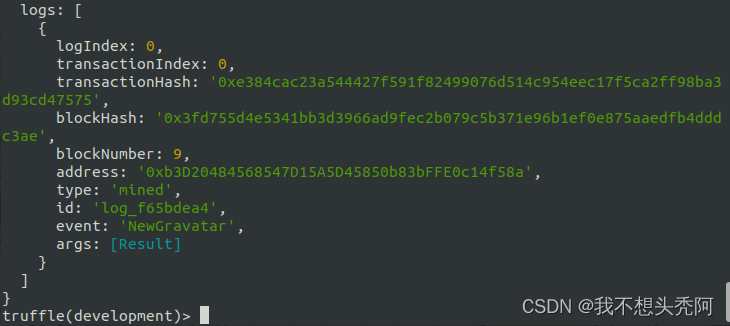
- graph-node获取到调用合约记录并log

- 访问http://127.0.0.1:8000/subgraphs/name/example/graphql可以进行graphql

END
边栏推荐
猜你喜欢




随机推荐
Maintain login and route jump
维持登录,路由跳转
First knowledge of C language -- common data types
弹性盒/伸缩盒(flex)的使用
Think about the role of some documents
SQL (MySQL) rookie tutorial knowledge
C WPF uses listbox to implement ruler control
使用vertical-align不能让图片和文字垂直居中对齐
Initial C language -- the function of keyword static
qsort — c语言中自带的排序函数(附带void*、回调函数知识点
信息学奥赛一本通1176题——谁考了第k名
C语言入门介绍
「PHP基础知识」PHP语句和语句块
[MRCTF2020]PYWebsite 1
C language string function: StrCmp, strncpy, strncat, strncmp, strstr, strtok, strError
[NPUCTF2020]ReadlezPHP 1
路由的配置和前往登录首页进行发送请求
Trying to evolve_ My first CSDN blog
[MRCTF2020]Ezpop 1
Dnsmasq Usage Summary